
Using Microsoft LogParser to create a report of who has been hitting a web page or URL
Need to know who's been hitting a specific URL? LogParser queries your IIS W3C logs and gives you every IP in chronological order. Then you can export unique IPs for identification.
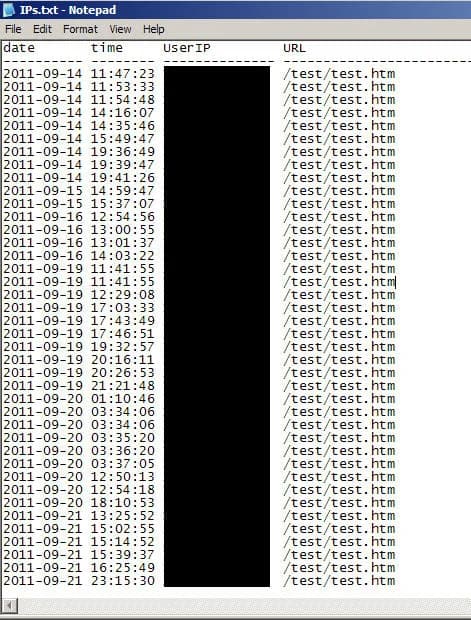
I received a request today to gather all the IPs of users that have been hitting a specific URL on an IIS web server for the last several months. Naturally, I turn to LogParser which I have blogged about quite a bit in the past. I copied the required IIS logs to the same path as LogParser since I was going to archive them anyway but you can just specify the path to your IIS logs just as easily. Then I wrote this query to quickly show the date, time, and IP for the URL I'm web page I am looking for, in this case test.htm:
logparser "SELECT [date], [time], [c-ip] as UserIP, [cs-uri-stem] as URL FROM ex*.log WHERE [cs-uri-stem] like '%test.htm%'" -rtp:-1 -i:iisw3c
This gives me a nice report of every hit in chronological order. I chose to use like statement above because sometimes there might be other URLs buried deep in your website structure and if you are not familiar with it, you might miss these hits from being calculated. It helps identify users who might be using a URL they really shouldn't be using anymore and no one is aware they are still using these legacy hyperlinks. You can export the report to a txt file by just adding ">> IPs.txt" to the end of the string and it will drop the screen output into a file called IPs.txt for you.
Or you can use the datagrid option which I have blogged about before, just search for LogParser in the search box in the top right corner of this site.
From here, I want to find only unique IPs. So I wrote another query that did a GROUP BY on the IP:
logparser "SELECT [c-ip] as UserIP FROM ex*.log WHERE [cs-uri-stem] like '%test.htm%' GROUP BY [c-ip]" -rtp:-1 -i:iisw3c
Even gives you a nice total count at the bottom:
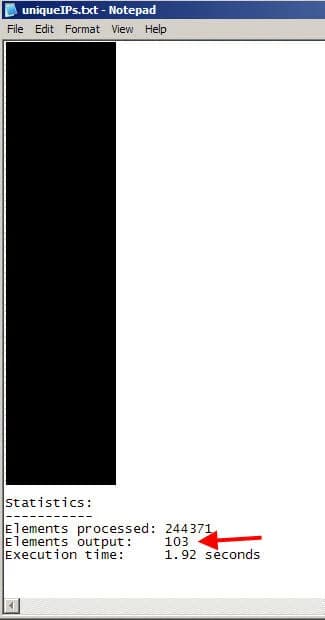
So now I have a list of unique IPs but I want to find if these IPs are still alive and talking on my network and if so, what their machine name is. For that, I turn to nmap (with the Zenmap GUI if you are using Windows). Just copy and paste all your IPs from before into the Target field and change the scan profile to "Ping scan". Yes, you can copy and paste your whole list at once into that little Target window, it will take them all. In this example, I copied and pasted 3 IPs at once and it parsed the carriage returns just fine:
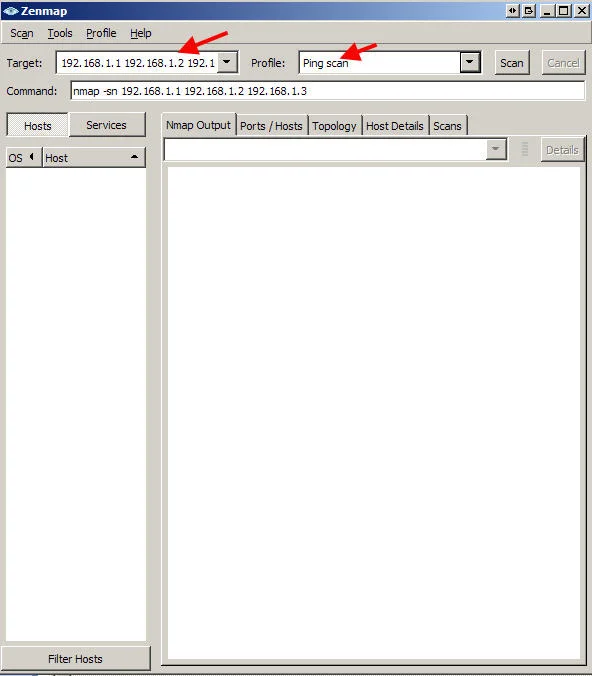
Once you begin the scan, it will ping sweep the IPs and do a reverse DNS lookup all at the same time.
If you want to take it one step further and find the currently logged in user, you could use PsLoggedOn from Sysinternals to accomplish this or even WMIC to pull the info via WMI.
PsLoggedOn info: http://technet.microsoft.com/en-us/sysinternals/bb897545
WMIC info: http://technet.microsoft.com/en-us/library/bb742610.aspx WMIC syntax would be something like:
wmic /node: machinename get username
Very easy! Let me know if you have any questions or come up with a better way. :)

Jason Samuel
Product leader, advisor, and international speaker with 27 years in enterprise end-user computing, security, and cloud. Has deployed infrastructure at Fortune 500 scale across 38 countries. 1 of 3 people globally to hold Citrix CTP + VMware vExpert + VMware EUC Champion concurrently. 220 articles, 1,000+ reader discussions.
Using the DATAGRID output option in Microsoft LogParser to see error 500 IIS issues
LogParser's DATAGRID output gives you IIS error 500 results and page load times in a readable GUI window. No CSV exports needed. Instant visual output.
iisHow to get the IUSR and IWAM user account passwords on a Microsoft IIS server
If you need the IUSR or IWAM password without resetting it, Adsutil.vbs in C:\Inetpub\AdminScripts will retrieve it for you. Quick and non-disruptive.
iisA quick way to troubleshoot SSL chain issues using OpenSSL
If you're troubleshooting SSL chain issues, the OpenSSL s_client command tells you exactly what's wrong in seconds. Here's the command and how to read the output.