
Citrix NetScaler 10.5 to 11.0 firmware upgrade issues to watch out for
The changes going from NetScaler 10.5 to 11.0 are too many to list. I can talk your ear off on the improvements in NetScaler 11.0, I love it. But there are some considerations when upgrading. In a small to medium size business you'll be fine with the upgrade. In any QA/QC testing you do in small development environments you'll probably be fine too. But in larger environments with the 10.5 to 11.0, I feel like your QA process must be expanded to include things you never thought you would have to test. Once you scale up traffic and have several thousands users hitting 11.0 you might see some issues and I'd like to cover a few of these here.
Citrix Receiver for iOS bugs
This is something that is part of every QA process when doing an upgrade, we all check to see if Receiver still works. And in most cases all the Windows Receivers and Android always work. But iOS Receiver has been very flaky lately. Even before Apple announced iOS 9, Receiver for iOS 6.0.1 that was released in August was having really bad issues in some NetScaler 11.0 environments. You could login to the Receiver on your iPad or iPhone once but if you put your iPad away and let the session timeout or force close and re-open the app, you could no longer login. The actual login prompt was gone completely. You had to go and edit your account within iOS Receiver to force the login prompt to come up again. Or you could download the older "not for regular end user consumption" R1 or CR0 releases of Receiver in the App Store. I myself only saw the issue in 1 NetScaler 11.0 environment out of several I help manage. There is an excellent discussion about this issue here:
Tim Cook jumped up on stage and released iOS 9 on September 16th but Receiver for iOS 6.1 was no where to be found. It was finally released 2 weeks later on October 1st. Not a big deal, the older Receiver did work fine with iOS 9 but it's interesting there was such a big delay on an enterprise app as important as Receiver. Receiver 6.1 for iOS release info:
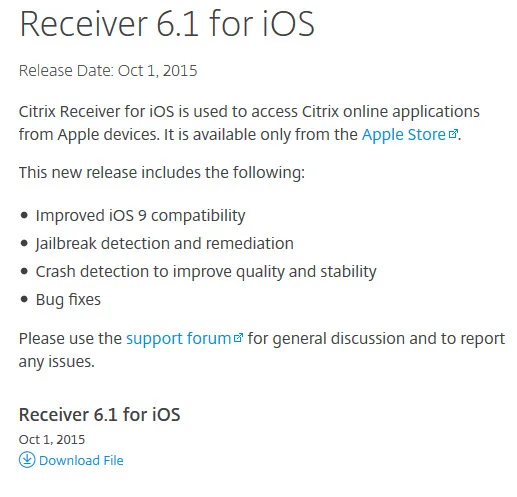
This Receiver fixed the issue above but created another problem. Receiver works fine once, but subsequent use of the app causes it to crash immediately or say it has a Connection Error. This time impacting both 10.5 and 11.0 NetScaler builds. I actually had to run a 10.5 build from January of this year in order to make iPads work. This issue is still not resolved and you can read more here:
If you have a heavy iPad user base, I encourage you to wait on your 11.0 upgrade until the back to back Receiver for iOS issues we have had are completely worked out. Give the dev team some time, let them QA and make sure it works. Don't even think about telling your users to download R1 or CR0 from the AppStore as a work around. You're going to cause yourself even more issues down the road, that is not something you can control centrally (unless you use XenMobile or another MAM solution). Just tough it out on 10.5, you will save yourself a lot of headache.
10.5 index.html or JavaScript being cached when hitting 11.0 login page
This one is brutal. In most testing environments, you won't be able to catch this issue. You do your upgrade, you hit the NetScaler Gateway login page, it just works. Try from IE 11, Firefox, Chrome, Safari, it all works. Try from multiple machines it all works. Have a whole QA team test, it still works. But then you roll into prod and have several thousand users hitting it. They're good too except a small subset of users. This is typically where I've seen this issue crop up. When you scale up. Some users will report they get a blank white page when they hit your NetScaler Gateway login page. They hit refresh a hundred times and nothing happens.
If you inspect the source code on a 10.x page vs. 11.0 in Beyond Compare, it's massively different. All sorts of changes in order to support the new Portal Themes feature and security that comes with 11.0. That old 10.x code isn't going to work with 11.0 JavaScript, CSS, etc. You expect that though, the user just refreshes the page and grabs all the new elements.
Wrong. With some users, that will not happen. It's hard to run this issue down without being able to replicate it easily but my belief is that the cached 10.x index.html or possibly other elements that compose the page are trying to interact with the new 11.0 index.html or page elements and the browser has no idea what to do. The browser just freaks out and displays a blank white page.
Here's how I have tried tracking this issue down. Do an HTTPFox capture on a 10.x page first, notice how the index.html contain all the HTML code for the page is always told to pull from cache while all JavaScript, CSS, and image files get a 200 because they are pulled down fresh from the NetScaler? Your 10.x capture will look something like this:
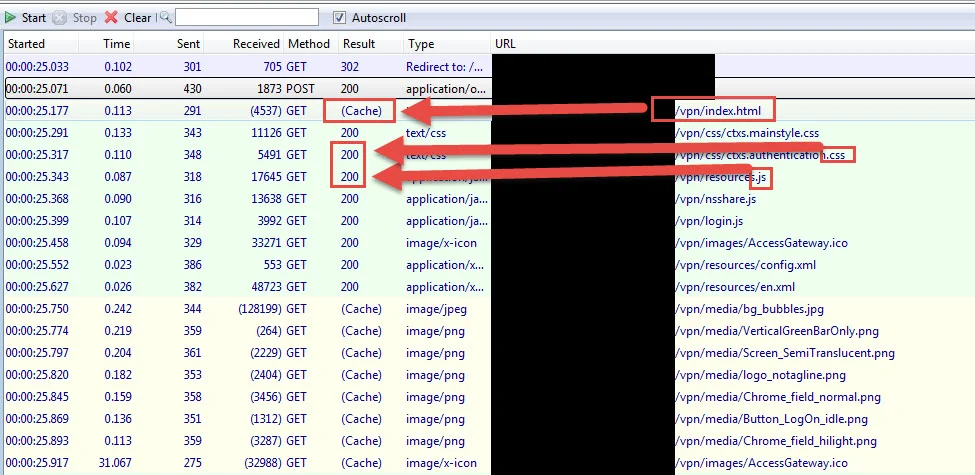
For some reason I've noticed HTTPFox always caches the index.html page no matter what. Even if you completely clear the cache and try it continues to say it's pulling from cache. I'm not entirely sure why this is. This lead me to initially chase down this issue as if the NetScaler cache control on the index.html page was broken. Further investigation and several hours down the rabbit hole found this was not the case. If you use Firefox Developer Tools, Live HTTP Headers for Chrome, etc. they will actually show a 200 for the index.html page. So let's use FireFox Developer Tools and use the Network tab on the same 10.x login page, your capture should look something like this with a 200. There are 15 HTTP requests being made:
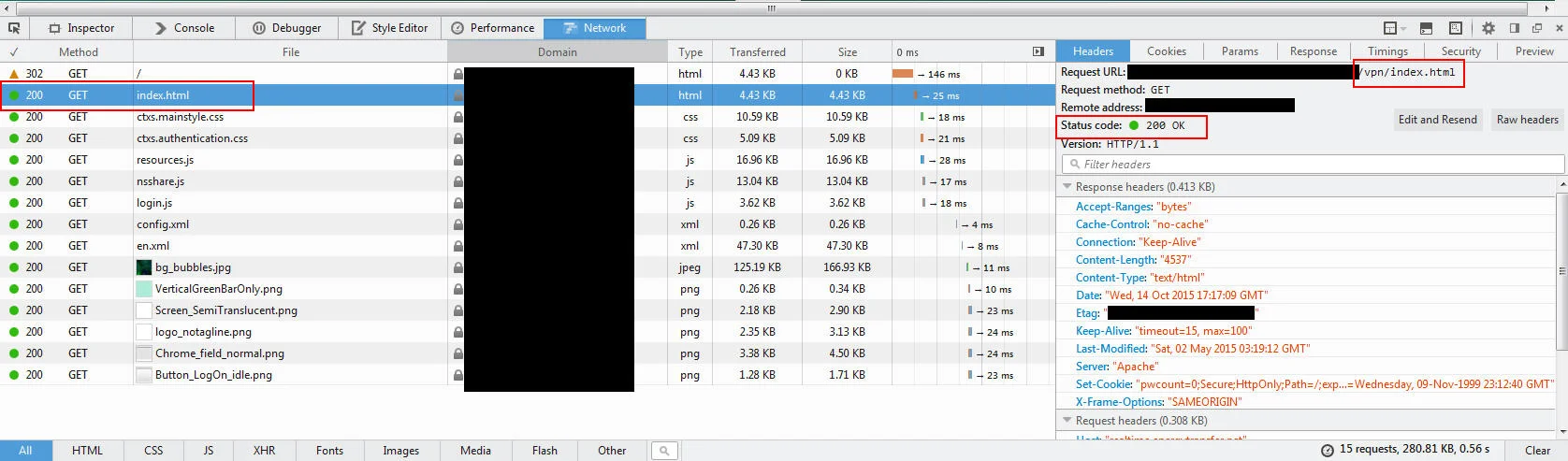
Now do your upgrade or got to another NetScaler running 11.0 and do another capture:
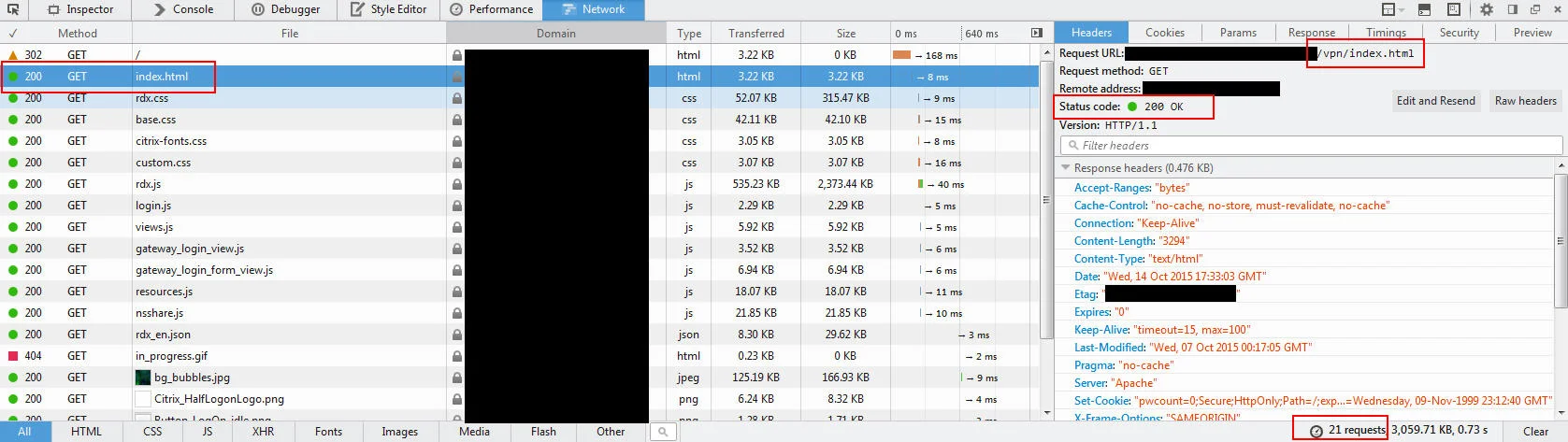
Notice how a lot of the elements that build the page are way different from 10.x. All sorts of new JavaScript and CSS. There are 21 HTTP requests now. Again, that's expected with a major upgrade like this and Portal Themes. For most users it will pull down everything new like these 2 captures show. Extra bonus for you eagle eyed readers:
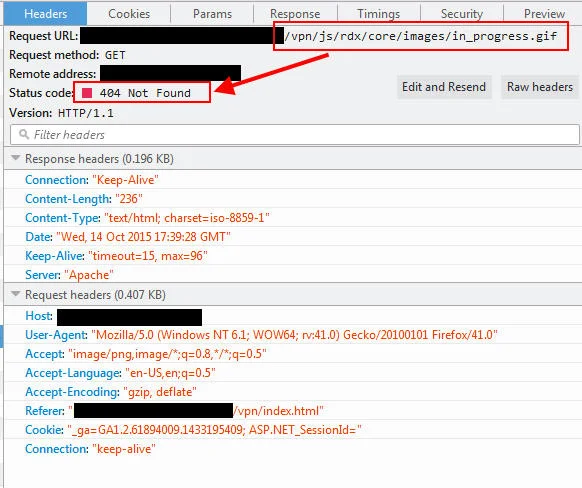
That is in fact a 404 on that https://www.yourdomain.com/vpn/js/rdx/core/images/in_progress.gif file. It's happening on all my 11.0 build environments. Nothing to worry about, doesn't hurt anything. But annoying to see every page view is calling on a non-existent file. I'm sure it will get fixed in an upcoming build.
Back to the comparison, you'll notice in both of these 10.x and 11.0 captures I hit the NetScaler Gateway URL directly which gives me a 302 temporary redirect to the index.html. If you look at the HTTP response headers closer, you'll see that the NetScaler is actually instructing NOT to cache:
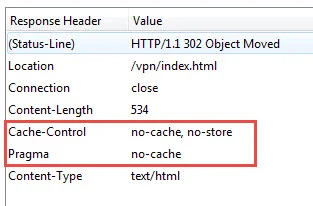
To break the Control-Cache portion down:
- no-cache = NetScaler tells browser to re-validate cache on every page view
- no-store = Don't store the response (the 302 redirect)
Let's move on to the index.html page, this is where things change. In 10.x you will see something like: Cache-Control : "no-cache"
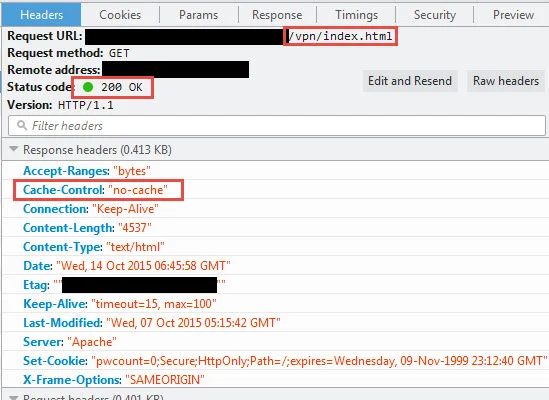
but in 11.0 you will see: Cache-Control : "no-cache, no-store, must-revalidate, no-cache" Expires: "0" Pragma: "no-cache"
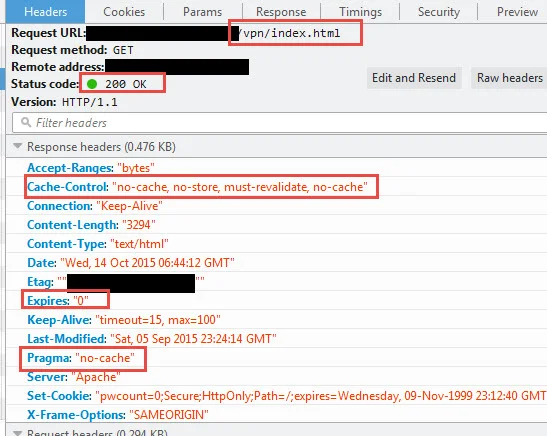
So now we went from having just a simple no-cache to a bunch more instructions to the browser. It's even using the old Expires and Pragma headers. Essentially NetScaler 11.0 is making absolutely sure there is no way that index.html will ever be cached. To break the Cache-Control down again, my understanding is:
- no-cache = NetScaler tells browser to re-validate cache on every page view
- no-store = Don't store the response (the 302 redirect)
- must-revalidate = Cache must not be used after going stale and must ask NetScaler for the latest
- 2nd no-cache = Don't know why it's in there twice like that
following this is the older Expires header. This was replaced by Cache-Control in HTTP 1.1 but the NetScaler team likely added it there for older browsers that don't support HTTP 1.1. Cache-Control should theoretically override this:
- 0 = expire immediately
I've read that if the time is not synced between the client OS and the NetScaler, this can lead to cached pages accidentally being served. I've read that the Expires header if even used, should be set to a fixed date in the past instead of a 0. But if it's being overridden then it's probably nothing to be concerned about.
Last is Pragma which is not a response header, it's actually an HTTP 1.0 request header. It's being used here in the response however to request that the response not be cached:
- no-cache = same as Cache-Control no-cache
Now let's move on to the JavaScript, CSS, and other elements. On either your 10.x or 11.0 go ahead and hit refresh a few times while keeping Firefox Developer Tools open. You'll see a 200 on index.html followed by 304 response codes for everything else. This means the NetScaler has told the browser nothing has changed with these elements so just use what's in the local cache. I believe the best way to mitigate any users potentially getting a cached element and having an issue is to force the NetScaler to tell the browser not to cache any elements at all.
Before I get to that, there are a few steps I've found that might help you mitigate the caching issue easily without any big changes on your side:
-
Clear temporary internet cache, close browser, re-reopen, bam 11.0 page
-
If a user uses a Favorites Bar in IE 11 with a pinned favorite to your NetScaler Gateway page, clearing the browser cache won't work. I suspect this is something to do with pre-render/pre-fetch in IE 11: https://msdn.microsoft.com/en-us/library/dn265039%28v=vs.85%29.aspx
-
Open the user's browser in InPrivate mode (IE 11), Incognito mode (Chrome), or Private mode (Firefox). Then navigate to your NetScaler Gateway URL. Nothing will be pulled from the local cache so the page should come right up.
But these are all workarounds. You can modify the HTML page on the NetScaler Gateway itself and drop in some instructions in the HEAD to not cache any elements but that's the wrong way to do it and can leave you in an unsupported state by Citrix Support. Don't go down this route.
The best way I can come up with to help mitigate the issue is to force the NetScaler to NOT cache anything at all TEMPORARILY during your upgrade. A few days prior to your 10.5 to 11.0 upgrade, create a new caching policy on your NetScaler that expires all calls to index.html and associated page elements. That means anytime a user hits the login page they're getting fresh code and elements with a 200 every single time time. Make sure it's only targeting web users so you don't impact mobile Receivers. Yes it's going to create increased traffic and yes it will cause a little bit of extra resource overhead on your NetScaler. Yes the eagle eyed users might notice an extra few milliseconds to load the page. Keep that caching/expiration policy going for a few days after the upgrade to ensure your upgrade goes smooth for all users. Then you unbind this policy and save it for next time. I have not had a chance to write a good example caching policy but I'll try and whip it up and update this article with it soon.
Extra bonus, I covered how IE-edge mode is on by default in my "How to fix Green Bubble theme after upgrading to NetScaler 11 Unified Gateway" article here:
If you have users with old deprecated Internet Explorer web browsers, you may have some issues with the 11.0 login page. Just a heads up. They may have to hit F12 to go into Developer Tools and change the IE mode manually.
SSL TLS 1.2 issues
We all know by now pretty much every SSL/TLS protocol has some level of vulnerability. If you've been living under a rock the past year you can catch up on reading here:
https://en.wikipedia.org/wiki/Transport_Layer_Security#Attacks_against_TLS.2FSSL
The only SSL protocol that hasn't been hacked to pieces yet is TLS 1.2 so I highly encourage you to use it if you can. Read over my "Mitigating DDoS and brute force attacks against a Citrix NetScaler Access Gateway" article under bullet 11 under "Lockdown SSL settings". It's a moving target so there have been some more recent developments since I originally wrote the article. But it's a great primer to get you started:
Per Wikipedia 66.5% of Internet traffic supports TLS 1.2 and it's growing every day. Unless of course you happened to be using it with Server 2012 R2 with bad Microsoft patches, or StoreFront 2.6 to the latest 3.0.1, or ShareFile StorageZone Controllers, or any others I'm forgetting. A lot of systems do not support TLS 1.2 or even TLS 1.1 for that matter. Many are still stuck with TLS 1.0 at that's a big problem.
When you upgrade from 10.5 to 11.0 it will automatically enable TLS 1.2 and TLS 1.1 for all backend communication. In the release notes it even says: If you have an MPX, TLS v1.1 and 1.2 is supported and enabled by default on the backend. It does not do this for virtual VPX appliances so if you do your QA testing on VPX appliances, you could easily miss this and have issues when you upgrade your physical MPX appliances. VPX appliances can only do TLS 1.0 for backend communication at this time. TLS 1.1 and TLS 1.2 can only be used on VPXs for client facing communication only like a NetScaler Gateway vserver or a load balanced SSL vserver. Just something to keep in mind. I really wish the upgrade process only switched on TLS 1.1 and 1.2 by default for any NEW services & service groups you create and not EXISTING ones in your config. That would give you the ability to test each of the existing ones for issues a little bit more methodically. This would make the upgrade easier for large environments.
What enabling these two for the backend means is that all the monitor probes going from your services/service groups will all attempt to communicate at the highest level possible during the SSL handshake and Server 2012 R2 will of-course say it can handle TLS 1.2 so let's talk. Except it doesn't.
You will see these 2 errors from Schannel in the System event logs on your server. Schannel (aka Secure Channel) is the the component that controls SSL negotiation on Windows servers: Log Name: System Source: Schannel Event ID: 36874 Level: Error Description: An TLS 1.2 connection request was received from a remote client application, but none of the cipher suites supported by the client application are supported by the server. The SSL connection request has failed. AND Log Name: System Source: Schannel Event ID: 36888 Level: Error Description: A fatal alert was generated and sent to the remote endpoint. This may result in termination of the connection. The TLS protocol defined fatal error code is 40. The Windows SChannel error state is 1205.
First off Microsoft totally destroyed Schannel with botched Windows update patches last year. So if your server has some of these botched patches, you're going to get these error messages. I'm still trying to get a straight answer from Microsoft on the correct combination of patches to truly correct the TLS 1.2 issue on Server 2012 R2. I will update this post once I get a good answer. Check out this post from last year where even Amazon Web Services had to issue a statement to the public about this:
But after several hours working with Microsoft Support, this does not appear to be the issue. So far it points to be an issue with the TLS_ECDHE_RSA_WITH_AES_256_CBC_SHA cipher which works great on Server 2012 R2/IIS 8 directly but won't work from the NetScaler. There is actually no cipher combination for this currently on the NetScaler and Citrix Support is investigating this for me.
In the meantime, you need your web servers to work. So the only thing I can recommend for the moment is disabling TLS 1.2. I hate saying this but it's so far the only thing that I have been able to figure out. There are a few ways to do this:
- Let's say for example you have a Service Group that is monitoring the impacted Server 2012 R2 servers running StoreFront on port 443 and it's using SSL BRIDGE or SSL. It will be Red and in a DOWN state like in this screenshot after the 11.0 upgrade which means your load balancing will be broken:

and the Monitor Details will say:
Failure - Time out during SSL handshake stage
-
Download IIS Crypto from here: https://www.nartac.com/Products/IISCrypto
-
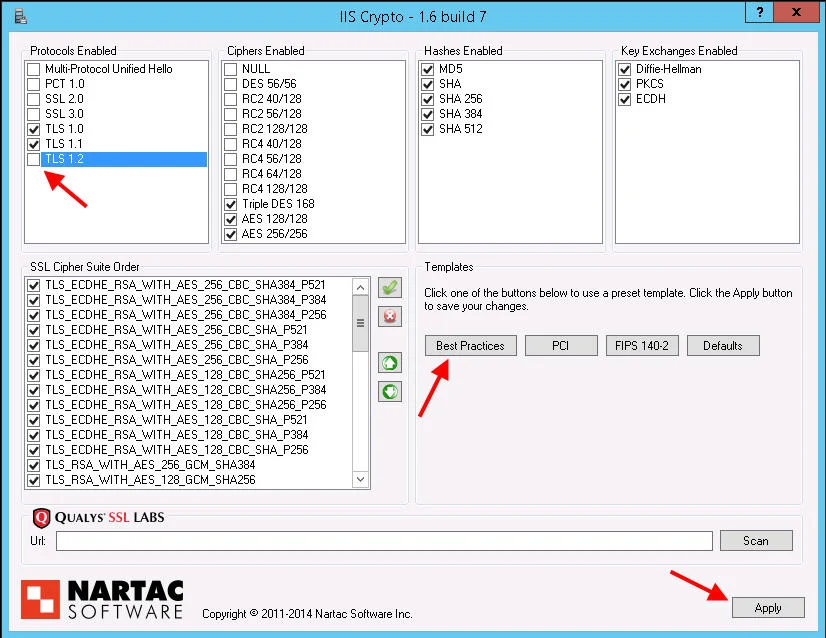
Open it, hit the Best Practices button, then uncheck TLS 1.2 so it looks like this. You can even uncheck TLS 1.1 if needed:
-
Now hit Apply. This will immediately make the registry changes necessary to disable all the old legacy vulnerable stuff on your server and only allow the things you have checked. Close the app and reboot the server for the changes to take effect.
-
Once the server is back up your Service Group will turn Green and the Monitor Details says:
Success – HTTP response code 200 receivedEven though the NetScaler is trying to connect on TLS 1.2, the server is saying it can only handle TLS 1.1 which is why it works.
But what if you don't want to hack the registry on all your servers? Well you can disable at the NetScaler level on SSL only, not on SSL BRIDGE. If your company has strict policies on where SSL terminates, then you have no choice but to touch all your servers. If using SSL offloading however, do this:
- Open your Service Group
- Hit SSL Parameters
- Uncheck TLS 1.2 and hit Done:
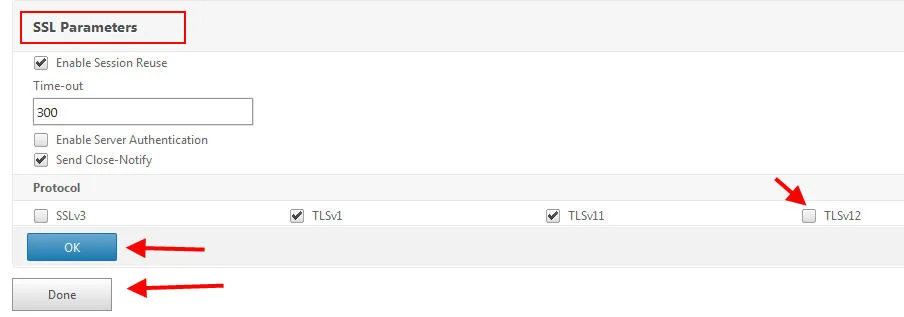
- Bam! Your Service Group is now green because you're connecting at TLS 1.1 to the web servers.
As far as the apps, even the latest StoreFront 3.0.1 released just a few weeks ago only supports up to TLS 1.1:
"Version 3.0.1 includes support for TLS 1.1"
https://www.citrix.com/downloads/storefront-web-interface/product-software/storefront-30.html
So your best bet is to suck it up and use TLS 1.0 or 1.1 for now in most cases.
But seriously...
None of these issues are really a direct result of anything in the NetScaler 11.0 firmware going bad (except possibly TLS 1.2 cipher issues which I'm waiting for confirmation on). It's rock solid otherwise. I absolutely love it and there have been several builds out since 11.0 first came out that has made it even better. Just make sure to consider testing your upgrade process in ways you never thought before to ensure a smooth upgrade experience for your users. Special considerations have to especially be made if you run a mix of MPX, VPX, or SDX appliances.
NetScaler, StoreFront, and Receiver are the glue that holds your Citrix infrastructure together. It's what drives the Citrix Workspace user experience. With the proliferation of every sort of device you can imagine walking through your company's doors every day, you must test the user experience extensively on any upgrades to these critical infrastructure components.
Don't have an iPad, buy one. Don't have an Android tablet, buy one. Don't have a Microsoft HoloLens, buy one (once Receiver is available for it of course). On that last one go ahead and send me one for testing too. :) Get your QA teams used to testing any and all possible user experiences.

Jason Samuel
Product leader, advisor, and international speaker with 27+ years in enterprise end-user computing, security, and cloud. Has deployed infrastructure at Fortune 500 scale across 34 countries. 1 of 3 people globally to hold Citrix CTP + VMware vExpert + VMware EUC Champion concurrently. 200+ articles, 1,000+ reader discussions.
Previous Comments (28)


