
Citrix XenApp 7.x VDA Registration State stuck in Initializing and a self healing powershell script to fix it
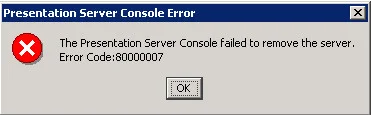
On XenApp 7.5 servers (and possibly 7.1 and 7.0), you may notice the registration state of the machine is stuck on "Initializing" in Citrix Studio and no one will be able to launch any apps. I'm still investigating if the 7.6 VDA also has this behavior. This is how it looks in Studio:
You can also run the following powershell command:
Add-PSSnapin Citrix.*.Admin.V*
followed by:
Get-BrokerMachine | select MachineName, SummaryState, MachineInternalState, RegistrationState
which results in:
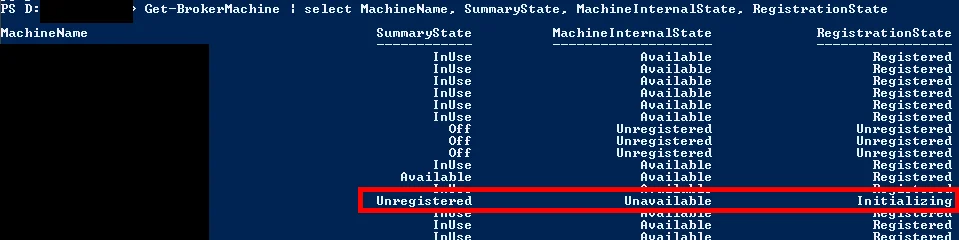
You will notice the impacted server in question has a MachineInternalState set to "Unavailable" and the RegistrationState is stuck on "Initializing". We've noticed this happening on XenApp servers that have been up around the 24 or 25 day mark. They suddenly stop being registered.
The work around is to restart the "Citrix Desktop Service" on the impacted server. The service is not in a Stopped state so it's hard to setup monitoring using a 3rd party monitoring tool. I just wrote this PowerShell script that queries the delivery controller for the actual state of registration on every XenApp server to see if it's stuck Initializing, restart the Citrix Desktop Service on the impacted servers, log a .csv file with the names of the impacted servers for historical purposes, and send an email notification out to the Citrix admins and NOC. I have this running as a scheduled task (stacked a few min apart) every 5 minutes on all my delivery controllers:
##Written by Jason Samuel - jasonsamuel.com
##http://www.jasonsamuel.com/2014/10/16/citrix-xenapp-7-x-vda-registration-state-stuck-in-initializing-and-a-self-healing-powershell-script-to-fix-it

Add-PSSnapin Citrix.*.Admin.V*

$Results = @()

$Date = (Get-Date -DisplayHint Date)
$save_date = $Date.ToString("MM-dd-yyyy-hh-mm-ss-tt")

$Results += Get-BrokerMachine -RegistrationState "Initializing" | select DNSname, AgentVersion


If (!$Results)
{
exit
}

Else {
##Restart the Citrix Desktop Service on stuck servers
foreach ($vda in $Results)
{

Restart-Service -InputObject $(get-service -ComputerName $vda.DNSName -Name "Citrix Desktop Service") -Verbose
$EmailBodyList += $vda.DNSName + "`t" + $vda.AgentVersion + "`r`n"
}
}

##Writes the result to a CSV file on your delivery controller for historical purposes
$file_output = ('D:\Citrix_VDA_Restart\XA_VDA_' + $save_date + '.csv')
$Results | Export-CSV -Path $file_output -NoTypeInformation


##Sends an email with the list of servers in the body as well as the CSV attachment
$filename = $file_output
$smtpServer = “YOURSMTPSERVER”

$msg = new-object Net.Mail.MailMessage
$att = new-object Net.Mail.Attachment($filename)
$smtp = new-object Net.Mail.SmtpClient($smtpServer)

$msg.From = “citrix@YOURDOMAIN.com”
$msg.To.Add(“citrixadmins@YOURDOMAIN.com”)
$msg.cc.Add("noc@YOURDOMAIN.com")
$msg.Subject = “XenApp 7.6 servers stuck Initializing”
$msg.Body = “The below XenApp 7.6 servers are stuck Initializing on the Delivery Controllers. This script is now attempting to

restart the Citrix Desktop Service on the impacted servers and force the VDA to register.” + "`r`n" + "`r`n" + $EmailBodyList
$msg.Attachments.Add($att)

$smtp.Send($msg)

Start-Sleep -s 5

exit
If the code runs off the page above you can highlight all of it and paste to Notepad or download it here in text format (make sure you right click - save as). Just change the extension to .ps1 and set your path for the CSV files, SMTP server, and email addresses you want notifications to go to:
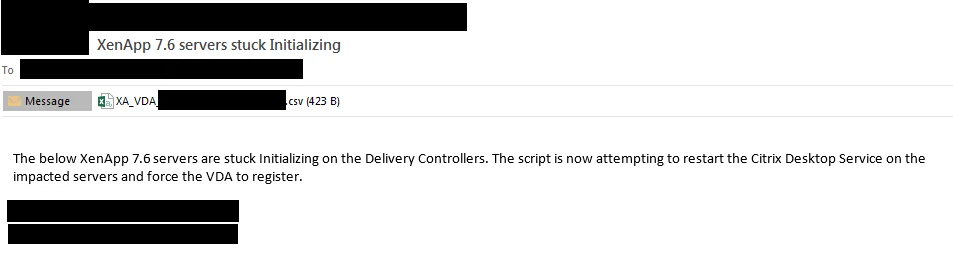
Anyhow, you will get a nice notification email like this when servers get stuck. In this example I had 2 servers that were stuck Initializing and by the time the email was received the VDA had already been restarted on both and were Registered again. :)
I'm hoping this is fixed in the the 7.6 VDA and am in the process of testing. I really don't like to have to setup scripts to monitor service health like this but in a pinch, running a self-healing monitoring script is your best bet to prevent an application outage until the issue is resolved. I'm currently monitoring all servers with the 7.6 VDA and will update this post if I see them exhibit the same behavior as the 7.5 VDA.
UPDATE:
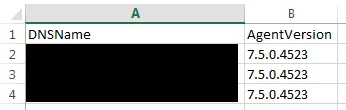
Just updated the script above to include the agent version. Here's how your notification email and .csv file will look:


Jason Samuel
Product leader, advisor, and international speaker with 27+ years in enterprise end-user computing, security, and cloud. Has deployed infrastructure at Fortune 500 scale across 34 countries. 1 of 3 people globally to hold Citrix CTP + VMware vExpert + VMware EUC Champion concurrently. 200+ articles, 1,000+ reader discussions.
Previous Comments (6)


