
Citrix XenServer and StorageLink SSL cert error caused by expired SSL certificate
When you try to start a VM in XenServer that talks to a StorageLink Gateway server, you get:
`1/19/2012 x:xx:xx PM Error: Starting VM 'xxxxxx' - Storage assignment failed
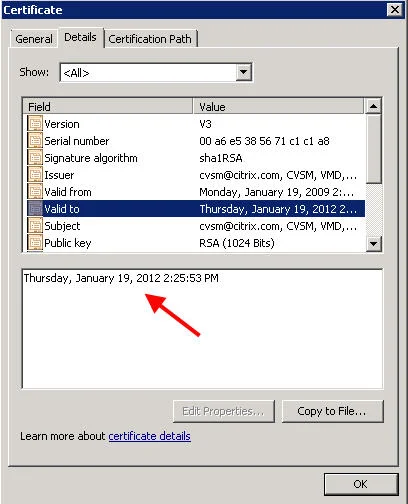
(SSL_ERROR_SSL error:14090086:SSL routines:SSL3_GET_SERVER_CERTIFICATE:certificate verify failed)` in the XenCenter log. You can verify the SSL cert by opening up the following in a browser window and replacing the x's below with your StorageLink server's IP address: https://xxx.xxx.xxx.xxx:21605 You will get a cert error message in your browser. Notice the Citrix CVSM SSL certificate issued on 1/19/2009 has expired today 1/19/2012 at 20:25:53 PM (GMT) which is 2:25 PM Central Standard Time. So basically any VM you try to turn on, reboot, or migrate after the cert expired will not work and return the SSL error above in the XenCenter log. Yeah, big problem.
I was the first to call in about this issue soon after the cert expired apparently. As I was on the phone troubleshooting this with the support engineer, others began calling in with the same problem. We have escalated it to the highest level at Citrix support and have been assured a workaround and a new cert are both being worked on and something should be available tomorrow morning. This is going to impact pretty much all StorageLink customers globally so trust me, they are working on it. Over the past several hours, I have tried numerous workarounds myself but been unable to get a full fix yet. I've tried self signed certs using OpenSSL, IIS & SelfSSL, etc. but to no avail so far. The StorageLink Gateway does not use a web server such as lighttpd, Apache, Tomcat, etc. either so I can't force it to use another set of certs on that end. Apparently it uses API calls. When you restart the services, you will notice it copies the following SSL certs which are the culprits (into memory I'm guessing). I used Process Monitor to verify:
`D:\Program Files (x86)\Citrix\StorageLink\Server\cacert.pem
D:\Program Files (x86)\Citrix\StorageLink\Server\server.pem`
I actually did manage to get a little further than I thought on the handful of workarounds I tried, but nothing completely successful yet to regain functionality while we wait for a hotfix. If you want to try playing with the certs yourself, just remember to restart the StorageLink services after you swap out the certs each time so it pulls them in. XenCenter should see the SSL cert change and prompt you almost immediately with a warning message.
I will keep this post updated with the latest developments. Please post if you are having the same issue or come up with a temporary fix. In the meantime, call Citrix and open a case so you are in the loop when the fix is released. UPDATE January, 24th, 2012 - Citrix has published the fix:
http://support.citrix.com/article/CTX131994
Apply the certs using the instructions in the KB. Shouldn't take long at all.

Jason Samuel
Product leader, advisor, and international speaker with 27+ years in enterprise end-user computing, security, and cloud. Has deployed infrastructure at Fortune 500 scale across 34 countries. 1 of 3 people globally to hold Citrix CTP + VMware vExpert + VMware EUC Champion concurrently. 200+ articles, 1,000+ reader discussions.
Previous Comments (12)


