
Fixing the Citrix Access Gateway blank page in Microsoft IE 11 (Internet Explorer 11) on your Netscaler
If you have a Netscaler and are using the Citrix Access Gateway (aka Netscaler Gateway now), you might have users using IE 11 (Internet Explorer 11) complain they are getting a blank page. Chrome and Firefox will work fine but IE11 just doesn't want to show the login page. A quick work around is to tell the user to view the site in compatibility mode or use a different browser but that will annoy users after some time. You have to make it as easy as possible for your users since not all of them are going to be tech savvy.
The best thing to do is force Internet Explorer into compatibility mode on page load. Just open up the index.html running in flash and the one in your theme:
`Flash - /netscaler/ns_gui/vpn/index.html
Theme - /var/vpn/themes/Horizon1/ns_gui/vpn/index.html`
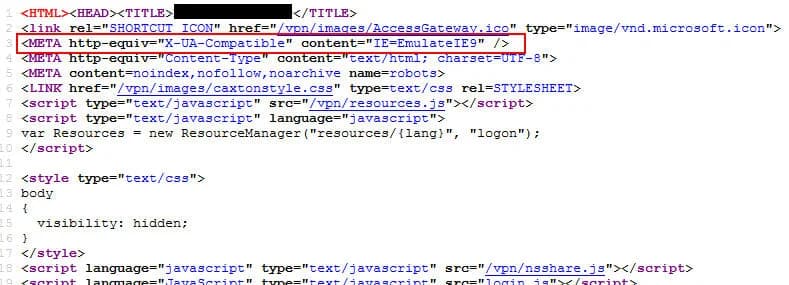
and add the following line in header at the top before the body tag:
<META http-equiv="X-UA-Compatible" content="IE=EmulateIE9" />
so it looks like this:
You can choose which version of IE to emulate and Stackoverflow has an excellent post on the differences between each here:
In my experience, sticking with emulating IE9 works great with the Access Gateway. Users won't even know the difference. Hope this helps!

Jason Samuel
Product leader, advisor, and international speaker with 27+ years in enterprise end-user computing, security, and cloud. Has deployed infrastructure at Fortune 500 scale across 34 countries. 1 of 3 people globally to hold Citrix CTP + VMware vExpert + VMware EUC Champion concurrently. 200+ articles, 1,000+ reader discussions.
Previous Comments (13)


