
How to find out what build version of Microsoft SharePoint you are running
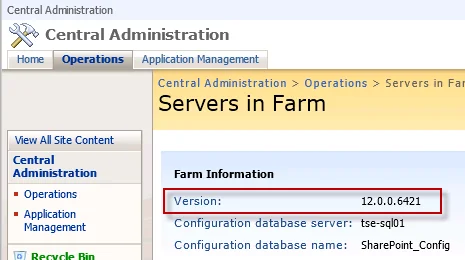
When you're applying updates to a large farm, you really need to check the version number of SharePoint running on each server in the farm in order to maintain consistency. You can do this easily by going to CA > Operations > Servers in Farm.
But what do these version numbers actually mean? There's a great Wiki maintained here that can answer this:
http://www.sharepointdevwiki.com/display/SharePointAdministrationWiki/SharePoint+Versions
This page will show you all the past and current version numbers and their associated KB articles. Very handy when troubleshooting updates or if you want to check the change log between versions.

Jason Samuel
Product leader, advisor, and international speaker with 27+ years in enterprise end-user computing, security, and cloud. Has deployed infrastructure at Fortune 500 scale across 34 countries. 1 of 3 people globally to hold Citrix CTP + VMware vExpert + VMware EUC Champion concurrently. 200+ articles, 1,000+ reader discussions.