
How to fix the TABCTL32.OCX is not registered error when using the Citrix Quick Launch tool
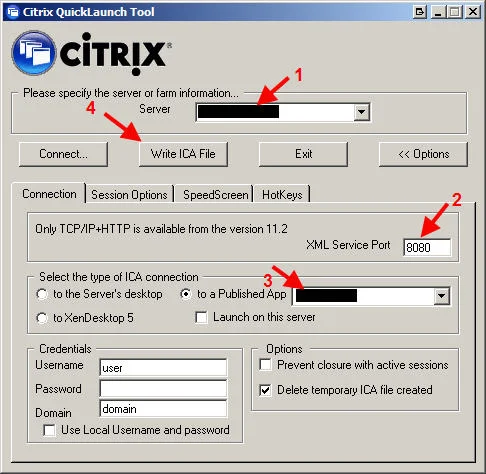
Citrix provides and awesome tool called Citrix QuickLaunch that can do many things including creating ICA files for your newer XenApp 6.5, XenApp 6, XenApp 5 farms, etc. It works great as an ICA file creator for XenApp 6.5 or any versions below it through PS 4.0. You can download it here:
http://support.citrix.com/article/CTX122536
I like the fact it talks about the TABCTL32.OCX not being registered error in the documentation:
`“Run-time error ‘339’: Component ‘tabctl32.ocx’ or one of its dependencies not
correctly registered: a file is missing or invalid”`
Unfortunately it doesn't tell you exactly where you can acquire the missing file. Instead of running around trying to fix it, I've hosted the TABCTL32.OCX here in zip format so you can download it and register it easily:
/downloads/2011/11/TABCTL32.zip
On an XP box, just unzip into c:\windows\system32 and then open command prompt. Type:
regsvr32 system32\TABCTL32.OCX
and it should pop up with a box saying "DllRegisterServer in system32\TABCTL32.OCX succeeded".
Now you can launch CitrixQuickLaunch.exe and it will load right up. Weird thing I noticed today, the tool says "Citrix QuickLaunch Tool" but the CTX documentation says "Citrix Quick Launch". So which is correct? :)
The screenshots in the article are very good. If you are using it just to create an ICA icon, make sure to click the "Options" button to expands the options and select "to a Published App". Don't forget to change the XML service port to 8080 instead of the default 80 or it will fail to connect to the XML Broker (granted you are using port 8080). Then just click "Write ICA File" and choose a location to save your ICA file.
Done! Double click your brand new ICA file and it should work fine. If you need to make any changes, use the tool to generate a new ICA icon or you can just open it in Notepad and edit by hand. You can remove the user name, password, and domain if you want. I typically just leave the domain only. I would NOT recommend storing passwords in plain text. Hope this helps.

Jason Samuel
Product leader, advisor, and international speaker with 27+ years in enterprise end-user computing, security, and cloud. Has deployed infrastructure at Fortune 500 scale across 34 countries. 1 of 3 people globally to hold Citrix CTP + VMware vExpert + VMware EUC Champion concurrently. 200+ articles, 1,000+ reader discussions.
Previous Comments (6)


