
How to force a Citrix XenApp application to open in a custom size window
With newer versions of XenApp (6.x on up) and Citrix Receiver, multi-monitor support is great and works as expected. But if your environment still has some PCs with legacy Citrix Online plugins (less than 12.x), you might get unexpected behavior like an application launching and stretching across both monitors. You can try going to AppCenter and setting the session size of your application under Appearance but it probably won't work depending on your plugin version. With older versions of XenApp and Presentation Server, there were a ton of multi-monitor configuration registry flags Citrix made available that you could use to manipulate the size and location of the application. These flags no longer work in XenApp 6.x and up. To verify your problem, go to your web interface and launch your application while doing a packet capture. You'll notice something like:
DesiredHRES=0 DesiredVRES=0
in the portion of the TCP stream with the ICA file being generated and pulled down from the web interface. You need to override this. So the work around is to go to your Web Interface to the following path:
C:\inetpub\wwwroot\Citrix\XenApp\conf
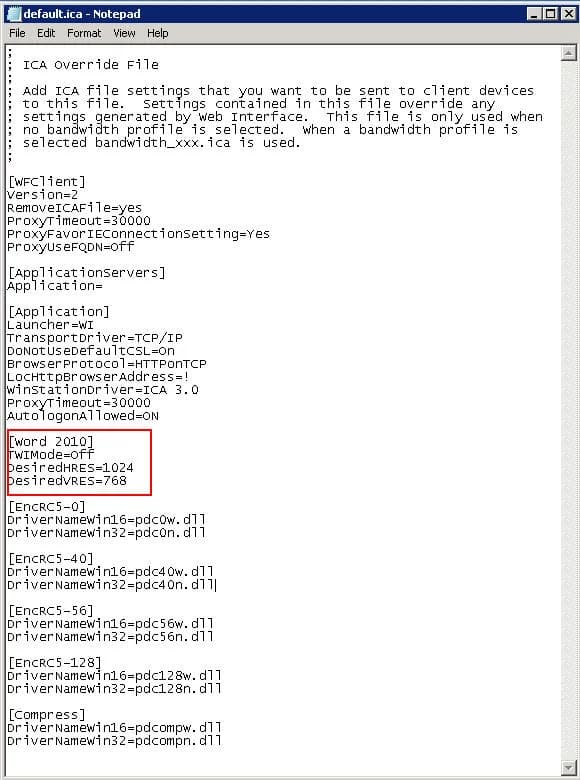
and open the default.ica file. You'll see a section like this:
[ApplicationServers] Application= [Application] Launcher=WI TransportDriver=TCP/IP DoNotUseDefaultCSL=On BrowserProtocol=HTTPonTCP LocHttpBrowserAddress=! WinStationDriver=ICA 3.0 ProxyTimeout=30000 AutologonAllowed=ON
right after this section, add this:
[Word 2010] TWIMode=Off DesiredHRES=1024 DesiredVRES=768
where the name of your application is in the bracket exactly as you publish it in AppCenter (it is case sensitive). In my example, I am publishing "Word 2010". The switches above mean the following: TWIMode - disable seamless mode (so there is a box around the application) DesiredHRES - horizontal size DesiredVRES - vertical size You don't have to disable seamless mode but I did in this example since my user wanted it for a specific reason. You can pretty much set any ICA setting you need for an application this way without impacting all the applications in your farm. Here is a full list of ICA Settings from Citrix:
http://support.citrix.com/proddocs/topic/ica-settings/ica-settings-wrapper.html Hope this helps!

Jason Samuel
Product leader, advisor, and international speaker with 27+ years in enterprise end-user computing, security, and cloud. Has deployed infrastructure at Fortune 500 scale across 34 countries. 1 of 3 people globally to hold Citrix CTP + VMware vExpert + VMware EUC Champion concurrently. 200+ articles, 1,000+ reader discussions.
Previous Comments (1)
