
How to integrate an APC NetBotz camera with Solarwinds Orion
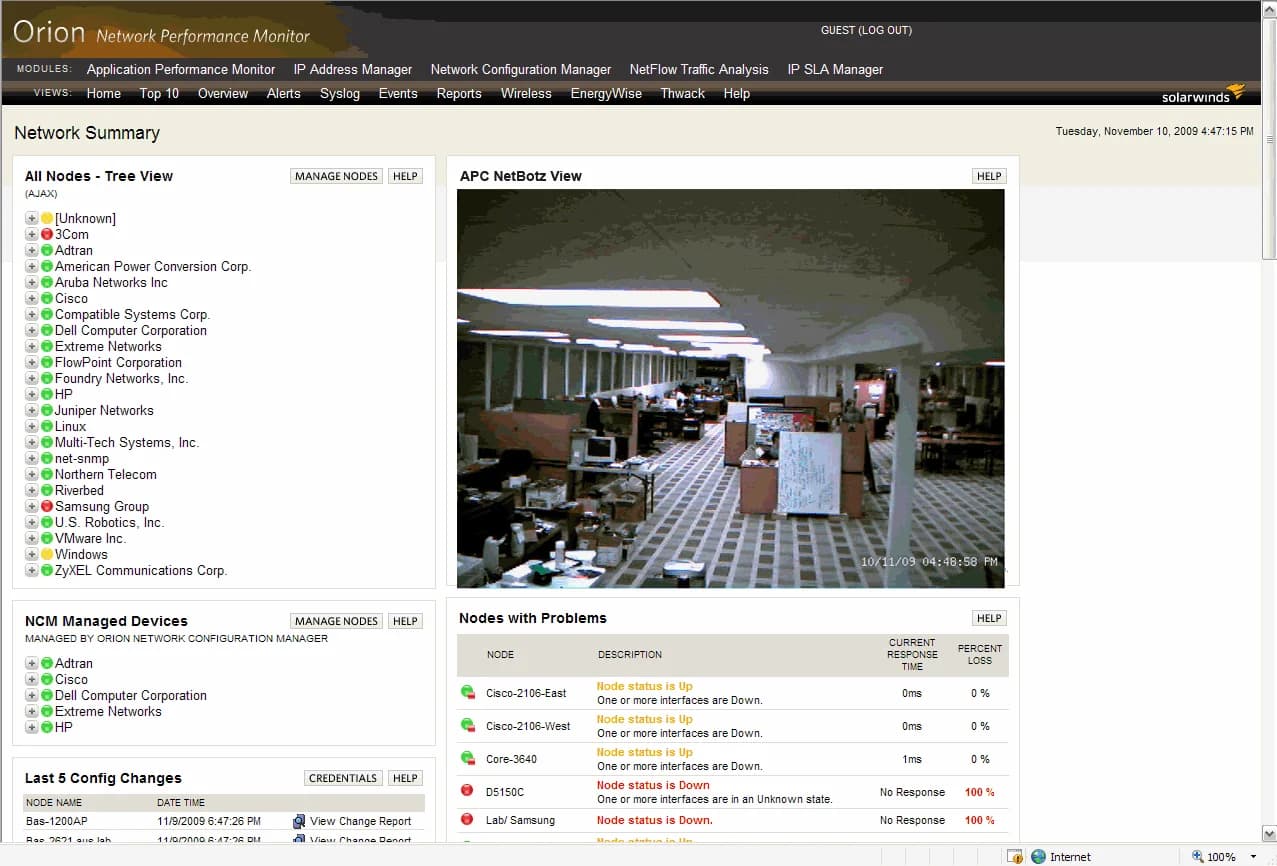
I was recently tasked with integrating some datacenter NetBotz cameras with Solarwinds Orion. But if you have disabled guest access to the NetBotz devices and require authentication, it will pop up with a login page each time you refresh your Solarwinds page. I'm not much of a developer so I came up with a solution that prefetches the camera image on the Solarwinds server. Here are the steps you need to follow to get your Netbotz to work with Solarwinds using HTTP authentication:
-
On the monitoring page you want to display your Netbotz stream, hit the Cutomize Page button.
-
Press the Green + sign and add a Custom HTML box under the Miscellaneous category.
-
Now go back to the the monitoring page and hit the edit button on the HTML box you just added.
-
Add this code. This code is set to poll the image from your Solarwinds server every 1 second. Replace "solarwindsserver" with the name of your server in both URLs:
<!– Netbotz Image Refresh Code Begin –>

          <IMG src=”http://solarwindsserver/networkatlas/campic.jpg” name=”refresh”>
          <SCRIPT language=”JavaScript” type=”text/javascript”>
          <!–
          var t = 1 // interval in seconds
          image = “http://solarwindsserver/networkatlas/campic.jpg” //name of the image
          function Start() {
          tmp = new Date();
          tmp = “?”+tmp.getTime()
          document.images[“refresh”].src = image+tmp
          setTimeout(“Start()”, t*1000)
          }
          Start();
          // –>
          </SCRIPT>

    <!– Netbotz Image Refresh Code End –>
Now you need to setup the image to be staged in the Inetpub directory on the Solarwinds server:
-
Download wget 1.11.4 (http://users.ugent.be/~bpuype/wget/)
-
Copy wget to the Inetpub folder. I chose to put in in an existing directory:
C:\Inetpub\SolarWinds\NetworkAtlas -
Create a new file in this directory called cam.vbs. The contents of this VBscript file should be:
Set WshShell = WScript.CreateObject("WScript.Shell")
Do
      WshShell.Run ("wget -m -nd --http-user=admin --http-passwd=password <a href="http://xxx.xxx.xxx.xxx/images/nbEyeEnc_0_CAMERA/VGA/campic.jpg">http://xxx.xxx.xxx.xxx/images/nbEyeEnc_0_CAMERA/VGA/campic.jpg</a>")
      WScript.Sleep(1000)
Loop
Depending on what model Netbotz or Wallbotz you have, the URL will change. nbEyeEnc_0 denotes the integrated cam on a Netbotz. You can easily grab your exact URL by logging into the Netbotz normally and right clicking, going to properites, and copying the URL for the image you want. The VBscript uses wget to go out to the Netbotz, authenticate, and download the image to the Solarwinds web server every 1 second. You can adjust the time by changing the 1000 to however many milliseconds you want.
- Now create a scheduled task in Task Scheduler and point it at
C:\Inetpub\SolarWinds\NetworkAtlas\cam.vbs. Set it to run on system startup. Run it manually if you like to get it going.
Done! Now if you visit your monitoring page, you should see a live stream from your locked down NetBotz! Added bonus your camera credentials are not exposed in your code in plain text and the performance hit on the server from this script running every second is only 6 MB.
Here's a composite image of what your integration will look like.

Jason Samuel
Product leader, advisor, and international speaker with 27+ years in enterprise end-user computing, security, and cloud. Has deployed infrastructure at Fortune 500 scale across 34 countries. 1 of 3 people globally to hold Citrix CTP + VMware vExpert + VMware EUC Champion concurrently. 200+ articles, 1,000+ reader discussions.
Previous Comments (1)

