
How to make ESM tabs for Microsoft Exchange 2003 work for ADUC on Windows 7 x64 and x86
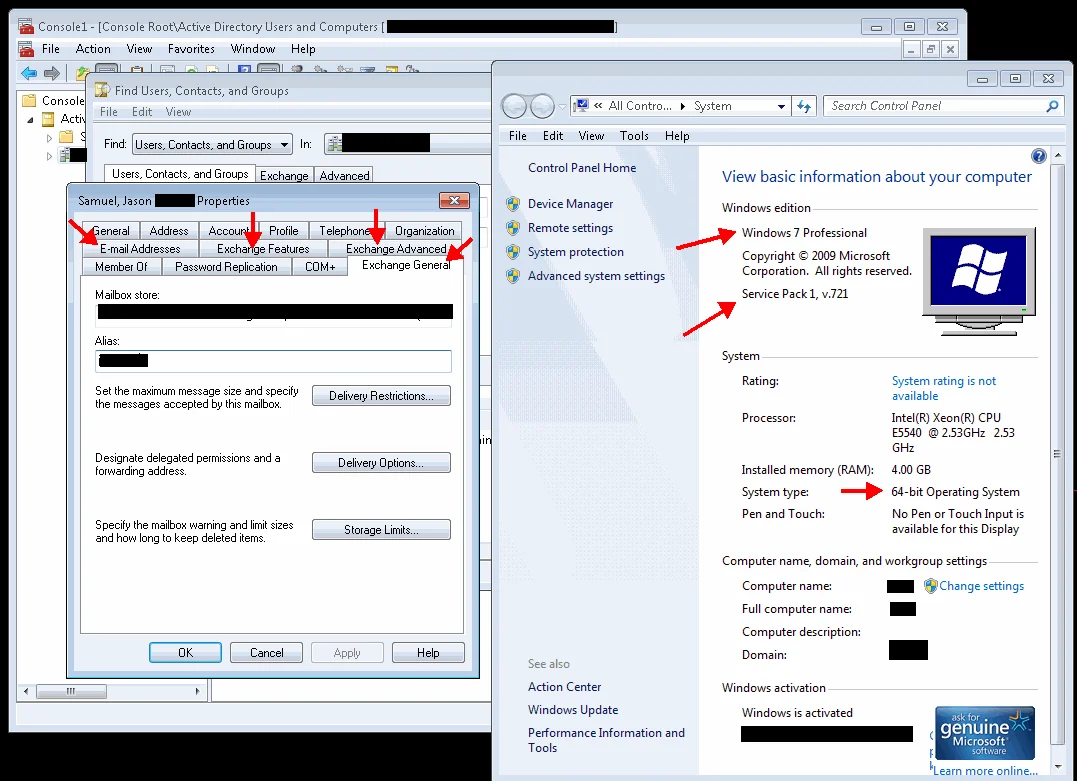
Yes, you can get Exchange 2003 ESM tools working with both Windows 7 x64 and x86 OSes! Microsoft does not seem to want to support Windows 7 and Exchange 2003 system management tools. They have not released ESM for Windows 7 so you have to work around it. Many companies out there are still using Exchange 2003 so I'm not sure why they don't allow for backwards compatibility.
To get ESM for Exchange 2003 to work on BOTH Windows 7 32 bit and 64 bit OS flavors, perform the following:
-
Download and install RSAT Tools for Windows 7 (Remote Server Admin Tools) here, select x86 (x86fre_GRMRSAT_MSU.msu) or x64 (amd64fre_GRMRSATX_MSU.msu) depending on what flavor of Windows 7 you are using - http://www.microsoft.com/downloads/en/details.aspx?FamilyID=7d2f6ad7-656b-4313-a005-4e344e43997d&displaylang=en
-
Download Exchange System Manager for Windows Vista here (ESMVISTA.EXE) but don't install it yet (see step 3) - http://www.microsoft.com/downloads/en/details.aspx?familyid=3403d74e-8942-421b-8738-b3664559e46f&displaylang=en
-
Do a silent install of ESM. This circumvents the OS check and allows you to install ESM for Vista on Windows 7. You can do this by opening a command prompt and typing this in the directory you downloaded ESMVISTA.MSI to:
ESMVISTA.MSI /q
-
If you are using Windows 7 x86, you are done and you can open up Active Directory Users and Computers (ADUC) and you will see the Exchange tabs for your users.
-
For Windows 7 x64, it's a little tricky. It just won't display Exchange tabs in ADUC when you open it. It took my some trial and error for a few hours before I figured it out. You have to run an MMC snapin in 32 bit mode to get the tabs to work. You can do this by opening a run prompt and typing:
mmc /32
then adding the "Active Directory Users and Computers" snap-in (should be the 3rd option). I am thinking this is because the ESM for Vista package was not designed for x64 and some level of compatibility is missing. Evidence for this is that if you check the target for the ESM or ADUC shortcuts, you will see this which clearly shows it's installed in the x86 Program Files folder:
`C:\Program Files (x86)\Exchsrvr\bin\exchange system manager.msc
C:\Program Files (x86)\Exchsrvr\bin\users and computers.msc`
Now the problem is that everytime I added the ADUC snapin in an MMC window, the text for it would disappear and I would get an error saying "MMC cannot initialize the snap-in" followed by the MMC crashing. I checked the application event log and found the following:
`Faulting application name: mmc.exe, version: 6.1.7600.16385, time stamp: 0x4a5bc3f1
Faulting module name: ntdll.dll, version: 6.1.7600.16559, time stamp: 0x4ba9b29c Exception code: 0xc0150010 Fault offset: 0x0008454b Faulting process id: 0x98c Faulting application start time: 0x01cb970a650fbae3
Faulting application path: C:\Windows\SysWOW64\mmc.exe
Faulting module path: C:\Windows\SysWOW64\ntdll.dll
Report Id: aac5fead-02fd-11e0-9946-005056b64915`
So obviously a core Windows 7 x64 system file is the culprit, ntdll.dll. Luckily, there is a release candidate for Windows 7 SP1 available for download here (windows6.1-KB976932-X64.exe):
http://www.microsoft.com/downloads/en/details.aspx?FamilyID=c3202ce6-4056-4059-8a1b-3a9b77cdfdda
I assumed that the service pack might fix whatever the issue was with ntdll.dll since it is a core system file. Turns out I was right, after installing Windows 7 SP1, I can now successfully open an MMC window in 32 bit mode and add the ADUC snapin. Now all my Exchange tabs show up in ADUC (Exchange General, E-mail Addresses, Exchange Features, & Exchange Advanced). See screenshot below:
Now I'm not advising you deploy a release candidate service pack into your environment. But for systems admins, we typically have a bit more leeway on our systems than end users so if you are under no policy restricting installing a release candidate on your workstation, then go for it. You can even install it in a VM temporarily until SP1 is released so you don't have to jeopardize your workstation with an RC build. Let me know how it works out for you! :)

Jason Samuel
Product leader, advisor, and international speaker with 27+ years in enterprise end-user computing, security, and cloud. Has deployed infrastructure at Fortune 500 scale across 34 countries. 1 of 3 people globally to hold Citrix CTP + VMware vExpert + VMware EUC Champion concurrently. 200+ articles, 1,000+ reader discussions.
Previous Comments (14)


