
How to redirect your XenApp Web Interface site to a new URL without breaking PNAgent sites
Had a request today to redirect a XenApp site on an old set of Web Interface 5.4 servers to a new URL as part of a brand change (domain name migration). Normally you could go into IIS and do a 301 or 302 redirect via a secondary site and push traffic to the correct site using host headers and you'd be good. Or even use a Netscaler rewrite policy if the servers were behind one. The catch in my scenario was there were PNAgent sites on the WI that still used the old URL and they had to remain working. Kind of tricky since Citrix puts all it's sites under the "Default Web Site" by default. I had to make sure the PNAgent site used the old URL while only GUI users navigating to the old URL in their browser would get redirected to the new URL. And I didn't have the benefit of a Netscaler in front of these servers to help me. NOTE: If you do want to do a complete migration away from the old URL (on all GUI, PNAgent, Access Gateway sites, etc) and need to update Citrix Receiver Enterprise, the easiest way to update the server URL on them is via GPO. Or you can do it via registry if you have an endpoint management solution. I prefer using group policy. Just remember to keep both URLs working for a bit because not all your endpoints may get the update at the same time. Especially true of laptop/mobile users. PNAgent (Receiver Enterprise) doesn't handle 301 redirects well in my experience so I prefer they not use a legacy URL and actually get updated/hard coded to the correct URL at some point. So on to the steps:
-
On your WI servers navigate to "
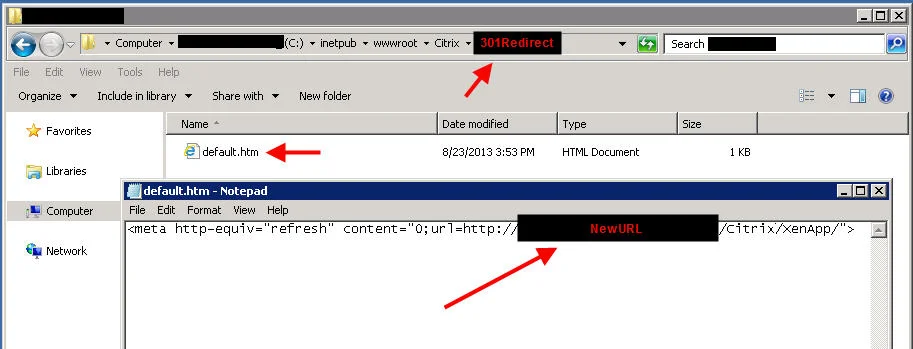
C:\inetpub\wwwroot\Citrix" and you will see all your sites. Create a folder in here called "301Redirect" or whatever makes sense for your company. -
Inside this folder, create a "default.htm" file. Open it and edit it with the following:
<meta http-equiv="refresh" content="0;url=http://NewURL/Citrix/XenApp/">
This is a 301 redirect, same as you would do in IIS but without having to mess with the IIS config. By default "XenApp" is your GUI site unless you've changed it. I don't recommend messing with the IIS config unless absolutely necessary since the Web Interface Management console also interacts with the IIS config. I prefer just using code in this instance for the 301. It's also easier to manage across many Web Interface servers and other people that may come in after you won't have to dig through the IIS console to see what you have done.
- Navigate to "
C:\inetpub\wwwroot" and edit the "WebInterface.htm". By default it will say:
window.location="/Citrix/XenApp";
so change it to:
window.location="/Citrix/301Redirect";
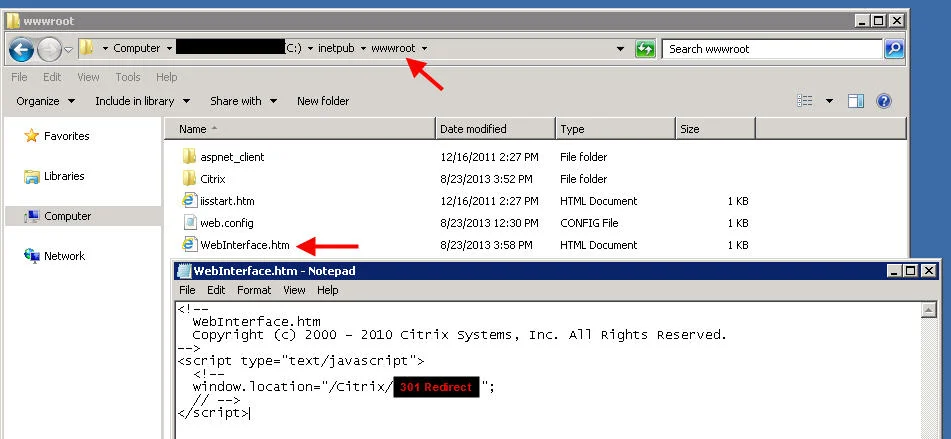
- At this point you should be able to hit the old URL via a web browser and it should redirect you the new URL. Login to the XenApp site and try launching an app. Then try launching an app using Citrix Receiver Enterprise/PNAgent and that should still work as normal since we didn't touch any of the Services sites. You can even logout and login under Online Plugin Settings just for grins. If you use Access Gateway it should be talking to these services sites too so you don't have to change anything in your Access Gateway session profiles. The old URL will continue to work there.
Hope this helps. Please post a comment if you run into any issues.

Jason Samuel
Product leader, advisor, and international speaker with 27+ years in enterprise end-user computing, security, and cloud. Has deployed infrastructure at Fortune 500 scale across 34 countries. 1 of 3 people globally to hold Citrix CTP + VMware vExpert + VMware EUC Champion concurrently. 200+ articles, 1,000+ reader discussions.
Previous Comments (2)

