
How to tell what license and edition you have applied to a NetScaler VPX appliance
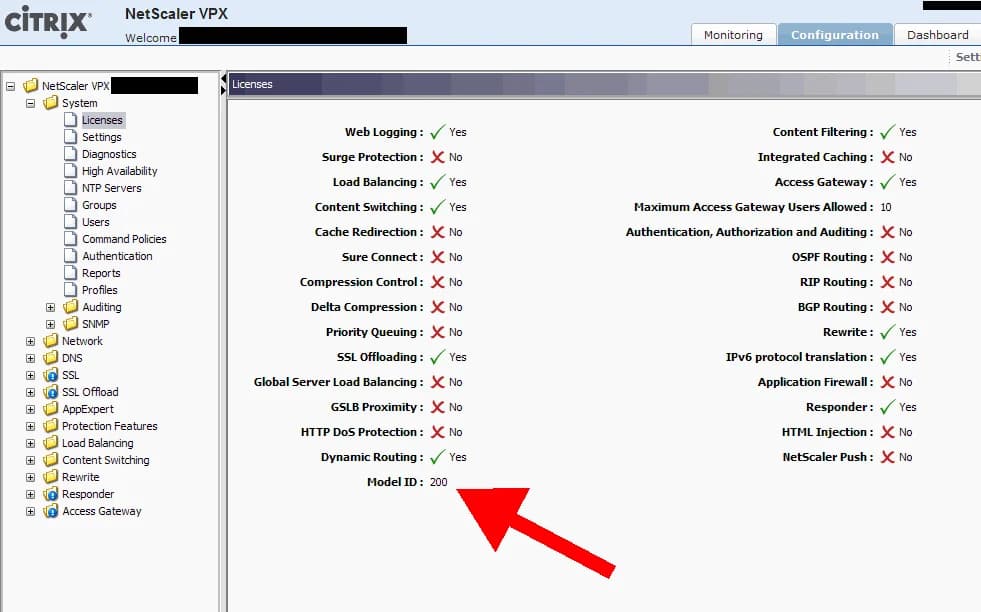
I get asked this question a lot. How do you tell what license you have applied to a Netscaler VPX appliance? The next question is what edition VPX do I have: Standard, Enterprise, or Platinum? Most people expect either one of these very important pieces of info would be displayed right along the top header where the IP and hostname are or at least under the main System window under the Hardware Information section but it is not. You can figure out what version you have by looking at the features of the appliance and looking at the current throughput to deduce the license and edition but that is not very practical. There are 3 ways you can see the current license applied easily without having to play detective:
-
Click Licenses under the System folder and the last item in the first column is "Model ID". For physical devices, it will show the model number like 7500, 9500, 15000, 17500 etc. But for VPX appliances, it will say 1 for the the free VPX Express appliance (denoting the 1 Mbps limit) and 10, 200, 1000, or 3000 for the pay for licenses. If you just upgraded from the free version to a pay for version, you can verify it was applied here at a glance easily.
-
WinSCP down the license file from the appliance and open it in Notepad or any text editor. Make sure wordwrap is off. The third line of the license file will tell you the version. For example, something like this: #CITRIXTERM FEATURE 1.0 CNS_V200_SERVER EN Citrix NetScaler VPX 200|Server This means the license I have is for a VPX 200. If you take a look at the very first line and scroll to the right some, you can see the edition level info under INCREMENT on physical appliances:
CNS_SPE_SERVER
The SPE part means I have a Platinum Edition license. Standard Edition would be CNS_SSE_SERVER and Enterprise Edition would be CNS_SEE_SERVER.
On a VPX virtual appliance, it will never say this. Instead it will say something like:
CNS_V200_SERVER
which tells you it is a VPX 200, but you have no way of telling the edition. The only thing you can do to figure out what edition it is by looking at the features available to you and comparing to the the VPX feature matrix here or move on to option 3 below.
- Login to MyCitrix.com and look at the license file there under Manage Assets. It will tell you which version you have. But when you have 50-60 Netscalers you might be responsible for, this becomes a bit tedious to wade through. You could also call Citrix Support and give them your license number and they can tell you what edition your license is but then you have to play the waiting game on the phone with them. Easier to just login to MyCitrix.com and go through your licenses.
Hope this helps. Please do post a reply if you have an easier way of identifying your VPX license edition level at a glance.

Jason Samuel
Product leader, advisor, and international speaker with 27+ years in enterprise end-user computing, security, and cloud. Has deployed infrastructure at Fortune 500 scale across 34 countries. 1 of 3 people globally to hold Citrix CTP + VMware vExpert + VMware EUC Champion concurrently. 200+ articles, 1,000+ reader discussions.
Previous Comments (2)

#DO NOT EDIT THIS LINE - This File is in UTF-8 format.
#
SERVER this_host
VENDOR CITRIX
USE_SERVER
INCREMENT CNS_SPE_SERVER CITRIX 2012.1217 16-mar-2013 1 \
	VENDOR_STRING=;LT=Eval;GP=720;CL=SPE;  \
	ISSUED=17-dec-2012 NOTICE="\
INCREMENT CNS_V1000_SERVER CITRIX 2012.1217 16-mar-2013 1 \
	VENDOR_STRING=;LT=Eval;GP=720;CL=V1000,  \
	ISSUED=17-dec-2012 NOTICE="" \
#
#CITRIXTERM FEATURE 1.0	CNS_SPE_SERVER	EN
Citrix NetScaler Application Switch - Platinum Edition|Server
#
#CITRIXTERM FEATURE 1.0	CNS_V1000_SERVER	EN
Citrix NetScaler VPX 1000|Server
