
Script to make your Citrix XenApp servers run better with SEP antivirus
If you use SEP (Symantec Endpoint Protection) on your Citrix servers, you will notice that performance on your server takes a huge hit if you leave Symantec as is. Specifically increased RAM and CPU usage caused by multiple instances of SmcGui.exe and ccApp.exe processes for all the connected sessions.
Symantec has a great KB article here that addresses this:
http://www.symantec.com/business/support/index?page=content&id=TECH105060
You can disable SmcGui to prevent multiple instances of it running by adding following DWORD registry value on your Citrix server:
HKLM\SOFTWARE\Symantec\Symantec Endpoint Protection\SMC\LaunchSmcGui
and setting the value to 0. You can also disable ccAPP by deleting the ccApp entry at the following keys: 32 bit:
HKLM\SOFTWARE\Microsoft\Windows\CurrentVersion\Run
64 bit:
HKLM\SOFTWARE\Wow6432Node\Microsoft\Windows\CurrentVersion\Run
I didn't want to go to each Citrix server and verify and/or make these changes manually so I created this little bat script I can execute remotely on each Server 2008 R2 box (you'll want to modify for 32 bit boxes):
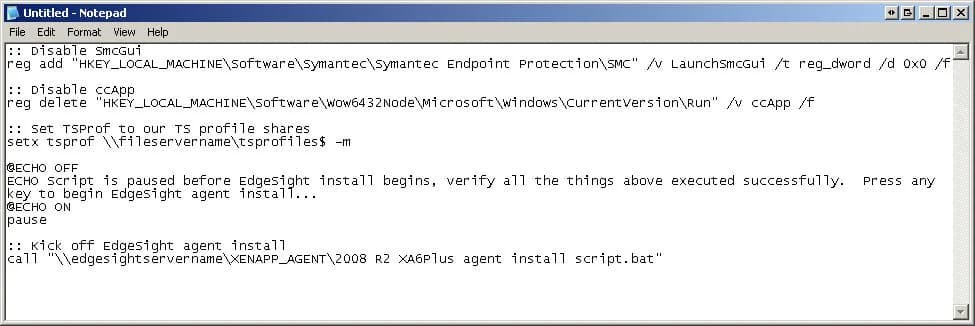
:: Disable SmcGui
reg add "HKEY_LOCAL_MACHINE\Software\Symantec\Symantec Endpoint Protection\SMC"
 /v LaunchSmcGui /t reg_dword /d 0x0 /f

:: Disable ccApp
reg delete "HKEY_LOCAL_MACHINE\Software\Wow6432Node\Microsoft\Windows
\CurrentVersion\Run" /v ccApp /f
Now when building a new XenApp server (i.e. not from a template), I wanted to use this same script as a "post-install script" after installing XenApp but with a few other things included. One thing I wanted is to set the Terminal Server roaming profile path (assuming you are not doing it with GPO already). So I add this to the script:
:: Set TSProf to our TS profile shares
setx tsprof \\fileservername\tsprofiles$ -m
I also want to install my EdgeSight agent at this time. I wrote a a few installs script for this already in my post here:
so I will call on these bat scripts from the script I am writing now. But I want it to pause and let me verify that the Symantec changes happened successfully. So I add this first:
@ECHO OFF
ECHO Script is paused before EdgeSight install begins, verify all the
things above executed successfully.  Press any key to begin EdgeSight
 agent install...
@ECHO ON
pause
then finally I call on the EdgeSight agent install script (which will reboot your system after installing automatically). I have it shared off my EdgeSight server under the "XENAPP_AGENT" share so my script looks like:
:: Kick off EdgeSight agent install
call "\\edgesightservername\XENAPP_AGENT\2008 R2 XA6Plus agent install
script.bat"
So my final script will look like this screenshot:
Hope this helps. Let me know if there is anything that any of you would like to see added.

Jason Samuel
Product leader, advisor, and international speaker with 27+ years in enterprise end-user computing, security, and cloud. Has deployed infrastructure at Fortune 500 scale across 34 countries. 1 of 3 people globally to hold Citrix CTP + VMware vExpert + VMware EUC Champion concurrently. 200+ articles, 1,000+ reader discussions.
Previous Comments (6)


Tom :I'm afraid I can't replicate the issue in a SEP 12.1.1 environment. Using The script continues to work fine for me. Are you running it as an administrator?Any remedies for the issue Eamonn points out??
Thank you, Tom
Eamonn Deering :Thanks for the update!I got it working. As far as I remember you have to disable Symantec Tamper protection if its on.
You can enable it after the reg change.