
Upgrading from XenDesktop 5.6 VDA to XenDesktop/XenApp 7.5 VDA
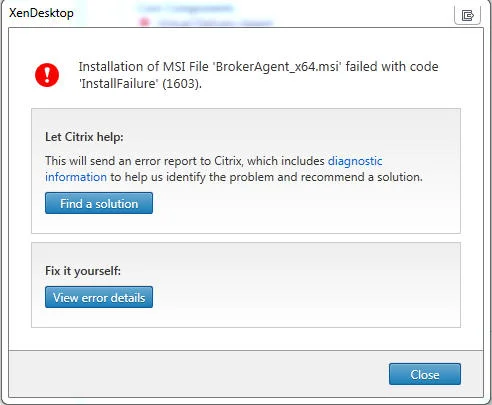
You may run into a little bit of a challenge upgrading a Windows 7 system from the XenDesktop 5.6 VDA (I was using 5.6.200.9 on this particular machine) to the latest XenDesktop/XenApp 7.5 VDA (7.5.0.4523). If you uninstall the 5.6 VDA, reboot, then try to install the 7.5 VDA expecting a clean install, it will fail and you’ll get the always wonderful and completely generic "InstallFailure 1603" error message:
When you View error details, you'll see something like this: *Error Id: XDMI:CFF2362A Exception: Citrix.MetaInstaller.MetaInstallerException Installation of MSI File 'BrokerAgent_x64.msi' failed with code 'InstallFailure' (1603).
at Citrix.MetaInstaller.Msi.InstallProduct(InstallationContext context, String msiPath, String parameters)
at Citrix.MetaInstaller.MsiComponent.Install(InstallationContext context)
at Citrix.MetaInstaller.InstallationManager.InstallComponent(IInstallableComponent component, InstallationContext installContext)*
Apparently this is an issue related to .NET changes by Microsoft. Even if you uninstall and re-install each .NET version manually, the install will fail. I'm aware of at least 4 incidents lodged with Citrix Support on this issue since 7.5 was released so not everyone may be impacted. It's been kicked up to development and I'm sure a fix is forthcoming.
In the meantime, it was suggested to re-image the system. That's not going to fly with me. I tried several things to fix this and here is what finally worked for me:
-
Completely uninstall the "half-way" installed XenDesktop/XenApp 7.5 VDA
-
Uninstall any other Citrix components from previous VDAs if anything is left over (the only thing I left was Receiver)
-
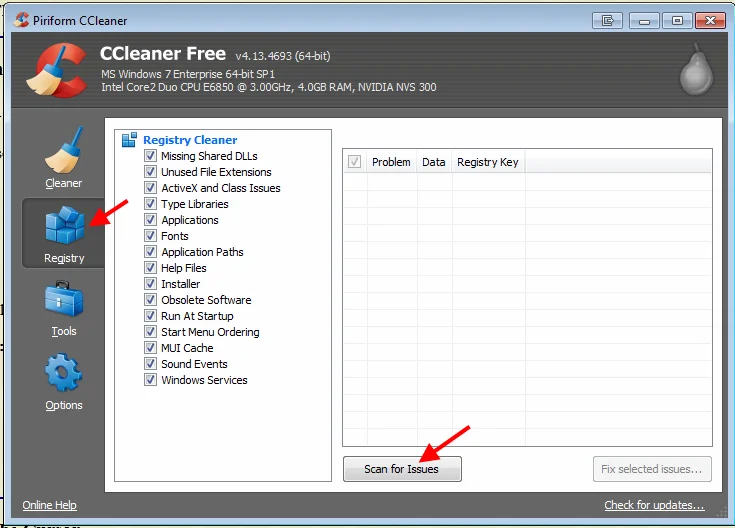
Download and run CCleaner - http://www.piriform.com/ccleaner/download
-
Click Registry on the side and hit "Scan for Issues". You'll notice a ton of Citrix related stuff left in the registry. Click "Fix selected issues" then reboot.
-
Once it's back up, do step 4 again and you might still notice a few things picked up by the scan. Fix and reboot yet again if you do see anything.
-
Once it's back up, intstall the 7.5 VDA and it should complete installation and register with the Delivery Controller
Hope this helps you out. I expect the next VDA version to resolve this issue and hopefully this workaround will hold you over till then.

Jason Samuel
Product leader, advisor, and international speaker with 27+ years in enterprise end-user computing, security, and cloud. Has deployed infrastructure at Fortune 500 scale across 34 countries. 1 of 3 people globally to hold Citrix CTP + VMware vExpert + VMware EUC Champion concurrently. 200+ articles, 1,000+ reader discussions.
Previous Comments (2)

