
Fixing the Citrix Access Gateway blank page in Microsoft IE 11 (Internet Explorer 11) on your Netscaler
If your Citrix Access Gateway shows a blank page in IE 11, add an X-UA-Compatible meta tag to the NetScaler Gateway index.html. Fixes it without touching client browsers.
If you have a Netscaler and are using the Citrix Access Gateway (aka Netscaler Gateway now), you might have users using IE 11 (Internet Explorer 11) complain they are getting a blank page. Chrome and Firefox will work fine but IE11 just doesn't want to show the login page. A quick work around is to tell the user to view the site in compatibility mode or use a different browser but that will annoy users after some time. You have to make it as easy as possible for your users since not all of them are going to be tech savvy.
The best thing to do is force Internet Explorer into compatibility mode on page load. Just open up the index.html running in flash and the one in your theme:
`Flash - /netscaler/ns_gui/vpn/index.html
Theme - /var/vpn/themes/Horizon1/ns_gui/vpn/index.html`
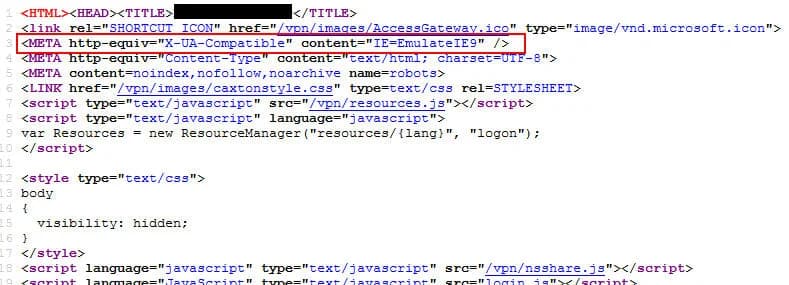
and add the following line in header at the top before the body tag:
<META http-equiv="X-UA-Compatible" content="IE=EmulateIE9" />
so it looks like this:
You can choose which version of IE to emulate and Stackoverflow has an excellent post on the differences between each here:
In my experience, sticking with emulating IE9 works great with the Access Gateway. Users won't even know the difference. Hope this helps!

Jason Samuel
Product leader, advisor, and international speaker with 27 years in enterprise end-user computing, security, and cloud. Has deployed infrastructure at Fortune 500 scale across 38 countries. 1 of 3 people globally to hold Citrix CTP + VMware vExpert + VMware EUC Champion concurrently. 220 articles, 1,000+ reader discussions.
Previous Comments (13)


Using NetScaler MA Service in Citrix Cloud to monitor and manage all your NetScalers easily
If you're tired of managing NetScalers appliance by appliance, the MA Service in Citrix Cloud gives you monitoring, management, and analytics across all of them in one console.
citrix-netscalerNative OTP with NetScaler: Securing your Citrix Environment Overnight for FREE!
Did you know NetScaler has built-in Native OTP? You can add MFA to your Citrix environment overnight with no additional licensing. Here's the CUGC presentation and slide deck.
citrix-netscalerWhat's New with Citrix NetScaler 12.0 and NetScaler MAS 12.0 Walkthrough
Our CUGC Networking SIG walkthrough of NetScaler 12.0 and MAS 12.0 is up. 54 slides covering new features, known issues, workarounds, and what's coming next from Synergy 2017.