
How to find out what build version of Microsoft SharePoint you are running
Not sure what SharePoint 2007 build you're running? Check it in Central Administration and cross-reference against the version wiki to see where you stand on cumulative updates.
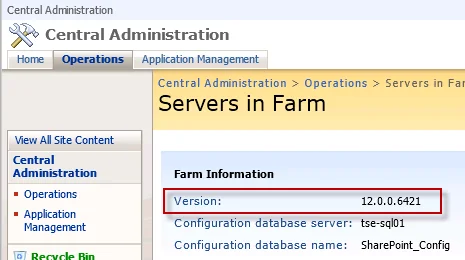
When you're applying updates to a large farm, you really need to check the version number of SharePoint running on each server in the farm in order to maintain consistency. You can do this easily by going to CA > Operations > Servers in Farm.
But what do these version numbers actually mean? There's a great Wiki maintained here that can answer this:
http://www.sharepointdevwiki.com/display/SharePointAdministrationWiki/SharePoint+Versions
This page will show you all the past and current version numbers and their associated KB articles. Very handy when troubleshooting updates or if you want to check the change log between versions.

Jason Samuel
Product leader, advisor, and international speaker with 27 years in enterprise end-user computing, security, and cloud. Has deployed infrastructure at Fortune 500 scale across 38 countries. 1 of 3 people globally to hold Citrix CTP + VMware vExpert + VMware EUC Champion concurrently. 220 articles, 1,000+ reader discussions.
How to edit Word and Excel documents in Microsoft SharePoint 2007 using Firefox
If Firefox opens SharePoint 2007 documents in read-only mode, install the Coral IE Tab or OpenDocument plugin. You'll be able to edit Word and Excel files directly from SharePoint.
sharepoint-2007Getting Firefox to pass Active Directory credentials to Microsoft SharePoint 2007
If Firefox keeps prompting for credentials on SharePoint 2007, add your SharePoint URLs to network.automatic-ntlm-auth.trusted-uris in about:config. NTLM passthrough works after that.
sharepoint-2007How do you get Microsoft SharePoint 2007 to read and index content inside a PDF file?
If SharePoint 2007 search can't find content inside PDFs, you need the Adobe iFilter. Here's how to install it and configure the index service for both x86 and x64.