
Prepping a golden image with AppSense in a Citrix Provisioning Services (PVS) environment
If you don't clear the CCA GUIDs before sealing your AppSense golden image in PVS, your pooled VMs won't check in properly. Here's the batch script that automates it.
Here's a little script I wrote to help me prep golden images in provisioned environments (pooled VMs) with AppSense DesktopNow. There is an excellent best practices guide on Citrix Provisioning Server and AppSense but I'm not sure it's publicly available because I couldn't find it on myappsense.com or I would link to it. I got it directly from an AppSense SE a while back. This script clears the CCA GUIDs for you as recommended in this best practices guide. If you don't clear the GUIDs then all your standard images come up and check in with the AppSense Management Server with the same GUID which can lead to very weird behavior like missing data or settings. You can burn it right into an admin tools folder in your private golden images or run it remotely, whatever you prefer. When I'm ready to go from private to standard, I just run this bat file before shutting down. Works great for me.
:: AppSense/Citrix PVS private image CCA prep script
:: Created by Jason Samuel - www.jasonsamuel.com

:: This will stop the CCA service
net stop "AppSense Client Communications Agent"

:: This will wipe the CCA agent GUID in registry for group id
reg add "HKEY_LOCAL_MACHINE\Software\AppSense Technologies\Communications Agent" /v "group id" /t reg_sz /d "" /f

:: This will wipe the CCA agent GUID in registry for machine id
reg add "HKEY_LOCAL_MACHINE\Software\AppSense Technologies\Communications Agent" /v "machine id" /t reg_sz /d "" /f

pause
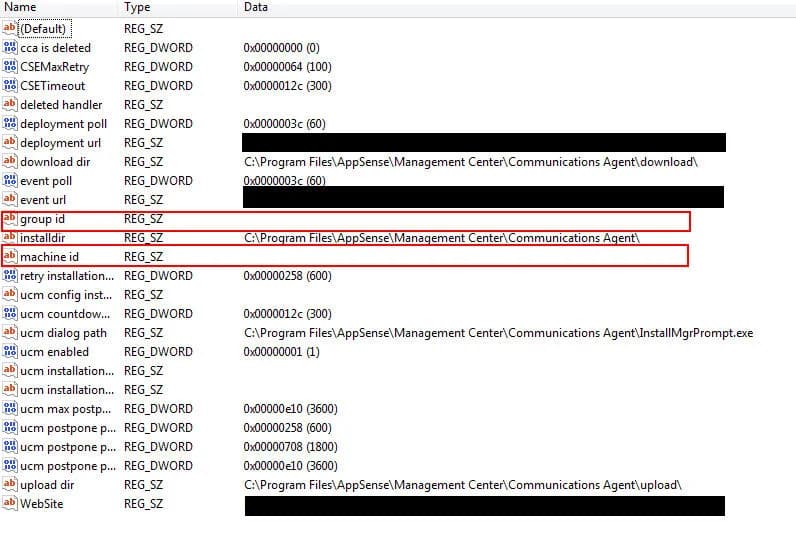
Once it runs check the registry and you'll see the keys are now blank:
If the code above runs off the page, just highlight the entire block of code and paste into Notepad to see it all. Alternatively, here's the script as a .txt file so you can see the whole thing or even rename it to .bat and use it as is (make sure you right click - save as):
Hope this helps. Let me know if you have any PVS + AppSense best practices questions or suggestions.

Jason Samuel
Product leader, advisor, and international speaker with 27 years in enterprise end-user computing, security, and cloud. Has deployed infrastructure at Fortune 500 scale across 44 countries. 1 of 3 people globally to hold Citrix CTP + VMware vExpert + VMware EUC Champion concurrently. 220 articles, 1,000+ reader discussions.
Deploying the Citrix ShareFile Outlook Plugin using AppSense Environment Manager
Need to push the ShareFile Outlook Plugin to XenApp users through AppSense? Here's the silent install approach that actually works, plus what changed in version 4.0.
appsenseHow I saw AppSense Application Manager stop what EVERY email filter missed
An .exe attachment got past every email filter we threw at it. AppSense Application Manager was the only layer that stopped it. This is why defense-in-depth matters.
appsenseUsing AppSense with VDI to help resolve Microsoft Windows Folder Redirection & GPO issues
If your VDI logins are slow, it's probably bloated GPOs and folder redirection, not storage. Here's how AppSense Environment Manager speeds up both in XenDesktop.