
Symantec/Veritas NetBackup robtest commands for your tape library
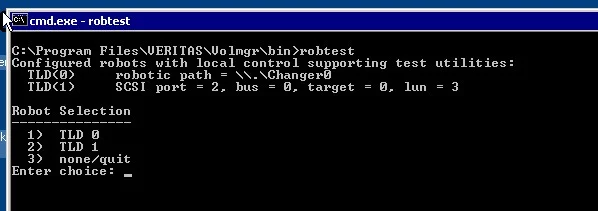
Having trouble with your tape library and Netbackup not seeing your tapes? Move those tapes manually with robtest commands! Robtest is a command line utility that can help you manually move tapes and inventory your magazines and drives when Netbackup is hung up or can't see them.
Here are some simple robtest commands I have used in the past. To start robtest.exe, just go to "veritas\volmgr\bin". Then select your robot (for example, 1 to select TLD 0) ? - help menu s d - show status of all drives s d1 - show status of just drive 1 s s - show status of all slots s s1 - show status of just slot 1 And some actual tape action: m s10 s5 - move tape media from slot 10 to slot 5
m d1 s1 - move tape media from drive 1 into slot 1
unload d1 - rewinds the tape in the drive and releases the read/write head

Jason Samuel
Product leader, advisor, and international speaker with 27+ years in enterprise end-user computing, security, and cloud. Has deployed infrastructure at Fortune 500 scale across 34 countries. 1 of 3 people globally to hold Citrix CTP + VMware vExpert + VMware EUC Champion concurrently. 200+ articles, 1,000+ reader discussions.
Previous Comments (1)
