
Creating a custom event log under Microsoft Event Viewer to log server events

By default, most applications write events to the Application Event Log. This is a great central place to write logs to but sometimes you might have a requirement to log informational events from an application and you don't want it filling up your Application Event Log because of the sheer number of informational events you might get a short period of time. The solution is to create a custom event log for your application to hold these events. You can then set max log size, overwrite rules, filters, etc. on this event log while your Application Event Log remains clean and intact.
The first step is to create the new log. You have to do this in the registry. Open up regedit and navigate to:
HKEY_LOCAL_MACHINE\SYSTEM\ControlSet001\Services\Eventlog
Right click on the Eventlog key and click New > Key
Name this new key the same name you want your new event log to be named. By default it will create the new .evt file here:
C:\WINDOWS\System32\Config\New Key #1.evt
You can always rename it by editing the string value data in the registry if you like.
Now you need to add Sources to your new event log. Right click in the right window pane under your new key and add a new Multi-String value called "Sources" and add the name of each of your applications on each line. It should look something like this:
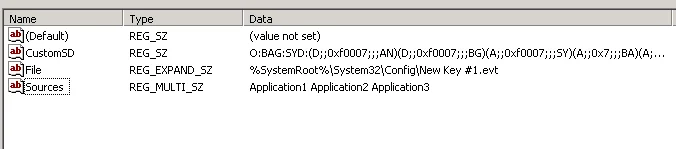
Now you need to move the association of your application from the Application event log to your new Custom log. Just expand the "Application" key located at:
HKEY_LOCAL_MACHINE\SYSTEM\ControlSet001\Services\Eventlog\Application
and copy whatever key you see in there for your app under your new Custom log:
HKEY_LOCAL_MACHINE\SYSTEM\ControlSet001\Services\Eventlog\CustomLog
There's no copy/paste command so you can recreate the key if it's small or you can export/import if it's something complicated and you are afraid of mistyping something. MAKE SURE to delete it from Application after you add it to the Custom log or it will not write events to your new log since Windows thinks its still associated with the Application log. If it is a custom source, you need to create a DWORD value under this key with the value of 1:

You will also notice my custom app in this example is a .NET 2.0 appliaction so I want .NET to write the events to the log. I have to create a string value called EventMessageFile and give it the path to the .NET 2.0 event log message dll:
C:\WINDOWS\Microsoft.NET\Framework\v2.0.50727\EventLogMessages.dll
Now you should reboot your server. When it's back up, check and see if your new event log appears under Event Viewer. If your application is not writing events to your new log, test it manually by opening a command prompt and going to:
C:\WINDOWS\system32
and typing:
eventcreate /l CustomLog /t Information /so Application1 /id 1 /d "Test message"
You should get a message saying it was successfully written or you should get an error message with details on why it was not written. If you followed the steps in this blog post, it should write the event just fine.

Jason Samuel
Product leader, advisor, and international speaker with 27+ years in enterprise end-user computing, security, and cloud. Has deployed infrastructure at Fortune 500 scale across 34 countries. 1 of 3 people globally to hold Citrix CTP + VMware vExpert + VMware EUC Champion concurrently. 200+ articles, 1,000+ reader discussions.
Previous Comments (8)


  EventCreate /l "SQL Server" /t information /so Console /id 1 /d "Log created"
  SUCCESS: A 'information' type event is created in the 'Console' log/source.
A new custom source key 'Console' got created under HKLM\System\CurrentControlSet\Services\Eventlog\SQLServer\, and it also got added to 'Sources' multi-sz value.
Now when I try to follow a similar logic and switch 'MSSQLSERVER' source from 'Application' log to the new one (by moving the key and eliminating it from App's 'Sources' multi-sz) I get the following:
  EventCreate /l "SQLServer" /t information /so MSSQLSERVER /id 1 /d "Log created"
  ERROR: Source parameter is used to identify custom application/scripts only (not built-in sources).
If I add 'DWORD:CustomSource=1' value under HKLM\..\Eventlog\SQLServer\MSSQLSERVER\, then the error disappears, but besides explicit attempts from command line:
  EventCreate /l "SQLServer" /t information /so MSSQLSERVER /id 2 /d "Log created"
  SUCCESS: A 'information' type event is created in the 'MSSQLSERVER' log/source.
nothing gets written to 'SQLServer' event log from the real SQL service.. or anywhere else for that matter! Once I restore back original MSSQLSERVER source under 'Application' log and restart SQL, it continues logging to App Event Log as it did originally.
Would not be a problem, if it was not flooding App log with loads of unimportant fluff!