
How to install and configure SNMP via command line on your Microsoft servers
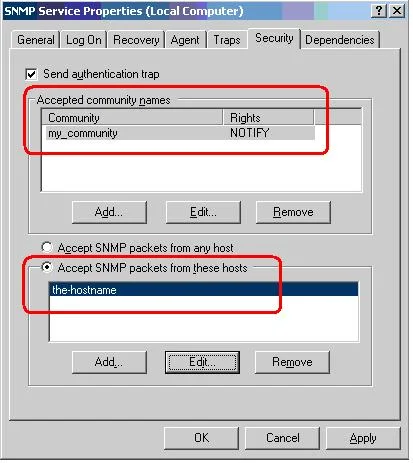
You can install pretty much any windows component locally or remotely on a server. Here is an example of installing SNMP using an answer file via command line locally on a server:
sysocmgr /i:%windir%\inf\sysoc.inf /u:"<a href="file://server/share/snmp.txt">\\server\share\snmp.txt</a>" /q
This will install SNMP quietly using the answer file I give it which is located on a file share. Here are the contents of the answer file:
[NetOptionalComponents]
SNMP = 1

[SNMP]

Send_Authentication = Yes
Accept_CommunityName = mine_ro:Read_Only
Any_Host = No
Limit_Host = xxx.xxx.xxx.xxx
This will automatically configure a new read only community you specify and add a single host that is allowed to connect (you can add more IPs but adding a comma after each one). The only dilemma is that during the install, it needs to get at the i386 directory and by default in the registry, it is pointed to “D:/i386” more than likely since that is typically the CD-ROM drive you installed the OS from. We just need to run a quick registry update to two keys that point it to the C: drive before running the line above and it should work with no issue. This can be done in bulk on servers too using whatever remote management tool you prefer:
HKEY_LOCAL_MACHINE\SOFTWARE\Microsoft\Windows NT\ CurrentVersion\Sourcepath
HKEY_LOCAL_MACHINE\SOFTWARE\Microsoft\Windows \CurrentVersion\Setup\Sourcepath
Keep in mind sysocmgr.exe has been replaced in Server 2008 by ocsetup.exe. You can read up on command line switches for it here:
http://technet.microsoft.com/en-us/magazine/dd673656.aspx
http://technet.microsoft.com/en-us/library/cc766272(WS.10).aspx

Jason Samuel
Product leader, advisor, and international speaker with 27+ years in enterprise end-user computing, security, and cloud. Has deployed infrastructure at Fortune 500 scale across 34 countries. 1 of 3 people globally to hold Citrix CTP + VMware vExpert + VMware EUC Champion concurrently. 200+ articles, 1,000+ reader discussions.
Previous Comments (2)


ServerManagerCmd -install SNMP-Services -allSubFeatures to automate the SNMP installation.