
vMotion fails saying the operation is not allowed in the current state
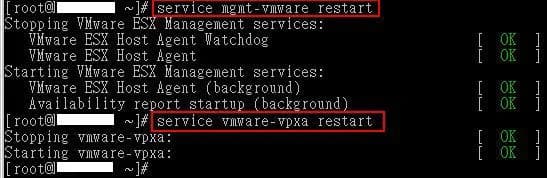
I've had this happen several times when an ESX host is stuck thinking it is going into maintenance mode from previous maintenance. You get an error saying it cannot complete the migration and "The operation is not allowed in the current state". Very cryptic error. Just restart the management agents on the ESX host by SSHing in and typing:
service mgmt-vmware restart
hit enter, then:
service vmware-vpxa restart
and hit enter again. You should see the services restart with an "[ OK ]" after each line.
Try to vMotion again now. If you still get an error, disconnect the ESX host from Virtual Center and then reconnect it. Try to vMotion again and it should work. You can also try restarting VC services too. If you have a better solution, let me know. I know it is a bit tedious to go through this process but it does work.

Jason Samuel
Product leader, advisor, and international speaker with 27+ years in enterprise end-user computing, security, and cloud. Has deployed infrastructure at Fortune 500 scale across 34 countries. 1 of 3 people globally to hold Citrix CTP + VMware vExpert + VMware EUC Champion concurrently. 200+ articles, 1,000+ reader discussions.