
Citrix console failed to remove the server from the farm with error code 80000007
If you're getting 'Error Code: 80000007' when trying to remove a server from your XenApp or Presentation Server farm, dscheck /full servers /clean will force-remove the stale entries.
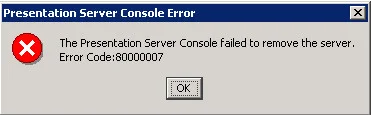
Had to clean up a Presentation Server 4.0 farm today. Yes you heard that right, PS 4.0. Yuck. Lots of servers that were decommed but never removed from the farm. I needed to eliminate the junk and see what was really going on with this farm and get the apps migrated to XenApp 7.6. So basically I had a bunch of dead servers that needed to be removed from the farm by force before I could proceed with my analysis of the good apps that were left. If you go through the console and try and remove the each server one by one, you would get this message:
The Presentation Server Console failed to remove the server. Error Code: 80000007
Do the following via command line:
qfarm
you will see it's a member of the farm. So let's hit the data store and kill it. Do a:
dscheck /full servers /clean
servers will remain most likely since you verified with the qfarm it's not really an inconsistent record and technically valid. The only option is to forcefully delete it:
dscheck /full servers /deletemf SERVERNAME
Keep in mind the SERVERNAME is case sensitive so when you do a qfarm and the server name is all capital letters, you must type it in as all capital letters. Now do the clean command again:
dscheck /full servers /clean
Now when you reopen the console and do a discovery, the server will be gone for good.

Jason Samuel
Product leader, advisor, and international speaker with 27 years in enterprise end-user computing, security, and cloud. Has deployed infrastructure at Fortune 500 scale across 44 countries. 1 of 3 people globally to hold Citrix CTP + VMware vExpert + VMware EUC Champion concurrently. 220 articles, 1,000+ reader discussions.
How to extend your on premises XenApp XenDesktop environment to Citrix Cloud XA XD Service and Microsoft Azure
There are a lot of misconceptions about what Citrix Cloud actually is. Here's how to extend your on-prem XenApp/XenDesktop to Citrix Cloud and Azure using Cloud Connectors.
citrix-xenappHow to publish content and use custom icons in XenApp XenDesktop 7.11 using PowerShell
XenApp/XenDesktop 7.11 lets you publish content (documents, URLs) with custom icons via PowerShell. Here are the exact cmdlets to deliver content shortcuts to your users.
citrix-xenappHow to setup Citrix Director Shadowing with Microsoft Remote Assistance using Group Policy
If you want help desk to shadow XenDesktop VMs from Director using Remote Assistance, you'll need Group Policy configured and Director 7.6.100. Here's the setup.