
Legacy Citrix apps not launching on newer Web Interface servers
If your Presentation Server 4.0 apps fail to launch with Event 31203 on a newer Web Interface server, disable launch reference requests in the farm config. Fixes the XML Service mismatch.
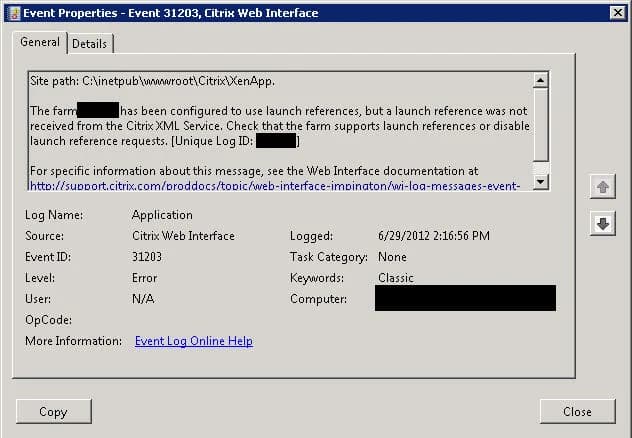
If you ever try adding a legacy Citrix Presentation Server 4.0 farm to a Web Interface and the apps don't launch, check the application event log on your Web Interface servers for Error 31203 messages like below:
`Source: Citrix Web Interface Event ID: 31203 The farm XXXXX has been configured to use launch references, but a
launch reference was not received from the Citrix XML Service.
Check that the farm supports launch references or disable launch
reference requests. [Unique Log ID: XXXXXXX]`
Launch references are only support with Presentation Server 4.5 and above. To fix this, go to your WebInterface.conf on your Web Interface servers:
C:\inetpub\wwwroot\Citrix\XenApp\conf\WebInterface.conf
and change RequireLaunchReference and OverrideIcaClientname to Off and On respectively:
RequireLaunchReference=Off OverrideIcaClientname=On
Update September 4, 2012:
I was informed by our Citrix SE this issue impacts Storefront as well. The work around above will work by changing the same settings in the web.config of the Storefront site.

Jason Samuel
Product leader, advisor, and international speaker with 27 years in enterprise end-user computing, security, and cloud. Has deployed infrastructure at Fortune 500 scale across 44 countries. 1 of 3 people globally to hold Citrix CTP + VMware vExpert + VMware EUC Champion concurrently. 220 articles, 1,000+ reader discussions.
Previous Comments (2)


How to extend your on premises XenApp XenDesktop environment to Citrix Cloud XA XD Service and Microsoft Azure
There are a lot of misconceptions about what Citrix Cloud actually is. Here's how to extend your on-prem XenApp/XenDesktop to Citrix Cloud and Azure using Cloud Connectors.
citrix-xenappHow to publish content and use custom icons in XenApp XenDesktop 7.11 using PowerShell
XenApp/XenDesktop 7.11 lets you publish content (documents, URLs) with custom icons via PowerShell. Here are the exact cmdlets to deliver content shortcuts to your users.
citrix-xenappHow to setup Citrix Director Shadowing with Microsoft Remote Assistance using Group Policy
If you want help desk to shadow XenDesktop VMs from Director using Remote Assistance, you'll need Group Policy configured and Director 7.6.100. Here's the setup.