
VMware PowerCLI script to set the Memory Resources limit on your VMs to Unlimited in bulk
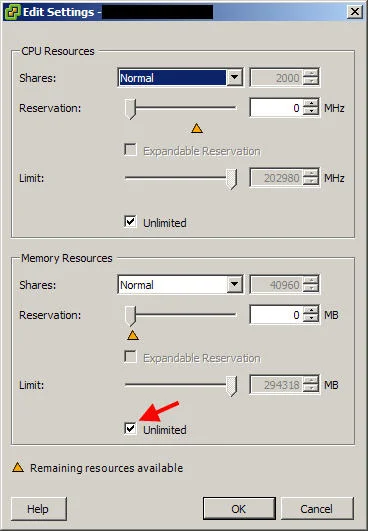
If you need to reset memory limits to Unlimited on all your VMs during a migration, this PowerCLI one-liner does it in bulk.

Had a situation where I needed to reset every VM in one environment to Unlimited that had previously had a an explicitly set memory limit. Here is a nice VMware PowerCLI script that will reconfigure all the affected VMs one by one automatically for you:
get-vm|get-vmresourceconfiguration|where-object{$_.memlimitmb -ne '-1'}|set-vmresourceconfiguration -memlimitmb $null

Jason Samuel
Product leader, advisor, and international speaker with 27 years in enterprise end-user computing, security, and cloud. Has deployed infrastructure at Fortune 500 scale across 38 countries. 1 of 3 people globally to hold Citrix CTP + VMware vExpert + VMware EUC Champion concurrently. 220 articles, 1,000+ reader discussions.
VMkernel ports change automatically when applying a Host Profile
If your vMotion and Management VMkernel ports get swapped when you apply a Host Profile, you need to reorder the kernel port entries in the profile first. Here's the fix.
vmware-esxivMotion fails saying the operation is not allowed in the current state
If vMotion fails with 'The operation is not allowed in the current state', your ESX host is stuck in phantom maintenance mode. Restart mgmt-vmware and vmware-vpxa to clear it.
vmware-esxiHow to fix an IP address conflict on your network caused by a VM using VMware PowerCLI
Got an IP conflict and traced it to a MAC address in your VMware cluster? This PowerCLI one-liner finds the exact VM and NIC causing it across all your ESX hosts.