
MCP servers in the enterprise: what every IT leader needs to know before AI connects to production systems
Your teams are about to connect AI agents to your production systems. Here's what you need to understand, what questions to ask, and how to govern it.
Someone on your team is going to come to you (if they haven't already) and ask to connect an AI agent directly to your internal systems. Not through a chat window. Not through copy-paste. They want to give the AI read and write access to your databases, your project tracking tools, your cloud platforms, and your internal APIs.
And it won't just be your IT team asking. Product managers want it for roadmap automation. Data analysts want it for self-serve reporting. Operations teams want it for workflow orchestration. Even your business development people are starting to see the value of an AI that can pull competitive data, update the CRM, and draft proposals without leaving a single conversation.
The technology that makes this possible is called MCP (Model Context Protocol). Introduced by Anthropic in November 2024 and now governed as an open standard under the Linux Foundation's Agentic AI Foundation, MCP creates a structured connection between AI agents and enterprise systems. It's going to change how organizations operate more than any single technology since the cloud migration.
But before you approve it, block it, or pretend it's not happening, you need to understand what it actually does, what risks it introduces, and how to govern it properly. Because if you don't get ahead of this, your people will do it anyway (and you'll find out the hard way).
What MCP actually is (without the jargon)
Think of MCP like this. Right now, when someone on your team uses an AI tool, they're copying data out of one system, pasting it into a chat, getting a response, and then manually putting the result back into another system. It's like having a brilliant analyst who can only communicate through sticky notes passed under a door.
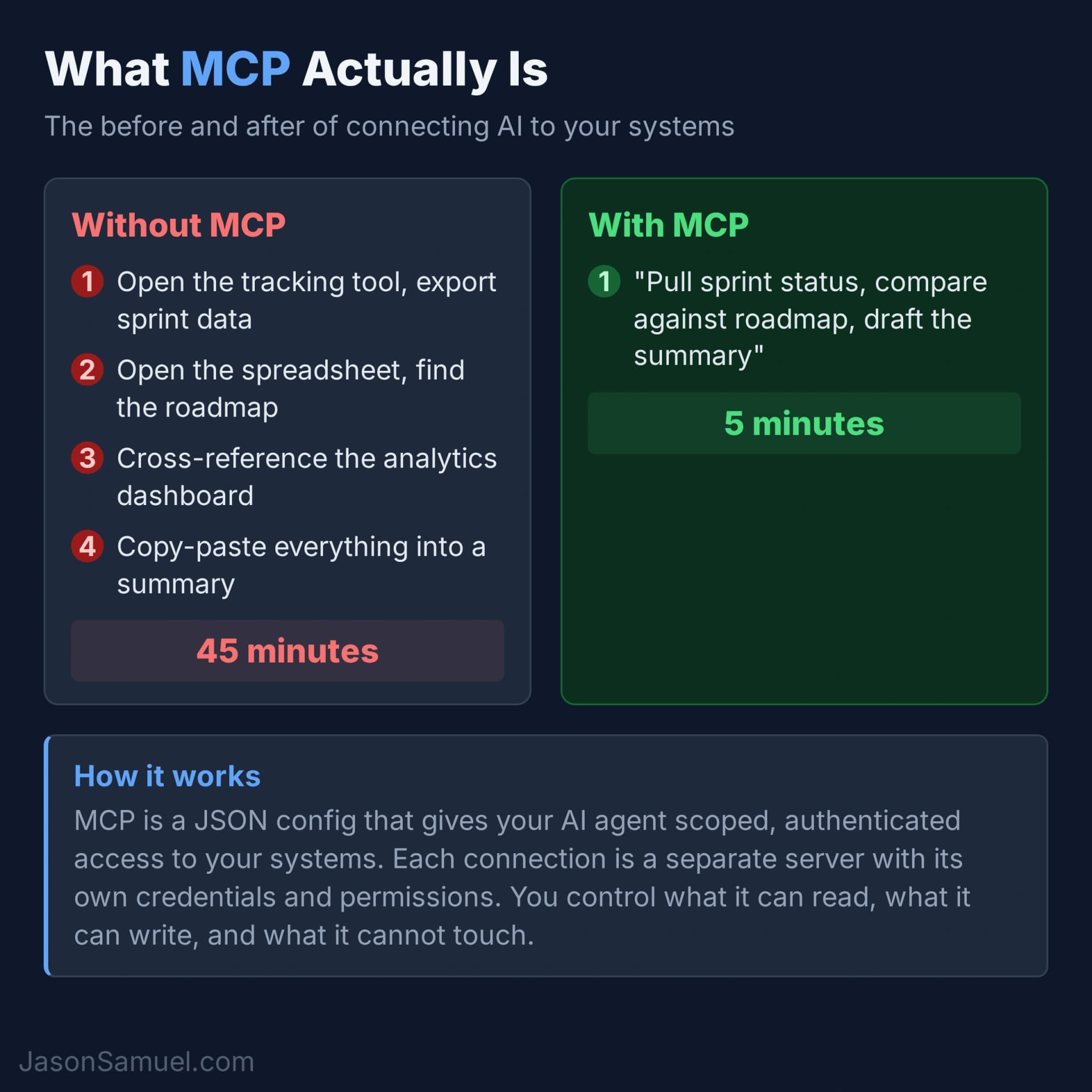
MCP opens the door. It gives the AI agent a structured way to directly read from and write to your enterprise systems. Your databases, your ticketing system, your cloud dashboard, your documentation wiki, your spreadsheets. All through authenticated, permission-scoped connections that you control.
The agent doesn't get blanket access to everything. Each connection (called an MCP server) exposes specific capabilities. You can give it read-only access to your database schema without letting it modify data. You can let it search your documentation without letting it edit pages. You can let it check system status without letting it make changes. The scoping is granular.
This is not theoretical. Teams that have adopted MCP are reporting dramatic productivity differences. Instead of context-switching between 10 browser tabs to gather information for a decision, someone asks one question and the agent pulls from all those systems simultaneously.
Why your teams want this (and why they're right)
The productivity case for MCP is not subtle. Here's what a typical workflow looks like without it versus with it.
Without MCP: Your product manager needs to prepare a stakeholder update. They open the tracking tool, export the sprint data, open the spreadsheet with the roadmap, cross-reference against the competitive analysis doc, check the latest analytics dashboard, draft the summary, and manually compile everything into a deck. That's 45 minutes minimum, most of it spent navigating between systems and reformatting data.
With MCP: They tell the AI agent "pull the current sprint status, compare it against the roadmap milestones, and draft the stakeholder summary." The agent queries the tracking tool, reads the spreadsheet, checks the analytics, and drafts the summary. Five minutes. Same output. No copy-paste errors.
And it's not just product managers. Your finance team can ask the agent to reconcile data across spreadsheets. Your operations team can ask it to check system health across platforms and draft incident summaries. Your HR team can ask it to compile onboarding checklists from multiple internal wikis. Any role that touches multiple systems (which is every role at this point) benefits.
The numbers being reported are consistently in the 3-5x range for tasks that involve gathering information from multiple systems. The gain isn't from the AI being smarter. It's from eliminating the context-switching tax that eats up most of a knowledge worker's day. This is consistent with the MCP specification's design intent, which explicitly optimizes for reducing round-trips between agents and data sources.
Your teams already know this. That's why they're asking.
What it touches in your environment
Here's what makes MCP different from previous AI tool conversations. This isn't a chatbot sitting in a browser tab. An MCP server is a process that has authenticated access to your actual systems.
An MCP server is just a program. It can run anywhere you can run code. That's both its strength and its risk, because there's nothing stopping someone from running one on a laptop on their desk or a desktop under it.
Where MCP servers can run:
Developer laptops (local mode). This is how most people use MCP today. Tools like Claude Code and Claude Desktop launch MCP servers as local processes on your machine. You configure a JSON file, point it at your systems, and the server runs as long as your terminal session is open. When you close the laptop, it stops. For individual productivity and experimentation, this is the fastest way to get started. For enterprise governance, it's a nightmare because IT has zero visibility into what's connecting to what.
Linux, macOS, and Windows servers. MCP servers are typically written in Python, TypeScript, or Go. They run on any OS that supports those runtimes, which is everything. There are no OS restrictions. If your environment is Windows-heavy, MCP servers run fine on Windows Server. If you're a Linux shop, same. macOS is common for developer workstations. The protocol doesn't care about the operating system.
Docker containers. This is the natural fit for enterprise deployment. Package the MCP server with its dependencies, define the credentials as environment variables, deploy it like any other container. You get reproducibility, version control, and the ability to run multiple MCP servers as isolated services. If your teams are already using Docker for microservices, this is the same workflow.
Kubernetes and container orchestration. For organizations running at scale, MCP servers can be deployed as pods in your existing Kubernetes cluster. This gives you health checks, auto-restart, resource limits, network policies, and centralized logging out of the box. If you already have the infrastructure, this is probably where MCP servers belong in production.
Cloud platforms (AWS, Azure, GCP). MCP servers can run as Lambda functions, Azure Functions, Cloud Run containers, ECS tasks, or EC2 instances. The deployment model depends on your existing cloud strategy. Serverless works for lightweight, on-demand MCP servers. Always-on containers work for high-throughput or stateful connections.
SaaS and managed hosting. Some vendors are starting to offer hosted MCP server platforms where you configure the connections through a dashboard and they handle the runtime. This is still early, but it's the direction things are heading for organizations that don't want to manage the infrastructure themselves.
The enterprise decision: The protocol doesn't dictate where the server runs. That's your architecture decision. But it should be intentional. You wouldn't let every developer run their own database proxy on a laptop. Same principle. For anything beyond individual experimentation, MCP servers should be deployed as managed services with centralized credentials, audit logging, and your infrastructure team involved.
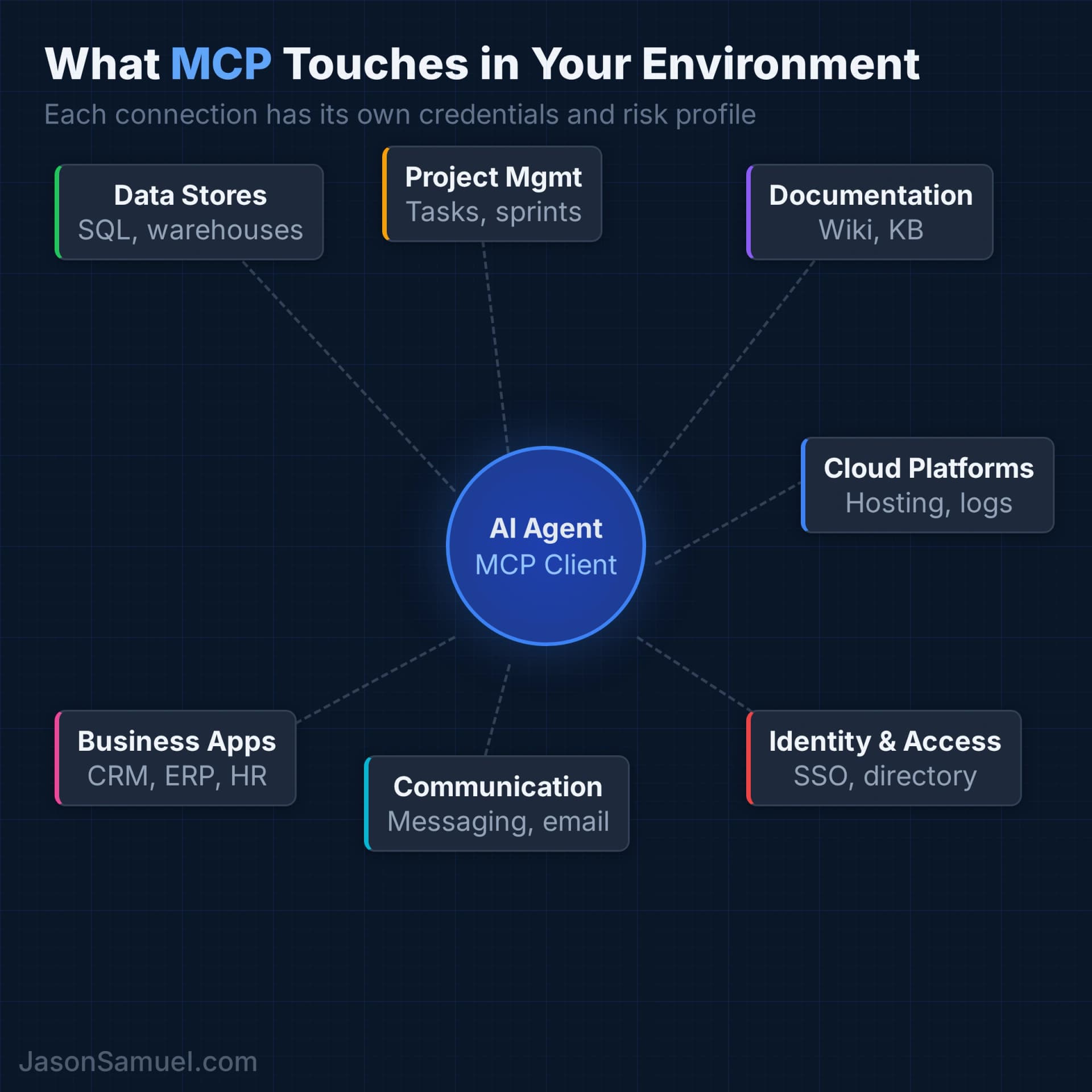
The most common MCP connections in enterprise environments:
Data stores — SQL databases, data warehouses, analytics platforms. The agent can query your data directly instead of someone exporting a CSV and uploading it to a chat.
Project management — whatever your teams use to track work. The agent can read task status, create tickets, update priorities, and pull sprint metrics.
Documentation — your wiki, knowledge base, shared drives. The agent can search internal docs and pull relevant information mid-conversation instead of someone manually finding and pasting the right page.
Cloud platforms — your hosting, infrastructure, and monitoring dashboards. The agent can check system status, read logs, and monitor health metrics.
Identity and access — your directory services, SSO provider, access management. The agent can look up user information, check group memberships, and verify permissions.
Communication tools — your messaging platform, email. The agent can search conversation history, post updates, and send notifications.
Business applications — your CRM, ERP, billing platforms, HR systems. The agent can read customer records, check order status, pull financial data, and query employee directories.
Each of these is a separate MCP server with its own credentials, its own permission scope, and its own risk profile. That's the part your teams might gloss over in their excitement. That's the part you need to focus on.
How MCP actually connects (and what happens when there's no API)
This is the question your architects are going to ask first, so let's address it directly. MCP servers are just code that translates between the AI agent and whatever system you're connecting to. The system doesn't need to "support MCP." The MCP server wraps whatever access method already exists.
If the system has a REST API, that's the cleanest path. The MCP server makes HTTP calls to the API endpoints, handles authentication, and translates the responses into something the AI agent can work with. Most modern SaaS platforms (your project tracking tools, CRM, cloud dashboards, communication platforms) fall into this category. If your team is already calling these APIs from scripts or integrations, an MCP server is doing the same thing with a structured interface.
If the system has a database, you can connect directly via SQL. The MCP server opens a database connection (ideally read-only) and exposes query capabilities to the agent. This is common for data warehouses, reporting databases, and internal systems that were built before "API-first" became standard. The risk profile is higher here because you're giving the agent database-level access, not application-level access. That's why scoping matters so much.
If the system has no API and no direct database access, you're not out of luck. MCP servers can wrap any programmatic access method:
- Command-line tools. If your system has a CLI (and most infrastructure tools do), the MCP server can execute commands and parse the output. Think of how your ops team already scripts against CLIs for monitoring and provisioning.
- File system access. For documentation, configs, logs, and internal knowledge bases stored as files, the MCP server reads the file system directly. No API needed.
- SDKs and client libraries. Many enterprise platforms ship SDKs that are richer than their REST APIs. The MCP server can use these directly.
- Web scraping as a last resort. For legacy systems that only have a web UI and nothing else, it's technically possible to automate the browser. But this is fragile, slow, and should be treated as a temporary bridge while you push the vendor for proper API access.
The bottom line for IT leaders: MCP doesn't require your vendors to support it. It doesn't require new APIs. If your team can access a system programmatically today (through any method), they can build an MCP server for it. The question isn't "does this system support MCP" but "what access method does this system already expose, and is it appropriate for an AI agent to use it?"
This is also why governance matters so much. A developer who builds an MCP server wrapping a database connection is making architectural decisions about data access patterns. That's not a hobby project. That's infrastructure.
Yes, anyone can build one (this is BYOD all over again)
This is the part that should make every IT leader sit up straight. Can a single employee, sitting at their desk with Claude Code, build a working MCP server that connects to your production database? Yes. In about 20 minutes.
They don't need approval. They don't need a deployment pipeline. They don't need infrastructure. They open Claude Code, describe what they want to connect to, and the AI writes the MCP server code for them. They paste in their database credentials (the same ones they use for their day job), save the config, and suddenly their AI agent has live SQL access to your production data. No one in IT knows it happened.
This is not hypothetical. This is the current state of things.
For enterprise systems: If an employee has credentials to access a system (database login, API token, SSO session), they have everything they need to build an MCP server for it. The AI agent inherits whatever access that employee already has. The difference is that now it's automated, it's making requests at machine speed, and there's no audit trail unless someone deliberately set one up.
For personal systems: Employees can also build MCP servers for their own tools. Personal note-taking apps, personal file storage, their own side projects. This is harmless and honestly none of your business. The line gets blurry when someone connects their personal Google Drive (where they've been saving work documents) to an AI agent that also has access to your company's project tracker. Data starts flowing between personal and corporate systems through an AI intermediary with no DLP policy covering it.
What's keeping security in place? Right now, honestly, not much. MCP has no built-in authentication layer between the client and server. There's no central registry of active MCP servers in your environment. There's no way to discover what connections exist unless you go looking. The protocol assumes the person setting it up is handling security themselves. That's fine for individual developers. For an enterprise with compliance requirements, it's a gap that needs to be filled by your policies and tooling.
The BYOD parallel is exact. Remember when employees started bringing iPhones to work and connecting to corporate email before IT had a policy? By the time most organizations wrote their BYOD policy, half the company was already accessing corporate data on personal devices. The ones that got ahead of it (MDM, containerization, conditional access) came out fine. The ones that tried to ban it entirely just drove it underground.
MCP is the same conversation. Your employees already have the tools. Some of them are already using it. The question is whether you'll have visibility and governance in place, or whether you'll find out about it during an incident review.
The security conversation you need to have
I'm going to be direct here. If you let anyone connect AI agents to production systems without a security framework, you are going to have a bad day. Maybe not this week, but eventually.
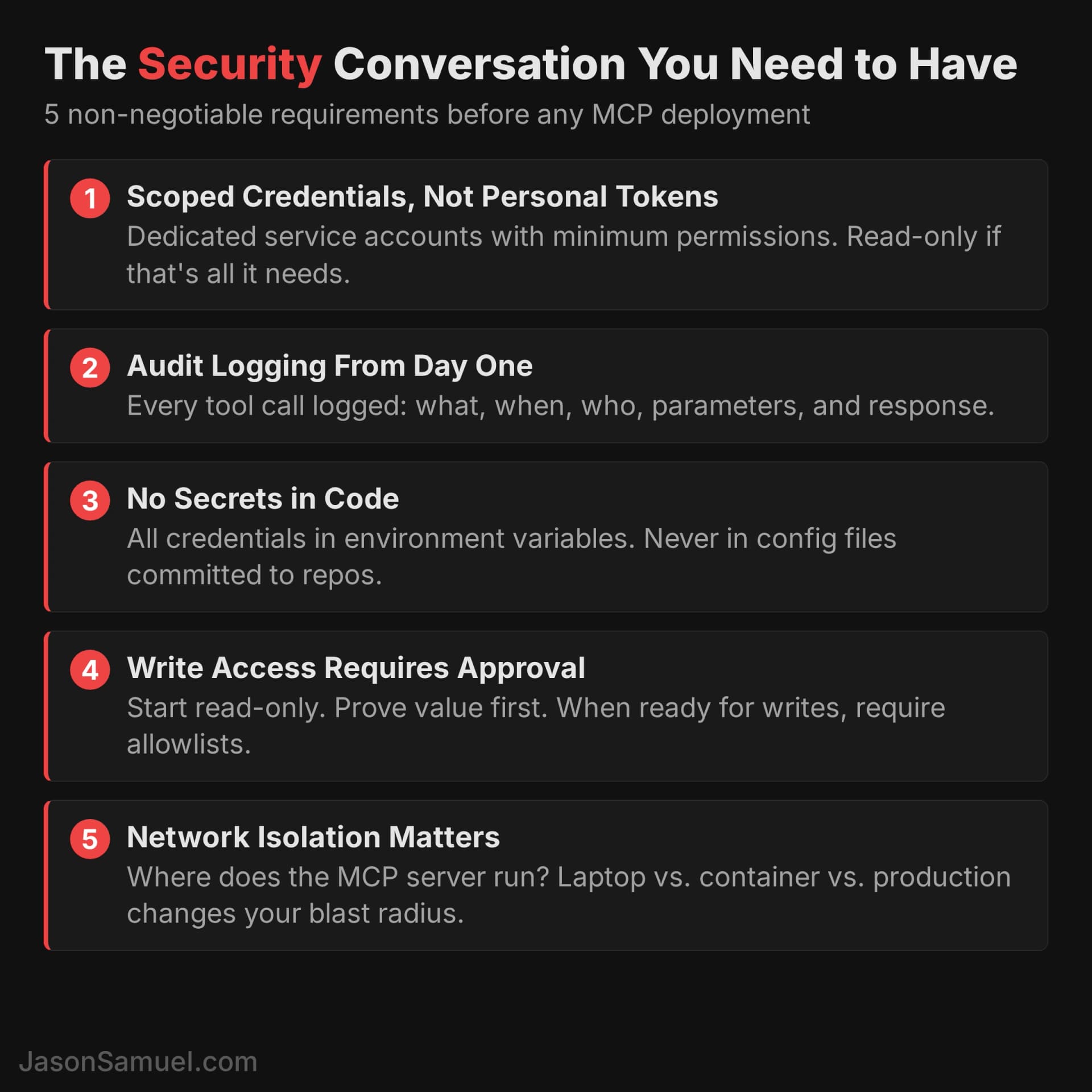
Here's what you need to require:
Scoped credentials, not personal tokens. Every MCP server should use a dedicated service account with the minimum permissions needed. If the agent only needs to read from your database, it gets a read-only connection. If it only needs to access certain tables, scope it to those tables. Never let an MCP server inherit someone's personal access token. If you've been in enterprise IT long enough, you know exactly how this goes wrong. It's the same conversation you had about shared admin accounts ten years ago.
Audit logging from day one. Every tool call the AI makes through MCP should be logged. What was called, when, by whom, with what parameters, and what was returned. This isn't optional. When your CISO asks what the AI agent accessed last Tuesday, you need an answer. If you've set up audit trails for privileged access before (and you have), this is the same discipline applied to a new type of actor.
No secrets in code. All credentials must be in environment variables, not in configuration files that get committed to repositories. This sounds basic but I've seen MCP tutorials that hardcode database connection strings right in the server code. Your teams need to treat MCP credentials with the same rigor as any other service account credential in your environment.
Write access requires explicit approval. Start with read-only MCP servers. Let the team prove the value with data retrieval before you open the door to modifications. When they're ready for write access, require table-level or endpoint-level allowlists. No blanket write permissions. An AI agent that can run UPDATE users SET role = 'admin' without guardrails is a risk you don't need to take.
Network isolation matters. Where does the MCP server run? On someone's laptop? On a server in your environment? In a container? The answer changes your risk profile significantly. A locally-running MCP server on a team member's machine has a very different blast radius than one running as a microservice inside your production network.
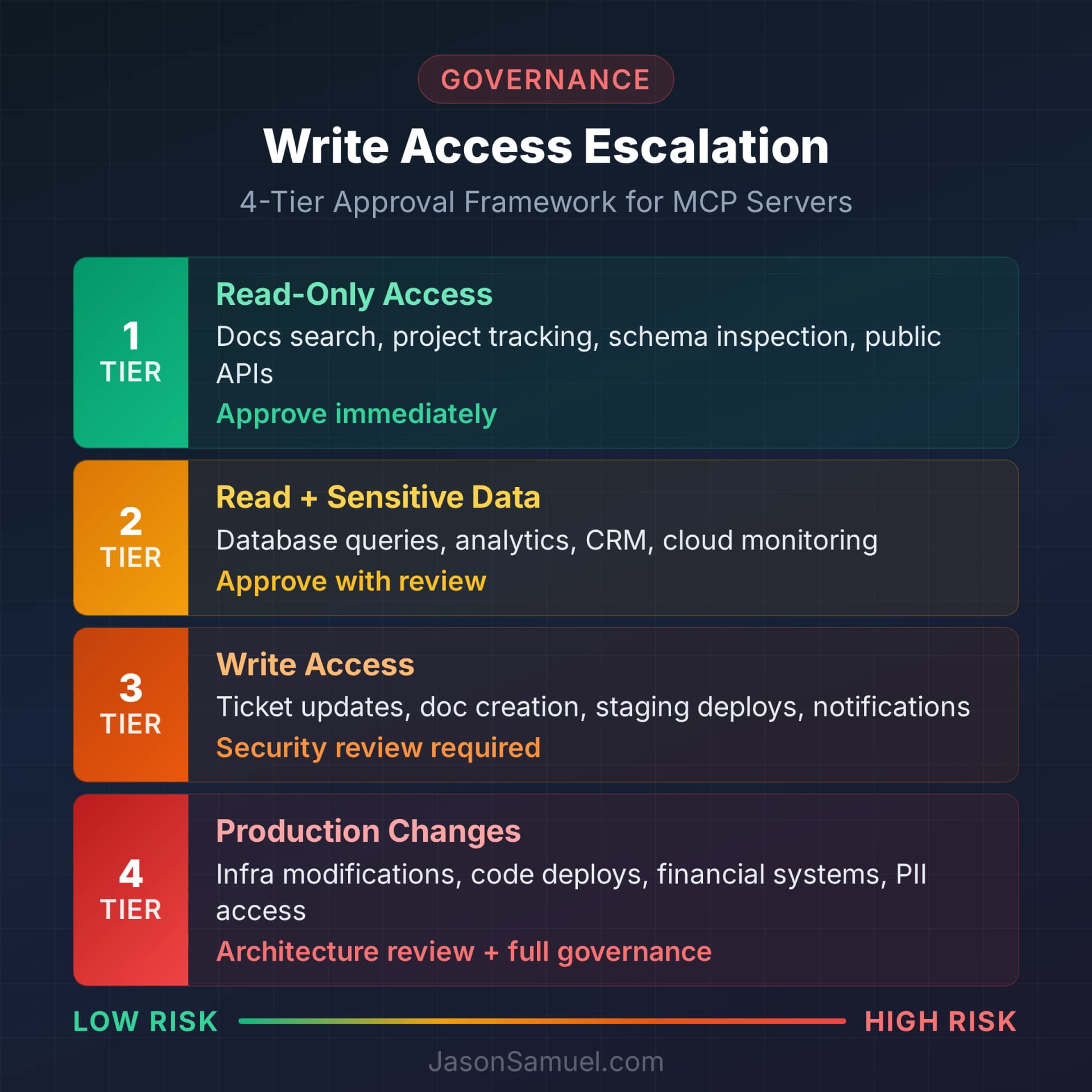
A governance framework that actually works
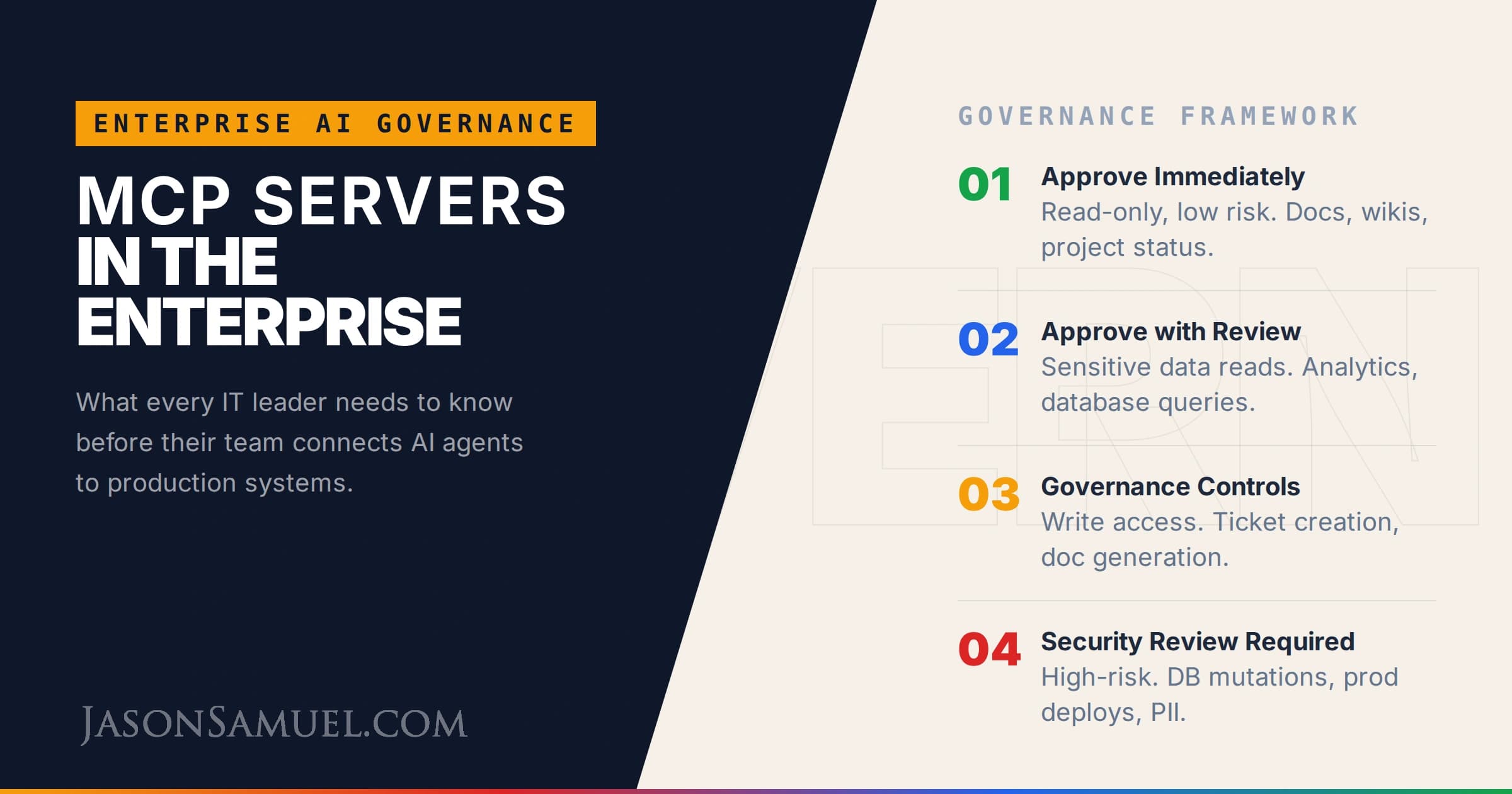
Governance is where most organizations either go too far (block everything, kill the productivity gain) or not far enough (approve everything, pray nothing breaks). Here's what I'd recommend:
Tier 1 — Approve immediately (read-only, low risk):
- Documentation search (wiki, knowledge base, shared drives)
- Project tracking read access (task status, sprint metrics, roadmap data)
- Database schema inspection (see table structures, no data access)
- Public API integrations (weather, stock prices, reference data)
Tier 2 — Approve with review (read access to sensitive data):
- Database query access (read-only, with table-level scoping and row limits)
- Analytics and reporting data
- Cloud infrastructure status and monitoring
- Communication platform search (message history, channel data)
- CRM read access (customer records, pipeline data)
Tier 3 — Approve with governance controls (write access):
- Ticket creation and updates in project tracking
- Document creation in shared drives
- Staging environment triggers (never production)
- Calendar event creation
- CRM updates (notes, status changes)
Tier 4 — Requires security review (high-risk writes):
- Database modifications (insert, update, delete)
- Production system changes
- Identity and access modifications
- Financial system transactions
- Any system containing PII, PHI, or regulated data
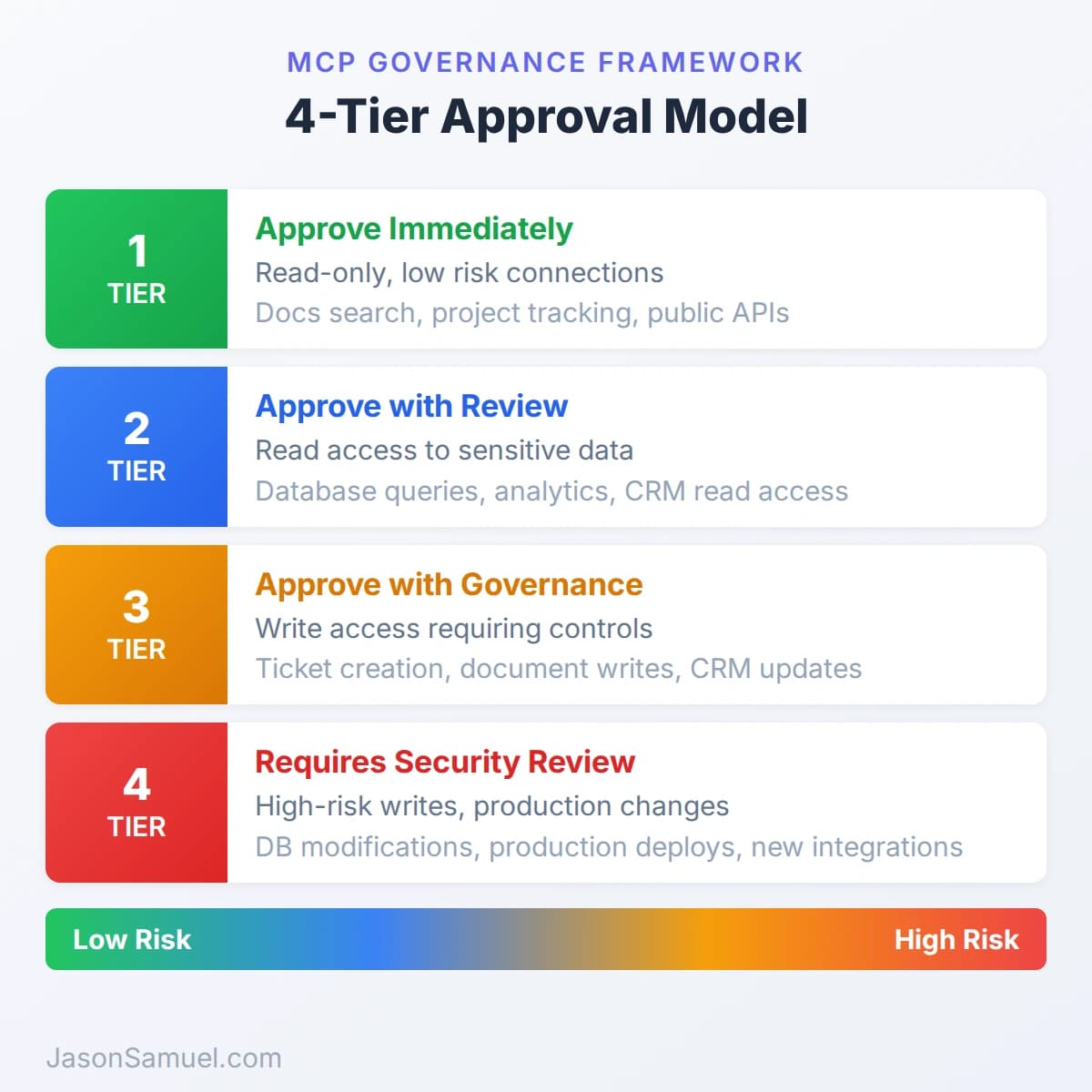
The key is to start at Tier 1, let your teams prove the value, then open Tier 2 with proper logging. Don't jump to Tier 4 because someone says they need it. Make them earn the trust incrementally, the same way you would with any new integration touching your environment.
The questions to ask before approving
When anyone comes to you with an MCP proposal, here's your checklist. Print this out if you need to.
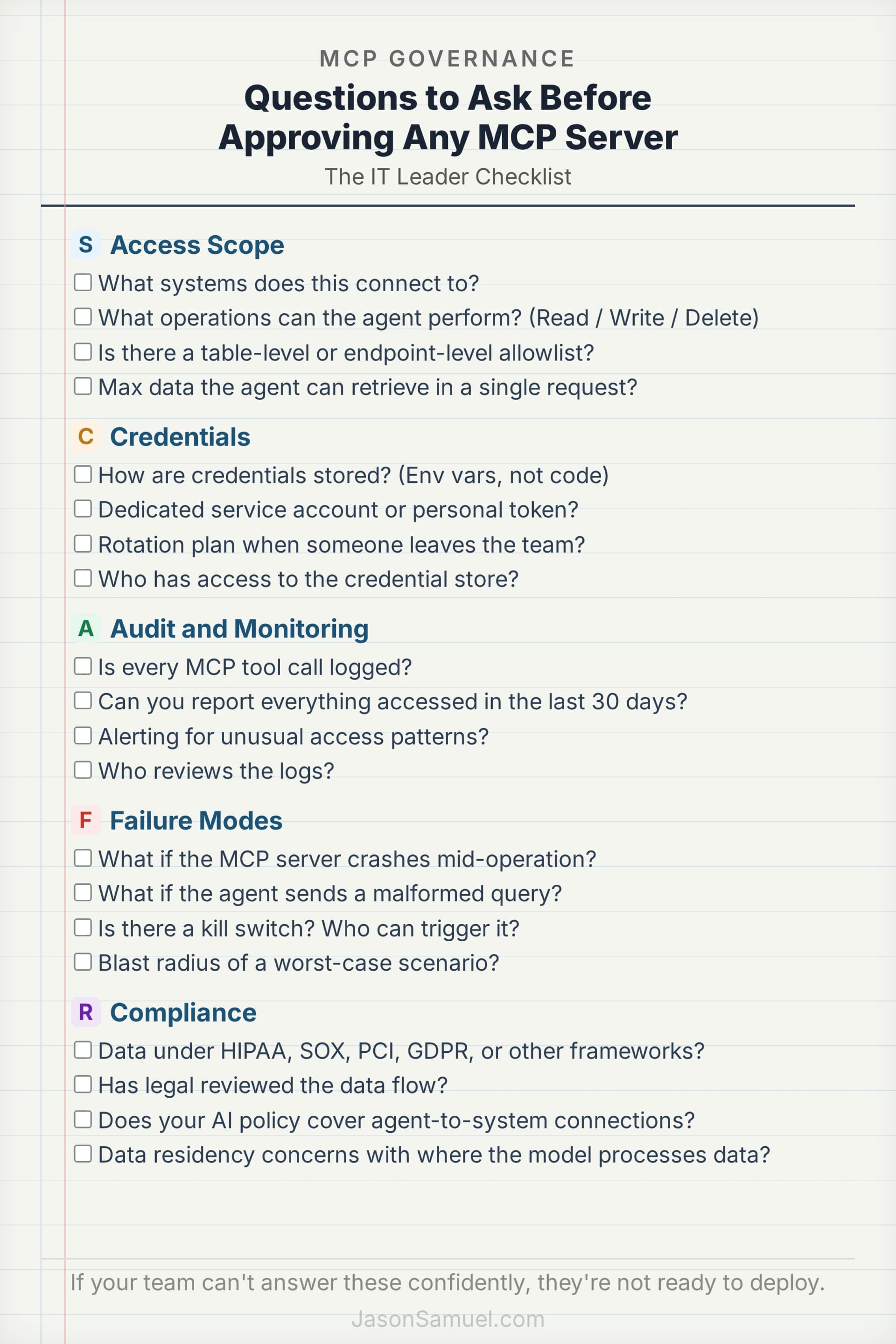
Access scope:
- What systems does this connect to?
- What specific operations can the agent perform? (Read? Write? Delete?)
- Is there a table-level or endpoint-level allowlist?
- What's the maximum data the agent can retrieve in a single request?
Credentials:
- How are credentials stored? (Environment variables, not code)
- Is it using a dedicated service account or someone's personal token?
- What happens when someone leaves the team? How are credentials rotated?
- Who has access to the credential store?
Audit and monitoring:
- Is every MCP tool call logged?
- Can you produce a report of everything the agent accessed in the last 30 days?
- Is there alerting for unusual access patterns?
- Who reviews the logs?
Failure modes:
- What happens if the MCP server crashes mid-operation?
- What happens if the agent sends a malformed query?
- Is there a kill switch? Who can trigger it?
- What's the blast radius of a worst-case scenario?
Compliance:
- Does any of this data fall under HIPAA, SOX, PCI, GDPR, or any other regulatory framework?
- Has legal reviewed the data flow?
- Does your AI policy cover agent-to-system connections, or just chatbot usage?
- Is there a data residency concern with where the AI model processes the data?
If your team can't answer these questions confidently, they're not ready to deploy. Send them back to do the homework. This isn't bureaucracy. It's the same due diligence you'd apply to any new integration that touches production data.
What to deploy first
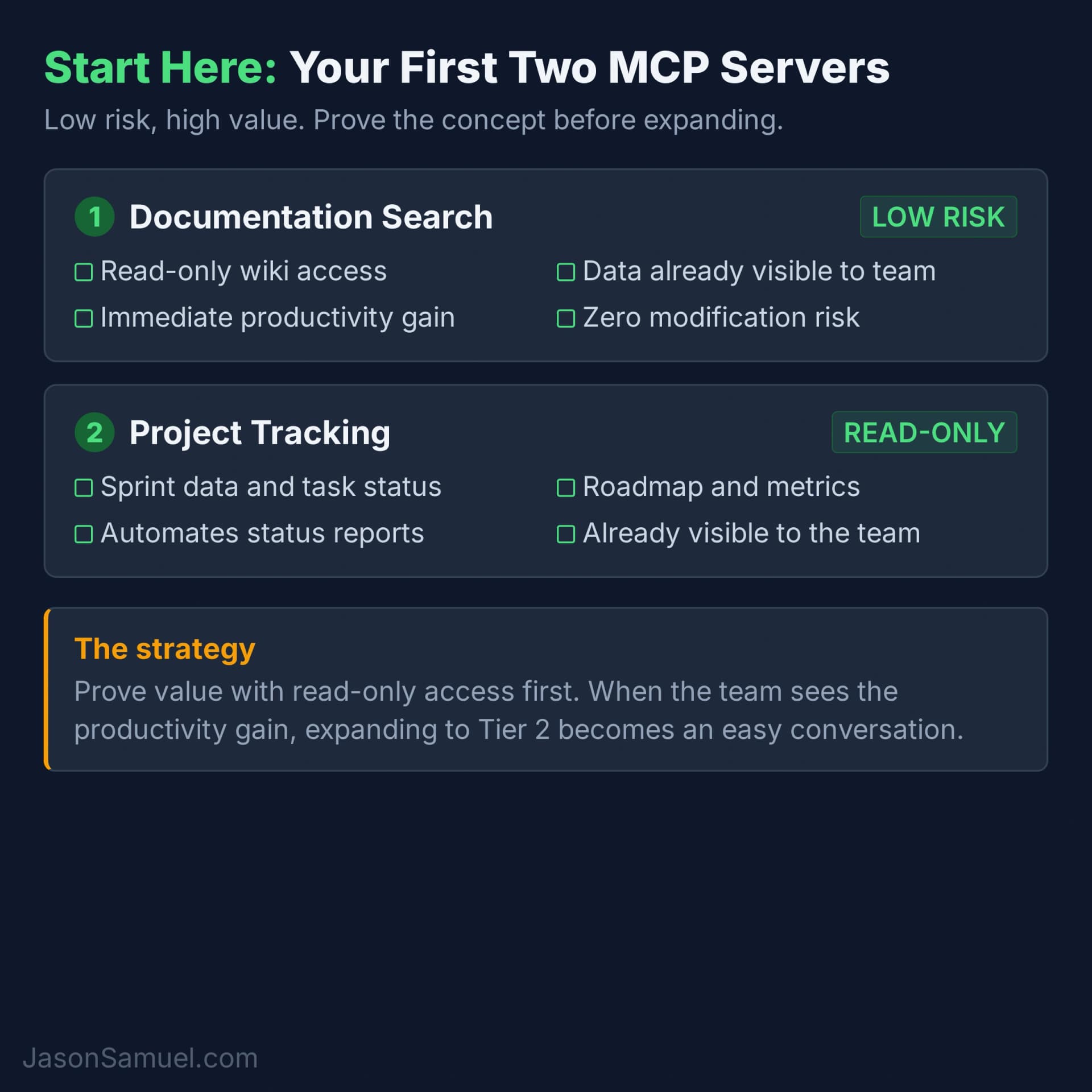
Start here. The highest value MCP connection with the lowest risk is documentation search. Give the AI agent read-only access to your internal wiki or knowledge base.
Why this one first? It's read-only (no risk of data modification). The data is already broadly accessible to your team. And the productivity gain is immediate because your people spend an absurd amount of time searching for internal docs that already exist.
After documentation, the next logical step is project tracking read access. Let the agent pull sprint data, task status, and roadmap information. Again, read-only. Again, the data is already visible to the team. And the time savings on status reports and stakeholder updates alone will justify the investment.
Hold off on database access and write operations until your teams have demonstrated they can handle the credential management, audit logging, and permission scoping at the first two tiers.
What to watch for
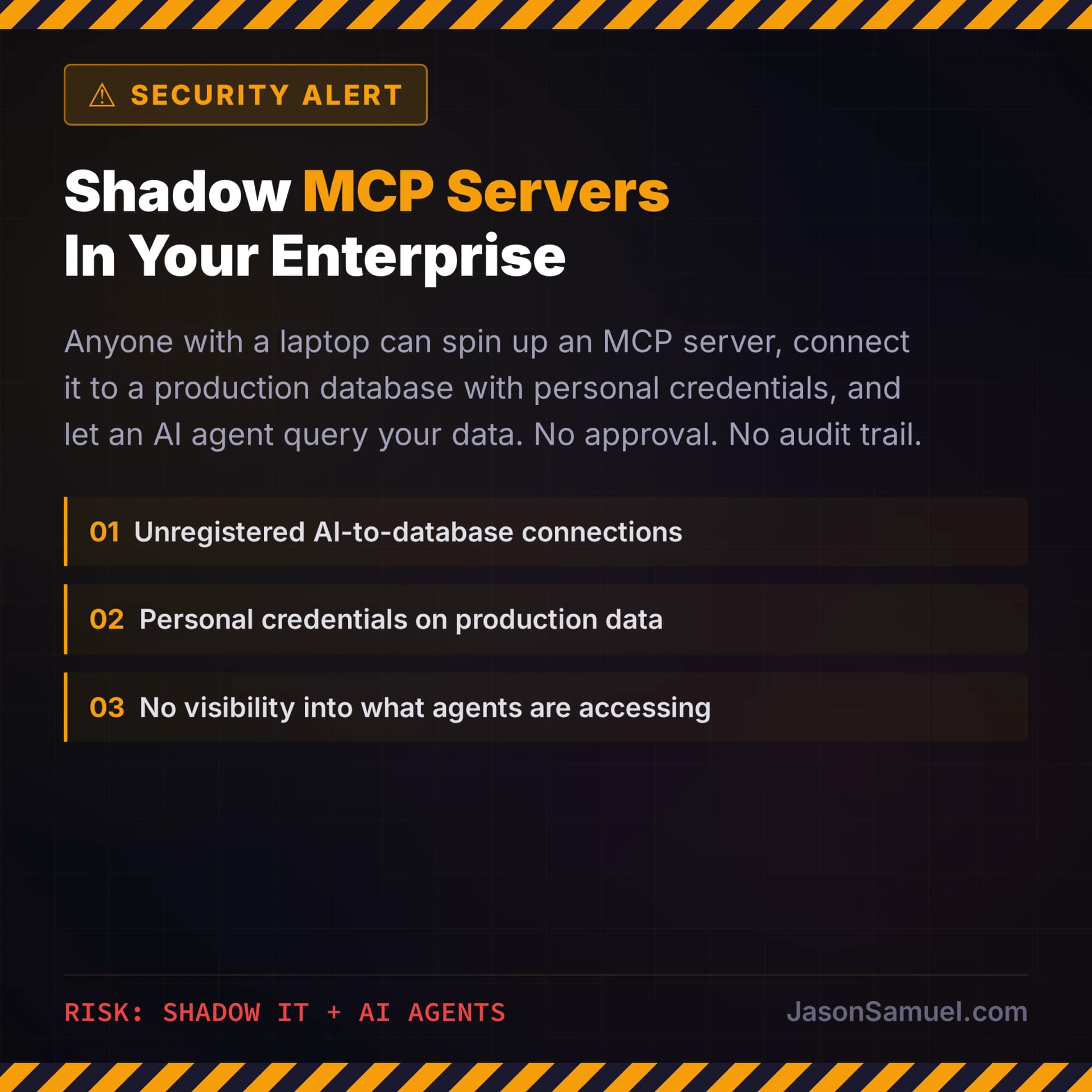
Shadow MCP servers. This is the one that should concern you the most. Anyone with a laptop can set up an MCP server, connect it to a production database using their personal credentials, and start using it without anyone knowing. Sound familiar? It's shadow IT all over again, except now the shadow service has an AI agent making automated requests against your production data. You need a policy, and your people need to know about it before you find out the hard way.
Credential sprawl. Every MCP server needs credentials. If your teams are spinning up MCP servers for every new use case without centralizing credential management, you'll end up with API keys scattered across laptops, config files, and environment variables with no rotation policy and no visibility into who has access to what.
Unbounded data retrieval. An AI agent that queries a database table with 500,000 rows and dumps all of it into a chat context is not just a performance problem. It's a data exfiltration risk. Every MCP server that touches data stores needs output limits. 100 rows per query is a reasonable default.
The "it works on my machine" problem. MCP servers that only run locally are fine for individual productivity. But when someone says "let's share this MCP server with the whole team," the risk profile changes dramatically. Now you're talking about a shared service with production credentials, accessible to multiple users, potentially running in your network. That conversation needs your security team involved.
Compliance blind spots. Your existing AI usage policy probably covers chatbot interactions. Does it cover an AI agent that has direct SQL access to your customer database? Does it cover an agent that can create tickets, modify project data, or trigger system changes? If your policy was written before MCP, it almost certainly has gaps. Update it.
This is happening whether you're ready or not
Here's the reality. MCP is an open standard. There are already hundreds of pre-built MCP servers on GitHub and npm for every major enterprise system. Anyone on your team can set this up in an afternoon. The question isn't whether AI agents will connect to your enterprise systems. It's whether you'll have governance in place when they do.
The right move is to get ahead of it. Approve Tier 1 and Tier 2 connections with proper logging. Write the policy. Set up the credential management. Let your teams prove the value in a controlled way. Because the alternative (blocking it entirely) just guarantees it happens without your knowledge.
If you've been through the cloud migration conversation, the BYOD conversation, or the SaaS sprawl conversation, you already know how this plays out. The organizations that built governance frameworks early came out ahead. The ones that tried to block it entirely just delayed the inevitable and lost visibility in the process.
MCP is the next version of that conversation. Start it now.

Jason Samuel
Product leader, advisor, and international speaker with 27 years in enterprise end-user computing, security, and cloud. Has deployed infrastructure at Fortune 500 scale across 44 countries. 1 of 3 people globally to hold Citrix CTP + VMware vExpert + VMware EUC Champion concurrently. 220 articles, 1,000+ reader discussions.
AI agents meet HIPAA, SOX, and FedRAMP: a practitioner's guide to shipping without getting blocked
Financial services, healthcare, and government agencies want AI agents too. Here is how to think about deploying them without your compliance team shutting everything down.
enterpriseHow to evaluate AI coding assistants for a 50-developer team without wasting six months
Claude Code, GitHub Copilot, Cursor, Windsurf, and more. A practical evaluation framework from someone who actually builds with these tools every day.