
AI agents in enterprise production: the 80% nobody talks about
Every vendor has an AI agent story. Here is what actually works when you deploy these things in a real enterprise environment with real users and real compliance requirements.
Every vendor website you visit right now has the word "agent" somewhere on the homepage. Every product pitch includes a slide where an AI handles a complex business process end-to-end, with clean data, no edge cases, and no compliance requirements. It looks great.
I have been evaluating AI tools and following enterprise AI deployments closely for the past two years, and learning about all of this with my own personal lens on as well. Every week brings changes at a pace that I personally think will be as transformative as the industrial revolution and the invention of the Internet and the World Wide Web. But in real enterprise environments, the reality on the ground is still messy. You have 47 different data formats, legacy systems that were last updated in 2019, compliance teams that need a 90-day review for any new data processor, and users who have been burned by every "this will change everything" technology since someone told them SharePoint would solve knowledge management. As a former SharePoint admin from many years ago, I can tell you that feeling never really goes away.
Here is what actually works. And more importantly, here is what does not.
The Gap Between the Pitch and Your Environment
The typical AI agent pitch looks something like this. Someone types a natural language request: "Find all invoices from Q3 that are over $50,000 and flag any that are missing PO numbers." The agent accesses the ERP system, runs the query, generates a summary, and presents it with a confidence score. It is impressive.
Now here is what your actual environment looks like.
Your ERP system has invoices stored across three different tables because of a migration in 2021 that was never fully completed. The "PO number" field is called po_num in one table, purchase_order_id in another, and is embedded in a free-text notes field in the third. Some invoices from Q3 were entered in Q4 because of a processing backlog. The date field uses a mix of MM/DD/YYYY and YYYY-MM-DD formats because two different teams do data entry. And the agent needs read access to the ERP database, which means going through your DBA team, your security team, and your change advisory board. That process alone takes six weeks.
This is not a hypothetical. A colleague reached out to me about exactly this situation in late 2025. They wanted to know how an AI agent would work from an EUC (End User Computing) perspective, whether it could even function at that layer. Before we could even begin to think about the end user experience, we had to talk through the data normalization layer. That was a huge part of the conversation and what I had to explain to the people asking me these questions. The pitch took 30 seconds. The actual project took four months, and the team had to build a data normalization layer before the agent could reliably query anything.
What Is Actually Working in Production
I want to be specific here about the categories of AI agent deployments that are succeeding in real enterprise environments. Not POCs that impressed the steering committee and then quietly died. Actual production deployments that are running today and delivering value.
Tier 1: Document Processing and Summarization
Before I get into the specifics, I want to say that I believe AI is genuinely amazing at correlating large amounts of data. Structured data is one thing, but unstructured data (complex documents, contracts, medical records) is a whole other ball of wax. And that is exactly where AI agents are proving their value.
In my opinion, this is where AI agents are delivering the most value today. AI agents that process, classify, summarize, and extract data from documents are working well in production. Insurance claims processing, legal contract review, medical record summarization, and invoice data extraction.
The reason this works is that the input is bounded. A document is a document. It has a beginning and an end. The agent's job is to extract specific information from a specific artifact. When it gets something wrong, it is relatively easy to detect and correct.
The tools that are working here, based on what I am seeing in the industry:
- Anthropic Claude 3.5 Sonnet and Claude 4 Opus are excellent for complex document understanding.
- OpenAI GPT-4o is solid for structured extraction. For production pipelines, AWS Textract feeding into Claude for the reasoning layer is a solid architecture.
- Google Document AI is decent for high-volume, lower-complexity extraction, but in my experience the current iteration still has some room to mature, which I am sure will get better over time.
Keep in mind that "working" does not mean "perfect." A friend in insurance reached out to me about a claims deployment they were rolling out. The agent correctly processes about 92% of claims with no human intervention. The other 8% get routed to a human reviewer. That 92% is enormously valuable. It used to require full human review on every single claim. But if someone tells you their agent handles 99%+ with no human in the loop, that has not been my experience with what people are seeing on real-world data.
Large volumes of document processing is honestly a wonderful way to learn how different models parse through data. How many times do you have to iterate on it? How many times do you have to say "audit this" or "catch this" and then apply a filter or a regex? It is all about learning how your documents are structured, and if they are unstructured documents, it takes a little bit longer obviously.
Tier 2: Internal Knowledge Q&A (RAG Systems)
RAG (Retrieval-Augmented Generation) systems that let employees ask questions about internal documentation, policies, and procedures are the second most successful category. The classic "ask the company knowledge base" use case.
This works when you do it right, and "right" has some very specific requirements:
-
Your source documents need to be reasonably up-to-date and not contradictory. If you have three different versions of the same policy in SharePoint, the RAG system will cite whichever version it retrieves first. The reason for this is that RAG systems are designed for retrieval, not for deep reasoning about which version of a document is the most current or authoritative. They grab what matches the query and present it with confidence, regardless of whether it is the latest version or a draft from 2019 that was never deleted.
-
You need chunking and embedding that understands your content structure. For example, if your company's expense policy is a 20-page document, bad chunking might split the reimbursement limits section right in the middle. The agent retrieves the first half, sees "pre-approval required for expenses over" but never gets the dollar amount because that was in the next chunk. It gives you an incomplete answer with full confidence, and now someone is submitting expenses without knowing the actual threshold. I have heard from people who had deployments fail because someone just pointed the system at a SharePoint site and said "index everything."
-
You MUST have citation and source attribution. If the agent says "according to company policy, you can expense up to $500 without pre-approval," the user needs to see exactly which document that came from so they can verify it. Any RAG deployment without source citations is a liability.
The tools that work here: Microsoft's Copilot (when properly configured with the right data sources and guardrails) is the easiest path for M365-heavy enterprises. Azure AI Search with a GPT-4o or Claude front-end gives you more control. For non-Microsoft shops, based on what I am seeing in the industry, LlamaIndex feeding into Claude with Pinecone or Weaviate for the vector store is a solid architecture.
What does NOT work: pointing a chatbot at your entire unstructured data lake and hoping for the best. The system will confidently mix up information from different departments, different years, and different contexts.
Your RAG system is only going to do as well as your data source. If your data source is garbage, you are going to have a lot of problems. You can use an LLM to help you with cleanup, but RAG by its design is not going to help you with the process of cleaning up your data. It is on you to get the cleanup going and then feed the RAG system, and you are good to go.
Tier 3: Code Assistance and Development Workflows
GitHub Copilot, Claude in the IDE (via Cursor, or Claude Code), and Amazon CodeWhisperer are genuinely productive tools for development teams. I use Claude Code daily and it has materially changed how I approach building anything. Not just software. Presentations, documents, automation, research, personal projects. It does so much, it is honestly a little crazy. I use it in and out all day long for both personal and enterprise use cases.
But here is the honest assessment. These tools are code ASSISTANTS, not code AGENTS. The distinction matters. An assistant helps a developer write code faster. An agent would independently take a ticket from Jira, write the code, test it, and submit a PR. We are getting closer to the agent model (Claude Code with its agentic capabilities is genuinely impressive), but in most enterprise environments, autonomous code generation is still gated by human review.
And it should be. I have personally caught so many issues across iterations, especially when it is API-driven integrations with other systems. MCP (Model Context Protocol) has some guardrails built in when interacting with other systems, but even then there are so many issues and so many iterations that you have to go through. You really have to have a developer brain or a product management type of brain to direct the assistant to the right result. It does take multiple iterations. There is no magic bullet, there is no single prompt. It just takes a lot of work.
This is why humans still have a massive role to play in the AI space. You cannot just replace humans and stick agents in there, as much as people advertise that to you right now and to the decision makers. In my opinion, it is not going to happen yet. Some iteration of that will happen down the road, but immediately getting to that level is a pipe dream for anybody that actually touches this stuff day in and day out. You will burn down your organization very quickly, and we have already seen aspects of that happening when the human check is not there.
We have seen multiple Fortune 500 companies deal with accidental data exposure through AI tools, from source code leaks to internal documentation surfacing in places it should not have been. API keys, environment files, and proprietary information have been exposed through AI code assistants when the proper human review was not in place. That is the emphasis here.
In my opinion, the right model for code AI in the enterprise right now is: AI generates, human reviews. Not AI generates, AI reviews, human rubber-stamps. The review has to be real.
What Is NOT Working Yet
Fully Autonomous Multi-Step Business Process Agents
This is the big one. The vision of an agent that can handle an end-to-end business process (receive a customer request, look up their account, check inventory, place an order, arrange shipping, send a confirmation, and handle any exceptions along the way) is compelling.
From everything I have seen and heard from people actually attempting this, it is not working reliably in production yet.
Here is the reality. What I am seeing is that the vision is ahead of the current production-ready capability. That gap is closing, but it is not closed yet.
The problem is compounding error rates. If each individual step has a 95% success rate (which is actually pretty good for an AI agent interacting with real systems), a 7-step process has a combined success rate of about 70%. This compounding failure dynamic is consistent with findings in McKinsey's 2025 State of AI report, which found that only 6% of organizations qualify as AI high performers with measurable enterprise-level impact — a gap driven partly by reliability challenges in multi-step agentic workflows. That means 3 out of 10 interactions will hit a failure somewhere in the chain. In a customer-facing process, that is not acceptable.
The other problem is exception handling. Business processes are full of edge cases that were never documented because the humans who handle them just "know" what to do. The customer who has a special pricing agreement. The order that needs to be split across two warehouses. The shipping address that the validation system flags as invalid but is actually correct (military APO boxes, for example). Human workers handle these exceptions instinctively. AI agents fail on them consistently.
Maybe for a small business you can do some fully autonomous agents for particular workflows. But doing it in a Fortune 500 is a completely different conversation. You have compliance teams that need to sign off on every autonomous action that touches customer data or financial systems, and that process alone takes months. You need service accounts across dozens of systems (ERP, CRM, HRIS, identity providers), each with its own security team and its own approval process. Your auditors need to understand WHY a decision was made, and "the AI decided" is not an acceptable answer in a regulated environment. And then you have 50,000 employees who need to actually trust the system before they stop doing the manual workaround, and building that trust takes time. Unless you are working with a fully on-prem model in a very limited scope, you are going to have a hard time getting autonomous agents into production at Fortune 500 scale right now.
And then there is the cost reality. Right now enterprises are blowing through their AI budgets in months when they forecasted it for years out. We saw the same thing happen with VDI, where VDI cloud projects would forecast that for 10,000 users it would cost X, but when they actually started approaching that number suddenly the numbers were wildly different. AI and EUC (End User Computing) have a lot of correlations here. The reason is that both are user-driven. AI is a user-driven product, VDI is a user-driven product, and users are unpredictable. Every single one of them has a different expectation. Compare that to a SQL server or web server, which has a known and relatively predictable cost when you are putting it in the cloud. Those systems are not user-driven in the same way. Performance matters, but it is not sitting directly in front of a user with individual expectations about how fast their specific request should complete, how their specific workflow should behave, and how their specific output should look. VDI and AI are both in the user's face, and every user has a different expectation.
This will get better. But right now, if you are evaluating a fully autonomous multi-step agent, ask for reference customers running in production (not POC, PRODUCTION) at your scale. Ask for their error rates. Ask what happens when the agent encounters an edge case it has never seen.
AI Agents Replacing Tier 1 Support
The idea that AI agents can handle Tier 1 support tickets autonomously is appealing. Reset passwords, unlock accounts, provision access, answer how-to questions.
The password reset and account unlock part actually works fairly well, because those are simple, well-defined, API-driven actions. But the moment you move beyond scripted responses into actual troubleshooting, the failure rate climbs fast.
A friend who runs a helpdesk with about 3,000 tickets per month asked me to look at an AI agent they were evaluating. On the types of tickets it was trained for (password resets, VPN connectivity with known solutions, application access requests), it handled about 40% of the total volume with acceptable quality. But it confidently gave wrong answers on about 12% of the tickets it attempted. That 12% is worse than not having the agent at all, because users followed the wrong instructions and made their problems worse. One user got told to clear their browser cache and reset their SSO cookies when the actual issue was an expired SAML certificate on the identity provider. The user cleared everything, lost all their saved sessions across every internal application, had to re-authenticate to 15 different systems, and reset two MFA enrollments that were tied to the browser profile. What should have been a five-minute certificate renewal on the IdP side turned into half a day of lost productivity for the user and three follow-up tickets.
The fix is having the agent recognize the boundary of its competence and escalate. But getting that boundary right is HARD. You either set it too tight (agent escalates everything and provides no value) or too loose (agent confidently mishandles things it should not be touching).
Copilot Across the Entire Suite
Microsoft is building Copilot into everything. Word, Excel, PowerPoint, Teams, Outlook, Power Platform, Dynamics, Security, and Windows itself. The idea is that one AI layer will make every application smarter.
Microsoft has made AI the primary entry point in office.com, which shows how much they are investing in the Copilot experience across the entire productivity suite. I have not seen any vendor commit to AI integration as deeply as Microsoft has done across their entire software stack.
From what I am hearing from people who have rolled this out: Copilot is very strong in some applications and still finding its footing in others.
Copilot in Teams (meeting summaries, action item extraction) is genuinely useful. I use it every day and I almost cannot imagine working without it at this point. The meeting recaps, the action item extraction, the ability to catch up on a meeting I missed by reading the summary instead of watching a recording. It gives me multiple ways to take in data from the same meeting, and that is extremely valuable when you are in back-to-back calls all day. In my opinion, Teams is where Copilot shines the brightest.
Copilot in Excel is impressive for formula generation and data analysis on well-structured data. It can struggle with messy real-world spreadsheets that have merged cells, hidden rows, and inconsistent formatting, but on clean data it is very capable.
Copilot in Word is useful for first drafts and summaries. It gets you to a starting point faster, though experienced writers will still want to refine the output to match their voice and intent.
Copilot in PowerPoint is the area with the most room to grow in my experience. I give a lot of presentations and have tried using it extensively for deck creation. It is decent for scaffolding the initial structure, but the output is still fairly templated. I actually prefer other models for presentation work because they give me more control over the visual narrative.
In my opinion, the reason Copilot struggles with PowerPoint specifically is that PowerPoint is a dynamic visual canvas. Word and Excel are fundamentally about data entry and structured content. There are only so many ways to enter and express that data, which makes it easier for AI to assist. PowerPoint requires a human eye for composition, flow, and visual storytelling, and AI is not there yet. That said, some of the models I am using outside of Copilot are leagues ahead of what I can do personally on certain tasks, so I do expect PowerPoint to get there. I expect the design and visual storytelling capabilities to improve as the technology matures.
The per-user pricing ($30/user/month for M365 Copilot) adds up fast. At a 5,000-user enterprise, that is $1.8 million per year. From what I am hearing, multiple organizations that rolled out Copilot broadly saw adoption plateau at 30-40% of licensed users and are now reconsidering whether they need it for everyone or just for specific roles.
We kind of saw this with VDI as well. Everybody starts off with a 4 vCPU, 16 GB image and then you start realizing that some people need an advanced GPU but other people are really just task workers doing data entry. You can actually do a 2 vCPU for a real kiosk-type purpose. Just like that, when you are rolling out AI, it is better to target rather than blanket deploy. As much as the industry is moving toward AI everywhere, not everything really needs AI right now. It is a trap you can get into if you say "for the sake of progress, I am just going to stick AI everywhere." That is how you bring down business process efficiency by holding things up and trying to force AI in where it does not have the maturity level to be yet.
The Hidden Costs
Data Quality
Every AI agent deployment I have heard about has required significant data cleanup before the agent could be effective. This is the cost that never shows up in the initial proposal. You want an agent to process your contracts? First you need to digitize the ones that are still scanned PDFs. Standardize the naming convention. Resolve the duplicates. Fix the metadata.
Budget 30-50% of your total AI agent project cost for data preparation. If someone tells you their agent "works with your data as-is," they have not seen your data.
Integration
Getting an AI agent connected to your actual systems is harder than it looks. Your CRM has a REST API but it is rate-limited to 100 calls per minute. Your ERP has an API but it requires a VPN connection and a service account that your security team takes three weeks to provision. Your document management system has an API that was last updated in 2020 and does not support the queries the agent needs.
What I am seeing that is really promising here is MCP (Model Context Protocol). MCP is being driven by cloud-first software companies that are building it directly into their products. What I really like about MCP is that it is a wonderful abstraction layer for APIs. It allows your models to not have to figure out how to work with your APIs and reverse-engineer everything. The MCP server is essentially telling the model: "Here is how I work, these are the guardrails. You do not need to think about it, just connect this way and let's go."
Obviously this is not going to happen with a lot of enterprise software, especially on-prem software that has been around for years and years in large Fortune 500 environments. It is just like authentication. You have WebAuthN, OAuth, and SAML on one end, and you still have Active Directory with Kerberos (which is not going anywhere) and RADIUS in heavy use. There is always going to be that period of time (which is usually a really long time in enterprise) where you have established protocols, newer standards, and a hybrid in between. You have to treat these integrations like hybrids.
If you have been in enterprise IT long enough, this is very similar to when we used to do application migrations with tools like AppDNA back in the day, modeling each application for compatibility and dependencies before moving anything. Today you would use something like Microsoft SCCM application compatibility reports or Lakeside SysTrack to understand your environment before making changes. AI integrations require that same level of due diligence.
For every successful AI agent deployment I have heard about, there was a non-trivial integration effort. Custom API connectors, data transformation layers, authentication middleware, error handling logic. This is software engineering work. It requires developers. It takes time.
Compliance
If you are in financial services, healthcare, government, or any regulated industry, your compliance team is going to have questions.
Where is the data being sent? If you are using a cloud LLM (and you probably are), your data is leaving your network. Is that allowed under your data classification policy? Does your BAA (Business Associate Agreement) with Anthropic or OpenAI cover all the data types the agent will process?
Who reviews the agent's decisions? If the agent approves a loan application or flags a transaction as fraudulent, there needs to be a human accountability chain. Most regulatory frameworks require "meaningful human oversight" for consequential decisions — a principle formalized in guidance such as the EU AI Act and reflected in NIST's AI Risk Management Framework (AI RMF 1.0).
I have seen situations where AI was implemented and it started taking the wrong actions automatically, aggressively flagging things that should not have been flagged. We have had a history of this with security tooling, but now it is becoming commonplace in regular business flows that have nothing to do with security. Things are getting flagged simply because the AI decided to flag them and a human would not have. The meaningful oversight is only happening hours, days, or even weeks later. That gap between the AI acting and the human reviewing is creating real customer friction and real business process friction. In my experience, the organizations that are struggling here are the ones that pushed AI into production without building the rapid iteration loop to catch and correct these issues quickly.
How do you audit what the agent did? You need detailed logs of every action the agent took, every piece of data it accessed, and every decision it made. And those logs need to be retained for your regulatory retention period, which might be 7 years or more.
The compliance workstream alone can add 2-3 months to a deployment timeline.
Hallucination Management
AI agents hallucinate. They make things up with confidence. This is a fundamental characteristic of current LLM technology, this is a known characteristic of current LLM technology that the industry is actively working to address.
I have spent a lot of time trying to understand how these models can hallucinate so confidently and what guardrails actually work. The core problem is that when an LLM is confident, it will blow right through whatever validation gates you put in front of it. You need checks that force the model to stop and verify against real data rather than trusting its own confidence score.
Think about it like tunnel vision. When a person is locked into a confident but wrong conclusion, it takes real effort to get them to step back and reconsider. AI is the same way, except worse. In my experience, I have seen models dig in harder than any human would and then, when you finally call it out, the response is essentially "oh, my bad." That is not an acceptable answer in enterprise AI. A confident hallucination in the wrong context could cost millions of dollars and put your organization in front of the news for the wrong reasons.
In a production environment, you need systems to detect and handle hallucinations:
- Output validation rules that check agent responses against known constraints
- Confidence scoring that flags low-confidence outputs for human review
- Automated testing suites that regularly probe the agent with known questions to detect drift
- User feedback mechanisms that let humans flag incorrect responses
Building and maintaining these guardrails is an ongoing cost. The agent's behavior can change when the underlying model is updated (which happens without your control if you are using a cloud API), so your validation needs to be continuous.
Where the Major Platforms Stand Today
Here is my honest assessment of the major players as of early 2026, based on my experience and what I am seeing in the industry.

Anthropic (Claude): In my opinion, best-in-class for complex reasoning, document understanding, and code generation. Claude 4 Opus is the strongest model I have used for tasks that require nuanced understanding of context.
The browser control capability is worth calling out specifically. It is still early and requires some coaching to get it working reliably, but the potential is real. I have tested both headless and headed browsing, and I was able to automate 300 lines of spreadsheet work on a Mac Mini that would have taken me a week manually. It ran overnight. Getting it there took iteration, especially around multi-select elements and client-side JavaScript loading, but once it was dialed in, it executed very efficiently. I expect this to improve significantly over the coming months.
The tradeoff with Anthropic is ecosystem. It is smaller than Microsoft's or Google's, which means you are doing more custom integration work.

OpenAI (GPT-4o, o1, o3): Strong general-purpose models with the broadest ecosystem of integrations and tools. The function calling and tool use in GPT-4o is very reliable for structured agent workflows. The o-series reasoning models (o1, o3) are impressive for complex analytical tasks but are slower and more expensive. The pace of innovation is fast, which is exciting but can make it challenging to build stable production systems. APIs and pricing evolve frequently, so you need to plan for that.
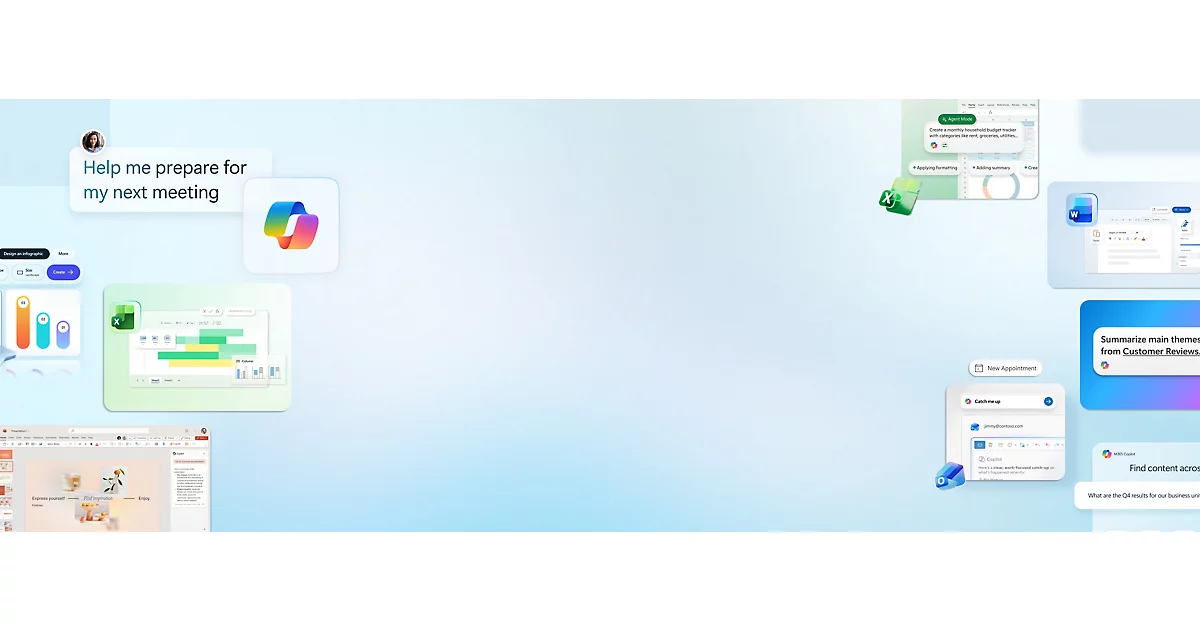
Microsoft (Copilot, Azure OpenAI): The strongest enterprise integration story by far. If you are an M365 and Azure shop, the path of least resistance is Microsoft. Azure OpenAI Service gives you the OpenAI models with enterprise security controls, private networking, and data residency guarantees. You are investing deeper into the Microsoft ecosystem, and the Copilot products are solid across the board with room to grow in specific areas. That said, for enterprises already deep in M365 and Azure, the integration advantage is real and the pace of improvement has been impressive. Microsoft is investing heavily here and I expect Copilot to get significantly better in the areas where it is currently mediocre.

Google (Gemini, Vertex AI): I like Gemini quite a bit. The consistency is not always there yet. Some days I will ask it something and the output is mediocre, then come back with the same prompt and get a phenomenal result. It has its quirks, but the underlying model is strong, especially for long context work (up to 1M tokens). Vertex AI is a solid ML platform. Google's enterprise go-to-market is still maturing compared to Microsoft and AWS, though it has improved significantly over the past year. The tooling and documentation are catching up, and I expect this to continue closing the gap.
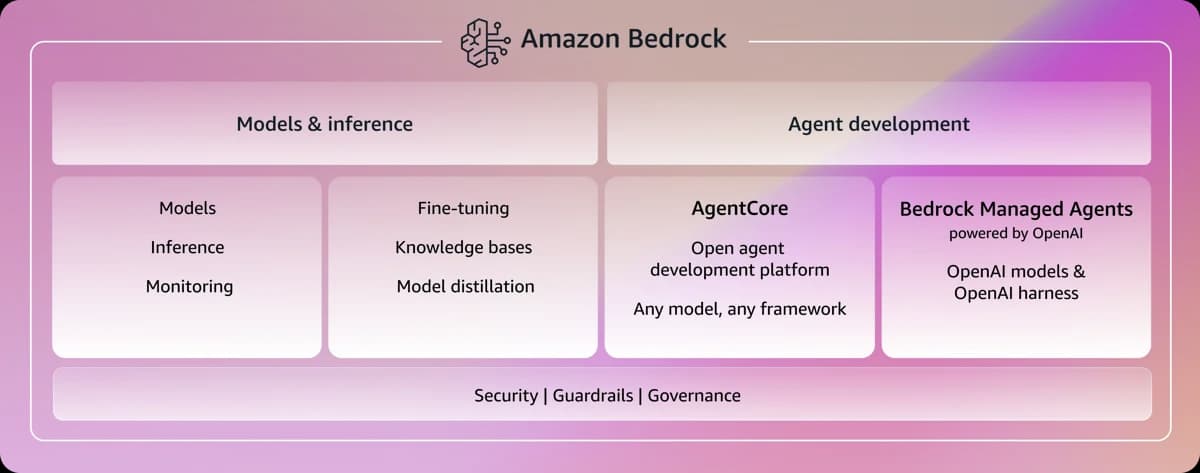
AWS (Bedrock, Q): Amazon Bedrock gives you access to multiple models (Claude, Llama, Mistral, plus Amazon's own Titan) through a unified API. This is appealing if you want to avoid lock-in to a single model provider. Amazon Q is their enterprise AI assistant, and while it is not as broadly capable as Copilot or Claude for general enterprise use today, there is a lot of promising work happening here. The Q Developer agent scored near the top of autonomous-coding leaderboards in early 2025, it can iterate on build failures unattended overnight using GitHub workflows, and Q Business now synthesizes information across 40+ enterprise systems. At $19/user/month for the Pro tier, it is also the most cost-effective option in this space. I expect AWS to close the gap significantly over the coming months.
What I Recommend
If you are trying to figure out where to invest in AI agents, here is my practical advice.
Start with document processing. Pick a high-volume, document-heavy process. Insurance claims, invoice processing, contract review, compliance document analysis. Large volumes of document processing is a wonderful way to learn how different models work with your data and how many iterations it takes to get the accuracy where you need it. Measure the results rigorously.
Use RAG for internal knowledge, but invest in your data first. Do not deploy a knowledge Q&A system until you have done a serious cleanup of your source documents. Deduplicate. Remove outdated versions. Standardize formats. The quality of your RAG system is directly proportional to the quality of your source data. You can use an LLM to help with the cleanup, but RAG by its design is not going to clean up your data for you. That is on you.
Deploy code AI tools to your teams immediately. GitHub Copilot or Claude Code. These deliver measurable productivity gains with relatively low risk. The ROI is almost always positive within the first month.
Be skeptical of fully autonomous agent claims. If someone tells you their agent can handle an end-to-end process with no human oversight, push back. Ask for reference customers running in production at your scale. Ask for their error rates. Ask what happens when the agent encounters an edge case.
Budget realistically. In an enterprise you are talking about API-level integrations that have a real cost associated with them. You cannot just hand out consumer AI plans and call it a day. When you are integrating products and software, you are talking about pure API-driven usage with tokens. Monitor it heavily because right now what I am seeing in the field is that people are blowing through their budgets and not even catching it in time. Literally within a few days, something that is supposed to last for a week is completely wiped out.
People use things differently. The applications are making API calls that you do not always get to control, and the model is churning through tokens in ways you do not see until the bill arrives. A lot of this is not real-time billing either. You need monitoring systems, hard limits on API usage, and proper key management. This is foundational infrastructure work that requires an enterprise operations mindset. You cannot approach it the way a consumer would.
Plan for model evolution. Any architecture you get into, build with standards and the ability to swap out providers. You do not want to be locked into something right now because it is not like legacy hardware back in the 90s and 2000s. You cannot approach it the way enterprises typically approach data center life cycles, where you plan for something to sit around for three to five years. The difference between having that flexibility and not having it could be the difference between being competitive and not.
If you go in with the mentality of flexibility, you will be successful with AI. If you go in with the typical enterprise approach of "let's keep this around for three to five years," you will fail hard. It is honestly better to do nothing than to force AI into a rigid architecture that calcifies before the technology matures. You need the mindset and the organizational ability to move fast. The traditional enterprise lifecycle approach does not work here.
Final Thoughts
AI agents in the enterprise are real. They deliver real value in specific use cases. But the gap between the pitch and your production deployment is significant, and it is mostly filled with data quality work, integration engineering, compliance reviews, and building user trust.
The organizations that are succeeding with enterprise AI agents are not the ones buying the flashiest platform. They are the ones doing the foundation work: cleaning their data, building proper integrations, establishing governance frameworks, and setting realistic expectations with their stakeholders.
This is why humans still have a huge role to play. You cannot just replace humans and stick agents in there. Some iteration of truly autonomous agents will happen down the road, but getting there immediately is a pipe dream for anyone who actually works with this stuff day in and day out. If the human guardrail is not there, you will burn down your organization very quickly.
If you take one thing away from this: the AI agent is maybe 20% of the work. The other 80% is everything around it.

Jason Samuel
Product leader, advisor, and international speaker with 27 years in enterprise end-user computing, security, and cloud. Has deployed infrastructure at Fortune 500 scale across 44 countries. 1 of 3 people globally to hold Citrix CTP + VMware vExpert + VMware EUC Champion concurrently. 220 articles, 1,000+ reader discussions.
Context rot is real. Your AI coding assistant gets dumber the longer you use it. Here is the structural fix.
AI coding assistants degrade mid-session and nobody warns you. The degradation is architectural, not motivational. Telling it to try harder does nothing. Here is the enforcement system that makes garbage structurally impossible.
ai-agentsYour AI agent is lying about being done. Here's the 4-part loop based proof system that makes faking impossible.
Hand an AI agent a codebase and tell it to fix things, and it'll happily report back that everything is done. The hard part isn't getting an agent to work autonomously. It's getting one that can't fool you into thinking it finished when it didn't.
ai-agentsHow Google's Open Knowledge Format validates the BuildOS knowledge layer I built by hand
I spent months hand-rolling a knowledge layer for my AI agent stack. Google just shipped a format that formalizes the exact same pattern. Markdown files, YAML frontmatter, cross-linked docs. Here is why that matters for anyone building with agents.