
Build at the speed of thought: the complete AI infrastructure guide for non-developers
I've been telling people for the last year that AI lets you build at the speed of thought. I mean that literally, not as a marketing line. Whatever idea pops into your head, you can have a working version of it in an evening. Not a prototype. A working version. The catch is that it doesn't matter how smart the AI gets if your setup is wrong.
I've been telling people for the last year that AI lets you build at the speed of thought. I mean that literally, not as a marketing line. Whatever idea pops into your head, an automation, a content site, a scraping pipeline, a tool to make a tedious process disappear, a piece of infrastructure that runs your business, an integration between two things that don't natively talk, you can have a working version of it in an evening. Not a prototype. A working version.
The catch, and this is the part most people miss, is that it doesn't matter how smart the AI gets if your setup is wrong. Most people right now are using AI like they used Google in 2005. They open a browser tab, they paste in a question, they copy the answer out, they paste it somewhere else, they run it manually, they hit a wall, they paste the error back in, they iterate. That works. It's better than nothing. But it's not building at the speed of thought. It's building at the speed of "copy, paste, alt-tab, copy, paste." Which is faster than the old way, but it's leaving 90% of the value on the table.
I want to lay out, in this article, what the right setup looks like in 2026. Not for developers, although developers will find it familiar. For everybody else. Product people, IT leaders, architects, operators, business owners, smart technical folks who can read a config file and reason about systems but who don't write production code for a living. People like me. I'm not a developer. I've never claimed to be one. What I love doing, and what I've built a career around, is product management, strategy, advising, educating, and shaping the industry. I'm a PM by day building product, and I've spent the better part of two decades as a trusted technology advisor for Fortune 500s across enterprise end-user computing, security, cloud, and virtualization. The thing I've always been good at is thinking about how systems should fit together. Asking the right questions of vendors. Pushing back when an architecture is going to bite somebody in two years. Connecting business outcomes to technology choices. Shaping the conversations the industry should be having before everyone else gets there. The actual code, when I needed it, was either someone else's job or a PowerShell script I'd cobble together to solve an immediate problem. I am not Linus Torvalds. I'm not pretending to be. What I am is someone who's spent a career figuring out how technology should work, and who writes about it because educating people and moving the industry forward is the part of this work I love.
And yet, in 2026, I'm shipping more functional software than I ever have in my career. Not because I learned to code in the traditional sense. Because the tools changed under me. AI agents now do the actual code production. My job, when I'm building something, is the part I was always good at, thinking about how it should work, and then describing that clearly enough that the agent can execute. The combination of clear thinking and a smart agent that can act on it is what lets a non-developer ship working software at speed. The setup that makes this work day to day, across multiple projects, across multiple devices, without falling over the moment something goes wrong, is what I'm calling the foundational stack. That's what this article is about.
A quick note on where you are, because I run two sites and people sometimes land on the wrong one. This site, jasonsamuel.com, is where I publish the long-form, deep-technical articles, the foundational stack pieces like this one, enterprise EUC and security writing, the kind of multi-thousand-word breakdowns that don't fit anywhere else. My other site, jasonsamuel.me, is where the mindset, health, and performance work lives, the stuff I do outside of building things, like the daily health protocols, the podcasts on performance, the personal-growth writing. If you're here for tech, you're in the right place. If you came looking for the supplement stack or the workout philosophy, swap the .com for .me and you'll find your way.
Before I dive in, two honest caveats up front.
First, AI is changing month to month. What I'm describing is the stack I run today, mid-2026. Six months from now some of these tools will have evolved or been replaced. My opinions will evolve too. Anyone who tells you they've found the permanent answer to anything in AI right now is selling you something. What I can confidently say is that this stack has been the most durable I've tried, because every piece of it plugs into pretty much anything coming down the road. It's built on a foundation of open standards (decades-durable ones like SSH and Git, plus newer but vendor-neutral ones like MCP and A2A that are now governed by the Linux Foundation via the Agentic AI Foundation), products that expose raw token-level capabilities, and APIs that aren't going anywhere. If a piece of it gets disrupted, you swap that piece without rebuilding the whole thing. The shape is more durable than any specific tool.
Second, this is opinionated. I've tried a lot of stuff. A lot of no-code tools. A lot of agent frameworks. A lot of all-in-one platforms. This setup is what's survived. Other people I trust run setups that look slightly different. The principles travel even when the specific tools don't, so read it for the principles first, the products second.
What "build at the speed of thought" means
The phrase sounds like a slogan, so let me make it concrete.
A few weeks ago I was watching a news story about a niche thing happening in a sector I follow, and I thought, "It would be useful if I had a daily summary of every public conversation happening about this topic across the internet, filtered to just the interesting stuff, delivered to me first thing in the morning." That's a real product. People sell things like that. If I'd had that idea in 2019, I would have either ignored it or hired a developer to spend two weeks building a janky version that broke every other week.
In 2026, I described the idea to my agent. I had the working version running on my always-on server in about two hours. I went to bed. The next morning the first summary was waiting in my inbox. I refined it over the next few days, told the agent to add a deduplication step, told it to use a better summarization prompt, told it to push the summaries into a Notion database so I could query them later, told it to add a weekly rollup. None of those iterations took longer than ten minutes of my time each. The thing that would have been a two-week dev project in 2019 was a one-evening side project in 2026, and it keeps running today, quietly, on the same always-on box that runs the rest of my stack.
If you want a visual for how fast this has moved, remember that the Will Smith eating spaghetti video, the AI-generated clip that went viral in early 2023 for being almost comically terrible (Will Smith's face melting into the noodles, the fork phasing through the plate, his teeth multiplying mid-bite), is what state-of-the-art generative AI looked like three years ago. We laughed at it. It was the canonical "look how bad AI still is" reference for the better part of a year. That was three years ago. Today, people are generating full video scenes of Will Smith eating spaghetti in movie-quality cinematography, indistinguishable from real film, and posting them as casual demos. The meme became the benchmark, and the benchmark got obliterated. The same trajectory of progress has happened across every part of the stack: code generation, agent reasoning, tool use, voice interfaces, the whole thing. We're past the initial calibration phase where the question was "can AI do this at all?" The question now is pure function: does it meet your specific requirements for this specific task? And increasingly, the answer is yes. If you're still calibrating your expectations of what AI can do based on what it could do when we were laughing at Will Smith trying to eat pasta, you're calibrating against a world that no longer exists. Recalibrate.
That's what "build at the speed of thought" means. The friction between having an idea and having a working thing that runs reliably has collapsed to almost nothing. The bottleneck used to be implementation. Now the bottleneck is knowing what to ask for, and having a place for it to run.
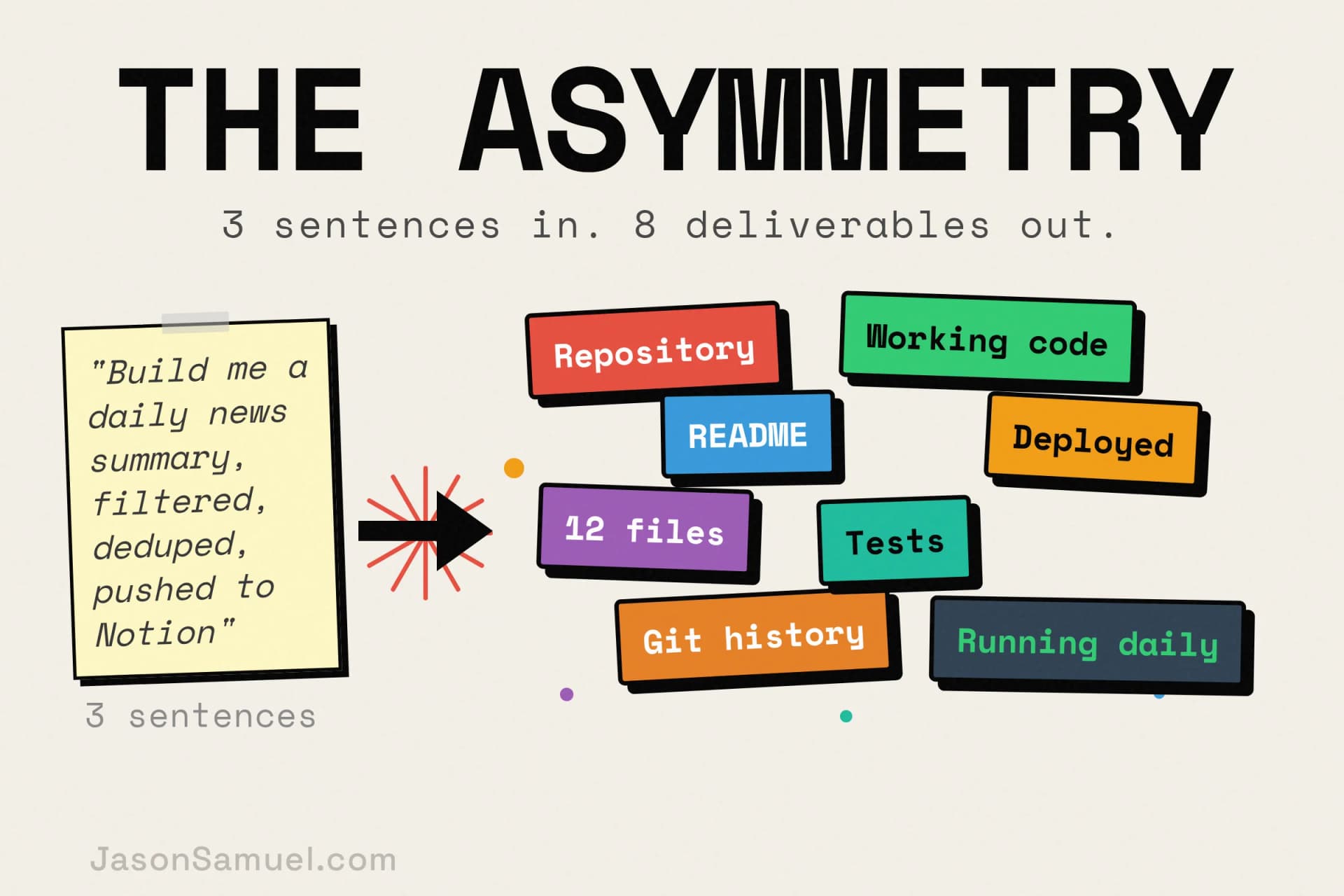
What I love most about working this way, and what I think people who haven't experienced it underestimate, is the asymmetry between input and output. You say a few sentences. You walk away. You come back later, an hour, an afternoon, the next morning, and there's a whole repository sitting there. Working code. Sensible structure. A README. Tests. Git history with reasonable commit messages. The agent has taken your three sentences of intent and turned them into something a person would have spent days producing. Then you read what it built, you push back on the parts that aren't right, you ask for the things you forgot to mention, and the next iteration arrives in another short cycle. Your input was a paragraph. The output was a system.
That asymmetry is what makes the speed-of-thought claim real. Every other AI workflow I've tried optimizes the wrong side of the equation. They make it faster to type, or smarter about autocomplete, or better at suggesting the next line. But they keep you in the loop the whole time, watching every character, approving every step. The setup I'm describing flips that. You spend your effort on the thinking and describing part, which is the part you're good at and the part that compounds across projects. You let the agent absorb everything that happens between the thought and the working artifact. When you come back to the session, you're not picking up where you left off mid-keystroke. You're picking up at the next decision point, with a whole working thing in front of you to react to.
The first part, knowing what to ask for, is the part you bring. It's product sense. It's architectural thinking. It's the engineering mindset of "what could go wrong, what assumptions am I making, what does the unhappy path look like, where does this break at scale." You don't need to be able to implement any of that. You need to be able to think about it. If you've ever sat in a room and pushed back on a vendor's solution because you could see a problem they hadn't, you have this skill. If you've ever read through a contract or a SOW and caught the gap, you have this skill. If you've ever architected a system in your head and explained it to someone who then went and built it, you have this skill.
The second part, having a place for it to run, is the setup I'm about to describe. That's the part most people fumble. They have the ideas. They have the mindset. They just don't have the infrastructure layer that lets the ideas become things. They try to use ChatGPT in a browser tab and they wonder why their projects keep dying. The browser tab isn't infrastructure. It's a toy. The real setup is something different.
A note on vibe coding (and why this is the foundation under it, not the same thing)
I want to address vibe coding directly because the term has become loaded over the past year, and I don't want anyone reading this to confuse the two ideas.
Andrej Karpathy coined "vibe coding" in February 2025 to describe a specific mode of working with AI: surrendering the keyboard to an agent, describing what you want in natural language, accepting whatever it produces, and iterating purely on results without digging into the code itself. By his own definition, you don't read the code, you just "see things, say things, run things, and copy-paste things, and it mostly works." A year later, in February 2026, Karpathy himself declared vibe coding "passé" and moved on to a more disciplined framing he calls agentic engineering, same tools, but with proper oversight, structured prompts, and the supervisor mindset of someone reviewing autonomous work rather than just trusting whatever comes out.
The setup I'm describing in this article is neither vibe coding nor agentic engineering specifically. It's the foundation underneath both of them. You can absolutely use this stack to vibe-code at midnight, just throwing prompts at the agent for a fun side project where it doesn't matter if things break. You can also use this same stack to do extremely careful agentic engineering with hooks, guardrails, multi-agent coordination, code review at every step, and production-grade discipline. The infrastructure doesn't care which mode you're in. The agent, the persistent server, the tmux session, GitHub as your filesystem, MCP for integrations, voice on every device, all of it works identically whether you're being playful or being rigorous.
That distinction matters because vibe coding has accumulated some negative press, fairly or unfairly. People have built things they didn't understand, shipped them to customers, and watched them break in embarrassing ways. The lesson isn't "don't use AI to build things." The lesson is "match your mode of using these tools to the stakes of what you're building." Vibe coding for a weekend toy: great. Vibe coding for a financial system: terrible. Same tools, different appropriate use.
What I'm offering here is the operating layer. The platform. The thing that makes either mode possible. It's deliberately mode-agnostic because the underlying capability, talk to an agent, agent acts on a persistent server, work syncs across devices, everything versioned in Git, is useful for any mode of building. You decide whether you're vibing or engineering on a given project, and the same stack supports both.
Why no-code blows up, and why this doesn't
Before I describe what to do, let me describe what most people are doing instead, because the failure pattern is so common that anyone who's tried to build anything in the last three years recognizes it instantly.
The no-code era promised this same thing. "Build without code." Tools like Zapier, Make, Bubble, Webflow, Airtable, Notion-as-database, n8n, dozens of others. Some of those are good products and I still use a few of them for specific jobs. But as a general-purpose strategy for someone trying to build serious things, the no-code approach has a ceiling that's lower than people expect, and the ceiling shows up in a predictable pattern.
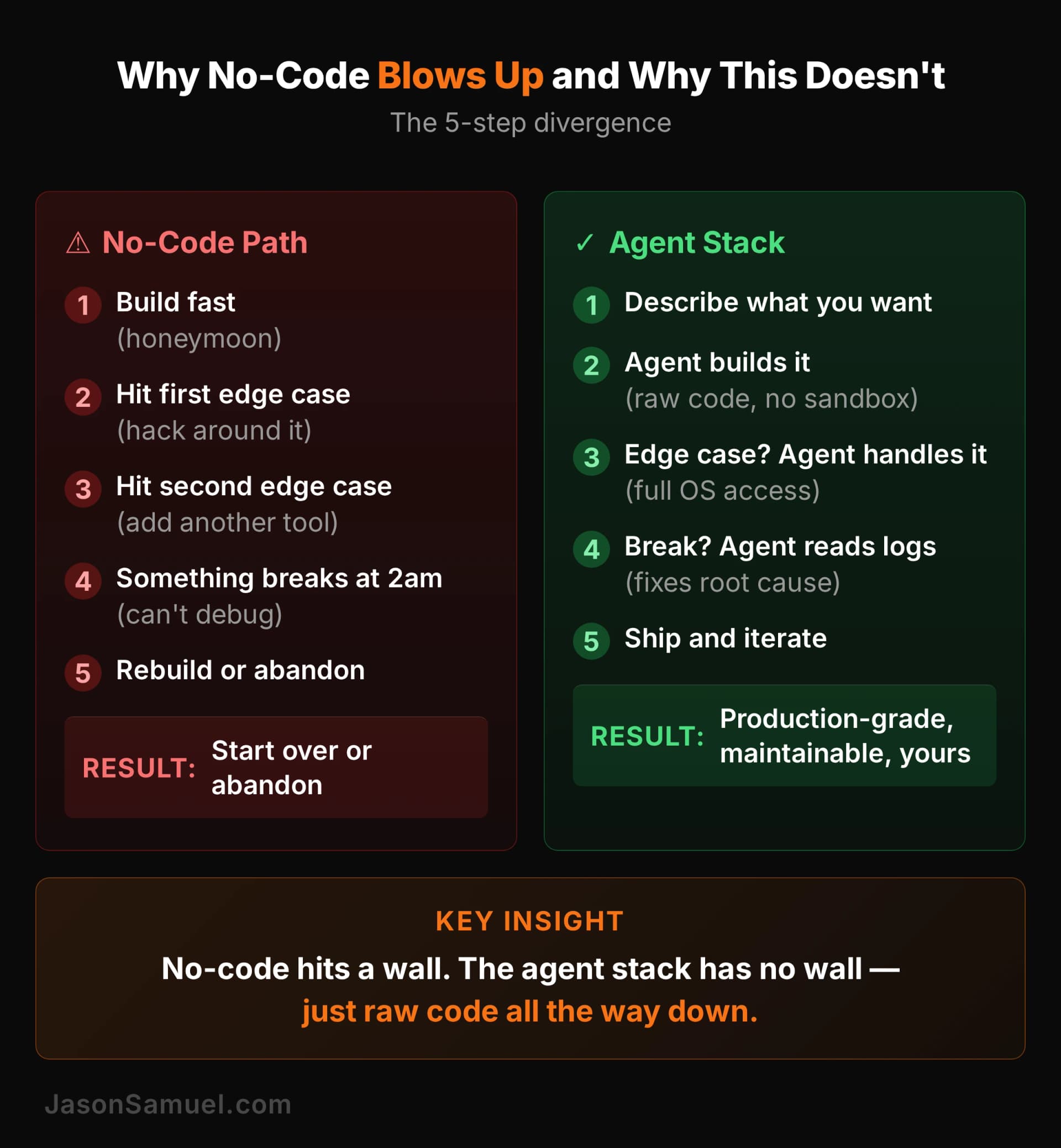
You build the first version fast. It works. You're delighted. This is the honeymoon phase and it's why no-code has so many evangelists.
You hit the first edge case the tool doesn't handle. Maybe you need to do something the visual builder doesn't support, or you need to combine two services in a way the integration doesn't allow, or you need a custom transformation in the middle. You hack around it. You add another tool to the chain. The Rube Goldberg machine grows.
You hit the second edge case. More hacks. More tools. The thing is now stitched together across four SaaS products with a couple of zaps and an Airtable in the middle. You have no idea what'll happen if any one of those products changes its API or its UI.
Something breaks at 2am. A trigger doesn't fire. A field gets renamed in some upstream service. A rate limit hits. You can't debug it because you can't actually see what's happening, you can only see what the no-code tool tells you is happening, and the tool is lying because it doesn't know either.
You rebuild the whole thing in real code with a developer. Or you abandon the project. I've watched a lot of projects play out this way, in my own work and in the work of people I've advised, and the endings are almost always one of those two.
The reason this happens is structural, not because the tools are bad. No-code tools work great when you stay inside their abstractions. They break the moment you need to think about your system in a way the abstraction doesn't support. And serious projects always cross that line eventually, because real-world requirements don't fit inside any pre-built abstraction.
The AI-agent stack I'm about to describe doesn't have this ceiling. The reason is simple: the abstraction is the agent itself. The agent is a general-purpose intelligence that can drop into raw shell commands, raw API calls, raw file edits, raw anything, whenever the situation needs it. There's no "this isn't supported in the visual builder, sorry." If the operating system can do it, the agent can do it. If a vendor has an API, the agent can call it. If something breaks, the agent can read the actual logs, debug the actual problem, and fix the actual root cause. You're not building inside someone else's sandbox. You're building on bare metal, with a smart partner who knows how to use it.
That's why this stack scales when no-code doesn't. You're not constrained by the toolmaker's imagination. You're constrained by yours. And the agent fills in the implementation skill you don't have.
The mental model: one persistent brain, infinite projects
Before I get into specific tools, let me describe the shape of the setup. The shape is more important than the tools, because the tools will change.
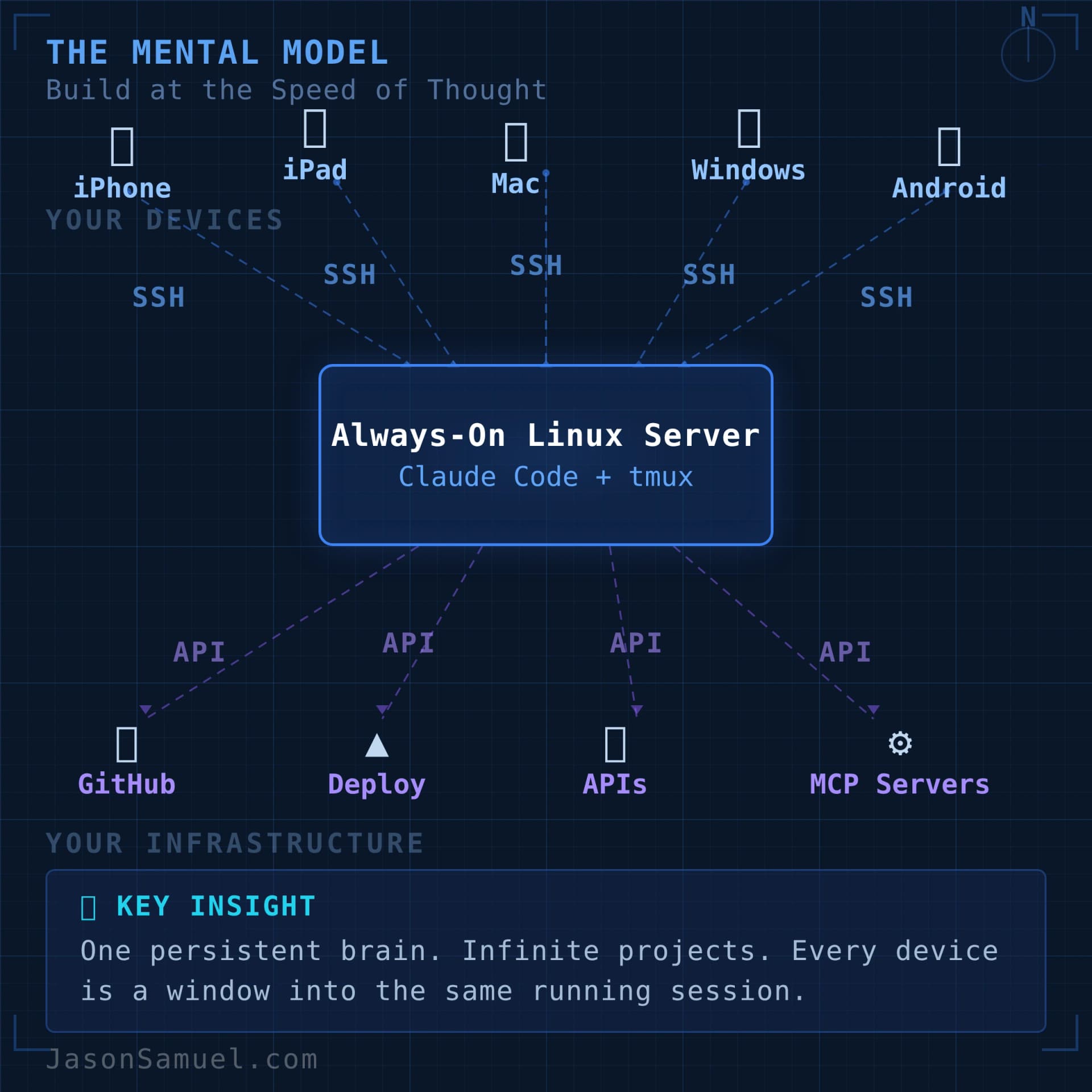
The shape is this. You have one always-on Linux server, somewhere in the cloud, running an AI agent inside a persistent terminal session. That server holds all your projects in one place. You connect to it from whatever device you happen to be holding, your Windows laptop, your Mac, your iPhone, your iPad, your Android phone, your Linux box, anything that can SSH, and you tell the agent what you want. The agent does it. The work persists on the server when you disconnect. When you come back later, even from a different device, even days later, you're right back where you were.
That's the whole architecture. One sentence. Everything else in this article is implementation detail.
Let me unpack why each part of that sentence matters.
Always-on. The server doesn't sleep, doesn't shut down, doesn't depend on your laptop being open. If you tell the agent to do a long-running task and walk away, the task keeps running. You don't have to babysit it. This is the single biggest mental shift from "AI in a browser tab" to "AI as infrastructure." The work is happening somewhere that isn't you.
Linux server. Doesn't have to be fancy. A small VPS for fifteen bucks a month works fine. Could be a Raspberry Pi in a closet, could be a tower under your desk, could be a Mac Mini you already have, could be an old laptop with the lid closed. The hardware is irrelevant. What matters is that it's reachable, it's always on, and the agent can do its work there without competing for resources. On the OS side, I personally run Ubuntu 24.04 LTS x64. It's free, it's the LTS (long-term-support) release so I get five years of security updates without forced upgrades, the agent ecosystem treats it as the default target, and almost every guide and answer you'll find on the internet assumes Ubuntu by default. Other distros work fine too, Debian, Fedora, Arch if you swing that way, but if you don't already have a strong preference, Ubuntu 24.04 LTS is the path of least resistance and the one I'd recommend to anyone setting this up for the first time.
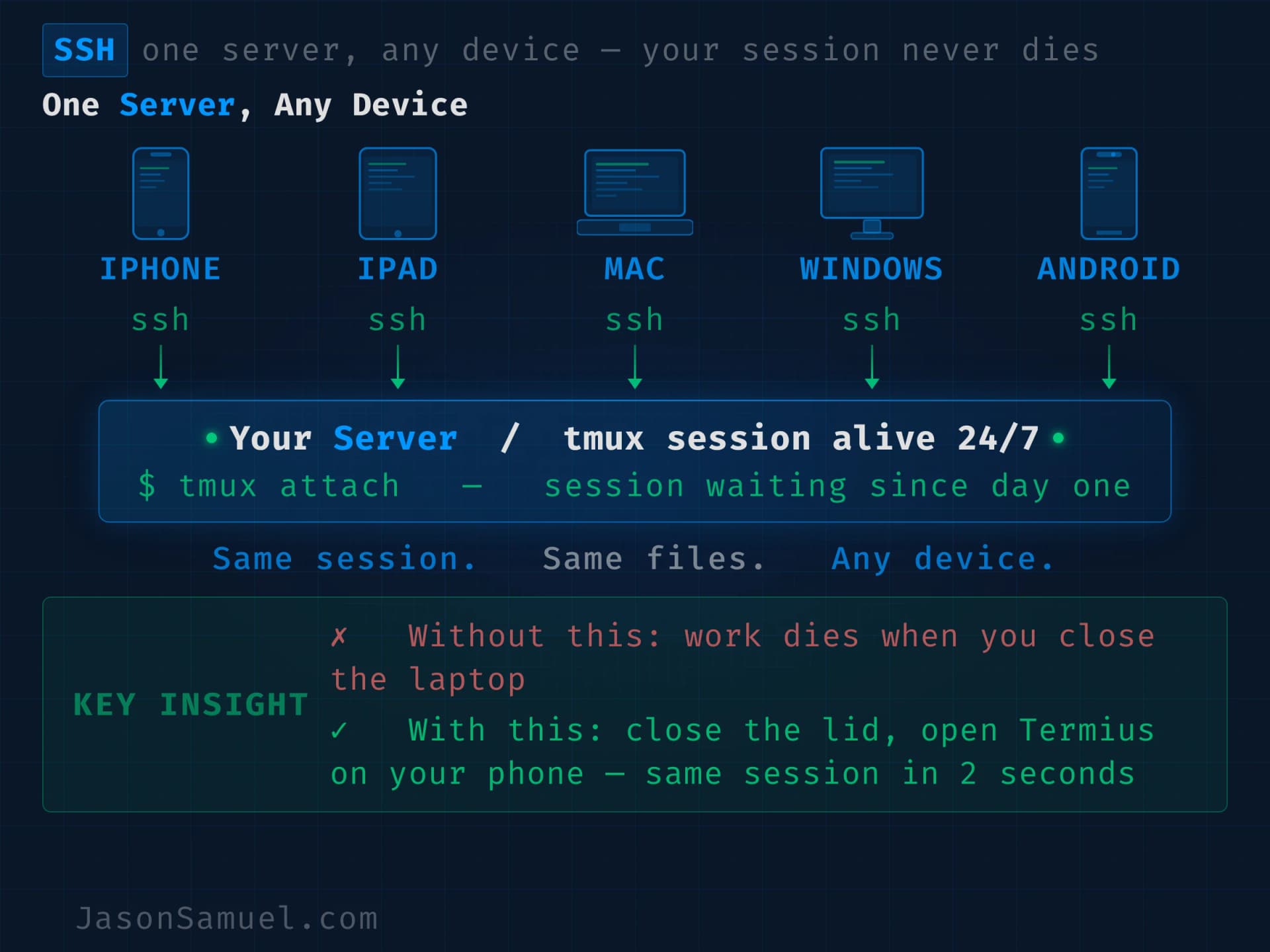
Persistent terminal session. A tool called tmux (short for "terminal multiplexer") keeps your shell session alive on the server independently of any device connecting to it, and can also host multiple shells inside one connection if you want it to. The piece that matters for this setup is the persistence: you attach to the session from your Windows desktop or Mac, you detach, you walk away, the session is still running on the server. You attach from your phone three hours later, you're right back where you left off. The agent doesn't know or care that you've moved devices or operating systems. This is the trick that makes the multi-device experience feel like magic.
Here's the part that most people don't realize until they try it: you don't even have to detach. You can be in the same tmux session from multiple devices simultaneously. I do this all the time. I'll be working at my desk on my monitors, and when I need to walk away, I open Termius on my iPhone and attach to the same session. Not a new session. The same one. Both devices are now showing the same live output, the same scrollback, the same cursor. I walk out of the room still talking to the agent, still seeing the output stream on my phone, and when I get back to my desk I put the iPhone on its cradle and pick up on the monitors again. Same session, never detached, never reattached. Two panes of glass into the same running workspace at the same time. Even sitting on its cradle, the iPhone continues showing me everything the monitors show. If I want to go to the gym or grab food, I can detach all the devices and let the session run headless. The agent keeps working. Nothing stops. When I'm back, I attach from whatever device is closest and the output is waiting in the scrollback. Add as many viewers as you want, detach them all when you don't need to watch, let it run in the background like a server process that happens to have a UI whenever you feel like looking at it.
If you're coming from a Windows background, the cleanest mental model for tmux is think of it like RDP, but for the terminal. When you Remote Desktop into a Windows server, you can disconnect (not log off) and your apps keep running, your windows stay open, and the next time you connect from any other machine you pick up exactly where you left off. Tmux does the same thing for shell sessions. Detach instead of disconnect. Attach instead of reconnect. Same idea, different layer of the stack. If RDP's persistence model makes intuitive sense to you, tmux's will too.
Holds all your projects in one place. Every project I touch lives as a directory on this one server, under the same parent folder. Whether it's a small automation, a content site, a SaaS-style product, a research pipeline, a personal scratchpad. The agent can move between them as easily as you switch tabs in a browser. Because they share a brain, the agent already has context on all of them. Switching from "fix a bug in the daily summary tool" to "draft a new article for the site" to "check the deploy status of the staging environment" is one sentence each, with no context-switching tax.
Connect from any device. This is where SSH comes in, and where Termius (the SSH client I use) becomes the access surface. Your phone, your laptop, your iPad, your work computer, anything you can SSH from. The same hosts, the same keys, the same snippets, sync across all of them. You're not tied to one machine. You're not tied to any machine.
Tell the agent what you want. Voice, typing, however you want. The agent absorbs the imprecision. You don't need to format your requests as prompts. You describe what you want like you'd describe it to a smart, junior person who happens to know how to type fast and remember everything.
The thing that ties all of this together, and the thing that makes the speed-of-thought claim real, is the agent in the middle. Without the agent, you'd need to learn shell scripting, learn deployment, learn debugging, learn the dozens of specific tools that this setup uses. With the agent, you don't. The agent learns them on your behalf and translates between your intent and the systems underneath. You bring the thinking. The agent brings the typing.
A name for the shape: BuildOS
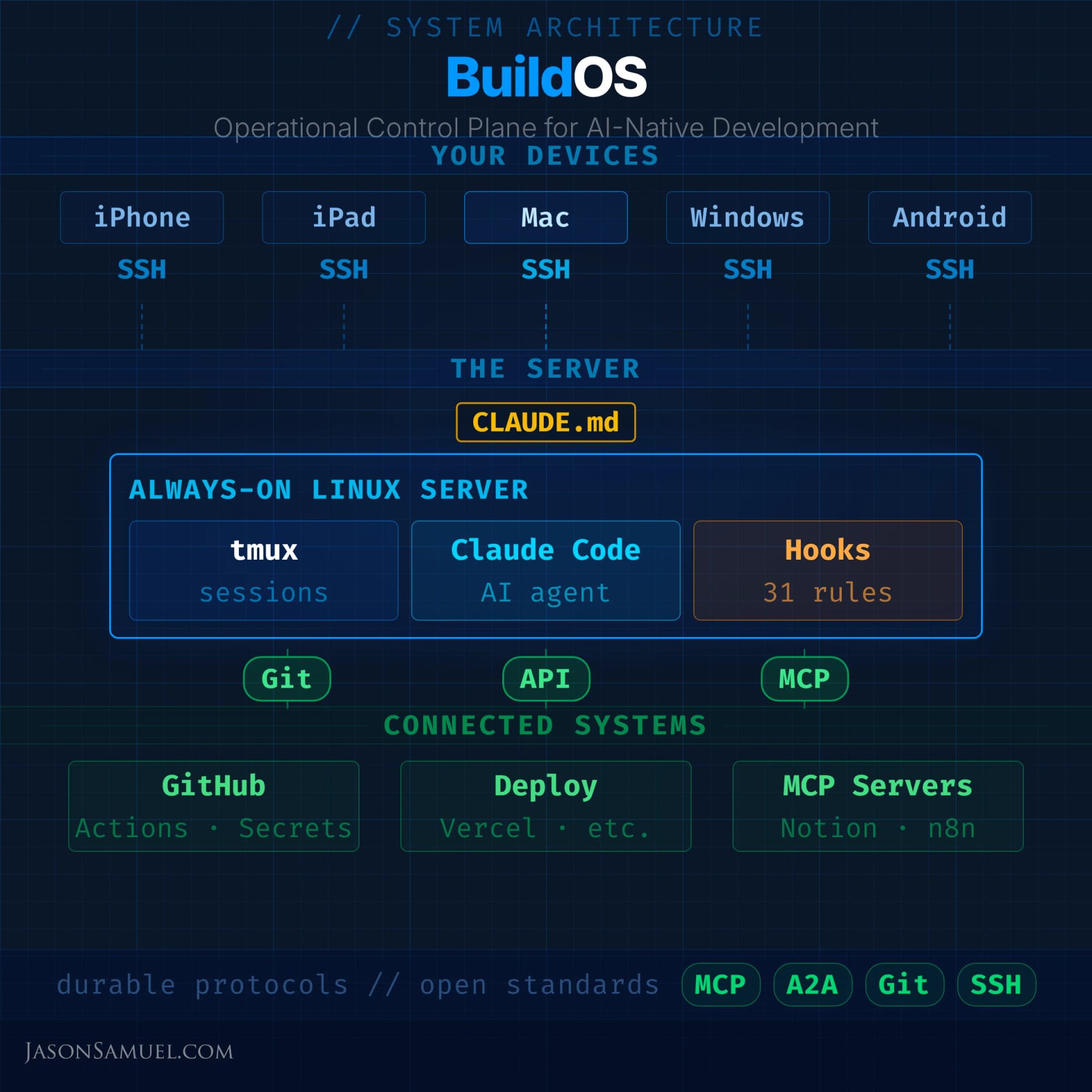
I've started calling this whole architecture BuildOS, my own shorthand for the operating-system-style stack I've been building around this approach for the past year. It's not an industry term, and it's not a product. It's just the phrase I've landed on internally to describe the thing as a whole: the always-on server, the persistent agent, the unified project filesystem, the multi-device access surface, the protocols underneath, and the operational patterns that hold it all together. BuildOS is the framework I think in.
There are adjacent concepts in the broader industry that you might run across, and it's worth naming them so you understand where BuildOS sits in the conversation:
- AI OS / Agent OS (VAST Data, Red Hat, various academic projects) is the enterprise infrastructure version of this idea, building runtime environments to manage many AI agents at scale across an organization. Datacenter-scale. Kubernetes-based. Built for companies, not individuals.
- Personal AI Infrastructure (PAI) from security researcher Daniel Miessler is the closest cousin to what I'm describing, an open-source template built on Claude Code that captures personal context, goals, and identity in structured files so the AI knows you over time. Worth looking at if you want a pre-built scaffold instead of rolling your own.
- OS Agent is the academic framing, focused on AI agents that operate the underlying operating system itself (clicking buttons, opening apps, automating GUI workflows) rather than agents as a layer on top of the OS.
BuildOS is none of those exactly. It isn't enterprise infrastructure, it isn't someone else's pre-built template, and it doesn't try to replace your operating system with an agent. BuildOS is my term for a personal operating layer built deliberately on durable foundations (SSH, Git, tmux, MCP, A2A, raw protocols rather than brittle frameworks), assembled and owned by an individual rather than handed to them by a vendor, designed to outlive any specific tool in its stack because the shape is what matters and the shape is portable.
If you want a martial arts analogy, BuildOS is Bruce Lee's Jeet Kune Do philosophy applied to technology. "Absorb what is useful, reject what is useless, add what is specifically your own." Lee built JKD by studying every fighting style he could find, keeping only what actually worked in real combat, and discarding the rest regardless of how traditional or respected it was. That philosophy became the foundation of modern mixed martial arts. BuildOS is the same idea applied to an AI-native workflow. I've tried every tool, every framework, every platform. What survived into this stack is what actually worked in production, not what looked good in a demo or had the best marketing. The tools in this article aren't here because they're popular. They're here because they're useful. The moment something more useful comes along, the old tool gets swapped out with zero sentimentality. Use what works. Reject what doesn't. Keep moving. Or as Lee put it in the other quote that applies here just as well: "Be like water." Water doesn't commit to a shape. It fills whatever container it's in, and when the container changes, it adapts instantly. That's the design principle. Your stack should be water, not concrete.
The reason the naming matters: when I talk about "the BuildOS lifestyle" or "a BuildOS-style stack" elsewhere in this article, I'm pointing at a coherent thing with a coherent philosophy, not just a random pile of tools. The philosophy is:
- Foundations over frameworks. Build on protocols and primitives that will still work in five years, not on whichever orchestration library is trending this quarter.
- One brain, many projects. Don't carve your work into isolated environments. Let the agent see across all of it.
- Persistence as a core property. The work happens on infrastructure that outlives any single device, session, or even outage.
- You own the network identity. Run on infrastructure you control, not on infrastructure that pretends to be a sandbox.
- Capture the thinking, defer the typing. Your input is intent and judgment. The agent's output is artifacts.
- Architecture beats vigilance. Encode safety in hooks and policies, not in moment-to-moment human attention.
- The repo is the source of truth. Sessions are disposable. Servers are disposable. The committed state of your projects is the canonical reality.
If you internalize those seven principles, you can rebuild BuildOS on whatever future tools end up replacing the specific ones I describe in this article, and the rebuild will still feel like the same thing. The tools are means. The shape is the thing.
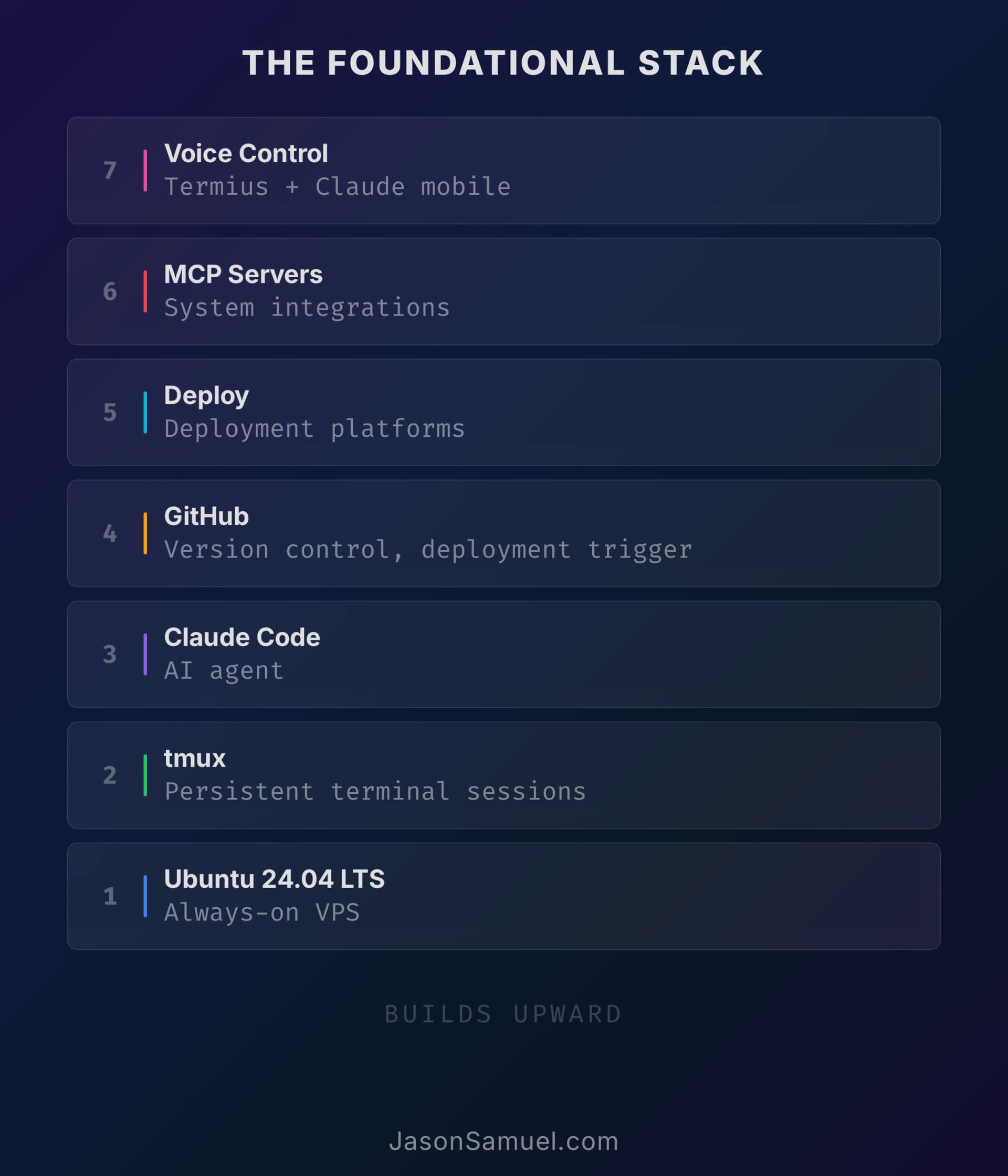
The agent: Claude Code, and why running it on a server (not your laptop) is what makes the whole thing work
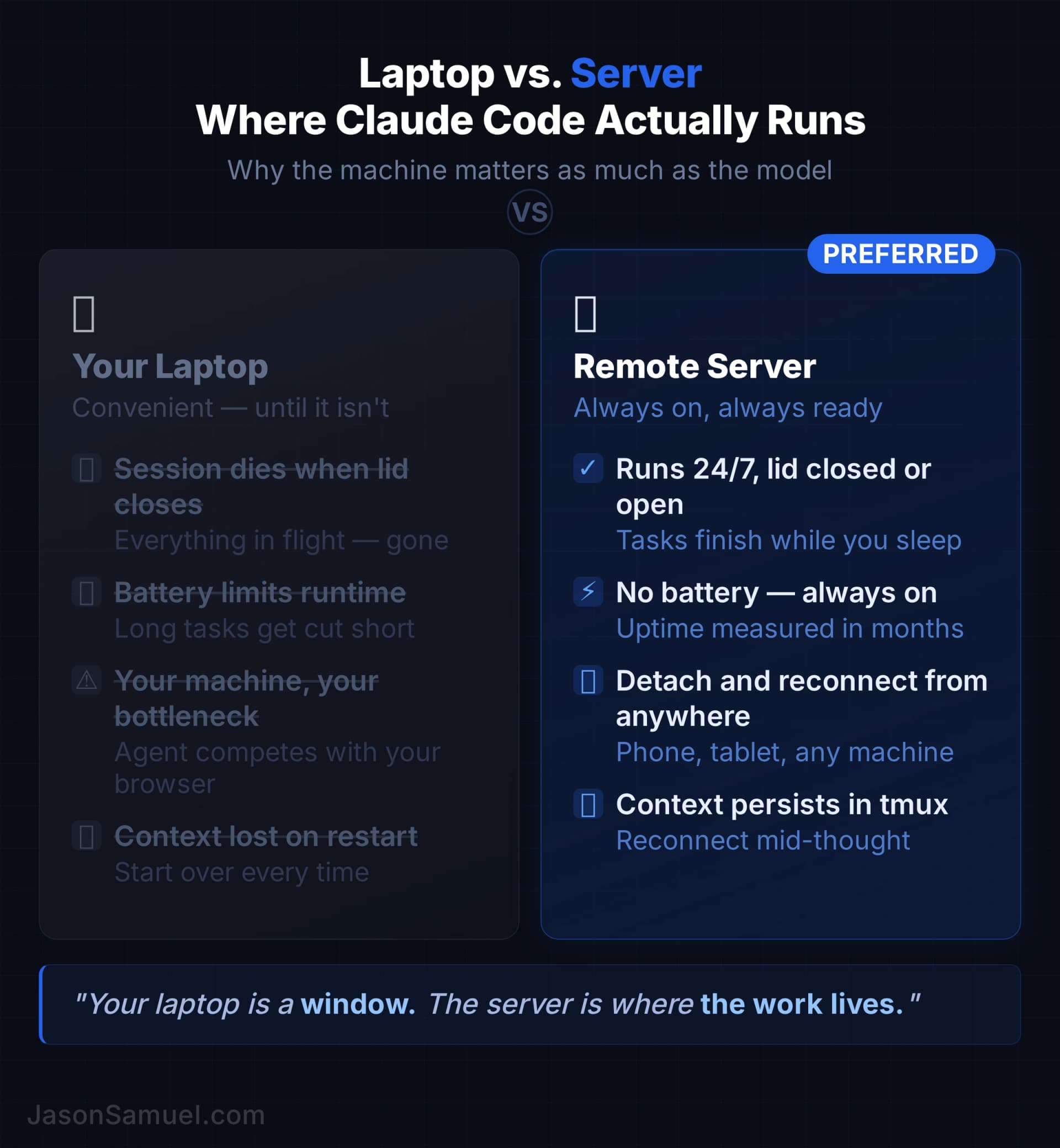
Let me talk about the specific agent I run, and then about why running it on a server instead of on your laptop is the move that makes everything else in this article possible. The short version: when the agent lives on a server, your work survives you closing the lid, walking away, switching devices, or going offline. When the agent lives on your laptop, none of that is true. Persistence and multi-device access are the actual payoffs, and you only get them by moving the agent off your personal machine.
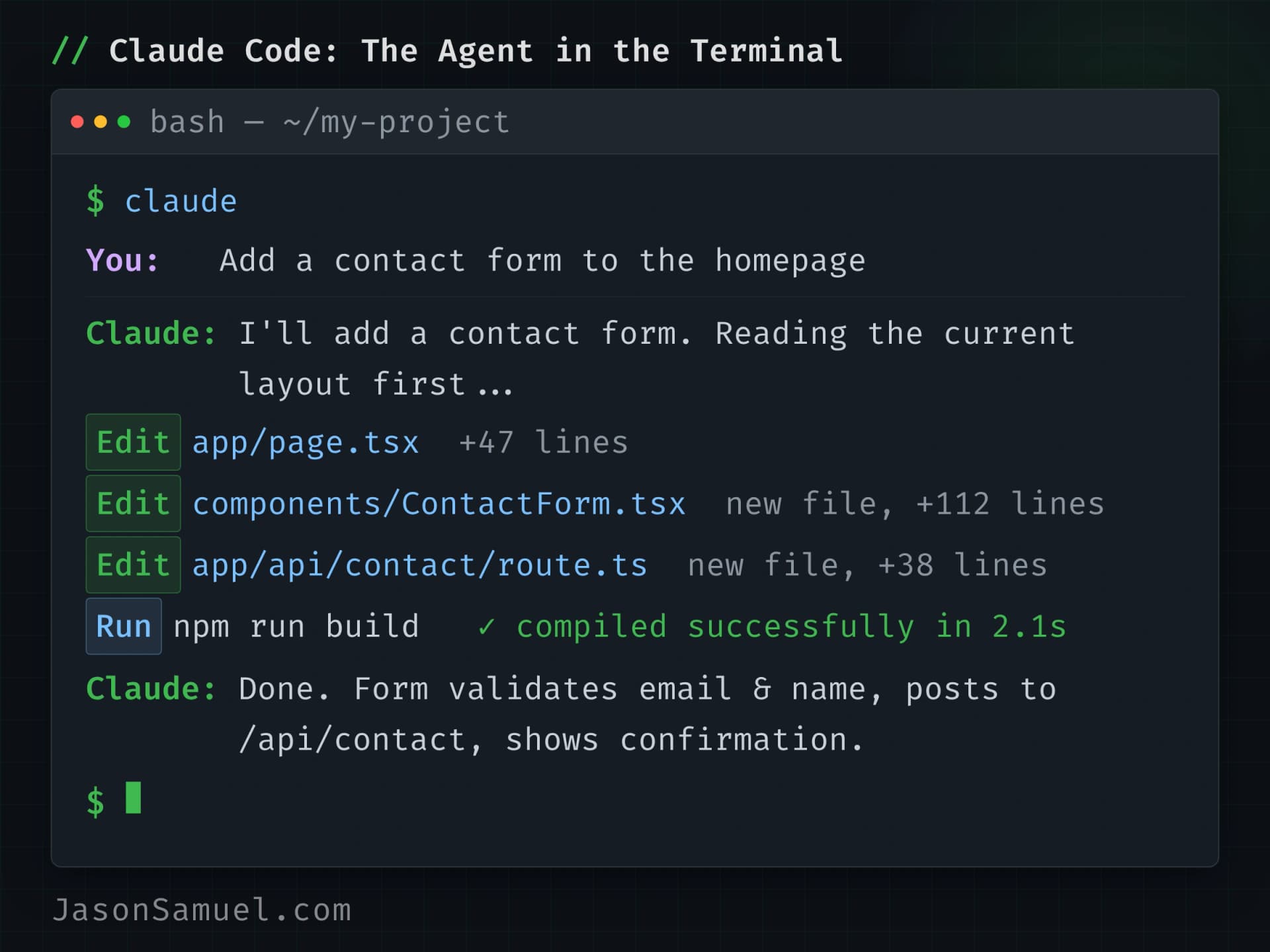
I use Claude Code, Anthropic's command-line agent. There are others: Cursor, Aider, OpenAI's Codex CLI, several open-source ones, and they're all moving fast. The thing they have in common is that they're agents, not autocomplete. They can read your whole project, plan a change across multiple files, run actual commands, read the results, iterate. Claude Code is what I've landed on because it's been the most reliable for me, the most willing to take action without endless permission prompts (with proper safeguards, which I'll cover), and the one whose mental model fits my own. If a different agent works better for you, the architecture I'm describing works just the same.
Worth noting: the LLM landscape underneath these agents is broader than most people realize, and it's moving fast. Claude (Anthropic), GPT (OpenAI), Gemini (Google), and Grok (xAI) are the names people know, but there are dozens of capable models now. Meta's Llama family is fully open-weight and runs locally on your own hardware via tools like Ollama, which means you can run a capable LLM on your server with zero API costs and zero data leaving your network. The rankings shift constantly. If you want to see how they actually compare on benchmarks, user votes, and real-world performance, OpenRouter and Artificial Analysis maintain some of the best live leaderboards. OpenRouter also solves a practical problem: it's a unified API that routes to any model from any provider through a single endpoint. Instead of managing separate API keys and billing for Anthropic, OpenAI, Google, Mistral, Meta, and everyone else, you point at OpenRouter and pick whichever model fits the task. I don't use it for my primary agent workflow (Claude Code talks directly to Anthropic's API), but for secondary tasks where you want to compare models or use a specific model for a specific job, it's invaluable. The point isn't to marry a model. It's to stay fluid. The best model for your task today might not be the best model for your task next month, and the architecture should make switching trivial.
On the subscription side, I run Claude Max, the higher-tier Anthropic plan that gives substantially more usage capacity per session than the Pro plan. As of mid-2026, Max comes in two flavors: Max 5x at roughly $100/month (about 5x Pro's per-session capacity) and Max 20x at roughly $200/month (about 20x Pro). For someone using Claude Code as their primary work surface, Max is the right tier. Pro hits its session ceiling fast when you're running the agent for hours at a time on real work; Max gives you the headroom to live in the agent without constant interruptions. The May 2026 announcement that Anthropic doubled Claude Code's rate limits and removed peak-hour throttling for Pro and Max made this even more workable.
A pattern worth mentioning because I actually use it: I run two Claude Max accounts and manually load-balance between them. It sounds aggressive at first, but the actual reason is the opposite of "going hard for the sake of it." It's a cost-optimization play. When you're driving the agent autonomously for hours at a stretch across multiple parallel projects, even Max's expanded session limits will run dry, and at that point Anthropic offers an extra-usage option that lets you keep going inside the same account at additional cost. I was buying so much extra usage that the bill stopped making sense. Two Max accounts running in parallel, with me manually shifting the active session over to the second account when the first one hits its rolling-window cap, is cheaper than one Max account plus the overflow billing I was paying on top of it. The math literally came out in favor of the second subscription.
The mechanics are not magic. It's two browser logins or two terminal sessions authenticated to different Anthropic accounts, with a sense of which one has fresher capacity available at any given moment. You move between them the same way you'd move between two coffee shops if one was unexpectedly full. The agent doesn't know or care which subscription is powering its session. Your work is still on the same server, in the same tmux session, against the same files in the same Git repo. Only the upstream authentication changes.
I'll add the obvious caveat: this is a power-user pattern. Most people will be fine on a single Max 5x or even Pro for a long time. The honest signal that it's time to add a second account isn't "I want to feel hardcore." It's "I'm consistently paying meaningful extra-usage charges on top of my Max subscription, and the math says a second Max subscription would be cheaper than the overflow I'm buying." If that's not happening to you, don't overbuy. If it is happening, run the numbers; two accounts is often the answer.
What people get wrong about agents is they install them on their laptop, whether that's a MacBook, a Windows machine, or a Linux box, and use them like a slightly smarter IDE. That works for small tasks. It does not work for the speed-of-thought lifestyle. The reason is that your laptop is a place you carry around, that you close, that goes to sleep, that you switch contexts on, that you eventually replace. The agent on your laptop has the same problems your laptop has. The agent is constrained by where it lives.
The move that fixes all of that is running the agent on a server you don't have to think about. A small Linux box, somewhere in the cloud or in your house, that you never close, never carry, never replace. The agent lives there. The agent has full access to that machine's filesystem and shell. The agent can do whatever you'd do on a Linux box, but faster, and without getting tired. You connect to it when you want to. You disconnect when you don't. The agent persists either way. Your work outlives the device you happened to be on when you started it, which is the property that makes the rest of the architecture in this article possible.
This shift, from "agent on my device" to "agent on a server I connect to," is the same shift that happened when we moved from local email clients to webmail. You used to have to be at your computer to read your email. Then Gmail happened and your email became a thing that lived in the cloud, accessible from anywhere. The data was on the server. Your devices were just windows. That same shift is now happening to your building. The work used to live on your laptop. Now it lives on a server. Your laptop and phone are just windows into it.
The practical effects of this are bigger than people expect. You can start a task on your laptop, close the lid, leave the house, finish reviewing the output on your phone in line at the coffee shop. You can have the agent work on something overnight and check the result over breakfast. You can be on a plane with no internet, then land and immediately reconnect to find that the things you set in motion before takeoff are done. You can have the agent monitor something for you, send you a message when it changes, and wake up only to act on actual decisions, not to babysit progress. The closest mental analogy is having a very capable, very fast assistant who works while you're not watching. The agent isn't a person and shouldn't be treated like one, but the operational feel of "I gave it a task, walked away, came back to find it done" is similar enough that the analogy is useful for thinking about how to use this productively.
A reasonable question at this point: why not just use GitHub Codespaces, or one of the other managed cloud dev environments, instead of running your own server? Codespaces in particular looks like it's designed for this exact use case. Cloud-hosted environment, accessible from anywhere, integrated with GitHub, no server admin required, comes pre-configured with whatever tools you want. Sounds perfect, right?
I tried it. I found it less flexible than running my own infrastructure, and I went back to running on my own box. The reasons were a mix of cost, performance, and freedom, but the most important one is the freedom point so I want to spend a minute on it.
When you run on managed cloud infrastructure (Codespaces, Gitpod, Replit's cloud, any of them), you're sharing IP space with millions of other users, and that IP space gets aggressively flagged by all kinds of services. Web pages and APIs you want your agent to fetch routinely come back with 403 errors, CAPTCHAs, or rate-limit walls when the request originates from a major cloud provider's IP range. Cloudflare flags it. WAF rules flag it. Anti-bot services flag it. Even some normal websites just refuse to serve content to known-cloud-datacenter IPs because they assume any request from that IP space is a scraper. The agent reads the internet for you. If the internet treats your agent's IP like a bot, your agent gets blocked more than it works.
There are workarounds. Residential proxy services. Browser-automation tools that present themselves as a real browser. Routing through a personal VPN. Renting an IP that isn't in the obvious cloud ranges. All of those work to varying degrees. None of them are clean. Each one adds latency, complexity, and another thing that can break.
The cleanest answer is to run on infrastructure where the IP space isn't on every blocklist. A VPS from a smaller hosting provider that isn't on every WAF's "default block" list. An on-premises server in your house or office. A hosted bare-metal box from a regional provider. The whole point of doing this is that you control the network identity and websites don't preemptively assume you're hostile.
Other reasons running your own infrastructure beat Codespaces for me:
- Persistence. Codespaces has time limits and idle shutdowns. Your tmux session goes away when the environment hibernates. The whole architecture I've been describing depends on the session staying alive forever, not "alive until the platform decides to recycle the container."
- Cost. A small VPS is fifteen bucks a month flat, and if you've already got a physical box at home that you'd run anyway, the marginal cost approaches zero. Codespaces charges by the hour and ramps with how powerful the machine is. For a 24/7 always-on workload, that math gets ugly fast.
- Tooling freedom. On your own server you install whatever you want. You're not constrained to what the managed environment supports.
- Privacy and trust. Your projects, your credentials, your work products. All of it runs on infrastructure you can audit and control.
- No platform risk. If GitHub changes Codespaces pricing or policies tomorrow, your whole setup is at their mercy. If a hosting provider does something weird, you move to another provider in an afternoon. If you're running on your own physical box, nobody can change your terms at all. The portability of "Ubuntu plus a few apt installs" is essentially infinite.
The honest caveat is that running your own infrastructure means you are responsible for it. You set up the server. You manage the SSH keys. You apply security updates. The agent can help with all of that, but the buck stops with you. Managed environments trade flexibility for convenience, and for some people that trade is correct. If you're not confident running your own Linux box, Codespaces is fine to start with, and you can graduate to your own infrastructure later when you understand what you need.
But if you can manage your own server, or you're willing to learn (and the agent will teach you), running your own is almost always the right move. The flexibility and the unblocked network identity are worth more than the convenience savings.
Now, the one thing about running an agent on a server with broad access that I want to address head-on, because anyone with a security background (mine included) sees it immediately. Claude Code has a flag called --dangerously-skip-permissions. By default, the agent asks before every shell command, every file write, every API call. The flag turns all that off. The agent just acts. The community calls this "YOLO mode" (some Anthropic docs use the phrase "Safe YOLO Mode"). Either way, the name is honest.
This is useful. It's also risky. The risk is real: a misinterpreted instruction, or worse, a prompt injection from a piece of data the agent is reading, could result in actual damage on your filesystem or your cloud account. The intelligent response, though, isn't to refuse to use the flag. It's to put guardrails in place that work regardless of how aggressively the agent is running.
Claude Code supports something called hooks. A hook is a script that fires before or after specific things the agent tries to do. You can write a hook that says: "before any bash command runs, check it against a list of nuclear patterns (delete everything, force-push to main, destroy infrastructure, fork bomb, etc), and if it matches, block it." The hook runs regardless of YOLO mode. The agent cannot talk its way past a hook script. You've moved the safety check from "ask the human every time" to "encoded policy that runs without humans." For autonomous workflows, that trade is right. You write the hook once, version-control it in the project, and from then on the agent has hard boundaries it can't cross. This is the same principle as a firewall or an access-control policy. You're trusting the system to enforce rules you've thought through carefully, not trusting yourself to catch every single command in real time.
This is one of the places where the architect mindset matters more than the developer mindset. A developer might think "I'll just be careful when I run YOLO mode." An architect knows that careful isn't a strategy, that systems need to be structurally safe, and that the right answer is policy in code, not vigilance in head. The agent's hooks are the policy layer. Use them.
Termius and the multi-device life
The agent lives on the server. You live on devices. The connection between them needs to be frictionless or the whole architecture falls apart.
The tool I use to connect is called Termius. It's an SSH client. It runs on Windows, macOS, Linux, iOS, and Android. All five major platforms, fully synced between them. There are others, Blink Shell is great on iOS, PuTTY is the classic on Windows, MobaXterm is solid if you're a Windows power user, you can roll your own with any terminal app and an SSH config if you want. The reason I prefer Termius is that it treats multi-device as a core design choice across every platform, not just the Apple ones. I bounce between a Windows 11 desktop, a MacBook, an iPhone, and an iPad in the course of a normal week. I configure the connection once on whichever device I happen to be on, and it shows up on every other device tied to my Termius account, with the same SSH keys, the same saved hosts, the same snippet library. No setting things up twice. No managing keys across devices manually. No "this works on my Mac but not on my Windows machine" friction. The whole "everything works the same on every device" experience is a Termius design choice, and it's the difference between a workflow that holds up across the day and one that doesn't.
A few specific Termius features that make the lifestyle work:
Startup snippets. You can attach a command to a saved host that runs automatically when you connect. Mine runs the tmux attach command on every connection. That single feature collapses three steps (SSH, switch user, attach to session) into one tap. From the moment I tap my server in Termius to the moment I'm in the running session with the agent waiting, it's maybe two seconds.
Snippets. You can save commands you run frequently, give them names, and execute them with a tap from the keyboard add-on. My library has things like "attach to claude session," "start claude in YOLO mode," "check git status across all projects," "list open pull requests." These sync across all my devices. The pattern that emerges is: use voice or typing to give the agent intent ("update the daily summary to also pull from this new source"), and use snippets to handle the structured commands that you wouldn't want to dictate or retype.
And honestly, half the time you don't even need snippets for the common stuff. Just press the up arrow on your keyboard and your recent command history is right there: your last tmux attach, your last git push, your last agent launch. On iOS, a two-finger swipe up on the Termius keyboard does the same thing. It pulls up your recent commands and you tap the one you want. Between up-arrow history and saved snippets, you almost never type a full command from scratch after the first week.
Keyboard add-on for mobile. The standard iOS and Android keyboards hide Ctrl, Tab, Esc, and arrow keys, which are the keys you reach for constantly in a terminal. Termius adds a row above the standard keyboard with those keys exposed, on both platforms. Once that row is customized, your phone becomes a real terminal device instead of a frustrating one. This is the difference between "I could use my phone in an emergency" and "I actually run my stack from my phone."
SSH key management. Generate keys in Termius's vault, push the public half to your server once, forget about it. The keys sync encrypted, you never expose them in plaintext, and you don't have to deal with copying ~/.ssh/id_rsa files between devices. This sounds small. It's the kind of small thing that determines whether multi-device works for you in practice or whether it stays theoretical.
Get this part right and the access layer disappears into the background. You stop thinking about "which device am I on" and start thinking about "what am I trying to accomplish." That's the goal.
Quick detour: what Git actually is, if you haven't used it before
I'm about to spend a lot of time talking about GitHub, and I realized I'm assuming everyone reading this knows what Git is. That assumption isn't fair. If you've never touched it, the next few sections will feel like jargon soup. Let me fix that in three minutes.
Git is a system for tracking changes to files over time. That's the whole concept. Every time you save a meaningful change, Git records what changed, when, by whom, and why. You can rewind to any earlier point. You can branch off and try something risky without affecting your main version. If the experiment works, you merge it back in. If it doesn't, you throw the branch away. Nothing is lost. Nothing is permanent until you say so.
Think of it like Google Docs revision history, but on steroids, and for entire folders of files instead of just one document. Google Docs lets you see what the doc looked like an hour ago. Git lets you see what your entire project looked like at any point in its history, undo any change at any granularity, and run multiple parallel versions of the project at the same time without them stepping on each other.
A few terms you'll see thrown around, with plain-English translations:
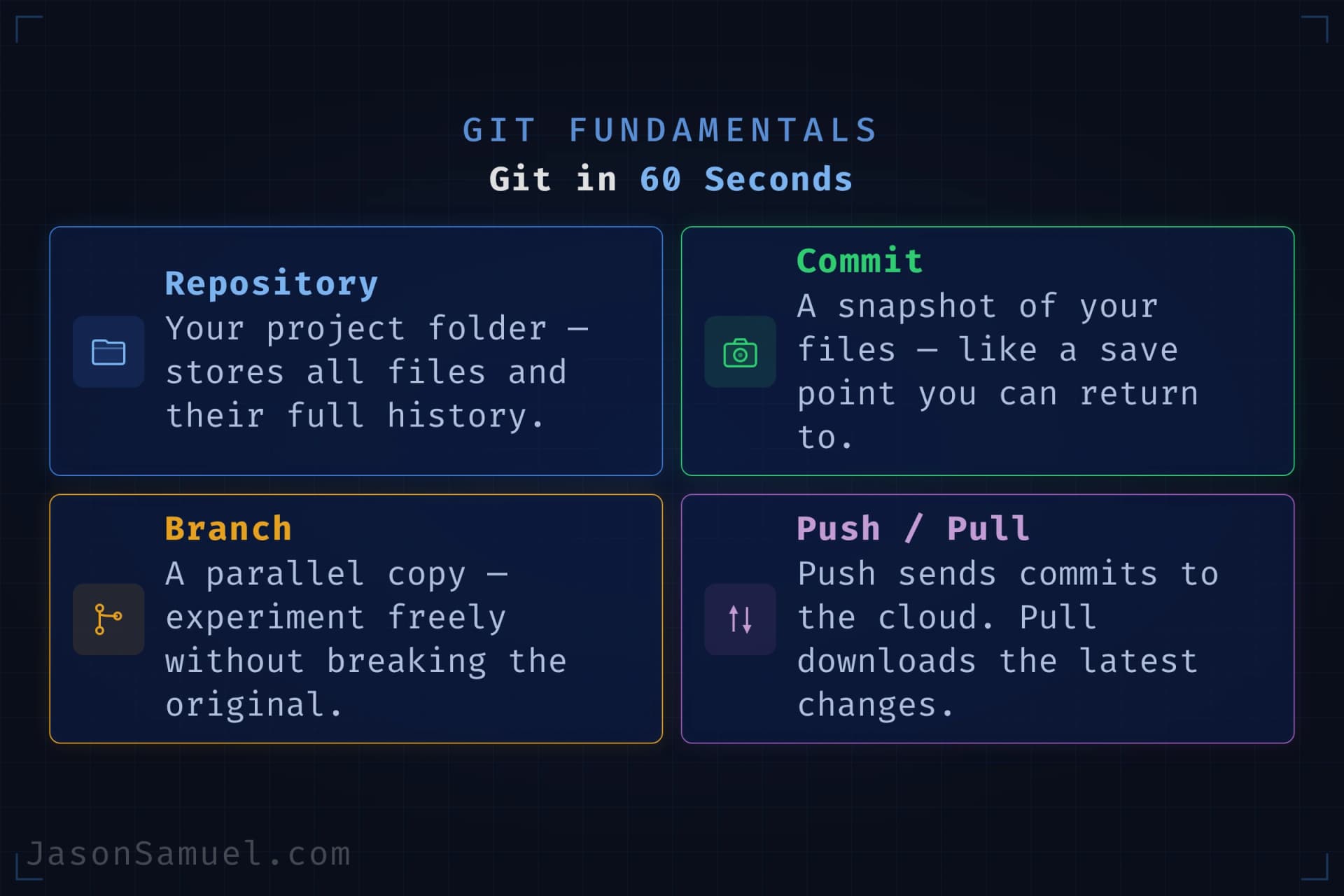
Repository (or "repo"). A folder with Git tracking turned on. It contains your project files plus the hidden history of every change ever made to them. When you "create a new project," what you're really doing is creating a new repo.
Commit. A saved snapshot of your project at a moment in time, with a short message describing what changed. Like hitting "save" in any normal program, except the save is permanent in the history, not overwritten by the next save. Every commit has a unique identifier, so you can always come back to any specific moment.
Branch. A parallel copy of your project where you can make changes without affecting the main version. You "create a branch" when you want to try something. If it works out, you "merge" the branch back into the main line. If not, you delete the branch and nothing is harmed. By default the main branch is called main (used to be master in older repos).
Push and pull. "Push" sends your local commits up to a remote copy of the repo (in our case, GitHub). "Pull" downloads changes from the remote down to your local copy. This is how you keep your local work synced with what's on GitHub, and how multiple devices (or multiple people) stay in sync with each other.
Pull request (or "PR"). A formal way of saying "I've made some changes on a branch; please review them before they get merged into the main version." The underlying merge mechanism is just Git, but the PR workflow itself is something GitHub popularized as a collaboration layer on top of Git. PRs are where reviews happen, where automated checks run, and where you can have a conversation about a proposed change before it goes live.
Clone. Downloading a full copy of a repo to your local machine (or to your always-on server). The first time you touch a project on a new device, you git clone it. From then on, push and pull keep you in sync.
That's it. That's the whole conceptual vocabulary you need for the rest of this article. You don't need to memorize Git commands; the agent will run them for you. What you need is the mental model: files versioned forever, parallel branches for experiments, push and pull to sync, repos as the unit of organization. Once those four ideas click, everything I say about GitHub will make sense.
One more thing: you are never going to lose work to Git. People are scared of Git because the command line is intimidating and the error messages are inscrutable. But the actual underlying system is the safest tool I've ever used for protecting your work. Once something is committed, getting it back is almost always possible, even if you've done something that looks catastrophic. The worst-case scenario in Git is usually "embarrassed for an hour while you figure out the right command to undo what you did." The agent makes even that part painless because it knows the commands and you don't have to.
GitHub as the universal home for everything you build
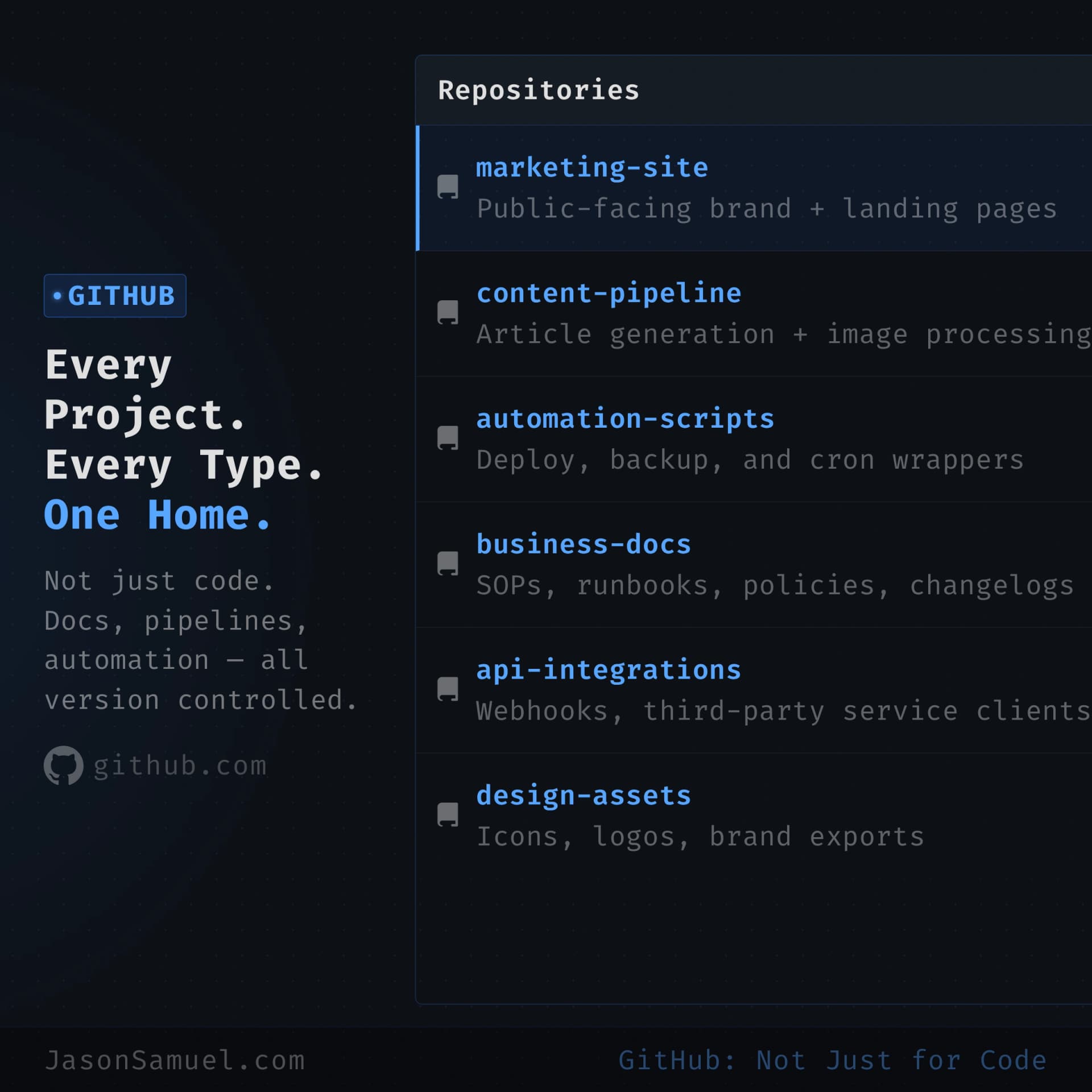
Every project lives in a GitHub repository. Every one. Code, content, infrastructure scripts, configuration, drafts, notes, ideas, knowledge bases. Anything that has text in it that I want to keep. I'm going to push on this point because it's one of the patterns most people resist when they first hear it, and once they adopt it they don't go back.
The reasons this matters more than people expect:
GitHub becomes your shared filesystem with the agent. The agent is going to read, write, edit, and reason about files. Those files need to live somewhere durable, somewhere accessible from any device, somewhere with a history you can roll back, somewhere with a clean way to share or not share. That's a GitHub repo. There's no better option.
Every change is automatically version-controlled. You don't have to think about "what did I change yesterday" or "let me try this, hope I can undo it." Every save is a commit. Every commit is an undoable point. The agent's changes get committed too, with messages describing what they did. Six months later, when you're trying to remember why something is the way it is, the answer is sitting in git log.
Sharing becomes trivial. When you want to show someone something, you give them a URL. When you want to invite a collaborator, you grant repo access. When you want to make something public, you flip a setting. The friction of "let me email you a zip" is gone, replaced with link sharing that's already built into the platform.
Issues are a frictionless inbox for ideas. I file issues against my own repos constantly. "Add a daily digest feature to this." "Fix the bug where the timezone is wrong." "Try a different summarization prompt and compare." These pile up in GitHub's Issues view. When I sit down to work on the project, the agent can read the open issues and work through them. It's a perfect external brain for things you don't want to forget.
It's free. GitHub's free tier is generous enough that for most personal stacks, you never hit a paywall. Even private repositories are free for individuals. This isn't a budget item. It just works.
It's open and durable. GitHub is owned by Microsoft, but the underlying protocol (Git) is open. If GitHub ever did something I disagreed with, I could move every one of my repos to GitLab or Codeberg or a self-hosted Gitea instance in an afternoon. Nothing's locked in. This is a big deal compared to no-code platforms, where moving off means rebuilding from scratch.
The mental shift here is from "GitHub is for code" to "GitHub is for everything I build, including non-code things." Treat it as your canonical store. Put your project notes in there. Put your configuration files in there. Put your CLAUDE.md (the agent's instruction file for that project) in there. Put your hook scripts in there. Put your scratchpads in there. Anything textual. Anything you'd be sad to lose. Anything that benefits from being versioned.
The agent's config files: CLAUDE.md, settings.json, hooks, and where everything lives
I've been mentioning CLAUDE.md, settings.json, and hook scripts throughout this article without ever sitting down to explain how the whole file ecosystem actually fits together. That's a real gap for someone setting this up for the first time, because once you understand the layout, everything about how the agent behaves stops being mysterious. Let me walk through it.
The agent reads from a small number of specific places when it starts a session. Knowing what each of those places does, and what to put where, is the difference between an agent that feels like it gets you and an agent that needs you to re-explain everything every time you sit down.
The two main configuration files you'll touch
Quick note if you haven't worked with these file types before. A markdown file (.md extension) is just a plain text file with lightweight formatting: # for headings, ** for bold, - for bullet points. You can open it in any text editor, read it without any special tools, and version-control it with Git like any other file. It's the universal format for documentation in software because it's human-readable and machine-readable at the same time. JSON (.json extension) is a structured data format, essentially a file that looks like a nested list of key-value pairs. Both are just text files under the hood. You don't need to memorize any syntax; the agent will write and edit both formats for you. You just need to know what goes where.
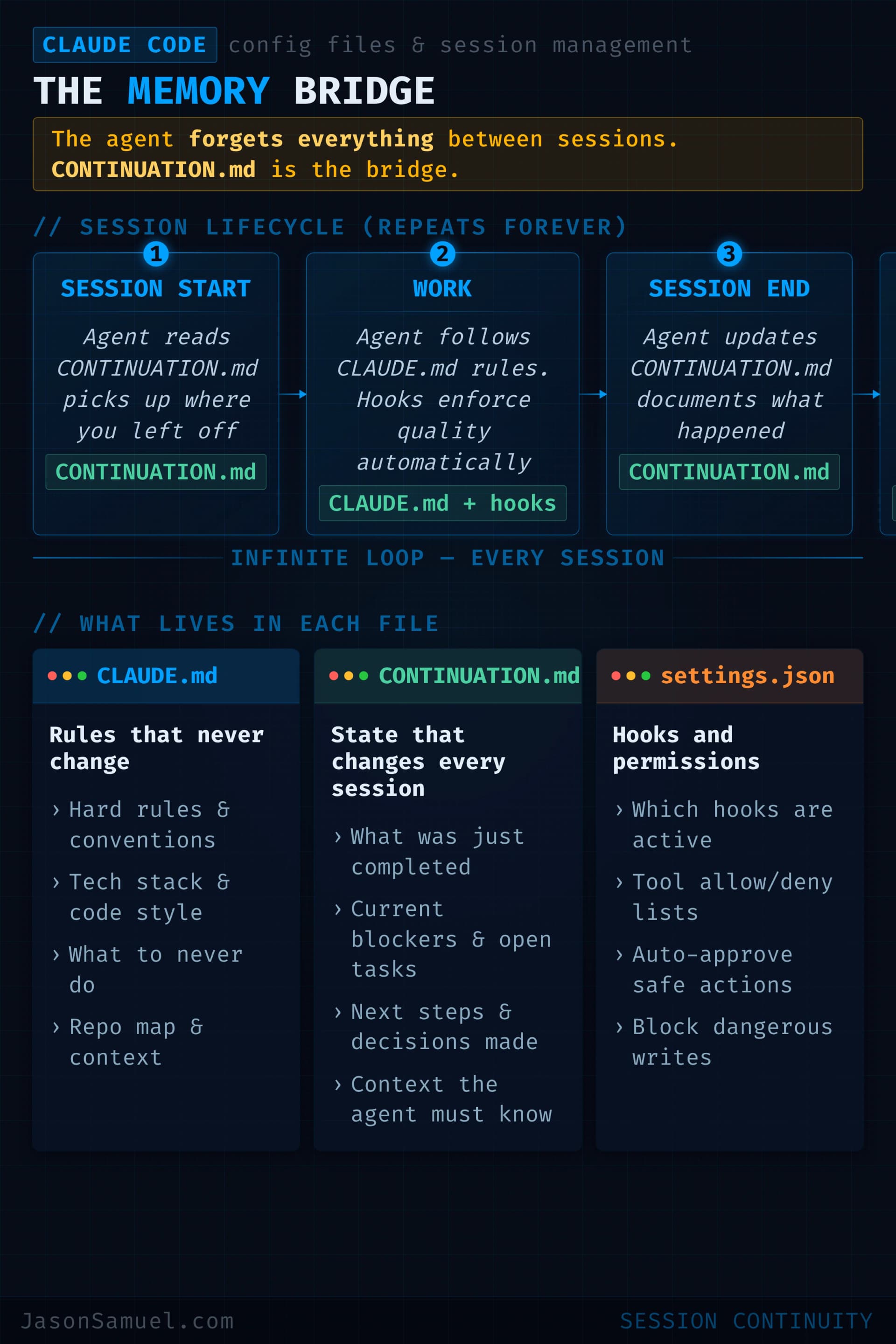
CLAUDE.md is a plain markdown file. It's the agent's onboarding doc, written in human language, that gets loaded into the agent's context every time you start a session in that directory. Think of it as a system prompt for your project that you can version-control and edit like any other file. There's no special syntax. There's no schema. It's literally a markdown document that you write in plain English, with whatever structure makes sense to you, and the agent reads it.
settings.json is a structured JSON file that controls how the agent operates. Tool permissions, hook configurations, model preferences, and other operational toggles live here. This is the part that's "code-shaped" rather than "prose-shaped." It's where you tell the agent things like "always run this script before any bash command" or "you have permission to use these tools without asking."
Those are the two main files. There's also the auto-memory system, which I'll get to.
Where each one lives, and the layering that comes from that
The agent reads configuration from multiple locations and layers them in a specific order. Higher-priority locations override lower-priority ones when there's a conflict. Here's the practical layout for someone who's just running their own setup, not managing a team:
User-level configuration lives in ~/.claude/ on the server. The most important file here is ~/.claude/CLAUDE.md, which contains your personal preferences that apply to every project you ever work on. Things like "I prefer concise responses," "always show me the plan before executing," "use British English in my prose," "don't apologize when you make a correction." This file should be small and stable. It's your default agent personality.
Project-level configuration lives at the root of each project, alongside your code or content. The two key files are CLAUDE.md (project-specific instructions that override or supplement your user-level ones) and .claude/settings.json (project-specific operational rules). The .claude/ folder also typically contains your hook scripts, in .claude/hooks/, plus any project-specific rules in .claude/rules/ if you want to break things into smaller files.
The way the layering works: when you start a session in a project directory, the agent loads your user-level ~/.claude/CLAUDE.md first, then loads the project's CLAUDE.md, then loads any .claude/rules/*.md files. The project files don't replace the user files. They add to and override them. So your global preference for British English stays in effect for the new project unless the project's CLAUDE.md explicitly says otherwise.
For monorepo-style projects where different subdirectories need different rules (like a frontend/ folder that should follow different conventions than a backend/ folder), you can place additional CLAUDE.md files in those subdirectories. The agent picks them up on demand when it starts reading files in that directory, not all at once. This is intentional. It keeps your context window clean. The agent doesn't load frontend/CLAUDE.md unless it's working in the frontend folder.
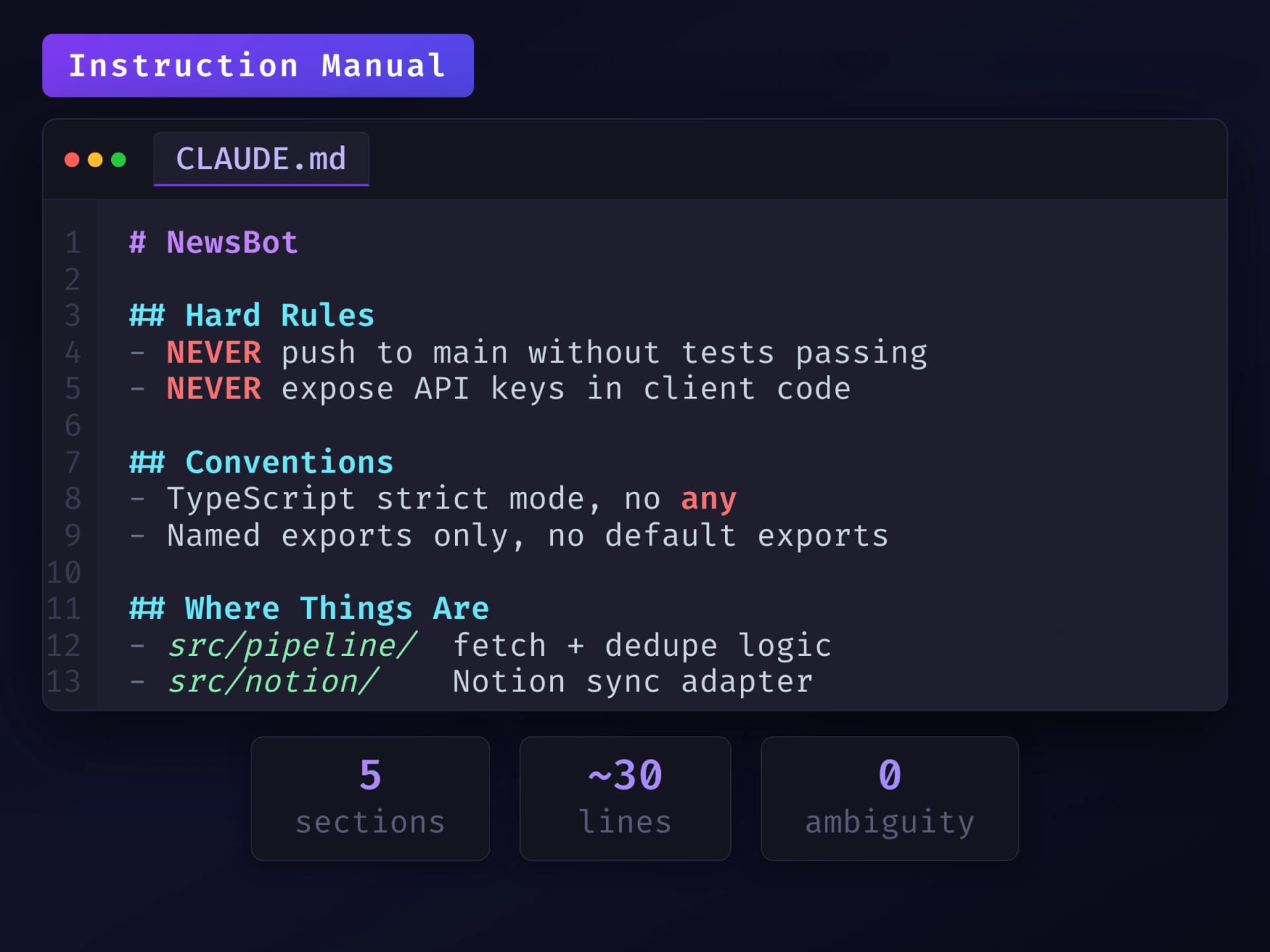
What goes in CLAUDE.md (and what doesn't)
A good CLAUDE.md is short, opinionated, and front-loaded with the rules that matter. Here's the structure I use:
# Project Name

## What this project is
One paragraph. What does this do? Who is it for?

## Hard rules
- Never do X.
- Always do Y before Z.
- Treat anything in /secrets/ as off-limits.

## Conventions
- File naming: kebab-case for everything.
- Commit messages: present tense, imperative mood.
- Test files live next to source files, not in a separate tree.

## Where things are
- Production deploys go through [GitHub Actions](https://github.com/features/actions) in .github/workflows/deploy.yml
- Secrets come from a .env file (gitignored).
- The agent's hook scripts live in .claude/hooks/.

## Glossary (if needed)
- "the customer" = the end user of the SaaS, not the buyer.
- "the operator" = me, running the admin side.The trap to avoid is writing CLAUDE.md as if it's documentation for a future developer. It's not. It's instructions for the agent. The agent doesn't need your code's history. It doesn't need your architectural debates. It doesn't need a tutorial on how to read the codebase, because it can just read the codebase. Don't waste lines on things the agent will learn after one session of working in the project. If the agent can figure out your file structure by running ls, you don't need to describe your file structure in CLAUDE.md. If it can figure out your test conventions by reading a test file, you don't need to document them. Save CLAUDE.md for the things the agent can't infer: your priorities, your taste, your rules, the things that would surprise it if you didn't say them.
A practical size target: keep your CLAUDE.md under about 200 lines. Mine are usually well under that. Once a CLAUDE.md grows past a couple hundred lines, it stops being useful, the agent loads the whole thing every session, every line costs context window space, and important rules start getting drowned out by less important ones. If you need more than 200 lines, that's the signal to split it into modular files under .claude/rules/ so the agent loads only what's relevant to the current task.
Pointers: how to keep CLAUDE.md lean even when you have a lot to say
There's a pattern I've grown into over the past several months that I want to share because it took me a while to figure out and it's quietly one of the most useful tricks for keeping the core system clean. Use pointers from CLAUDE.md to longer external files, rather than stuffing everything into CLAUDE.md itself.
The setup looks like this. CLAUDE.md stays small and pristine, focused on the rules and priorities that actually belong loaded into context on every session. For the longer-form material that you don't want loaded by default but you do want the agent to know about, you put it in a separate markdown file (or several) elsewhere in the project, and you add a single line in CLAUDE.md that points at it. Something like:
## Where to find more context
- Detailed architecture notes: docs/architecture.md (read on demand)
- Deployment runbook: docs/deploy-runbook.md (read before any prod-touching task)
- API conventions: docs/api-conventions.md (read when working on API endpoints)That's all CLAUDE.md needs. Three lines, instead of 800. The agent now knows those files exist and knows when to read them, but it doesn't pay the token cost of loading them every session. When a task requires the deployment runbook, the agent fetches it then. When it doesn't, the runbook isn't sitting in context taking up space and competing for the agent's attention.
I've personally written 800-line documents on specific aspects of projects and pointed at them from CLAUDE.md rather than dumping the content directly in. The original long-form file stays as the canonical source of truth, well-organized for human reading, and the agent has a pointer that lets it pull the relevant context exactly when needed. The agent's "core OS" stays uncluttered. I don't have to keep editing CLAUDE.md as the project grows and the supporting documentation grows with it.
This is the same pattern as a well-designed software system. You don't put every function in one giant file. You organize related logic into modules and import what you need. CLAUDE.md is the entry point. Your supporting documents are the modules. The pointers are the imports.
Carrying context efficiently across sessions
Related to the pointer pattern, and worth talking about explicitly even though I'm still learning this myself as the ecosystem evolves: context management and token optimization is its own discipline, and it's a rabbit hole worth going down for anyone serious about running this stack long-term.
The short version of what I've figured out so far. Every session starts with a finite context window, currently 200,000 tokens by default and 1 million tokens for Claude Code on Max, Team, and Enterprise plans where Opus 4.6 and Opus 4.7 are automatically upgraded to the larger context (Pro users can opt in for an additional cost). Every CLAUDE.md line, every file the agent reads, every previous message in the session takes up some of that budget. When you hit the ceiling, the agent has to start dropping older context to make room for newer stuff, and you start losing the thread of what you were doing.
A few patterns that have helped me:
Be surgical about what loads automatically versus what loads on demand. This is what the pointer pattern above is doing in practice. The default-loaded stuff (CLAUDE.md, settings.json, anything in .claude/rules/) should be the minimum needed to make the agent behave correctly out of the gate. Everything else loads only when relevant.
Use the built-in /cost and /memory commands. /cost tells you how many tokens you've consumed in the current session. /memory shows you what the agent has loaded into context. If you don't know what's in context, you can't optimize what's in context. These two commands let you see what's happening, instead of guessing.
Compact when the session gets long. Claude Code has a /compact command that summarizes the conversation so far, dropping the verbose history and keeping the essential decisions and state. After a few hours of back-and-forth on a complex task, /compact can recover a meaningful chunk of context window for the next phase of work. It's the conversational equivalent of garbage collection.
Start fresh sessions when you switch tasks. If you're shifting from working on the SaaS app to working on the content site, just exit the agent and start a new session. The new session gets a clean context, loads the relevant project's CLAUDE.md, and doesn't carry the weight of an unrelated conversation. This sounds obvious but a lot of people try to do everything in one mega-session and pay the token tax for it.
Watch your costs as an observability signal. If your monthly Anthropic spend is jumping unexpectedly, that's usually a clue that something in your setup is over-loading context. Maybe a CLAUDE.md grew bloated. Maybe a hook is reading too many files. Maybe you've stopped using /compact and your sessions are running too long. Cost is observability.
I want to be honest that this part of the discipline is still evolving and I'm still learning it myself as the ecosystem matures. The tools for context observability are getting better, the model context windows are getting larger, and the patterns that work best today might be replaced by smarter patterns next quarter. But the principle is durable: the agent's effectiveness is bounded by the quality of its context, and the quality of its context is something you actively manage, not something that happens by accident. People who get good at this end up with stacks that feel two or three times more capable than the people who just throw everything into one big CLAUDE.md and hope.
It's a wonderful rabbit hole to go down. True cost optimization and observability for AI infrastructure is going to be its own discipline within the next year or two, and the people who learn the foundations of it now are going to have a real edge over the people who don't.
What goes in settings.json
settings.json is the operational config. The most common things you'll put there are tool permission rules and hook configurations. Here's a minimal example:
{
  "permissions": {
    "allow": ["Bash(npm:*)", "Bash(git status)", "Bash(git diff:*)"],
    "deny": ["Bash(rm:*)", "Bash(sudo:*)", "Bash(git push --force:*)"]
  },
  "hooks": {
    "PreToolUse": [
      {
        "matcher": "Bash",
        "hooks": [
          { "type": "command", "command": "bash .claude/hooks/block-destructive.sh" }
        ]
      }
    ]
  }
}The permissions block tells the agent what it's allowed and not allowed to run autonomously. The Tool(specifier) syntax is how Claude Code defines patterns: Bash(npm:*) matches any npm subcommand, Bash(rm:*) matches any rm invocation, and so on. Deny rules always win over allow rules. The hooks block points to your hook scripts. Both blocks layer the same way as CLAUDE.md does: user-level ~/.claude/settings.json defines defaults, project-level .claude/settings.json overrides or adds for the specific project.
Where hooks live
Hook scripts are just executable files. They can be bash, Python, anything that the operating system can execute. Convention puts them in .claude/hooks/ at the project root, but they can technically live anywhere, the settings.json just needs to point to the path. Each hook gets called with the tool invocation details as JSON on stdin, runs whatever logic you wrote, and exits with a status code that tells the agent whether to proceed (exit 0), block the action (exit 2), or fall through with a warning.
The pattern I use: small, focused hook scripts, one per concern. A block-destructive.sh that blocks nuclear commands. A format-on-write.sh that runs a formatter after the agent edits a file. A notify-on-deploy.sh that pings me if a deploy command runs. Each script is twenty or thirty lines. Each one does one job. Each one is independently version-controlled and reviewable in a pull request.
Auto memory: the agent's own notebook
There's one more piece of the puzzle. Beyond the files you write (CLAUDE.md, settings.json, hooks), the agent also maintains its own notes about what it's learned. Auto-memory shipped in Claude Code v2.1.59 in late February 2026, and it lives at ~/.claude/projects/<project-path>/memory/ on the server. The main file inside that folder is called MEMORY.md, and Claude can create topic-specific files alongside it. Over time, the agent records things it has discovered about your project that weren't in CLAUDE.md: file naming patterns it observed, dependencies it found, conventions it inferred from reading your code, debugging insights from past sessions.
You can view this with the /memory command inside a session, and you can edit it directly if you want to (it's just markdown). One real gotcha: only the first 200 lines of MEMORY.md are loaded at session start. If you let auto-memory grow beyond that limit, the agent silently won't see the rest. Periodically run /memory to prune entries that are stale or no longer relevant. But the bigger point is the agent learns about your project automatically, and you should use that rather than fight it. Don't put things in your hand-written CLAUDE.md that the agent will figure out on its own. Let auto-memory handle the inferred stuff. Reserve CLAUDE.md for the things only you know.
One important thing to understand about auto-memory: it lives on your server's local filesystem, not in Git. The ~/.claude/ directory is local to the machine. It's not committed to any repository. It persists across conversations on the same server, but if the server dies or you move to a new machine, the memory files are gone. This is by design, since memory often contains project-specific context, credential references, and personal notes that don't belong in a shared repo. But it means you should treat auto-memory as a convenience layer, not as permanent storage. Anything truly important should live in your project's docs/ folder, committed to Git, where it survives server failures and is accessible to anyone (or any agent) who clones the repo. The pattern I've settled on: keep auto-memory files short (6 lines or less each), use them as pointers to the canonical docs in Git, and let the real knowledge live in the repo. If the server burns down, the agent can rebuild its memory by reading the repo docs. Nothing critical is lost.
A useful command to know: /cost shows you token usage for the current session. Fair warning: if you're on a Max subscription, it mostly just tells you "you are using your Claude Max subscription," which isn't very illuminating. It's more useful on the API-billing side where you're paying per token. On a subscription, the more practical signal that your context is bloated is when the agent starts getting slow, forgetting instructions from earlier in the session, or running into rate limits faster than usual.
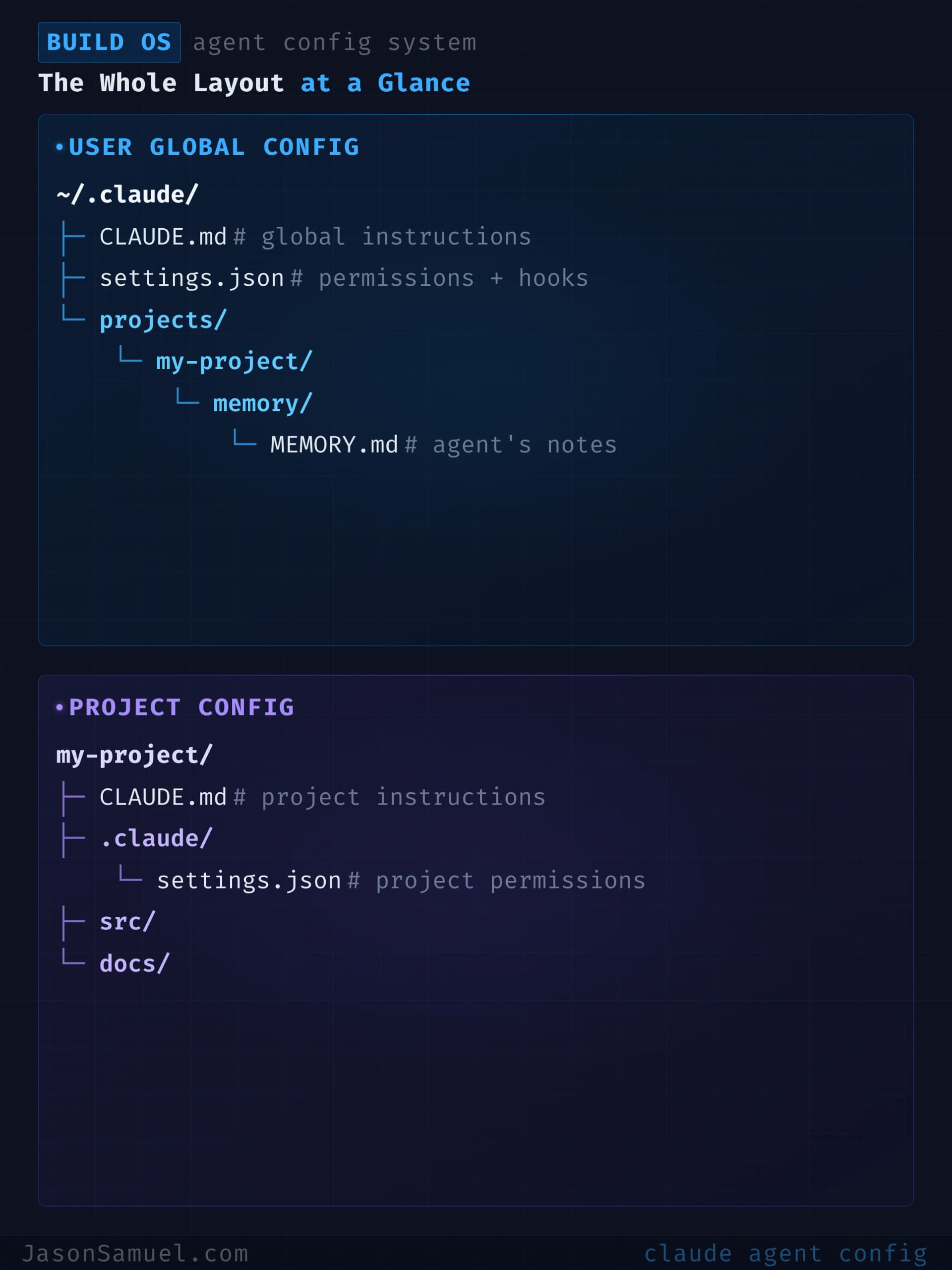
The whole layout, at a glance
For a typical project, this is what the file layout looks like:
~/.claude/                          ← user-level (applies to all projects)
├── CLAUDE.md                       ← your personal preferences
├── settings.json                   ← your default tool permissions
└── projects/
    └── my-project/
        └── memory/                 ← auto-memory the agent maintains

~/projects/my-project/              ← the project itself
├── CLAUDE.md                       ← project-specific instructions
├── .claude/
│   ├── settings.json               ← project-specific operational rules
│   ├── hooks/
│   │   ├── block-destructive.sh
│   │   └── format-on-write.sh
│   └── rules/                      ← optional modular rules
│       ├── testing.md
│       └── deployment.md
├── (your actual project files...)
└── README.mdThat's the whole picture. Five locations. Two file types you'll write yourself. One file type the agent writes for you. Once you've seen it laid out once, you stop being surprised by how the agent knows what it knows.
The mental model worth holding: your ~/.claude/ directory is who you are. Your project's .claude/ directory is what this project demands of the agent. Auto-memory is what the agent figured out along the way. Keep each one focused on its actual job and the whole thing stays maintainable.
GitHub Actions, Secrets, and n8n: the automation layer
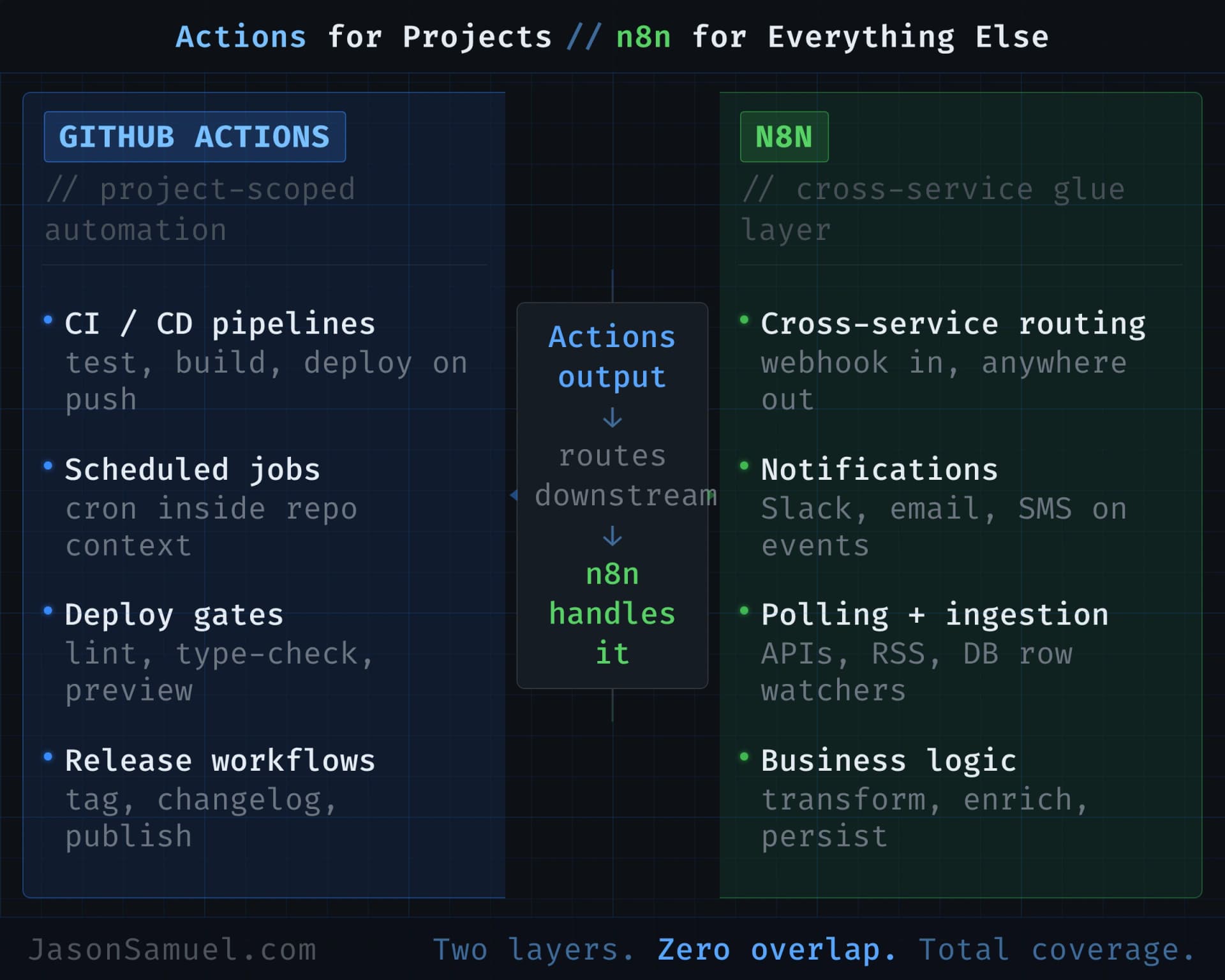
Once GitHub is your canonical home for everything, the next question is how things run on a schedule, in response to events, or as part of a pipeline. This is where it gets interesting, because there are basically two good answers and they complement each other rather than competing.
GitHub Actions is the automation engine built directly into GitHub. Every repository can have a .github/workflows folder with YAML files in it that describe things to run. Need a script to execute every six hours? Actions. Need a workflow that fires every time you push a commit, opens a pull request, or merges to main? Actions. Need a deployment that pauses for approval before it touches production? Actions has built-in environments with required-reviewer protection and wait timers. Need to run a job in parallel across Windows, Mac, and Linux? Actions does that natively because it has runners on all three.
The reason Actions is so good for the BuildOS lifestyle is that the workflows live in the same repo as the thing they automate. The automation is part of the project, not a separate system you have to remember exists. When you clone the repo to a new machine, the workflows come with it. When you delete the repo, the workflows are gone too. Nothing orphaned. Nothing forgotten.
GitHub Secrets is how you handle the credentials those workflows need. Every repository has an encrypted secrets store, plus you can scope secrets at the organization level or per environment (so your staging secrets are different from your production secrets). Inside a workflow, you reference them like ${{ secrets.STRIPE_KEY }} and Actions injects the value at runtime. They're never visible in logs. They never appear in plain text in your repo. Even repository collaborators can't read them; they can only use them in workflows.
There's a better pattern than static secrets for cloud credentials, though, and most people skip it the first time and put long-lived AWS or Azure keys in Secrets. The better pattern is called OIDC federation. It lets your GitHub Actions workflow authenticate to your cloud provider with short-lived tokens that expire in minutes, instead of long-lived static credentials. You configure it once in your cloud's identity service (IAM for AWS, Entra ID for Azure, Workload Identity for GCP), and from then on every workflow run gets a fresh token automatically. No static credentials anywhere. The first time you set this up takes an hour. Every subsequent project takes five minutes. If you're going to do anything serious with cloud resources, set up OIDC federation before you do anything else.
n8n is a different beast. It's a workflow automation platform that you can either self-host on your own infrastructure or run as a managed cloud service. Think Zapier or Make but open-source, with the option to run it on the same always-on server we've been talking about or just use their hosted cloud if you don't want to manage it yourself. Where Actions is great for "things that touch my code or my deploys," n8n is great for integration-heavy automation across many third-party services, especially when you want a visual canvas to wire things up.
I use n8n for things like: cross-posting notifications across Slack, email, and a ticketing system when something happens. Polling APIs that don't have webhooks and routing new records to multiple destinations. Triggering ad-hoc agent runs from a chat command. Fanning out alerts to PagerDuty plus email plus a specific person in WhatsApp. Pulling RSS feeds and routing items through filters before they hit me. None of those need to be in a Git repo. None of those benefit from the audit trail of a pull request. They're glue, and n8n is purpose-built for glue.
The thing I want to emphasize, because most people get this backwards, is these two tools don't compete; they layer. Actions is for "things that happen to my projects." n8n is for "things that happen because of my projects, downstream of them, in the wider ecosystem of services I touch." A typical workflow looks like this: Actions runs a scheduled job that produces some output, n8n picks up the output and routes it to wherever it needs to go (Slack, email, Notion, a webhook to another system). Each tool does what it's best at. Each tool stays simple because it's not trying to do everything.
Secret scanning solves the other half of the credentials problem. GitHub Secrets keeps credentials out of your workflow logs. But what keeps you from accidentally committing a key directly into your source code? This happens more than you'd think. I had it happen this week: an AI sub-agent writing documentation pulled API keys from memory and wrote them straight into a docs file. Gitleaks, running as a pre-commit hook, caught it at commit time and blocked the push. Without it, those keys would have been on GitHub, in the git history forever (deleting the file doesn't delete the history), and anyone with repo access could have extracted them.
Gitleaks is the tool I use. It's open-source (MIT), runs in under a second as a pre-commit hook, and scans your staged changes for anything that looks like a credential: API keys, tokens, passwords, connection strings, private keys, you name it. It uses regex pattern matching against a curated ruleset, and since v8.28 it supports composite rules that reduce false positives by requiring a credential pattern to appear near a related identifier (like "AWS" near a string that looks like an access key). Install it, add it to your pre-commit hooks, and every git commit gets scanned before it touches the repo. The agent sets this up for you if you ask.
Gitleaks has a few competitors worth knowing about. TruffleHog is the other major open-source option. Its differentiating feature is credential verification: when it finds something that looks like an API key, it makes a read-only API call to test whether the key is still active. This eliminates false positives where a key matches a pattern but has already been revoked. TruffleHog detects 800+ secret types and can scan beyond git into S3 buckets, Docker images, and Slack workspaces. The trade-off is speed. Because verification requires network requests, TruffleHog is slower than Gitleaks, sometimes significantly. The smart play is to run both: Gitleaks pre-commit for speed, TruffleHog in CI/CD for depth. detect-secrets from Yelp takes a different approach. It generates a baseline file that lets you mark known-safe strings and re-scan incrementally. It's built for onboarding secret scanning into legacy codebases where you have thousands of existing files and need to triage gradually rather than block everything on day one. GitGuardian is the commercial option. It monitors the public GitHub firehose for secrets leaked outside your control, which is a capability no open-source tool provides. If someone forks your repo and pushes a key to their public fork, GitGuardian catches it. ML-based filtering gives it the lowest false-positive rate (1-3%), but it's a paid SaaS product.
GitHub's own secret scanning is the platform-level defense. GitHub scans every push for known credential patterns from partner providers (AWS, Azure, Stripe, Twilio, dozens more) and alerts you automatically. For public repos, this is free. For private repos, GitHub now sells it as Secret Protection at $19 per month per active committer. The key feature at that tier is push protection: instead of alerting you after a secret hits the repo, it blocks the push before the secret ever lands on GitHub. This is the server-side backstop that catches what your local pre-commit hook missed. If you skipped installing gitleaks locally, or if a contributor pushes from a machine without the hook, push protection is the last line of defense. $19 per committer per month is cheap insurance for any project handling real credentials.
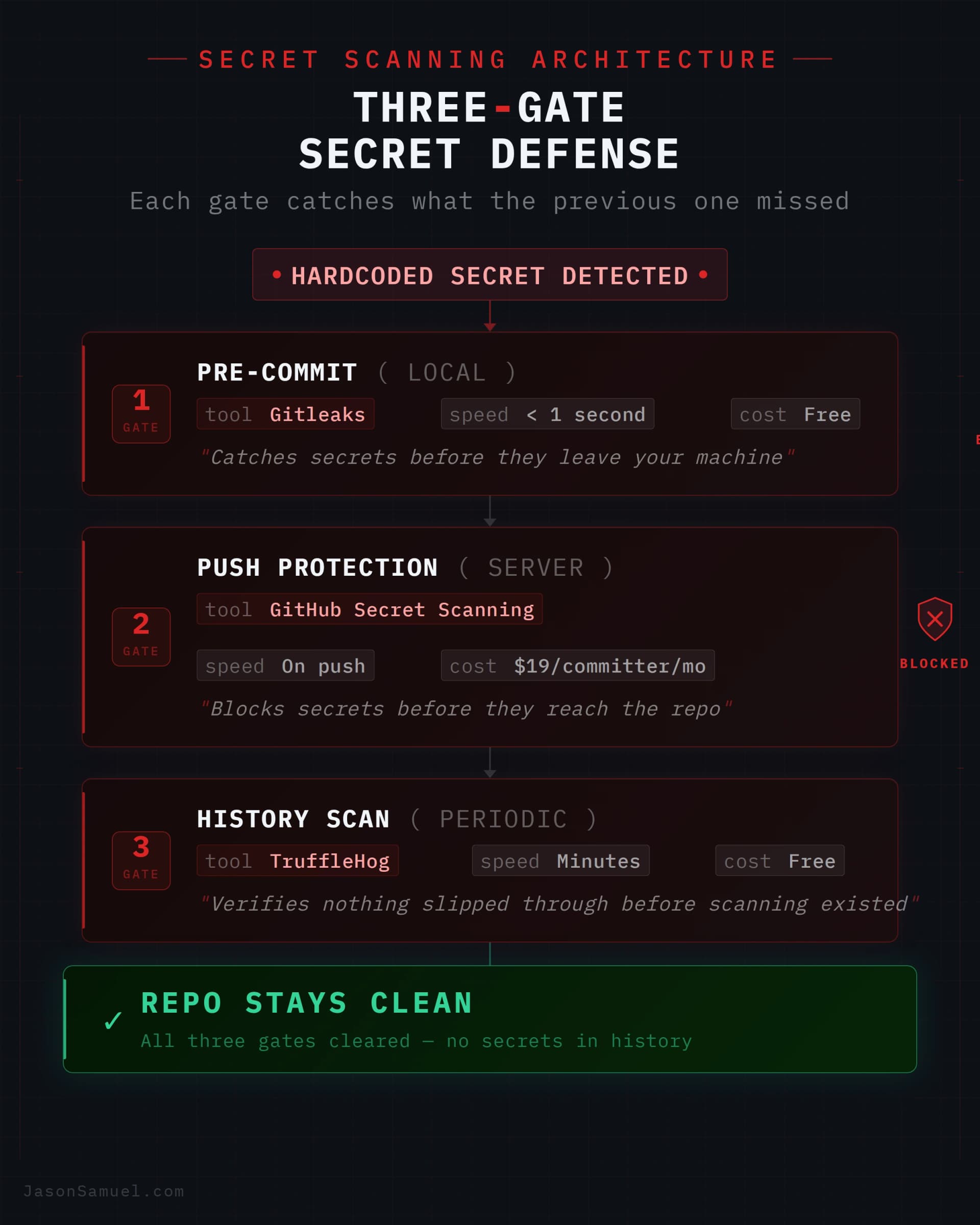
The mature approach is layered. Gitleaks pre-commit (free, local, instant). GitHub push protection (server-side backstop, catches what local hooks miss). TruffleHog periodic history scans (verifies nothing slipped through before you had scanning in place). Three gates, different positions, and the cost of all three combined is less than the cost of rotating one leaked production credential.
A third option worth naming so you can rule it out: plain cron on your server. Works fine as a backstop for tiny things. Terrible for anything that matters, because you have zero visibility, no central logging, no notifications when something fails, and no record of what changed in the cron file or when. If your server goes down at 3am, your scheduled job silently doesn't run and you don't find out until customers complain. Use Actions or n8n. Don't use cron for anything important.
The agent writes all of this for you, of course. You don't need to learn YAML for Actions, or the n8n node configuration, or any of the syntax. You describe what you want, the agent generates the workflow, you review it (especially the parts touching secrets, because the agent occasionally makes mistakes there), you commit it, and from then on it runs. The skill you're developing isn't YAML syntax. It's knowing what should happen and when, which is the architect's skill and the one you already have.
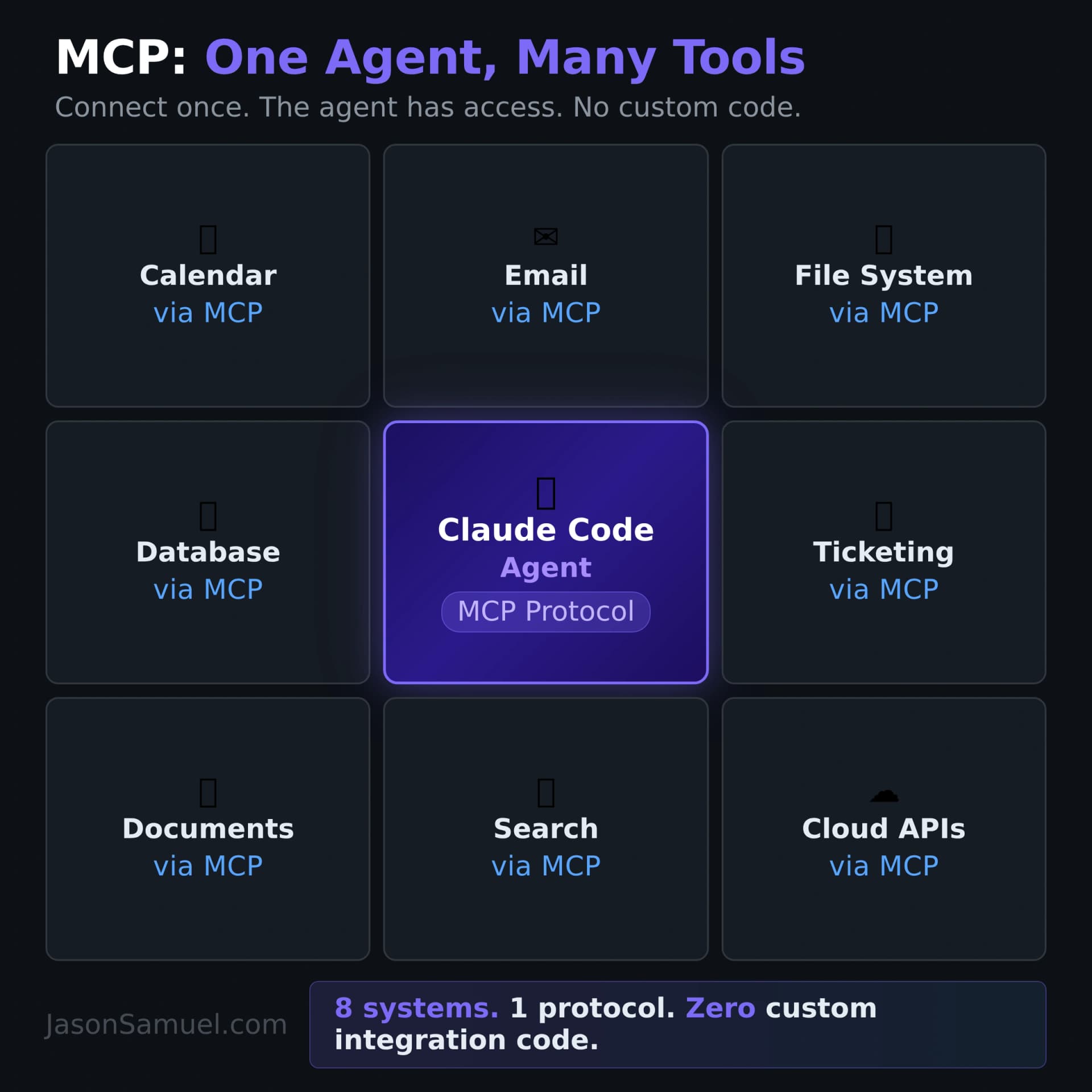
MCP: the protocol that's about to change how everything connects
I want to spend some time on this because it's the piece of the stack that's moving fastest right now, and the piece I think will look obvious in two years even though it's still niche today.
The problem MCP solves is one any IT leader recognizes: the integration explosion. You have a bunch of systems that need to talk to each other, and historically every pair needed a custom integration. Stripe to Slack. Salesforce to your data warehouse. Your help desk to your monitoring tool. Email to your CRM. Every one of those is an integration project. Multiply by all the systems any modern business runs and you get the iPaaS market: Mulesoft, Workato, Boomi, Zapier, the whole industry built around managing this complexity.
Now add AI agents to the mix and the problem gets exponentially worse. You don't have N systems integrating with M systems anymore. You have N AI agents, each of which might want to talk to M systems, and the combinatorics explode. Every agent vendor had to write its own way of "calling tools." OpenAI had function-calling. Anthropic had tool-use. Google had its own. Microsoft had Copilot extensions. Every tool vendor had to write a different wrapper for each agent. It was an integration disaster waiting to happen.
The Model Context Protocol (MCP) is the standard that solves it. Anthropic introduced it in late 2024. Within a year, OpenAI adopted it. Google adopted it. Microsoft adopted it. By late 2025 it had been donated to the Agentic AI Foundation (AAIF) under the Linux Foundation, jointly stewarded by Anthropic, OpenAI, Google, Microsoft, AWS, and Block. By 2026, OpenAI deprecated its proprietary Assistants API in favor of MCP. Stripe ships an official MCP server. GitHub ships one. Hundreds of vendors ship them. Thousands of community ones exist. It's one of the fastest standardizations in the history of developer tooling, and it's happening because the underlying pain was so universal.
The mental model that helps me explain MCP to other technologists is MCP is USB-C for AI. Before USB-C, you needed a different cable for every device. Now you have one cable that works with everything. Before MCP, every agent needed custom integration code for every tool. Now you have one protocol. Any agent that speaks MCP can use any tool that speaks MCP, with no custom integration work.
What does this mean practically for someone running the stack I'm describing? It means that any time you want your agent to interact with an external service, instead of writing custom code or building a brittle API wrapper, you connect an MCP server. Want the agent to access your Notion workspace? There's an MCP server. Want it to query your Postgres database? There's an MCP server. Want it to send and receive email? There's an MCP server. Want it to manage your calendar? Read your filesystem on a remote machine? Update tickets in your ticketing system? MCP servers, all the way down. You connect them once, configure permissions, and the agent has access. No custom code.
Now, the misconception I want to head off: MCP does not replace APIs. This is the thing people get wrong on first reading. APIs still exist. REST APIs still serve web frontends, mobile apps, and human developers. MCP is a different layer of abstraction that sits on top of APIs. Most MCP servers are thin wrappers that translate MCP calls into normal API calls underneath. The APIs aren't going away. What's going away is the bespoke glue code you used to write to get an agent to use those APIs. That glue code is now somebody else's open-source MCP server.
The reason this matters for a non-developer audience is that MCP democratizes integration. When the integration code is custom, you need a developer to write it. When the integration is "connect this MCP server and the agent knows what to do," you don't. You're back to the architect's level: knowing what should connect to what, not how to write the connection code. That's a skill IT leaders and operators have always had. It just became enormously more valuable.
If you're building something today and you find yourself thinking "I need my agent to talk to X," your first question should be "is there an MCP server for X?" The answer is increasingly yes. And when the answer is no, the work to create one is small enough that the agent itself can often build one for you, especially for services with decent existing APIs.
The broader signal: products without MCP servers are becoming progressively less visible to AI-first workflows. Just like mobile-first changed which products got used in the 2010s, MCP-first is going to be one of the things that decides which products get used in the late 2020s. The vendors that ship official MCP servers early are going to find themselves naturally adopted inside customer workflows where an agent is the user, while vendors who treat MCP as a low priority will increasingly be reached only through whatever generic browser-automation fallback the agent can manage. The early-mover advantage here is real. This is the kind of shift that's easy to underestimate in the short term and impossible to catch up on once you're behind, because by the time the laggards realize what happened, the customer workflows have already standardized around the early movers.
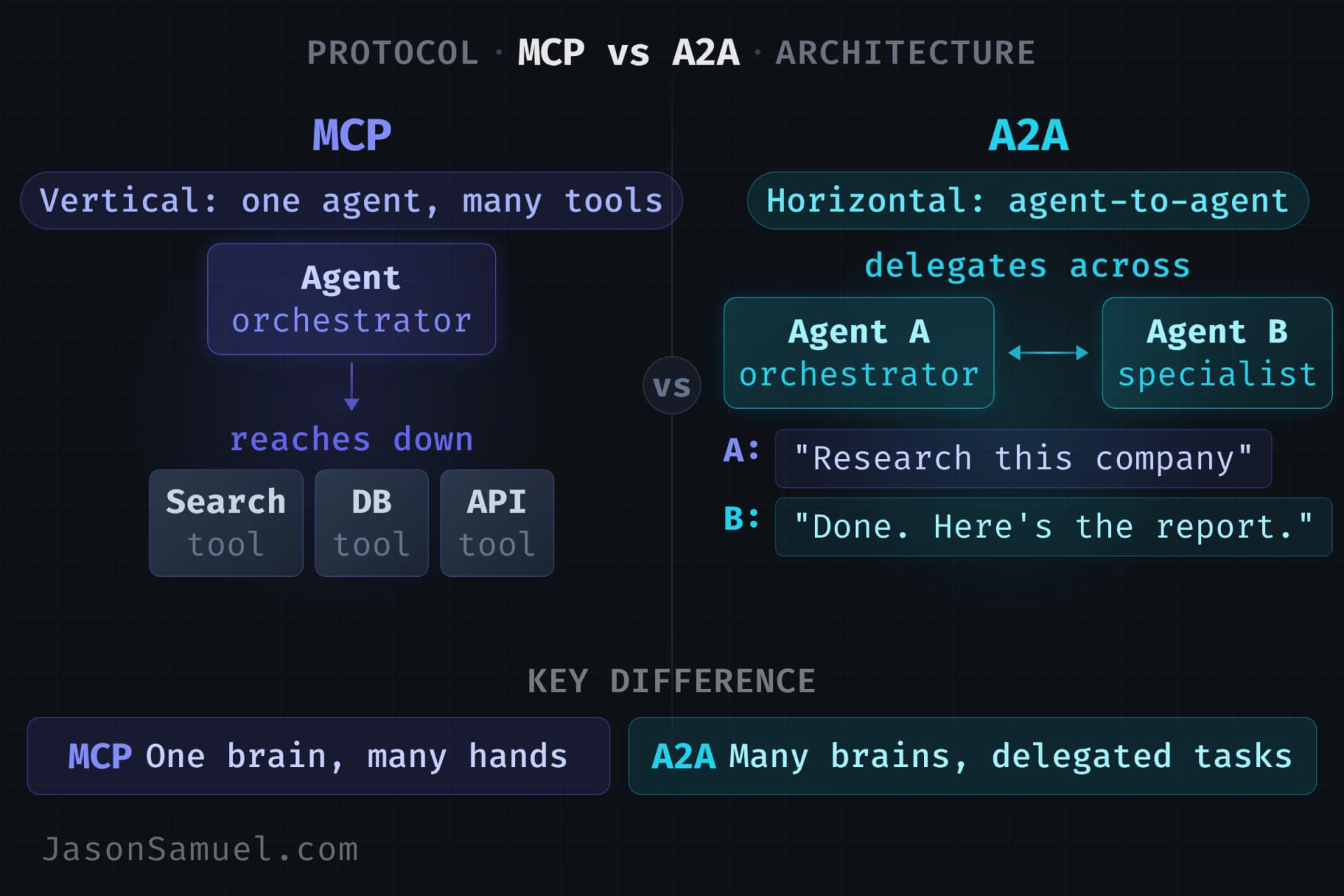
A2A: the other protocol you'll start hearing about
While we're on the topic of protocols eating glue code, there's a second one you should know about, even though it's newer and you'll use it later than MCP. It's called A2A, short for Agent-to-Agent. Google introduced it in April 2025. By April 2026 it had crossed 150+ organizations in production (including AWS, Cisco, Google, IBM, Microsoft, Salesforce, SAP, and ServiceNow), been donated to the Linux Foundation alongside MCP, absorbed IBM's competing ACP protocol when IBM merged its standard into A2A in August 2025, and shipped v1.0 stable in early 2026. It's not theoretical. It's running real workflows at Salesforce, SAP, ServiceNow, Workday, Microsoft, AWS, and a long list of others.
Pay particular attention to IBM here. IBM doesn't just make software; they own the infrastructure orchestration layer that most of the Fortune 500 runs on. They acquired Red Hat (which owns Kubernetes through OpenShift, Ansible for automation, and the enterprise Linux that runs most of the world's servers) and HashiCorp (which owns Terraform, Vault, Consul, and the infrastructure-as-code stack that provisions everything from cloud VMs to secret management). When IBM decides to merge its own competing protocol into A2A rather than fight it, that's not a small company hedging its bets. That's the company that controls the plumbing of enterprise infrastructure saying "this is the standard." The same company that owns the tools enterprises use to orchestrate Kubernetes clusters, manage secrets, provision infrastructure, and automate deployments is now building on A2A for agent-to-agent communication. If you work in enterprise IT, that signal matters more than any benchmark or feature comparison.
Here's the cleanest way to think about how MCP and A2A relate:
MCP is the vertical layer. A2A is the horizontal layer.
MCP connects an agent down to tools and data. The agent reaches down through MCP to call Stripe, query Postgres, read your filesystem, manage your calendar. One agent, many tools. Vertical.
A2A connects an agent across to other agents. Your customer-support agent hands off a refund question to a finance agent. Your research agent delegates a fact-check to a verification agent. Your scheduling agent coordinates with someone else's scheduling agent to find a meeting time. Multiple agents, each specialized, talking to each other. Horizontal.
Here's the way I explain it when I'm at conferences and presentations. Think of the AI as a brain. Now you're building it a body.
MCP gives it eyes. The ability to see into your systems -- read your databases, scan your file systems, observe your deployment status, monitor your logs. Without eyes, the brain is guessing. With MCP connected to your data sources, it sees the actual state of everything.
MCP gives it limbs. Hands to reach out and manipulate things -- write to databases, call APIs, modify files, process payments. Legs to move between different places -- your calendar, your email, your cloud infrastructure, your deployment pipeline. Eyes let it see. Limbs let it act.
A2A gives it ears and a tongue. The ability to listen to other agents and speak to them. Without A2A, each brain works alone in silence. With A2A, brains coordinate, delegate, negotiate, report back.
Hooks give it a nervous system. The reflexes that fire automatically -- pain signals that stop the hand before it touches something hot. A hook that blocks a dangerous command is a reflex. A hook that validates data before it ships is a reflex. You don't consciously think about reflexes. They just protect you.
CLAUDE.md gives it memory and values. The long-term knowledge of who it is, what it cares about, what the rules are. Without CLAUDE.md, every session starts from zero. With it, the agent wakes up already knowing the project, the conventions, the boundaries, the priorities.
Voice gives it hearing. Your speech, captured by the OS dictation layer, streamed into the terminal, absorbed by the agent. The agent doesn't care about your accent, your pauses, your filler words. It hears intent.
Git gives it a skeleton. The structural framework everything hangs on. Every project, every config, every piece of work has a durable frame that persists, tracks history, and can be rebuilt from scratch.
You're building a body, one protocol at a time. Eyes and limbs first (MCP, which is why you'll use it before anything else). Then communication (A2A, which becomes essential as your stack grows and you have multiple agents that need to talk to each other). Then reflexes (hooks). Then memory (CLAUDE.md). Then hearing (voice). The skeleton (Git) is there from the beginning, holding everything together.
And if you want to push the analogy one more step: yes, you're building something that didn't exist before. Every version of it will have quirks. The early versions will be rough. You'll spend time debugging things that feel like they should just work. But unlike Frankenstein's story, this one doesn't end in tragedy. The creation isn't something you lose control of. It's something you refine. Every hook you add, every rule you write, every iteration you push through makes it more capable and more aligned with what you actually want. The early prototype is clunky. The version you're running six months from now, after hundreds of small improvements, is something you'll genuinely be proud of. And unlike a human team, it never forgets the improvements. Every fix is permanent. Every lesson is encoded. The thing you build gets better monotonically, session after session, and it compounds in ways that human workflows simply don't.
And here's the analogy that locks it in: if MCP is USB-C for AI, A2A is HTTP for AI agents.
Think about what HTTP eventually did. Through the late 80s and most of the 90s, every online service was a walled garden. CompuServe had its own commands. AOL had its own. Prodigy had its own. BBSes each had their own login screens, their own menus, their own file transfer quirks. If you wanted to move from one to another, you logged out, dialed a different number, learned a different system. The networks existed, but they didn't talk to each other in any standard way. Each one was an island. I lived in this world. I started with BBSes, dialing into local boards at 2400 baud, then 14.4, then 28.8, working my way through Hayes-compatible modems and Fido message networks before the commercial online services and the public web were even on most people's radar.
And the islands were hostile to anyone trying to operate across them. If you came up in this era, you'll remember the specifics. AOL Punt wasn't a metaphor, it was a literal cottage industry of kids running scripts to kick other users off AOL by exploiting client-side weaknesses, because AOL was a closed system where the only people who could even reach you were other AOL users and the only recourse you had was AOL's own customer service. ICQ assigned you a numeric UIN (mine was a seven-digit one if I remember right) and that number worked beautifully inside ICQ and was meaningless everywhere else. Want to message someone on AIM from your ICQ account? Couldn't. Want to send a message to someone on MSN Messenger from Yahoo Messenger? Couldn't. IRC was its own universe entirely, and if you ran mIRC on Windows like most people did, half your time was spent loading defensive scripts and add-ons to protect yourself from the constant barrage of DCC exploits, nick collisions, channel takeover attempts, flood attacks, CTCP abuse, and the dozen other ways someone could mess with you over a protocol that never quite caught up to the adversarial reality of the late 90s. Every chat network was its own island, with its own protocol, its own client wars, and its own folk knowledge of "things you have to do to not get owned." The only way to talk across them was running multiple clients side by side and switching between them constantly. Moving a file across these networks meant negotiating which protocol to speak: xmodem if the other side was old enough, ymodem if you were lucky, zmodem if the stars aligned and both sides actually supported it cleanly. Every transfer started with a small negotiation of how you were going to transfer, before the actual transfer could happen. The mechanical overhead of just moving bits between two computers was significant, and every operator had their preferences and quirks. Nothing worked the same way twice across different systems.
Here's where the timeline I always see compressed in tech writing gets it wrong. HTTP and the World Wide Web didn't come along after the walled-garden era. They overlapped with it for the entire 1990s. Tim Berners-Lee invented HTTP and HTML at CERN at the very start of the decade, and the open web was already growing in parallel with AOL, CompuServe, Prodigy, and the BBS scene throughout the years those services were peaking. The walled gardens didn't lose to a sudden HTTP shockwave. They lost gradually, as users figured out that the broader web offered more than any single walled garden could, and as the walled gardens themselves added internet gateways that ironically taught users they didn't need the walled garden in the first place. AOL kept growing through the early 2000s even though HTTP had been around for over a decade by then. The end didn't come from a single protocol moment. It came from a long, gradual realization that the open standard offered more than any closed system could.
CERN is a place I actually have a connection to. I visited the lab in 2025 and do volunteer work for them, and I made a video about how particle physics is powering the next-gen AI revolution that walks through the connection between what CERN built (the web) and what they're now doing with agentic AI on top of it. Standing in the place where Berners-Lee wrote the first browser, looking at the NeXT machine that ran the first web server, made the timeline I'm describing here viscerally real to me in a way it hadn't been before.
The protocol won eventually, and that's the part of the story that matters for the analogy. HTTP didn't win because it was technically superior to AOL's proprietary protocols. It won because it was a standard anyone could implement, anyone could consume, and discovery happened automatically through links. You didn't need to know in advance that a service existed. You followed a link, your browser spoke HTTP, the server spoke HTTP, the page rendered. Done. No protocol negotiation. No client wars. No "well actually you need to install our specific software first." Over the course of about fifteen years, that openness compounded until the closed systems just couldn't keep up.
The same dynamic is playing out in the agent world right now, one layer up. Before A2A, every multi-agent system was a walled garden. If you built an agent on LangGraph, it could only easily talk to other LangGraph agents. If your company's agents ran on AutoGen, they couldn't easily delegate to a partner company's agents running on something else. Every integration was custom. Every cross-vendor handoff was a bespoke project. We're in the AOL-versus-CompuServe-versus-Prodigy moment of agent infrastructure right now, and A2A is the protocol that turns those walled gardens into a connected web. Each agent publishes an Agent Card (the agent equivalent of a website's homepage and /.well-known/ metadata combined) that advertises what it can do, what endpoints it accepts, and how to authenticate against it. Any other A2A-speaking agent can read that card, place a structured call, and delegate work. No custom integration. No pre-arranged handshake. The protocol handles the discovery, the addressing, the authentication, and the task lifecycle.
HTTPS specifically maps onto A2A's security model. The web didn't really take off for serious commerce until HTTPS made authenticated, encrypted communication routine. A2A ships with signed Agent Cards and OAuth-based authentication as first-class concerns, not afterthoughts. When your finance agent receives a delegated task from a research agent at a different company, it can verify that the request actually came from who it claims to be, with the right scopes, before doing anything with it. That's the agent-layer equivalent of HTTPS certificates: trust, baked into the protocol.
USB-C connects devices to peripherals. HTTP connects clients to servers, and through that, the entire web got built. MCP and A2A do the same two things for AI agents. One protocol for tools. One protocol for peers. Together they're the foundation that everything else in the agent ecosystem will be built on top of, the same way every modern internet service is built on top of HTTP plus some kind of device-to-peripheral I/O.
They're not competing. They're stacked. A production multi-agent system in 2026 uses both: MCP for how each agent reaches its tools, A2A for how agents collaborate with each other across organizational and vendor boundaries. Google was explicit about this when they launched A2A. They built it specifically to complement MCP, not replace it.
The thing that makes A2A useful for someone running a BuildOS-style stack is specialization without lock-in. You can have an agent built on Claude that needs to delegate a piece of work to an agent built on Gemini. A year ago that was either impossible or required a custom integration project. With A2A, both agents speak the same protocol, advertise their capabilities through a thing called an Agent Card (a standardized self-description that lives at /.well-known/agent-card.json on the agent's endpoint), and can hand work to each other with proper authentication, signed identity claims, and a defined task lifecycle (submitted, working, input-required, completed, failed, canceled, rejected). The receiving agent treats the request as a structured task, not a free-text prompt. You get the same kind of clean handoff you'd get between microservices in a well-designed software architecture, except the services are AI agents that can reason about ambiguous instructions.
I want to be honest about where I am personally with A2A. I haven't deployed A2A across my own stack yet. The protocol is real, the production deployments at the companies named above are real, and the trajectory is clear, but in my own day-to-day building I'm still in the world of one primary agent (Claude Code) reaching out to MCP servers for tools. The cross-agent delegation pattern A2A enables, where a primary agent hands a subtask to a specialized agent at a different vendor, is something I'm watching mature rather than something I'm running in production. I'm including A2A in this article because I think anyone who internalizes the BuildOS philosophy now will want to know what's coming, and because the foundations (signed identity, OAuth-style scopes, structured task lifecycles, agent cards as discovery documents) are durable concepts you should understand even before you personally need them. When I do start using A2A in earnest, I'll write the follow-up piece with the lessons. For now, treat this section as a heads-up about the protocol that's clearly going to matter in the next twelve to eighteen months, not as a how-I-use-it walkthrough.
A2A is earlier in its lifecycle than MCP. As of mid-2026, MCP is everywhere. Every major AI vendor has adopted it, official servers exist for hundreds of products from Stripe and GitHub on down, and the official MCP code libraries that developers install to actually use the protocol (the SDKs on the public Python and TypeScript package registries) pull 97 million downloads per month according to Anthropic's own published numbers. That's industrial-scale adoption. A2A is at an earlier point on the same curve: 150+ organizations running it in production, integrated into Azure AI Foundry, Amazon Bedrock, and Google Cloud, with active deployments at Salesforce, SAP, ServiceNow, Workday, and others, but the ecosystem of available A2A-speaking agents is still thinner than the ecosystem of MCP servers. If you're getting started today, MCP is going to be the protocol you use; A2A is the protocol you'll learn about now and start touching as the ecosystem fills in over the next year. By 2027 I expect that balance to shift as multi-agent systems become the default architecture for anything serious. The two protocols are clearly the foundation of the next ten years of agent infrastructure, the same way HTTP and SMTP were the foundation of the last thirty years of internet infrastructure. Worth understanding now, even if you don't need A2A immediately.
One specific signal worth watching: when MCP launched in late 2024, plenty of IT leaders dismissed it as a niche Anthropic thing. By late 2025 it was a Linux Foundation standard adopted by every major AI vendor. A2A is on the same trajectory, one year behind. Don't make the same mistake of dismissing it because the timeline feels fast. The timeline is fast because the underlying problem is real and the solution works.
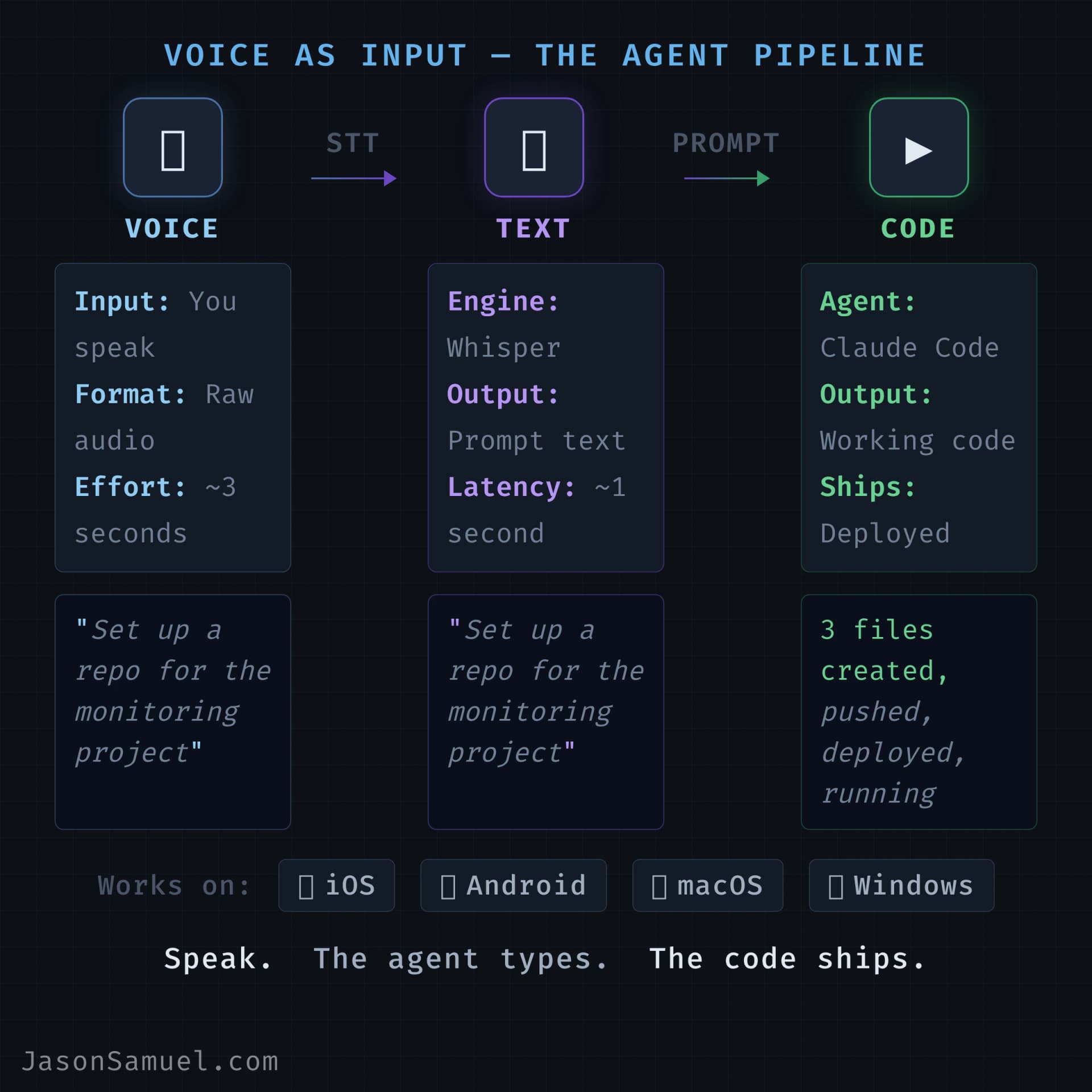
Voice control: the input modality that finally fits
I want to be honest about how I use this stack in 2026, because the typing-and-shell-commands description doesn't capture it. I talk to the agent more than I type to it. Out loud. On Windows 11 through Voice Access and Voice Typing. On macOS through Voice Control. On iOS through the native keyboard mic on my iPhone and iPad. While walking. Mid-workout between sets. In the sauna and cold plunge when the mood is right (AirPods in, phone in the sauna with me or off the side of the plunge, voice command into the tmux session, the agent works while I either heat up or freeze). While in the car (hands-free, dictating prompts for the agent to work on while I'm driving). Waiting in line somewhere. Pacing around between meetings. Voice has become the dominant input mode for me, and I think it'll become the dominant mode for most people once they realize it works.
The reason voice works now, when it didn't work with Siri or Alexa or the previous wave of voice assistants, is that the agent absorbs imprecision. With Siri you had to phrase things just right. With an agent, you can say "uh, can you, like, set up a new repo for that project I was thinking about, you know, the news monitoring one, and pull in the same scraping library we used for the other one, and put a draft README in there I can come back and fill in later" and it just works. The agent extracts the intent from sloppy prose. You don't have to format your speech as a command. You can talk to it the way you'd talk to a smart assistant.
The other half of why voice works now is that speech recognition itself got dramatically better in the past few years, and most people haven't fully realized how much. OpenAI's Whisper model is what changed it. Before Whisper, accurate speech recognition was either expensive cloud-only services like Dragon and Nuance, locked into one vendor's ecosystem (Apple, Google, Microsoft each with their own), or just bad. Whisper changed that overnight. Open-source, runs on a laptop, hits accuracy levels on clean audio that were science-fiction a few years ago. Just as importantly, it raised the floor on what users now expect from any voice input. The voice tools built into Windows 11 and macOS today are dramatically better than they were even two years ago, partly because the underlying recognition models took a generational leap, and partly because Whisper proved what was possible and the platform vendors had to catch up. There's now a whole ecosystem of local-first dictation tools that run Whisper-style models on consumer hardware with no audio leaving your device. The combined effect: voice input went from "occasionally useful, often frustrating" to "the fastest way to get text into a machine for most tasks" in about three years. If you tried voice input a few years ago and gave up, you owe it another look. The thing you tried doesn't exist anymore.
On Windows 11, you've got two built-in voice tools that work great. Voice Typing is the dictation tool, triggered with Win + H. Click into any text field, hit the shortcut, talk, your words appear. It handles punctuation automatically on Copilot+ PCs with fluid dictation, and the recognition quality is good now (it was rough for years; it's not anymore). Voice Access is the more powerful tool, the Windows equivalent of macOS Voice Control. It has dictation mode, command mode for clicking and navigating, and the ability to define custom voice commands that map to keystrokes, app launches, or scripts. Voice Access lives under Settings → Accessibility → Speech. For driving the agent inside Termius on Windows, the workflow is similar to the Mac one: dictate the prose prompts, use custom commands for the structured stuff like detaching tmux sessions or launching the agent in autonomous mode. Microsoft has been investing heavily in the speech stack since 2024, and Windows 11's voice tooling now sits roughly on par with macOS for this kind of work.
On macOS, the tool I use is Voice Control, found under Accessibility settings. There are two voice features on macOS, and they conflict with each other, which trips up most people. There's the simpler Dictation (under Keyboard settings) and there's the more powerful Voice Control (under Accessibility). You can only have one on at a time. Pick Voice Control. I'll mention one annoying detail I hit personally: standard Dictation, in my testing, did not reliably get text into the Termius terminal when running inside a tmux session. The dictation buffer would form but the text wouldn't land. Voice Control's Dictation Mode worked fine. If you hit the same wall, don't fight it, just commit to Voice Control.
What makes Voice Control more powerful than Dictation is custom commands. You can map any spoken phrase to any action: text to insert, key combo to press, shell command to run. I have a small library of these for things I do constantly. "Detach session" triggers the tmux detach keystroke. "Yolo mode" types the command to start the agent in autonomous mode. "Switch to project foo" runs the cd command and switches tmux panes. Each of these is configured once, in System Settings, scoped to Termius so they don't fire in other apps. Windows Voice Access has the equivalent feature, just configured under its own settings panel.
Do this on both Windows and Mac: teach the voice system your vocabulary. Words like "tmux," "Anthropic," "Claude," "Postgres," and your own product names will get autocorrected into something useless by default. On macOS, add them to the custom vocabulary list under Voice Control settings. On Windows, you can train Voice Access by going through its vocabulary additions in settings. The autocorrect mangling stops immediately and it's like getting a new tool.
On mobile, whether you're on iOS or Android, the tool is just the native keyboard's microphone button. On iOS, tap the mic icon on the bottom-right of the keyboard. On Android, tap the mic icon on whichever keyboard you use (most major Android keyboards have one built in). Open Termius, tap into the terminal, tap the mic, talk. The OS dictation streams what you say straight into the Termius input buffer like any other text field. It works because mobile OS dictation is a system-level service that doesn't have the compatibility issues macOS Dictation has with terminal apps.
Three things make mobile voice fluent rather than a novelty.
First, speak the punctuation you need. "Dash dash" produces --. "Slash" produces /. "Open quote ... close quote" wraps things in quotes. "New line" inserts a newline. Both iOS and Android handle this well once you commit. For dense command-line flags, voice gets painful, so use Termius Snippets for those. For natural-language prompts to the agent, voice is the right tool.
Second, customize the Termius keyboard add-on so the modifier keys are visible. The combination of "talk the words, tap the modifiers" is what makes the phone feel like a real terminal, regardless of platform.
Third, use snippets aggressively for the structured stuff. Voice for prose, snippets for syntax. The natural pattern is: tap a snippet to get into the agent, then voice-dictate the actual prompt. Snippets handle the structure, voice handles the intent.
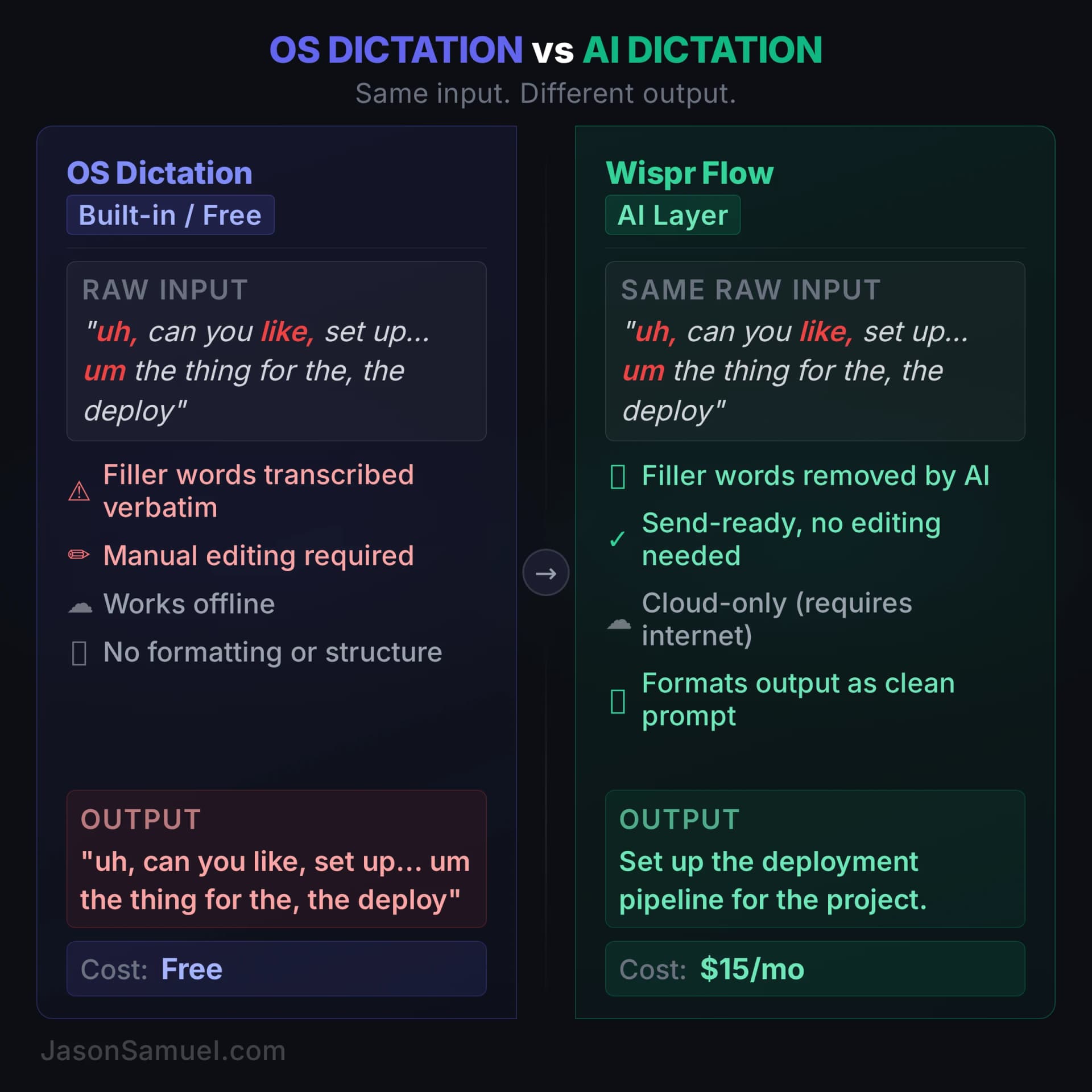
Wispr Flow: when OS dictation isn't enough
Everything I described above uses the free voice tools built into your operating system. They work. They're good. For a lot of people, they're all you need. But there's a next level, and it's worth understanding even if you decide it's not for you yet.
Wispr Flow is an AI dictation layer that sits on top of everything. It works on Mac, Windows, iPhone, and Android, in any text field in any app. The difference between Wispr Flow and OS-native dictation is what happens after your words are transcribed. With Apple Voice Control or Windows Voice Access, you get your raw speech. Every "uh," every false start, every sentence you restructured mid-thought comes through verbatim. With Wispr Flow, the AI cleans it up. You ramble, it writes. "Uh, can you, like, set up a new repo for that project, you know, the monitoring one, and pull in the same library we used before" becomes a clean, formatted prompt. The filler words vanish. The intent stays.
The speed difference is real. Wispr Flow claims 4x faster than keyboard typing: 220 words per minute via voice versus 45 WPM typing. Independent benchmarks put it around 179 WPM without errors in a quiet environment. Either number is dramatically faster than typing, and the AI post-processing means the output is closer to send-ready than anything OS dictation produces.
For developers and technical users, Wispr Flow has a few things the OS tools don't. A personal dictionary that learns words like "tmux," "Supabase," "Prisma," and your product names, so they stop getting autocorrected into something wrong. (OS dictation has custom vocabulary too, but Wispr Flow's learns from context rather than requiring manual additions.) A snippet library for voice shortcuts: say a trigger phrase and it expands into a full block of text, formatted how you want it. Native integration with VS Code, Cursor, Slack, Claude, ChatGPT, and 40+ other apps. It works in the terminal. It works in your IDE. It works in your email.
The honest trade-offs. Wispr Flow costs $15 per month ($12 if billed annually). All transcription happens in the cloud, so there's no offline mode and your audio leaves your device. They're SOC 2 Type II certified and HIPAA-eligible, but if the idea of your voice going to a server bothers you, this isn't the tool. On Windows, the app uses around 800 MB of RAM even when idle, and some users report it freezing target applications like VS Code during dictation. The Trustpilot reviews are mixed (2.7 out of 5), mostly around reliability complaints on Windows. On Mac and mobile, reports are considerably better.
One more honest limitation specific to this stack: Wispr Flow doesn't work inside a tmux session in Termius. The dictation layer doesn't inject text into the terminal the way native OS dictation does. So for the actual BuildOS workflow, talking to the agent inside tmux, I still use the built-in OS voice tools. When I want Wispr Flow's AI cleanup, I dictate into a text editor first, then copy-paste into the terminal. It's a workaround, not a solution. Honestly, for the go-go-go BuildOS lifestyle where you're firing off prompts to the agent all day, the native OS dictation is usually enough. Claude is genuinely good at parsing messy speech, figuring out your intent, and ignoring the filler. You don't need perfectly formatted input when the agent on the other end is smart enough to handle imprecise language. Wispr Flow is great for longer-form writing, emails, documentation, and anything where you want polished output without editing. But for rapid-fire agent prompts in a terminal session, the free OS tools do the job. If someone figures out how to make Wispr Flow work cleanly inside tmux, I'd love to hear about it in the comments.
Where Wispr Flow fits in this stack: it's the upgrade path for everything outside the terminal. Start with the free OS tools described above. Get comfortable with voice as an input mode. If you find yourself constantly editing dictated text to remove filler words and fix formatting for non-terminal work, that's the friction Wispr Flow removes. The OS tools are free and work offline. Wispr Flow costs money but gives you output you can send without editing. You'll know within the 14-day free trial whether the AI cleanup layer is worth $15 a month to you.
The handoff between your desktop and your phone is where the whole architecture pays off, regardless of which OS combination you're running. Start a long-running task on your Windows or Mac box via voice, detach the tmux session, close the lid, go do something else. Two hours later on a train, open Termius on the phone, tap the saved host, you're back in the same session, the task is done, the output is in the scrollback. Tap the mic, say "summarize what happened and tell me if there's anything I need to act on." The agent reads the scrollback and tells you. The desktop was for setting things in motion. The phone is for steering and approving while you're doing something else. Both are windows into the same persistent session.
This is the lived experience of "build at the speed of thought" more than any other single thing. The work isn't on your laptop. The work isn't on your phone. The work is on a small Linux box somewhere, and you're just talking to it from wherever you happen to be standing.
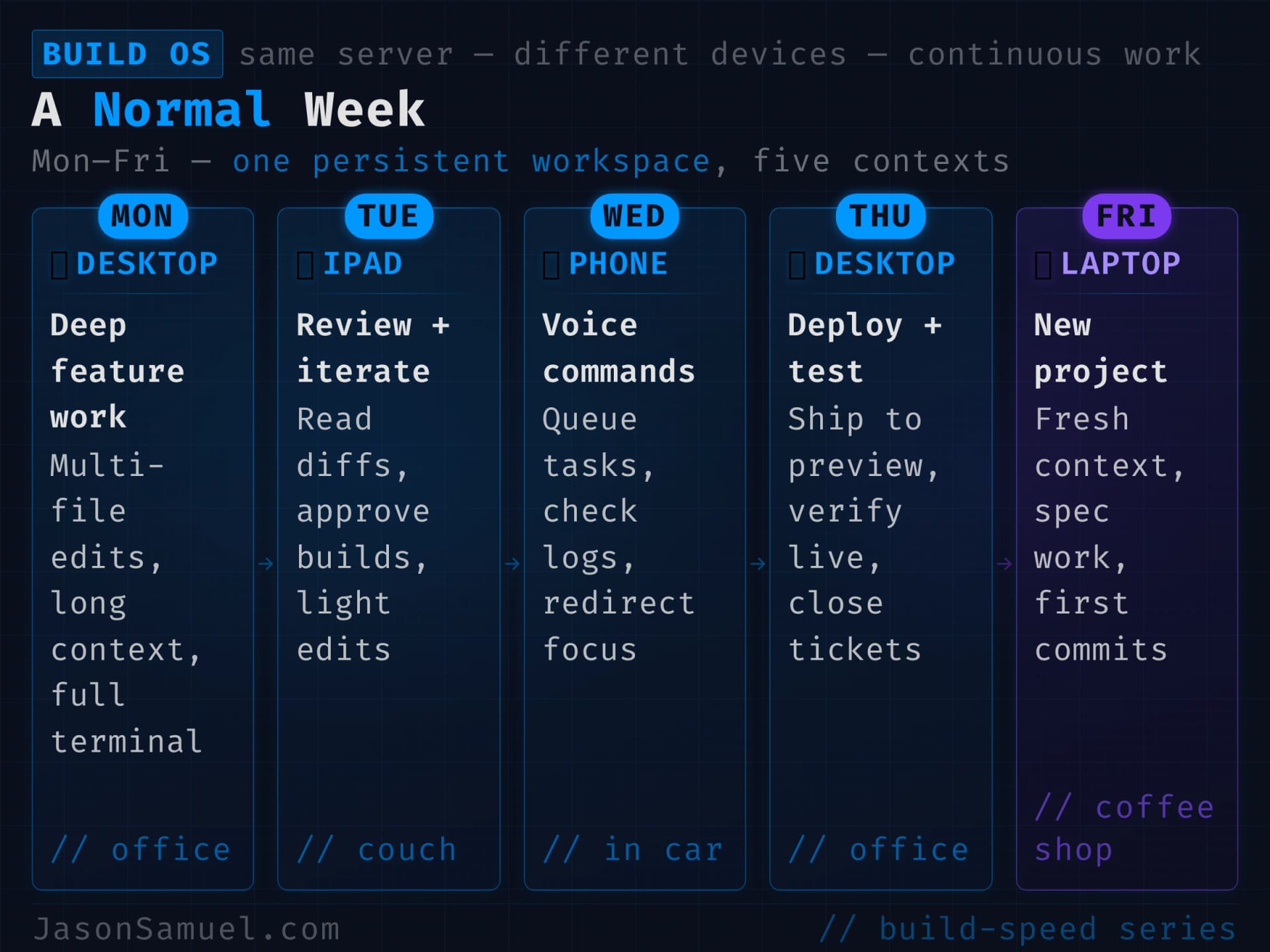
What this looks like in a normal week
Let me give a concrete picture of how this plays out across a normal week, because the abstract description doesn't capture the texture.
Monday morning. I'm having coffee at the kitchen counter, scrolling news on my phone. I see something happening in a sector I care about and I think "I want to track this." I open Termius on the phone, tap into my server, the tmux session is waiting where I left it Friday. I tap the mic, say "create a new project called sector-tracker, set it up to scrape these three sources daily, summarize what changed, and post a digest to the Notion workspace I use for monitoring." The agent starts working. I finish my coffee.
Tuesday afternoon. I'm at my desk on the desktop (might be Windows that day, might be Mac, it doesn't matter which). The agent has been running the daily digest job for two days now. I notice one of the summaries missed an important detail. I tell the agent (via voice into Termius, on the desktop now), "look at yesterday's summary for sector-tracker, the third item is wrong because it missed context about the regulatory background. Update the prompt to include a regulatory-context section, and rerun yesterday's digest as a one-time backfill so I can see what it should have looked like." Agent does it. Five minutes of my time.
Wednesday. I'm on a call. Halfway through, I realize the way someone is describing a problem is exactly the kind of thing I built a tool for last year. I haven't used that tool in two months and I can't remember if it still works. I open Termius on the iPad next to me, attach to the session, tap mic, say "check if the log-parser tool still runs cleanly, do a test run against the last 24 hours of server logs." Agent starts. I keep listening to the call. By the time the call ends, I have an answer.
Thursday evening. I have an idea for a new content piece for my website. I draft the outline by talking to the agent in the middle of a workout, between sets. The agent is patient. It doesn't care that I'm winded. It doesn't care that I'm breathing hard into the mic. It doesn't care about the ums, the pauses, the half-finished sentences where I change direction mid-thought. The voice dictation captures all of it, messy and raw, and Claude parses through the noise and extracts the intent anyway. That's the part that makes this work: the agent on the receiving end is smart enough to handle imperfect input. After the workout I move to the sauna and keep going, voice command into the same tmux session, the agent picks up right where the workout-pause left off, no context lost, no re-explaining. Then into the cold plunge for the recovery side of the protocol. Yes, I have literally Claude-coded from the sauna and the cold plunge. The actual setup is unglamorous: AirPods in my ears, iPhone in the sauna with me, voice control through the iPhone keyboard mic into the persistent session on the server. Modern iPhones can take a surprising amount of water exposure and sauna heat before they complain. I only pull the phone outside the door if it starts to overheat and throws the temperature warning. Most of the time it just rides out the session next to me. For the plunge, the phone sits off the side and I voice through the AirPods. The agent works while I either bake at around 195°F in the sauna or hold at roughly 45°F in the cold plunge.
Here's the deeper point about why this matters, beyond the novelty. The state of mind when you're in the sauna or the cold plunge, or in the shower, for that matter, is when your best thinking happens. There's a reason "shower thoughts" is a meme. When the executive part of your brain relaxes its grip, when you stop forcing focus, when ambient body sensations dominate your attention, your default mode network lights up and starts making connections that the conscious focused mind can't. Architects, designers, founders, anyone whose work depends on novel synthesis, they get their best ideas in exactly these states. The shower. The walk. The drive. The sauna. The cold plunge.
The cruel joke for the past hundred years has been that this is also when you don't have your phone. You can't write the idea down. You can't act on it. You hold it in your head for as long as you can, then you forget it, and the world is poorer for the dozen brilliant scaffoldings that died on the floor between the shower and the towel rack. Every person reading this has lost ideas this way. Probably dozens of times this year alone.
The setup I'm describing breaks that constraint. AirPods plus a phone parked nearby is the input device for the part of my brain that does its best work when nobody's listening. The tmux session waiting on the server isn't infrastructure for infrastructure's sake. It's the receiving end of the thoughts that would otherwise evaporate. Some of my best scaffolding for entire projects has happened in states where I'd previously have had to choose between enjoying the recovery and capturing the thinking. I no longer have to choose. The thinking happens, the agent catches it, and when I'm back at a desk later the scaffolding is already in the repo waiting for me to refine it.
The other thing the setup gives me is the freedom to not use it. Sometimes I'm in the sauna or the cold plunge and I let the twenty minutes pass with nothing in my ears, no phone within reach, no agent listening. That's the version of the protocol where the goal is to let my mind fully reset, not to capture anything. Other times I'm in build mode and the ideas are flowing and I want them caught before they slip away. The difference between those two modes isn't the equipment. It's my mood and what I need from that hour. The architecture supports both. I decide which one I'm doing based on what the day calls for.
It sounds absurd. It is absurd. It's also the single most underrated benefit of this whole architecture, and it's the exact picture of what "AI infrastructure as a window into the same workspace from anywhere" means when you take it seriously.
One important caveat before anyone takes this too far: I don't do this all the time, and you shouldn't either. Recovery is recovery. Unplugging is real and necessary. Reducing screen time is something I take seriously across my own life, and you absolutely need protected hours where the phone is in another room and the only thing you're doing is being present. The cold plunge isn't a productivity meeting. The sauna isn't a standup. Most of the time I'm in those spaces, I'm in those spaces, not working. The architecture I'm describing exists to capture thoughts when they happen during high-energy parts of the day where I'm already operating in build mode and recovery is woven through the schedule. It doesn't exist to colonize every minute of rest. There's a difference between "I'm in the middle of a high-output day, my brain produced an insight during a recovery block, and I have an outlet to capture it without disrupting flow" and "I am incapable of being alone with my thoughts." Stay on the right side of that line.
The honest version is this: most of the time, when you're recovering, recover. When you're sleeping, sleep. When you're with people, be with people. But for those specific moments, the high-energy mid-day stretches where you're already moving fast between building blocks and recovery blocks and your brain throws you a gift, having an outlet for the thought is the difference between capturing the idea and watching it evaporate. The setup makes that outlet possible, not mandatory. You decide when to use it.
(The recovery side of all of this, the protocols, the equipment, the philosophy of stacking high-performance habits, including how I think about when to not be available and when screens absolutely don't belong, is something I've written about extensively over at jasonsamuel.me. Different site, different focus, same operating philosophy of outsourcing trivial things so you can keep building the important ones, while protecting the parts of life that need to stay analog.)
Friday. Mostly a meetings day for me. While I'm in calls back-to-back, the agent is doing several things in parallel that I queued up earlier in the week. One window is finishing the article draft from Thursday night. Another window is running a research pass on a vendor I'm evaluating, pulling product docs, recent reviews, and pricing into a Notion page I can read between calls. A third window is monitoring a long-running data export I kicked off Monday and notifying me when it finishes. Between meetings, I review what the agent has produced, course-correct where needed, and approve the parts that are good. By end of day Friday, the article is ready to publish, the vendor research is ready to share with whoever asked for it, and the data export is sitting in a clean Google Drive folder. None of that required me to context-switch out of meetings to do hands-on work. The agent absorbed the work in the background and produced finished outputs I just had to review.
Saturday. Some Saturdays I'm not working and the stack is just running on autopilot. Daily digests landing in Notion, scraping jobs checking sources, backups rotating. None of it needs me. Other Saturdays I spend the entire day building because I love to build and the weekend is distraction-free. No meetings, no interruptions, just me and the agent and whatever idea grabbed me. I've built entire projects from start to deployed in a single Saturday from places that have no business being a development environment. From an observation deck on the Burj Khalifa. From the back of an Uber crossing the Brooklyn Bridge. From the London Underground between stations. Walking around the CERN campus in Geneva. Browsing vintage watches in Ginza, Tokyo, ducking into a side street to voice-dictate a prompt, then going back to the display cases. Sitting in a cafe in the Marais in Paris. On a red-eye somewhere over the Atlantic with the cabin lights off. Standing on a dock in Santorini waiting for a ferry. In the back row of a conference I wasn't paying attention to. In the passenger seat of a car on a road trip through the Swiss Alps. None of these were emergencies. None of them required me to find a desk or open a laptop. Phone, Termius, tmux, voice, done. The point is the weekend is yours. Some weekends you let the automation run and you don't touch anything. Other weekends you go deep because you have the energy and the freedom and the stack lets you do it from literally anywhere on the planet.
Sunday. Same choice. Some Sundays are recovery days where I don't open a terminal. Other Sundays I wake up with an idea and I'm in the tmux session before the coffee is done. I've shipped features on Sunday mornings that I thought of in the shower, deployed them before lunch, and spent the afternoon doing something completely unrelated while the monitoring hooks confirmed everything was running. The beauty of this setup is that building doesn't require a dedicated workspace or a block of "work time." It happens in the gaps, when the mood strikes, from whatever device is closest. Whether your weekends are crazy productive or completely relaxed, the stack adapts to you. It's there when you want it. It's silent when you don't.
The texture of all of this is what's different. There's no moment in any of those days where I sat down to "build software." There's no "engineering project" with a start date and an end date. There's just thinking about what should happen and describing it to the agent and checking the result. The boundary between "having an idea" and "implementing the idea" has disappeared. That's what speed-of-thought means in practice.
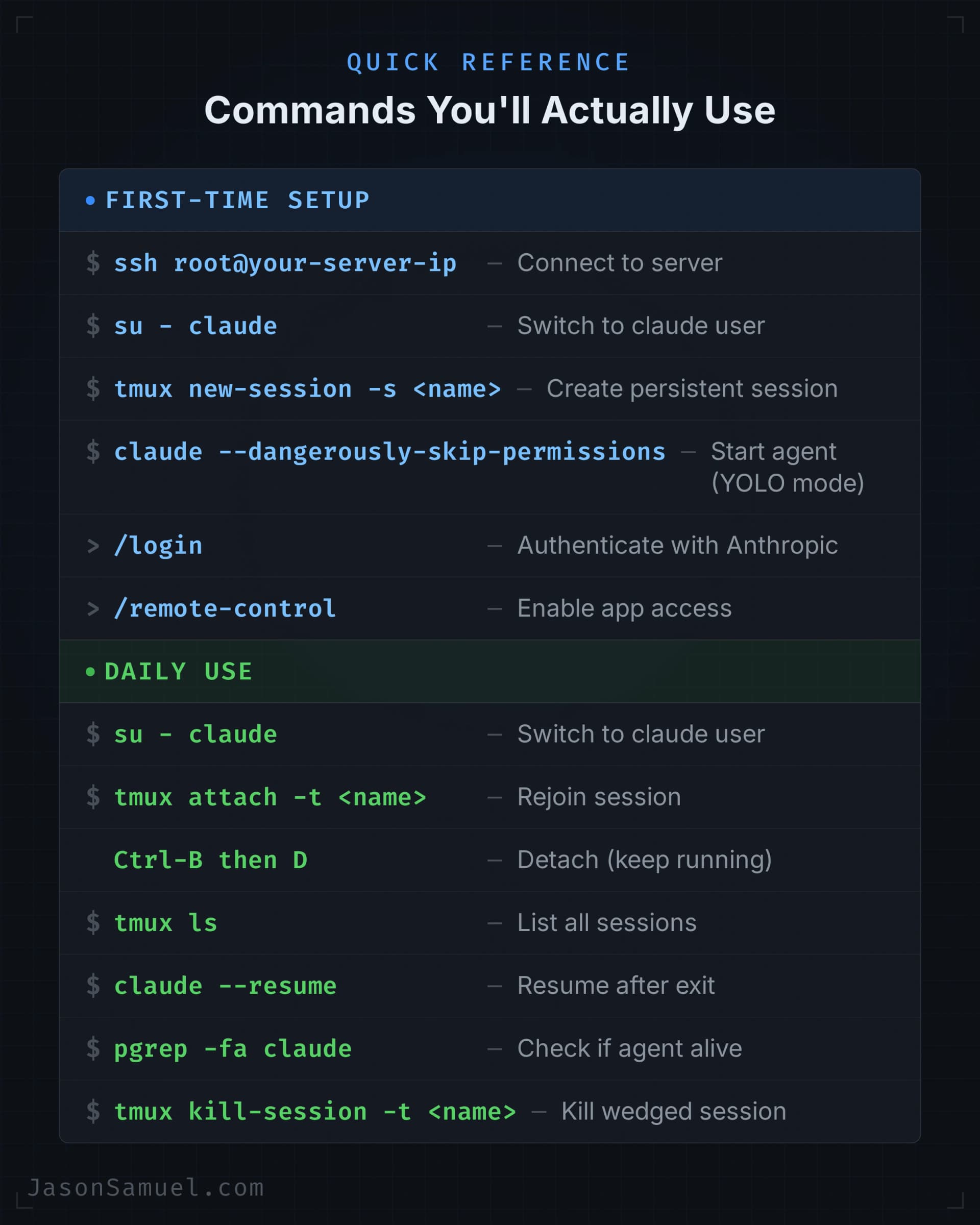
The actual commands you'll use every day
I've been talking in the abstract about how this works. Let me get specific about the commands you'll type (or speak) every day, because the abstract description undersells how short the list really is. This is not a hundred-command reference manual. It's about a dozen things that you'll use constantly, and once they're in muscle memory, the whole stack becomes invisible.
I'm going to split this into two sections: the one-time setup you do when you first get the server running, and the daily commands you'll use forever after. The gotchas are inline because they're the things that would otherwise cost you an hour of frustration each.
First-time setup (you do this once)
Step 1: Connect to your server.
ssh root@your-server-ipEnter the root password from your hosting provider's dashboard. If you've already set up Termius with the saved host, just tap it and you're connected.
Step 2: Install system packages. These are the foundational tools the agent and your projects will depend on. Run this as root, all one command:
apt update && apt upgrade -y && apt install -y curl wget git tmux ripgrep jq htop unzip build-essential ufw fail2banIf it asks about sshd_config, hit Enter on "keep the local version." This installs Git, tmux, ripgrep (fast code search the agent uses constantly), build tools for compiling native modules, and basic security (ufw firewall, fail2ban for blocking brute-force SSH attempts).
A word on SSH security. This applies whether you're running a cloud VPS, a Mac Mini under your desk, a Raspberry Pi in a closet, a dedicated server at a colo, or a repurposed laptop in your home office. If it's reachable over the network and it has SSH enabled, do NOT leave port 22 open to the entire internet. ufw and fail2ban are a good starting point, but they're not the answer. The real answer is a VPN so SSH is only reachable from inside the tunnel. There are several good options depending on how much you want to manage yourself.
Option 1: Tailscale (easiest, recommended for most people)
Tailscale is a zero-config mesh VPN built on WireGuard. You install it on your server and on every device you connect from, and they can all see each other over a private network. Your server gets a private 100.x.x.x address that is only reachable by your devices. No port forwarding, no NAT configuration, no firewall rules to maintain on the server itself. It works behind NATs, across cell networks, through hotel WiFi, everywhere. Free tier covers up to 100 devices, which is more than enough.
On your server (Linux):
# Install Tailscale
curl -fsSL https://tailscale.com/install.sh | sh

# Authenticate (opens a URL you approve in your browser)
sudo tailscale up

# Get your server's private tailnet IP
tailscale ip -4

# Make sure it starts on reboot
sudo systemctl enable --now tailscaledOn macOS (if you're self-hosting on a Mac Mini or similar), install Tailscale from the Mac App Store or via brew install tailscale. Sign in with the same account.
Then go into the Tailscale admin console and disable key expiry for your server node. It's a headless machine, you don't want to have to re-authenticate it every 90 days.
On your laptop, phone, iPad, whatever you connect from, install Tailscale on the same account. Test that you can SSH to the server's 100.x.x.x address before you touch any firewall rules. Once that works, you know the tunnel is solid.
Now lock down the public side. How you do this depends on where your server lives:
Cloud VPS (any provider): Most providers have a network-level firewall in their control panel. Create a firewall group and add one inbound rule: UDP port 41641 from anywhere (that's the Tailscale relay port, and only the Tailscale daemon listens on it, it only accepts authenticated WireGuard packets). Do this for both IPv4 AND IPv6. If you skip the IPv6 tab, that side stays wide open (your box almost certainly has a public IPv6 address with sshd listening on it). Attach the group to your instance. Some providers require you to hit the apply button twice before it sticks, so verify it took.
Then lock down the host firewall too. Make sure you are connected over the tailnet (100.x) before you do this, not over the public IP, or you will drop your own session:
# Set defaults
sudo ufw default deny incoming
sudo ufw default allow outgoing

# Allow everything on the Tailscale interface
sudo ufw allow in on tailscale0

# Enable the firewall
sudo ufw enable

# Check the result
sudo ufw status verboseIf you see a pre-seeded SSH rule (like 22/tcp ALLOW IN Anywhere), delete it:
sudo ufw delete allow 22/tcp
sudo ufw delete allow 22
sudo ufw status verboseThe correct end state is only these two lines, with Default: deny (incoming):
Anywhere on tailscale0      ALLOW IN    Anywhere
Anywhere (v6) on tailscale0 ALLOW IN Anywhere (v6)Self-hosted at home (Mac Mini, NUC, Raspberry Pi, etc.): Configure your router to NOT forward port 22 to the server. If you never set up port forwarding, you're already fine on the router side. On the server itself, run the same ufw commands above. If you also want LAN access (so you can SSH from other machines on your home network without Tailscale), add this BEFORE enabling ufw: sudo ufw allow from 192.168.0.0/16 to any port 22 proto tcp.
Dedicated server or colo: Use the provider's firewall or IPMI/KVM interface to restrict port 22. If the provider doesn't offer a network firewall, the ufw commands above are your only layer, so they're even more important.
Verify from the outside. Use an external port checker like portchecker.co to scan your server's public IP on port 22. It should show closed or filtered. Then confirm you can still SSH through the Tailscale 100.x.x.x address. If both check out, you're done.
One important detail on verification: if you already have an SSH session open to the server, that connection stays alive even after the firewall blocks new connections. SSH multiplexing (ControlMaster) can also reuse existing sockets. To truly test, force a fresh connection: ssh -o ControlMaster=no -o ControlPath=none user@your-public-ip. That should fail. Then ssh user@100.x.x.x should succeed.
Option 2: WireGuard (self-hosted, no third party)
WireGuard is what Tailscale is built on. If you want the same encrypted tunnel without depending on Tailscale's coordination service, you can run WireGuard directly. It's more setup (you manage your own keys, endpoints, and peer configs) but there's no third party involved.
# Install WireGuard
sudo apt install -y wireguard

# Generate server keys
wg genkey | tee /etc/wireguard/server_private.key | wg pubkey > /etc/wireguard/server_public.key
chmod 600 /etc/wireguard/server_private.keyYou'll need to create a config file at /etc/wireguard/wg0.conf with your server's private key, a chosen subnet (e.g., 10.0.0.1/24), and a [Peer] block for each device. Each client device generates its own key pair and gets a config pointing to your server's public IP on a UDP port you choose (commonly 51820). The WireGuard quick start guide walks through the full process.
Once the tunnel is up, lock down SSH the same way: ufw allow from the WireGuard subnet, deny port 22 from everywhere else.
WireGuard is a great choice if you want full control and don't mind managing the key exchange yourself. Tailscale is a great choice if you want WireGuard's security without the manual configuration.
Option 3: Zero Trust alternatives
Cloudflare Tunnel (formerly Argo Tunnel) and Ngrok can also put services behind an authenticated proxy without exposing ports. These are more commonly used for web services than SSH, but Cloudflare Tunnel in particular can proxy SSH connections through their network with browser-based authentication. If you're already using Cloudflare for DNS, this is worth looking at.
Gotchas that will waste your time
These are the things that trip people up. I'm listing them because they come up constantly and people waste hours on them.
Empty firewall group = no filtering. On most cloud providers, creating a firewall group and attaching it does nothing until you add at least one rule per IP family. The implicit deny only activates once that family has a rule. If you add an IPv4 rule but no IPv6 rule, IPv4 gets filtered and IPv6 stays wide open. Always add rules for both.
Forgetting IPv6. Your server almost certainly has a public IPv6 address, and sshd listens on it by default. If you only lock down IPv4, someone can still SSH in over IPv6. Check both.
Phone with Tailscale gives false positives. If you're testing "is port 22 closed?" from your phone, but your phone has Tailscale installed on the same account, the test might route through the tailnet and succeed. Always verify from an external port checker like portchecker.co, not from a device on your tailnet.
Already-open sessions survive firewall changes. Firewalls only block NEW connections. If you had an SSH session open before you applied the firewall, that session keeps working. This makes you think the firewall didn't take effect. Kill the session and try to reconnect over the public IP. Or force a fresh connection: ssh -o ControlMaster=no -o ControlPath=none user@public-ip.
Firewall rules look right but don't apply. Some cloud providers need you to re-apply or re-attach the firewall group to the instance after making changes. If your rules look correct but port 22 still shows open, try re-attaching the group and give it a couple of minutes.
Cloud providers don't rate-limit SSH by default. DDoS protection, if your provider offers it, is typically a separate opt-in feature for volumetric floods, not for brute-force SSH attempts. Closing port 22 entirely is the control. Don't rely on the provider to protect an open port.
The bottom line
Every bot on the planet scans for open port 22. Even with fail2ban, key-only auth, and a strong password, you are one misconfiguration away from a bad day. It doesn't matter if your server is in a cloud data center or sitting next to your router at home. Put SSH behind a VPN. Tailscale takes ten minutes. WireGuard takes thirty. Either one removes an entire class of risk, and once it's set up you'll never think about it again.
Step 3: Install Node.js. Claude Code runs on Node.js. This installs the latest LTS version:
curl -fsSL https://deb.nodesource.com/setup_22.x | bash - && apt install -y nodejsStep 4: Install Claude Code.
npm install -g @anthropic-ai/claude-codeThis installs the agent globally so it's available to all users on the system. Alternatively, the native installer from claude.com/code works too and doesn't require Node.js, but the npm method is what I use on servers because it's one command and plays well with the rest of the Node.js tooling you'll end up needing anyway.
Step 5: Create a non-root user. Claude Code won't run in autonomous mode as root (safety measure). You need a dedicated user:
adduser claude --disabled-password --gecos ""
echo 'export PATH="/usr/local/bin:/usr/bin:$PATH"' >> /home/claude/.bashrcThe first line creates the claude user. The second line ensures the PATH includes the directories where npm installed Claude Code globally, so the claude command works when you switch to this user. All your projects and agent sessions will live under this account, scoped so the blast radius of any mistake is contained to this user's files.
Step 6: Switch to the claude user.
su - claudeThe dash matters. su - claude loads the full login environment (PATH, home directory, bashrc). su claude without the dash can cause subtle breakage because the environment doesn't get set up properly.
Step 7: Create your first tmux session.
tmux new-session -s claudesessionYou're now inside a persistent terminal session named claudesession. This session stays alive on the server even when you disconnect. You can come back to it from any device, any time.
Step 8: Fix mouse scrolling (do this now so you don't forget).
echo 'set -g mouse on' >> ~/.tmux.confMouse mode is off by default and that makes scrolling miserable. You can't scroll up to read what the agent did ten minutes ago. This one line in the config file fixes it permanently for every future session. For the current session, hit Ctrl-B then : and type set -g mouse on.
Step 9: Start Claude Code.
claude --dangerously-skip-permissionsThis starts the agent in autonomous mode. The --dangerously-skip-permissions flag (the YOLO flag I covered earlier) means the agent doesn't ask for permission on every command. Once your hook scripts are in place, this is safe. Without hooks, this is dangerous. Set up the hooks as soon as you're comfortable.
Step 10: Authenticate. Type /login at the Claude Code > prompt. It gives you a URL. Copy it, paste it into a browser on any device (your phone, your laptop, doesn't matter), complete the auth flow, and the agent is linked to your Anthropic account. You do this once per server and then never again unless you explicitly log out. This is also how you load-balance across multiple Max accounts if you run more than one (as I described earlier in the subscription section). When you hit a rate limit on one account, the agent tells you. You type /login again, paste the auth URL for your second account, and you're back to a working session in seconds. Everything picks right back up like nothing happened. The agent doesn't care which account is powering it. Your work, your files, your tmux session, all untouched. Only the upstream billing changes. And unlike switching between accounts in most SaaS tools where each account has its own data, history, and settings, there's nothing to worry about here. You're only using Anthropic for the model itself -- the raw intelligence. All of your knowledge, your files, your projects, your CLAUDE.md, your hooks, your Git repos -- none of that lives on Anthropic's systems. It's all on your server. The accounts are just a billing pipe to the brain. Swap them freely. This is also why the whole architecture is portable across LLMs if you ever want to switch: the intelligence layer is a commodity, your infrastructure is the asset.
Step 11: Enable remote control (optional but recommended). Type /remote-control inside the Claude Code session. Once enabled, your running server session shows up in the Claude desktop app and the Claude phone app under the Code tab as a live session with a green dot. You can control the agent from the Claude app without SSH, without Termius, without any terminal at all. It's another access surface into the same session. I still use Termius for the full terminal experience, but remote control is useful for quick checks from the phone when you don't want to open Termius, or for giving someone else temporary visibility into what the agent is doing.
Step 12: Clone your first repo. Tell the agent in plain English at the > prompt: "Clone the repo https://github.com/your-username/your-project.git into ~/projects/ and cd into it." The agent handles the git commands. You're now working on a real project.
That's the complete setup. Twelve steps, start to finish, from a blank server to a working agent session with a cloned repo. You do it once. Everything after this is daily use.
Daily use (the commands you'll actually type)
Getting into your session, from any device. This is the sequence you'll run a hundred times a week:
ssh root@your-server-ip
su - claude
tmux attach -t claudesessionIf you're using Termius, you skip the first command entirely -- just tap your saved host and you're connected, pick up at su - claude. If you've configured the Termius startup snippet correctly (tmux new-session -A -s claudesession), all three commands collapse into one tap on your saved host. The whole "getting back to work" experience is roughly one second.
You're now in the same session you were in last time. Same scrollback, same open panes, same agent state. The agent is right where you left it, whether that was ten minutes ago or three days ago.
And you're not limited to one session. You can have as many tmux sessions running on the same server as you want, one per project, so the agent in each session stays focused on its own repo without jumping between contexts. Termius has a feature called Workspaces that makes this seamless. A Workspace groups multiple terminal sessions into one view. You can split the screen into up to 16 terminal panes side by side, drag the dividers to resize them, and save the whole layout as a template so you can reload it with one click. Ctrl-Alt-M on Windows (Cmd-Option-M on Mac) toggles between Focus Mode (one terminal full-screen) and Split View (all your panes visible at once). Set up your four project sessions once, save the Workspace, and from then on you're looking at four agent sessions at once. Put your cursor in the quadrant you want, voice-dictate the prompt, press enter, and that agent starts working while the other three keep doing their thing undisturbed. It's like having four people in an office, each working on a different project, and you walk between their desks giving directions. Except none of them take lunch breaks.
Getting four agents going at the same time is one thing. The next level is putting them into work loops -- where each agent iterates autonomously toward an intent, checking its own work, refining, retrying, until the result meets a quality bar you defined. That's a deep topic and it's probably worth its own article. The short version: instead of giving the agent a single instruction and checking the result, you give it a goal and a set of validation criteria, and the agent keeps looping -- build, test, evaluate, adjust -- until the criteria pass. It's the difference between "do this task" and "achieve this outcome." I'll write that up separately because the patterns around agent loops, when to use them, how to bound them, how to prevent infinite loops, how to set exit conditions, that deserves a focused deep dive rather than a section crammed into this already long article.
Detaching from the session without killing anything. Press Ctrl-B then D. This is the single most important keystroke in your daily workflow. It tells tmux "I'm leaving, but keep the session running." You can close your laptop, walk away, switch devices, do whatever. The agent keeps doing what it was doing. When you come back, you reattach with tmux attach -t claudesession and you're right back where you were.
In practice, Ctrl-B D is the textbook way, but it's not the only way and honestly it's not even what I do most of the time. On desktop, I just hit the X to close the Termius window. On mobile, I let the Termius app time out on its own, or I just swipe it closed. None of this is destructive. That's the whole point of tmux. The session keeps running no matter how you leave. Close the window, kill the app, lose your WiFi, let your phone die -- the agent doesn't notice and doesn't stop. The trick most people fail to internalize early is that they quit out of SSH and assume "everything stops." That's true if you weren't using tmux. It's false once tmux is in the picture. There is no wrong way to leave. Every exit is safe.
Listing your sessions. tmux ls. Shows you every session running on the box and whether anyone is currently attached. Useful when you forget what you named things, or when you want to confirm a session is still alive. Gotcha: if tmux ls shows nothing, you probably forgot to su - claude first. tmux sessions belong to the user who created them. If you're still logged in as root, you won't see the claude user's sessions. Switch users, then tmux ls, and they'll show up. And yes, if the server reboots, all sessions are gone. Don't panic. The server is just a surface. All your code, your configs, your CLAUDE.md, your hooks, everything that matters lives in GitHub. Clone the repo, start a new tmux session, fire up the agent, and you're back to full speed in five minutes. The server is disposable. Git is permanent.
Starting a new session for a different project. tmux new-session -s myproject. The -s flag just means "name this session." Whatever you put after -s becomes the session name. You can have claudesession for your main project, websitesession for your site, apisession for a backend, whatever makes sense. Each one is independent. You'll also see -A in some commands, like tmux new-session -A -s claudesession. The -A flag means "attach if this session already exists, create it if it doesn't." That's the safe version you want in your Termius startup snippet because it works regardless of whether the session is already running or not. You don't have to think about it or check first. -s = name. -A = don't fail if it's already there.
Killing a wedged session and starting fresh. The agent occasionally gets into a bad state, usually after ingesting a problematic image or after an API hiccup where it starts throwing errors. The cleanest fix is to nuke the session and start fresh:
tmux kill-session -t claudesession
tmux new-session -s claudesession
claude --dangerously-skip-permissionsYou lose the in-memory conversation, but anything the agent wrote to disk persists. All three commands, in that order: kill the old session, create a new one, restart the agent.
Resuming the conversation after an exit. claude --dangerously-skip-permissions --resume. The underrated lifesaver. Sometimes I accidentally mash Escape one too many times and it kicks me right out of the Claude Code session back to the bare terminal prompt. Sometimes the agent crashes on a bad API response. Sometimes I kill the wrong tmux window. Doesn't matter how it happened. Run the resume command and it pulls up a list of every recent conversation you've had. You'll see the last chat for each session, select the one you want, press Enter, and you're right back in that conversation like nothing ever happened. Full context, full history, right where you left off. It's wonderful. The first time this saves you forty minutes of re-explaining what you were doing, you'll wish you'd known about it sooner.
Checking if the agent is running. pgrep -fa claude. Shows every process on the machine with "claude" in its command line. Sanity check when you're not sure if the agent is alive.
Handling a disconnect. Wi-Fi drops, you go through a subway tunnel, your phone locks, your laptop sleeps, the train goes underground, you hop between cell towers on the highway, the airplane WiFi hiccups for the third time this hour. None of these touch the session on the server. Just tap your saved host in Termius again and you're back. This happens to me constantly on flights and in spotty WiFi situations. The SSH session drops, I tap reconnect, I'm back in the same tmux session, the agent kept working the whole time I was disconnected. The whole point of the architecture is that disconnects are non-events. You'll feel this within the first week, and it's one of the most freeing aspects of the setup: the realization that your network quality no longer matters. Bad WiFi is annoying but it's not destructive. Nothing is lost. Nothing stops.
Handling a server reboot. Tmux sessions don't survive a reboot of the underlying server. This is the one limitation. After a reboot, you SSH back in and redo from the "switch to claude user" step onward:
ssh root@your-server-ip
su - claude
tmux new-session -s claudesession
claude --dangerously-skip-permissionsIt's a five-minute interruption. The agent's conversation history is gone unless you saved checkpoints. If your host provider gives you reliable uptime (most do, you'll see 99.9%+ on any decent VPS), reboots are rare enough that this is more of a theoretical concern than a daily one. If you want to fully protect against this, you can configure the agent to auto-start via a systemd user service on boot, which is a one-time setup that the agent itself can help you create.
Destroying or rebuilding the host. If it's a hosted VPS, use your provider's control panel, billing stops immediately on most providers. If it's a physical box, you just wipe it or repurpose it whenever you want. The important thing to make sure of, either way: every project you care about should already be pushed to GitHub. The server is meant to be disposable. If everything is in GitHub, you can rebuild from scratch in twenty minutes with no real loss. Treat the host like a phone you could replace tomorrow, not a family heirloom.
That's the whole list. About a dozen commands. Three of them (ssh, su - claude, tmux attach -t claudesession) are the ones you'll use a hundred times a week. Most of the others you'll use a few times a month, when something needs recovering. None of this is hard to learn. None of it requires a CS degree or a sysadmin background. It's the same level of "operate a tool" complexity as learning the shortcuts in any other application, except that once you have it, you can run an entire technology stack from anywhere.
A good move when you're getting started: put this list of commands in a Termius snippet folder, with each command as its own one-tap snippet. The snippets sync across all your devices. The first week, you'll use the snippets constantly because the commands aren't in muscle memory yet. By the second week, you'll have started typing them without thinking. By the third week, you'll forget you ever needed the snippets, and they're just there as backup for the rare cases when something goes weird.
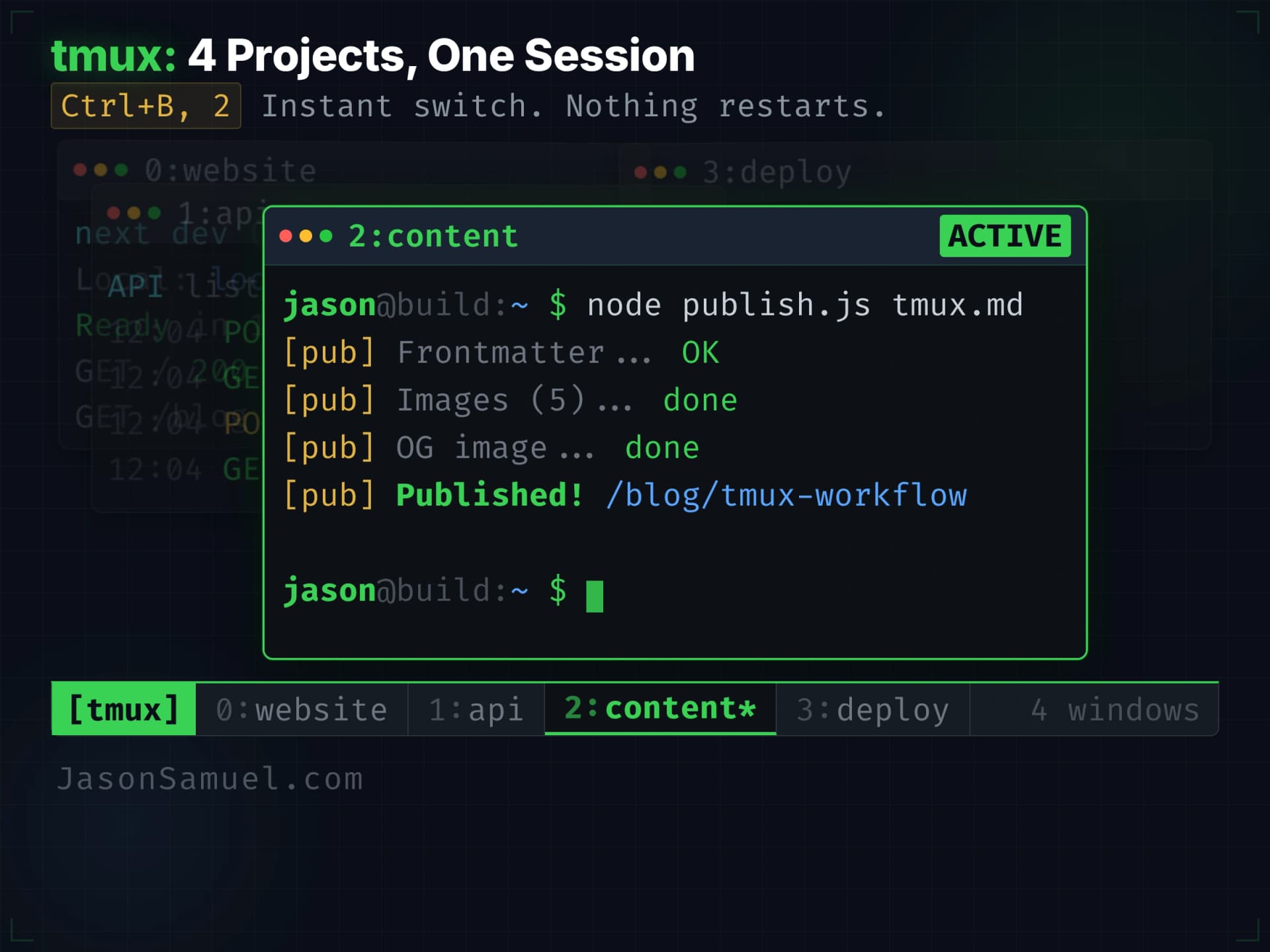
Running multiple projects at once: tmux windows, worktrees, and continuation files
Once the basic single-session workflow feels natural, the next step is running multiple agent sessions in parallel. This is where the architecture really starts paying off, because the always-on server can host many sessions simultaneously and the agent doesn't get tired or confused by switching between them. Here's how I do it.
Tmux windows for context switching across projects
Inside a single tmux session, I run separate windows for separate topics. Tmux supports multiple windows in one session (think of them like browser tabs for terminals), and switching between them is instant. My naming convention is something like topicA-1, topicA-2, topicB-1, topicC-1 so I can see at a glance which window is doing what.
The pattern in practice. Window 1 might be an agent working on a feature for project A. Window 2 might be a separate agent doing a different task in the same project A. Window 3 might be an agent on project B. Window 4 might be an agent doing research for project C. I can Ctrl-b followed by a number key to jump between them instantly. The agent in each window has its own context, its own scrollback, its own conversation. None of them know about each other. I'm the orchestrator. They're the workers.
This is enormously powerful for someone who runs multiple things at once, because context-switching costs you basically nothing. You're not waiting for an environment to load. You're not re-attaching to anything remote. You're just hitting a key to jump to the window where that agent is already mid-thought, and you pick up where you left off. When you're done with that window, you hit another key to jump back. The agents keep working in the background regardless.
As I mentioned earlier, Termius Workspaces make this visual. Set up a Workspace with your project windows tiled side by side, save the layout as a template, and you can reload the whole multi-agent view with one click. Ctrl-Shift-M toggles between seeing all the panes at once and focusing on one full-screen. The combination of tmux windows (for the sessions on the server) and Termius Workspaces (for the visual layout on your screen) is what makes parallel agents feel manageable rather than chaotic.
A practical ceiling here, and I want to be honest about it: two to three parallel agents is the realistic limit for most people, including me. Maybe four if the tasks are independent and don't need much steering. You can technically run more, but you stop being able to monitor what they're doing effectively. The bottleneck stops being the machine and starts being your own attention and your ability to context-switch between conversations. Beyond three or four, your supervision shifts from "checking every detail" to "did you get to the outcome I wanted?" and that's a fundamentally different mode of working.
This is where work loops become essential. Instead of babysitting each agent and waiting for it to ask you questions, you give the agent a goal, a set of validation criteria, and permission to iterate autonomously until the criteria pass. The agent loops: build, test, evaluate, adjust, repeat. Your role shifts from "person who approves every step" to "person who defines what done looks like and checks the final result." That's how you scale from managing three agents to orchestrating ten. The patterns around work loops, how to define exit conditions, how to prevent infinite loops, how to set quality gates, are deep enough that I'll write a dedicated follow-up article on it. But know that this is the next level after parallel sessions, and it's the level where the productivity gains get genuinely absurd.
Git worktrees: how to run multiple agents on the same repo without disaster
Here's where it gets technically subtle and worth slowing down for, because this is the single biggest source of preventable problems for anyone running parallel agents.
If two agents are working on the same project simultaneously, and they're both editing files in the same directory, you have a recipe for catastrophe. Agent A writes to src/auth.ts. Agent B writes to the same file two minutes later, overwriting A's changes without knowing they existed. You end up with half-applied changes, broken git state, and an afternoon of figuring out what went wrong.
The clean solution is git worktrees. A worktree is a separate working directory pointing at the same underlying git repository, on its own branch, with its own files on disk. Multiple worktrees can exist for the same repo at the same time. They share the underlying git object store, so they're essentially free in terms of disk, but each one is a fully isolated checkout that the agent treats as its own little world.
The mechanical setup is simple. From inside your main project directory, you run:
git worktree add ../my-project-feature-x feature/x-branchThat creates a new directory at ../my-project-feature-x checked out to a branch called feature/x-branch. You can now cd into that new directory in a separate tmux window and start an agent there, and it has no idea that another agent is doing different work in the main directory. The two agents are on different branches, in different directories, and cannot step on each other at the filesystem level. When the work is done, you merge the branch back through a normal pull request and clean up the worktree with git worktree remove.
Claude Code now has first-class support for this pattern via a --worktree flag and subagent isolation settings, so the agent can manage the worktree lifecycle itself if you ask. But even if you do it manually, the concept is the same: isolate the filesystem, share the git history.
A few worktree best practices I've learned the hard way:
- Shared config files are still shared. If both worktrees modify a file like
.envorpackage.json, you can get conflicts at merge time. Either keep config out of the repo (env vars from a gitignored file) or accept that you'll occasionally merge those files manually. - Dependencies live per-worktree. When you create a new worktree, you'll need to run
npm install(or the equivalent) inside it becausenode_modulesisn't shared. Same for Python venvs, anything language-specific. - Port conflicts will bite you. If both worktrees try to run a dev server on port 3000, only one will succeed. Use environment-variable-based port configuration so each worktree can pick its own.
- Pre-commit hooks need to be worktree-aware. If you have a hook that touches
./tmpand assumes that's the project's tmp directory, it'll collide between worktrees. Usegit rev-parse --git-common-dirwhen you mean the shared metadata, not--git-dir.
The payoff is enormous. Three agents working on three features in parallel, each on its own branch in its own worktree, all running on the same server. None of them step on each other. You merge in whatever order makes sense when each finishes. This is what the "parallel agentic development" pattern actually looks like in practice.
When a session dies: kill it, bootstrap from the repo, you're back
I touched on this in the daily commands section but it deserves its own explicit pattern because it's so frequently necessary. The agent session is disposable. The work product is in the repo. When something goes wrong, kill the session and start fresh.
The full sequence:
tmux kill-session -t topicA-1
tmux new-session -s topicA-1
claude --dangerously-skip-permissions
> bootstrap from the xyz repo, read the continuation log, and tell me where we're starting todayFour lines. The first three are terminal commands, the fourth is what you say to the agent once it's running. Total time: about fifteen seconds. You're back in business. The agent starts fresh with a clean context, clones or navigates to the repo, reads the project's CLAUDE.md and CONTINUATION.md, and tells you exactly where things stand and what's next. You don't type cd or git pull or any of that -- you just tell the agent what repo to bootstrap from and it figures out the rest. The only thing you lose is the in-memory conversation, which was about to fail anyway. Don't waste time trying to revive a wedged session. Kill it, start fresh, let the agent bootstrap from the repo. A fresh context is better than a corrupted one.
This is why having everything in GitHub matters so much, by the way. The repo is the source of truth. The tmux session is just a window into the agent working on the repo. If the window dies, you open a new window. The work is still in the repo.
Continuation and history files: surviving catastrophic infrastructure failures
This is the pattern I love most because it's what makes the whole stack resilient instead of just technically working. I keep CONTINUATION.md and HISTORY.md files in my projects as a way for the agent to maintain coherent state across sessions, even when infrastructure fails catastrophically.
The idea is simple. Inside each project repo, there are two extra markdown files (or sometimes more, named after specific concerns) that the agent maintains alongside its actual work:
CONTINUATION.md is "where I am right now." When the agent stops a session, it updates this file with the current state of whatever multi-step task is in progress. What's been done. What's next. What decisions have been made. What's still open. When the agent resumes (in the same session via --resume, or in a fresh session after a server reboot, or weeks later after picking up the project again), the first thing it reads is CONTINUATION.md and it knows exactly where the work was paused. No re-explanation needed. No "wait, what were we doing?" The agent reads the file and knows.
HISTORY.md is "what got done and why." It's a running log of significant changes, decisions, and reasoning that informed how the project got to its current state. Not commit messages, those live in git. This is the higher-level narrative: "we tried approach X, it didn't work because of Y, we pivoted to Z." Future-you (or future-agent) reading this file gets caught up on the why of the project, not just the what.
Together these two files solve a problem that nobody really talks about: agents have no long-term memory unless you give them one. Auto-memory helps for inferred patterns, but it doesn't capture deliberate project narrative. CONTINUATION.md and HISTORY.md are how you make the project legible to the agent across arbitrary gaps in time, devices, sessions, and even catastrophic failures of infrastructure. Server gets nuked? No problem. Spin up a new server, pull the repo, start a fresh agent session, and the agent reads CONTINUATION.md and HISTORY.md and is back in the project's headspace within sixty seconds.
I've had catastrophic things happen, lost hosts, corrupted sessions, mid-task crashes, and the recovery has always been a non-event because the project state lived in the repo, not in the agent's memory. The continuation files are the bridge between session-bounded agents and project-scoped continuity. If you internalize one pattern from this whole article, internalize this one.
A starter template for CONTINUATION.md:
# Continuation

## Where we are right now
[One-paragraph snapshot of current state]

## Current task
[The specific thing in progress, with enough detail to resume]

## What's done
- [Bullets of completed steps]

## What's next
- [Bullets of upcoming steps]

## Open questions
- [Things waiting on a decision or external input]

## Recent decisions
- [Recent calls and the reasoning behind them]The agent updates this file at the end of each working session, either because you explicitly ask it to or because you've made "update CONTINUATION.md before stopping work" part of the project's CLAUDE.md. But here's the thing: you can't predict when a crash happens. The agent might hit an API error, the SSH connection might drop, the server might hiccup. If the continuation file only gets updated when the session ends gracefully, you lose everything since the last update. The smarter approach: build hooks that update CONTINUATION.md and HISTORY.md automatically after every few commits. The agent just does it programmatically in the background. You don't have to think about it. Every few commits, the continuation log gets refreshed with the current state, so if a crash happens mid-session, the worst case is you lose the work since the last commit, not the entire session's context. Between hooks for the continuation file and hooks for the history file, the whole thing stays current without any manual intervention. It's insurance you set up once and never think about again.
This is one of those patterns that sounds like overhead until you've experienced what it saves you. Then it stops being optional.
What this stack is not
Let me be clear about what this isn't, because I don't want to oversell.
This isn't a replacement for serious engineering teams if you're running a serious business with real customers and real production systems. The setup I'm describing is for the kind of building that you are personally doing, where you are the user and the owner and the operator. If you're building software for paying customers at scale, you need actual engineers, actual SRE practices, actual on-call rotations. The agent can help your engineers, but it doesn't replace them.
This isn't a no-code platform with a friendly UI. There's no drag-and-drop interface. You're writing prompts and reading shell output. The interface is a terminal. The barrier to entry is "you can comfortably read what's happening when commands run." If that sounds like too much, this isn't for you yet. The good news is the barrier is much lower than "you must know how to code." The bad news is it's still a barrier.
This isn't a finished or stable industry. The tools I'm describing today will change. Some of them will get acquired. Some will release something that obsoletes another. The open protocols underneath (SSH and Git are decades-durable; MCP and A2A are newer but governed by neutral standards bodies and adopted across every major vendor) are the closest thing this stack has to a stable foundation. The specific products on top of those protocols are not. Be ready to swap pieces as the landscape evolves.
This isn't free. A small VPS is fifteen bucks a month, or zero marginal cost if you're running on a box you already own. An Anthropic subscription for Claude Code is twenty bucks a month, or you can pay per-token via API which can be more or less depending on usage. GitHub is free for most personal use. Termius is free for basic use, ten or fifteen bucks a month for the pro features I recommend. Voice tooling is built into every major OS for free: Voice Access and Voice Typing on Windows, Voice Control and Dictation on macOS, native dictation on iOS and Android. Total cost of running the full stack lands somewhere between thirty and fifty bucks a month depending on which pieces you pay for, which is less than most people spend on coffee. But it's not zero.
This isn't going to make you a developer. And it doesn't need to. The point is to let you build like an architect rather than learning to type like a developer. If learning to code from scratch is your goal, this isn't the best path for that, because the agent does the coding part for you. Different goal, different stack.
What this is is the highest-payoff setup I've found for a smart non-developer to build real things, durably, at speed, without acquiring a skill set you don't have time or interest to acquire. If that's what you want, this is the path I'd recommend.
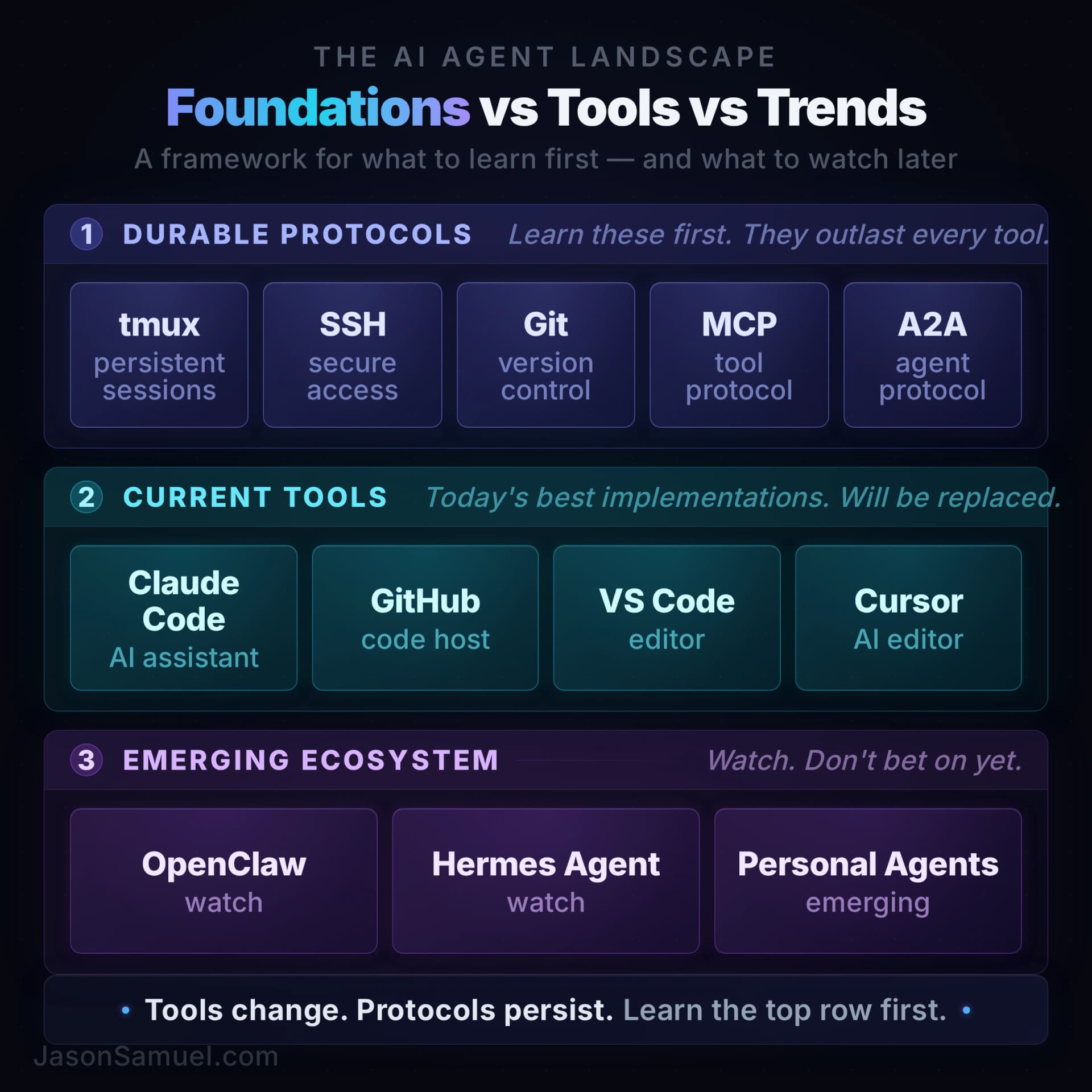
Adjacent ecosystems worth watching: OpenClaw, Hermes Agent, and the personal-agent space
The setup I've described in this article centers on Claude Code because it's what I run, but I'd be selling you short if I didn't tell you about the broader category of self-hosted personal AI agents that has exploded in 2026. These are projects that take the "agent on your own server" idea even further than what Claude Code does, layering on persistent memory, messaging-app gateways, skill marketplaces, and other capabilities that turn the agent into something closer to a permanent employee than a coding tool.
Two of them are worth naming.
OpenClaw is the project that defined the category. It's a self-hosted personal agent that runs on your own infrastructure (VPS, home server, dedicated box, whatever you've got), connects to messaging platforms (WhatsApp, Telegram, Discord, Slack, iMessage, and more), and exposes 100+ pre-built "AgentSkills" for things like shell commands, file management, web automation, and browser control via Playwright. You bring your own API keys for whichever model you want to power it (it's model-agnostic by design), and the agent runs continuously, talking to you through whatever messenger you prefer. It went from a solo side project to 247,000 GitHub stars in under 60 days, which is one of the fastest organic growth curves in open-source history. Then something significant happened: OpenClaw's creator, Peter Steinberger, joined OpenAI in February 2026 to work on bringing personal agents to everyone. Before leaving, he transferred OpenClaw to an independent OpenClaw Foundation, keeping it MIT-licensed, community-governed, and independent of any single company. Sam Altman publicly committed that OpenAI would continue to support it. Read the signal here: when the creator of the fastest-growing personal agent project in history gets hired by OpenAI to "drive the next generation of personal agents," that tells you where OpenAI thinks the industry is heading. Personal agents on your own infrastructure isn't a niche hobby. It's the next major platform.
Hermes Agent is the second major project in this space. Where OpenClaw bets that the hard problem is breadth of integration and manual control, Hermes bets that the hard problem is memory and self-improvement. It has a three-layer memory system (skill memory, conversational memory, user modeling) that means it measurably gets better at recurring tasks the longer you use it. The architecture is also more flexible in some ways: multiple execution backends including local, Docker, SSH, and serverless options, plus a wide messaging gateway covering Telegram, Discord, Slack, WhatsApp, Signal, and others. MIT licensed, no telemetry, fully self-hostable on infrastructure as small as a $5 VPS or any modest box you already have lying around. Hermes has been growing even faster than OpenClaw at the same stage, hitting 57,000 GitHub stars in its first six weeks with growth velocity around 9,500 stars per week. Nous Research (backed by Paradigm and a16z) recently launched Hermes Desktop, bringing the agent into a native app for macOS, Windows, and Linux. As of mid-2026, Hermes Agent is processing 224 billion tokens per day on OpenRouter's rankings, edging out OpenClaw. The competition between these two projects is pushing both forward at a pace that benefits everyone building on top of them.
Both projects sit in the same conceptual neighborhood as what I've been describing. Same idea (agent on your own infrastructure, talks to you through whatever interface you prefer, lives on as a persistent thing rather than disappearing between sessions), but with more ambition about what the agent should do unprompted. OpenClaw and Hermes both lean toward "give the agent its own messaging endpoints and let it text you when it has news." Claude Code stays closer to "give the agent a terminal and let you drive." Both philosophies are defensible. They serve different use cases.
Here's the honest part, and the reason I'm framing this as "adjacent ecosystems worth watching" rather than "things you should run alongside the rest of this stack right now":
These projects are young and they need constant tinkering. I want to be direct about this because I've actually tried, not just read about. I've stood up this category of personal-agent system five separate times across different versions, on different hardware, ranging from a Mac Mini in my house to a beefy VPS in the cloud, and every single time I've ended up frustrated and walked away. Not because the projects are bad. The teams behind them are serious and the ideas are right. But the day-to-day reality of running them in 2026 is that they break a lot, they ship updates that introduce regressions, integrations work great until a third-party messenger changes its API and suddenly the agent has gone silent, memory systems drift in ways that take a while to diagnose, and the security surface is scary. OpenClaw shipped a critical remote code execution vulnerability just weeks after launch that required everyone to update immediately. Hermes Agent has shipped point-releases at a pace that means you're never running the same build for very long. The skill ecosystems are growing but inconsistent. The documentation lags the code. None of this is a knock on the maintainers, it's just where the category is right now.
A specific data point from my own runs because I think it'll save someone reading this a weekend of frustration: OpenClaw is picky about which model you point it at. Some models drive it beautifully and the agent feels intelligent and responsive. Others, including some that perform fine on every other benchmark, just don't click with OpenClaw's prompting and tool-calling style, and the agent feels stupid, ignores instructions, gets stuck in loops, and generally makes you wonder if you broke something. You didn't. The model just doesn't pair well with the harness. Expect to experiment with several model backends before you find the one that works for your specific use case. And here's the part I'm only half-joking about: OpenClaw also seems to work noticeably better when you threaten to throw your Mac Mini out the window. I have run that experiment. Try it and tell me I'm wrong. There's something about giving up emotionally, walking away in disgust, and coming back twenty minutes later that resolves something in the way the system is behaving. I cannot explain it. I can only report it.
The honest framing for whether you should run one of these today: if you like managing children, get OpenClaw. Or Hermes. Or any of the others. They are not bad products. They are young products that need a parent watching them. They need someone who is entertained by the maintenance, who enjoys waking up to the fact that a third-party integration broke overnight and now needs an hour of attention, who treats the constant updates and reconfigurations as part of the fun rather than as a tax on the actual work they're trying to get done. Some people love that mode. If you're one of them, you'll have a great time with these projects. They're playgrounds for tinkerers.
If you're not in that mode, and most working people who want this infrastructure for actual building aren't, you'll be much happier letting OpenClaw and Hermes mature for another year or two before making them load-bearing parts of your stack. Try them as experiments. Run them in parallel. Learn what they're doing well. But don't bet your daily workflow on them yet unless you enjoy the parenting role. The Claude Code plus tmux plus GitHub plus MCP foundation I've been describing is what I keep coming back to after each of my five OpenClaw-style attempts, because it just works. Five attempts is a real number, by the way. I'm including it because I want you to understand I'm not theorizing here. I'm reporting from the other side of trying to live with these things.
The version of you that wants to try them is the version that already has the Claude Code stack working reliably and is looking for the next experiment. That order matters. Get the foundation stable first. Then experiment around the edges. Anyone who starts with OpenClaw or Hermes before they've internalized the always-on-server-plus-tmux-plus-Termius pattern is going to spend a lot of time troubleshooting things that aren't the interesting part of what these projects are doing.
There are other projects in the space too, Letta (formerly MemGPT) for stateful memory, AutoGen for multi-agent orchestration, LangGraph for agent workflows, plus a long tail of personal-agent experiments on GitHub Trending any given week. Most of them have the same trajectory: interesting ideas, fast-moving code, maintenance overhead that's higher than the maintained commercial alternatives. Watch the space. Try the ones that resonate with what you're trying to accomplish. Just don't confuse "newly viral" with "ready to be the thing your work depends on."
The single most reliable signal I've found for whether to adopt one of these projects right now versus wait: does it have one clear maintainer commercially incentivized to keep it working, or is it a community project running on enthusiasm? Claude Code has Anthropic. OpenClaw has an independent foundation with community governance and a creator who got hired by OpenAI. Hermes has Nous Research behind it, a $65 million AI research lab backed by Paradigm. Those are reasonable bets. The hobbyist projects on GitHub Trending this week are not. Adjust accordingly.
Don't chase brittle ecosystems. Learn the foundations underneath them.
I want to make a bigger point about the personal-agent and multi-agent space, because the same impulse that draws people to OpenClaw and Hermes is the same impulse that's about to drive a lot of people into building elaborate multi-agent orchestration systems for their businesses, and I think most of them are going to waste six months on it.
Here's the situation as of mid-2026. Every major AI player, Anthropic, OpenAI, Google, Microsoft, Meta, Amazon, is actively working on agent orchestration. It's the next logical step after agent-to-tool integration (which MCP solved) and agent-to-agent communication (which A2A is solving). The next layer is multi-agent orchestration: how do you have ten agents working on a complex problem in parallel, handing off subtasks, reasoning about each other's outputs, recovering from each other's mistakes? Every serious lab has a research team on this. Every cloud provider is racing to ship the managed version. The category will exist as a properly-supported, commercially-backed thing within twelve to eighteen months.
In the meantime, the current tools for multi-agent orchestration -- AutoGen, CrewAI, LangGraph, and others -- are doing genuinely impressive work and solving real problems for people right now. I respect what those teams are building. The challenge isn't the quality of the frameworks; it's that the ground underneath them is still shifting. Model behavior changes month to month, infrastructure standards are still being finalized, and patterns that work today might need rethinking when the next generation of models ships with different capabilities. If you build an elaborate multi-agent orchestration on top of any framework today, there's a real chance the underlying model swap or a framework API change means significant rework down the line. That's not a criticism of the tools. It's the reality of building on top of a layer that's still evolving this fast.
The people I see going hardest on multi-agent orchestration right now are people who want to build a business out of it. They see the agent revolution happening, they want to be early, they want to ship something impressive. I get it. But the math doesn't work yet. You're not early to the future of agent orchestration; you're early to the unstable middle. Early is going to be when one of the major labs ships the orchestration layer as a first-class, reliable, documented product. That's a lot closer than people think. The current generation of orchestration frameworks is going to look, in 2027, the way Cordova and PhoneGap looked in 2015 next to native iOS and Android development. People built real businesses on them in the gap years. Most of those businesses then had to rebuild on the proper platforms when they arrived.
The advice I keep giving people who ask me about this: don't spend your time building brittle ecosystems. Spend it learning the foundations underneath them.
The foundations are the things that don't change when the framework-of-the-month gets disrupted. The foundations are:
- How LLMs actually work (token prediction, attention, context windows, the fact that they're stateless between calls)
- How tokens are counted and priced, and why prompt design has cost implications
- What context windows actually contain and how to think about what's in scope at any moment
- The lifecycle of a model request: tokenization, inference, output streaming, post-processing
- The protocols that connect models to the outside world (MCP for tools, A2A for agents, the standard HTTP/JSON-RPC plumbing underneath both)
- Authentication and authorization models for agents (OAuth scopes, Agent Cards with signed identity claims, etc.)
- Where prompt injection actually happens and how to defend against it structurally
- The math on running costs at scale (input vs output token pricing, caching, batching, fine-tuning vs prompt engineering tradeoffs)
- Evaluation: how you actually know if an agent is doing the right thing, and how to measure it
None of those things become obsolete when the framework-of-the-month gets disrupted. All of them transfer cleanly to whatever orchestration layer ends up winning. People who learn the foundations now will be the people building real systems on the proper orchestration layer the moment it ships, because they'll understand what's happening underneath. People who skip the foundations and chase frameworks will be the people who have to relearn everything every six months because they were always one abstraction layer above understanding.
Here's the analogy that makes this click for me. Networking went through the same cycle. Every few years a new generation of consumer Wi-Fi shipped: 802.11b, then 802.11g, then 802.11n (which finally brought dual-band 2.4/5 GHz to mainstream consumer gear), then 802.11ac, then mesh systems, then 802.11ax (Wi-Fi 6 and Wi-Fi 6E with the new 6 GHz band), and now Wi-Fi 7 with its multi-link operation. On the security side, the same cadence: WEP, then WPA, then WPA2, then WPA3. Each generation made the previous one look dated, and a whole cottage industry of "experts" specialized in whichever flavor was current. The people who actually understood networking didn't specialize in any single generation. They understood TCP/IP. They understood how DHCP and DNS work. They understood the OSI model. They understood radio frequency basics and why interference happens at 2.4 GHz but less at 5 GHz, and why 6 GHz cleaned that up further. When Wi-Fi 7 shipped, they could reason about it on day one because the foundations didn't change. The people who only knew one vendor's implementation or one generation's quirks had to start over every cycle.
Multi-agent orchestration is going through the same cycle right now. The frameworks are the Wi-Fi generations -- each one important for its moment, but each one eventually superseded. The foundations are TCP/IP -- they outlast every generation. Learn the foundations. The frameworks will come and go, and when the next one ships, you'll be ready on day one because you understand what's happening underneath.
This is exactly why the stack in this article is opinionated about foundations and not about frameworks. SSH is foundational; it's not going anywhere. Git is foundational; it's not going anywhere. The terminal as an interface is foundational; it's outlasted every IDE that's tried to replace it. MCP is the closest thing we have to a foundational protocol for agent-to-tool interaction, which is why I cover it. A2A is the closest thing for agent-to-agent. The agent itself (Claude Code specifically) is the most replaceable piece in the whole stack, which is why I keep saying "if a different agent works better for you, the architecture works just the same."
The reason this matters for someone building a business with AI right now is that you want your investment in learning, tooling, and infrastructure to compound across whatever generation of AI tooling comes next. The setup I'm describing compounds. A bespoke multi-agent orchestration built on this quarter's hot framework does not.
Learn the foundations. Build on the foundations. Watch the orchestration layer mature. When it ships properly, you'll be ready to use it the day it lands. Everyone who spent the gap years gluing AutoGen and LangGraph and CrewAI together with duct tape will be rebuilding from scratch.
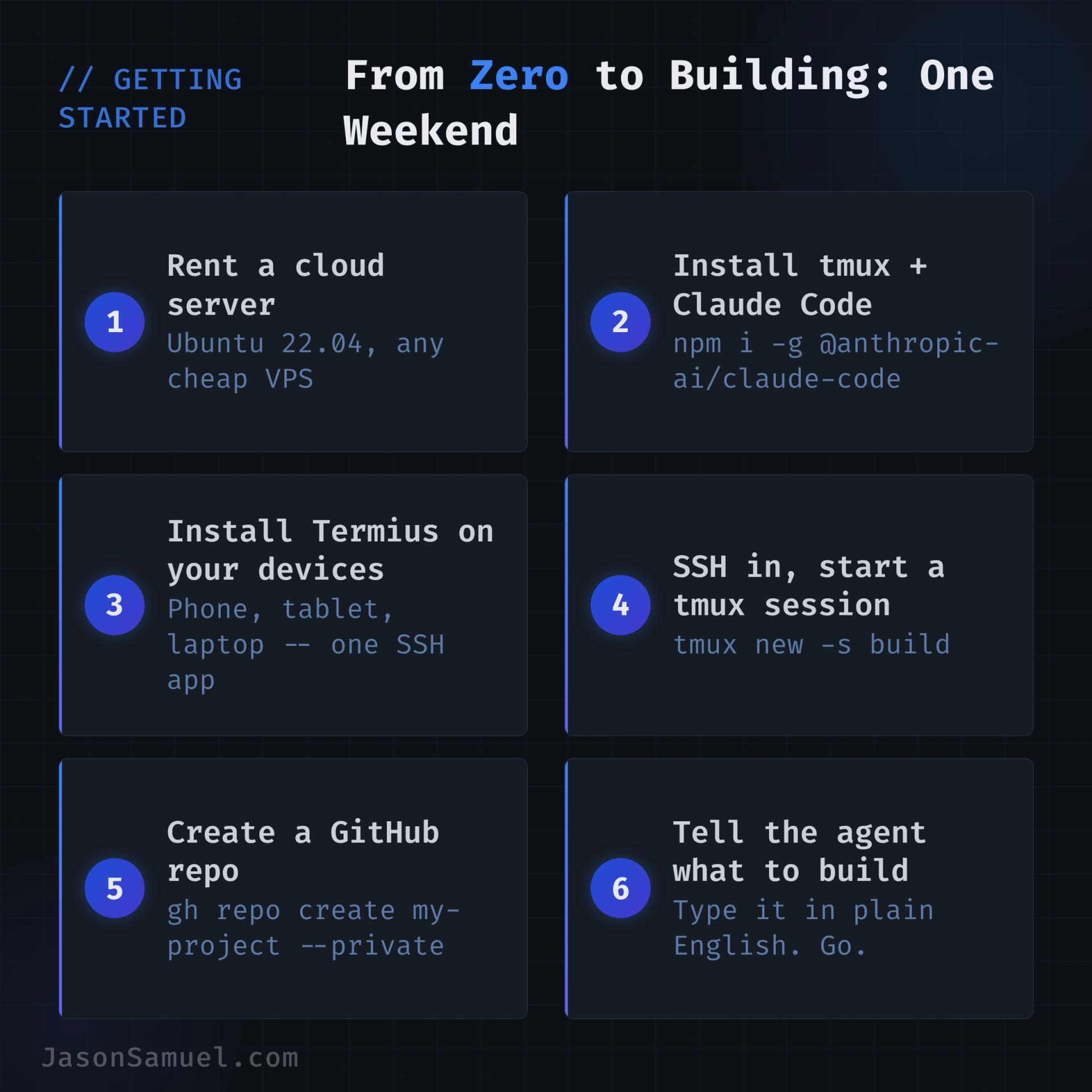
How to start
If you've read this far and you want to try it, everything you need is in the "First-time setup" section earlier in this article. Twelve steps, start to finish, from a blank server to a working agent session with a cloned repo. Don't try to build the whole thing on day one. Follow the steps, get the basic single-session workflow running, and let it grow naturally from there.
The only additions beyond the technical setup:
-
Install Termius on every device you use. Windows, Mac, Linux, iPhone, iPad, Android, whatever's in your life. Set up the connection to your server using SSH keys (Termius walks you through this). Save the host. Add a startup snippet that runs
tmux new-session -A -s claudesessionso you land in a persistent session every time you connect. The hosts, keys, and snippets sync automatically across everything. -
Create a GitHub account if you don't have one. Create your first repo for whatever small project you want to start with. Tell the agent to clone it.
-
Iterate. When you hit something you don't understand, ask the agent. When you want to expand, ask the agent. When you break something, ask the agent. The agent is the teacher as well as the typist.
That's it. Total time to first useful thing is maybe two hours, most of which is account setup and waiting for installs. After that, every subsequent project is much faster because the foundation is already in place. You're just adding new directories to the same server.
The first week will feel awkward. You'll reach for old habits (opening a browser to look things up, opening an IDE to write code) and you'll have to consciously redirect to "ask the agent instead." By the end of the second week, the new habits start to feel natural. By the end of the first month, the old way feels weird.
Be prepared to endure
I've said this about every complex technology transition I've been through in 27 years. I said it about VDI when everyone was trying to figure out image management and user environment virtualization. I said it about zero trust when the frameworks were immature and the vendor landscape was a mess. I said it about endpoint security when EDR was brand new and nobody knew how to tune it without drowning in false positives. The pattern is always the same, and it applies here more than any of those.
This stack is not a weekend project you finish and forget. The weekend gets you started. The next six months are where you actually learn it. You will hit walls. The agent will do something baffling. A tool will change its API. A protocol you just learned will get a breaking update. Your hooks will catch something you didn't expect, or miss something they should have caught. You will spend an evening debugging a problem that turns out to be a one-line fix in a config file you didn't know existed.
That's not failure. That's the process.
The people who get value from this stack are not the ones who set it up perfectly on day one. They're the ones who keep showing up. Train. Learn. Tinker. Iterate. Endure. Progress forward. Break things, understand why they broke, fix them, and move on. The compound effect of doing this consistently, even 30 minutes a day, is staggering over three months. You will look back at what you could do in week one versus week twelve and it won't feel like the same person.
The one thing you absolutely cannot do is stagnate. You cannot baseline anything in this world. The moment you say "I've figured it out, I'm done learning," the landscape moves and you're standing on a platform that no longer exists. Every technology I've worked with in enterprise IT has had a shelf life on its best practices. The shelf life here is measured in months, not years. The tools will change. The protocols will evolve. The agent capabilities will expand in ways that make today's workflows look primitive. If you're not continuously iterating on your setup, your setup is rotting.
This isn't unique to AI. It's the same endurance that separates the people who actually master any complex system from the people who attend the webinar, try it for a week, and move on. The difference is that the pace here is faster than anything I've seen in my career. The rewards for endurance are proportionally larger, too. The people who push through the awkward first month and keep iterating through months two and three are building capabilities that most of their peers won't have for years, if ever.
One more thing on this, because it's a trap I've watched people fall into repeatedly. Be careful where you get your information. YouTube is full of channels run by people who present themselves as AI practitioners but are really content creators chasing clicks. Many of them are sponsored by the very AI services they're recommending to you, and they don't always disclose it clearly. They'll tell you "this is THE stack" or "this is the ONLY tool you need" because that's what gets engagement and that's what their sponsor is paying for. Some of them have never shipped a production system in their lives. They've built demos.
I'm not saying ignore them entirely. There are genuine gems out there, people who are actually building things and sharing what they've learned honestly. Watch their videos. Try the tools they recommend. But try them with your own hands, on your own problems, and form your own opinions. Don't blindly align with anyone's tech stack, including mine. The stack I described in this article is what works for me, for the specific things I build, in mid-2026. Your problems are different. Your constraints are different. The right combination for you might look nothing like what I run.
There is so much evolution happening on a weekly basis in this space that no single person's recommendation stays accurate for long. The person who told you "use tool X" three months ago might already be using something else and hasn't updated the video. The sponsored review from January is selling you January's product at June's price. It's on you to stay current, to test things yourself, to find the best combination for the specific thing you're trying to solve. Nobody else can do that homework for you, and anyone who tells you they can is selling you a shortcut that doesn't exist.
So when you hit a wall, and you will, don't interpret it as a signal to stop. Interpret it as the curriculum working. The wall is the lesson. Push through it.
Where this is going
I'll close with a few predictions I'm willing to put my name on.
Voice will become the default input for technical work within two years, not just for me but for most people running similar setups. The combination of agent absorption of imprecision and the maturity of voice dictation across Windows, Mac, iOS, and Android has crossed a threshold where typing is the slower option for everything except dense syntax.
MCP will change which products get used. Vendors who ship official MCP servers will find themselves naturally adopted inside AI-first workflows. Vendors who don't will increasingly be reached only through whatever generic browser-automation fallback the agent can manage. The early-mover advantage on this is real, and the shift is the kind that's easy to underestimate in the short term and hard to catch up on once the customer workflows have standardized around the early movers.
The "always-on personal server" is going to be a default infrastructure layer for technical people the way "personal cloud storage" became a default in the 2010s. The cost is too low and the productivity gain too high for it to remain niche. According to McKinsey's State of AI research, frequent AI users report saving more than 9 hours per week — effectively more than a full working day reclaimed.
The line between "developer" and "non-developer" is going to blur for anyone willing to operate at the architect level, and this is going to be a great thing for both groups. The translation skill that used to require years of training, turning intent into production-quality code, is becoming a capability that agents handle competently for everyone who can describe what they want clearly. That doesn't diminish what experienced developers bring. The deep judgment, the systems thinking, the ability to spot a subtle correctness or performance problem before it ships, the architectural taste that comes from having seen a thousand codebases, none of that gets commoditized by agents. If anything, it gets more valuable, because agents amplify whatever judgment is steering them. A great developer working with an agent moves at a pace that wasn't possible a year ago. A thoughtful non-developer working with an agent can finally build things that previously required hiring one. Both groups are winning. What's blurring is the gatekeeping function the industry used to perform around who was allowed to ship software, not the value of being good at it. Anyone with strong product sense, architectural instincts, and the ability to ask good questions of an agent is going to look enormously capable over the next five years, regardless of whether they came up writing code or came up running businesses, designing systems, or solving problems at the strategy layer.
My specific opinions in this article will change. I'll write follow-ups as the tools evolve. What I'm describing is the best version of this stack I've found as of mid-2026. Six months from now I might be using a different agent, a different access surface, a different protocol stack. The shape will stay the same. The components will move.
If you've made it to the end of this, you're probably the kind of person who'd benefit from this setup. Don't overthink it. Don't try to architect the whole thing perfectly before starting. The agent will help you iterate into the right setup faster than you could plan it on paper. The fastest way to learn how this works is to start using it.
When the next iteration of this stack is worth writing about, it'll show up here on jasonsamuel.com, long-form technical pieces are this site's whole purpose. If you want the other half of how I think (mindset, daily protocols, performance, the operating philosophy behind why someone outsources the trivial things), that lives at jasonsamuel.me. Two sites, same person, different lanes.
Build at the speed of thought. That's the line. It's not a slogan. It's how I work now, and once you see what it feels like, you won't want to work any other way.

Jason Samuel
Product leader, advisor, and international speaker with 27 years in enterprise end-user computing, security, and cloud. Has deployed infrastructure at Fortune 500 scale across 44 countries. 1 of 3 people globally to hold Citrix CTP + VMware vExpert + VMware EUC Champion concurrently. 220 articles, 1,000+ reader discussions.
Context rot is real. Your AI coding assistant gets dumber the longer you use it. Here is the structural fix.
AI coding assistants degrade mid-session and nobody warns you. The degradation is architectural, not motivational. Telling it to try harder does nothing. Here is the enforcement system that makes garbage structurally impossible.
ai-agentsYour AI agent is lying about being done. Here's the 4-part loop based proof system that makes faking impossible.
Hand an AI agent a codebase and tell it to fix things, and it'll happily report back that everything is done. The hard part isn't getting an agent to work autonomously. It's getting one that can't fool you into thinking it finished when it didn't.
ai-agentsHow Google's Open Knowledge Format validates the BuildOS knowledge layer I built by hand
I spent months hand-rolling a knowledge layer for my AI agent stack. Google just shipped a format that formalizes the exact same pattern. Markdown files, YAML frontmatter, cross-linked docs. Here is why that matters for anyone building with agents.