
I'm not going to show you how to build a todo app with AI. If you've been following the AI coding space, you've seen enough of those demos. What I want to talk about is what happens when you use an AI coding agent for hours every single day across both personal and professional work.
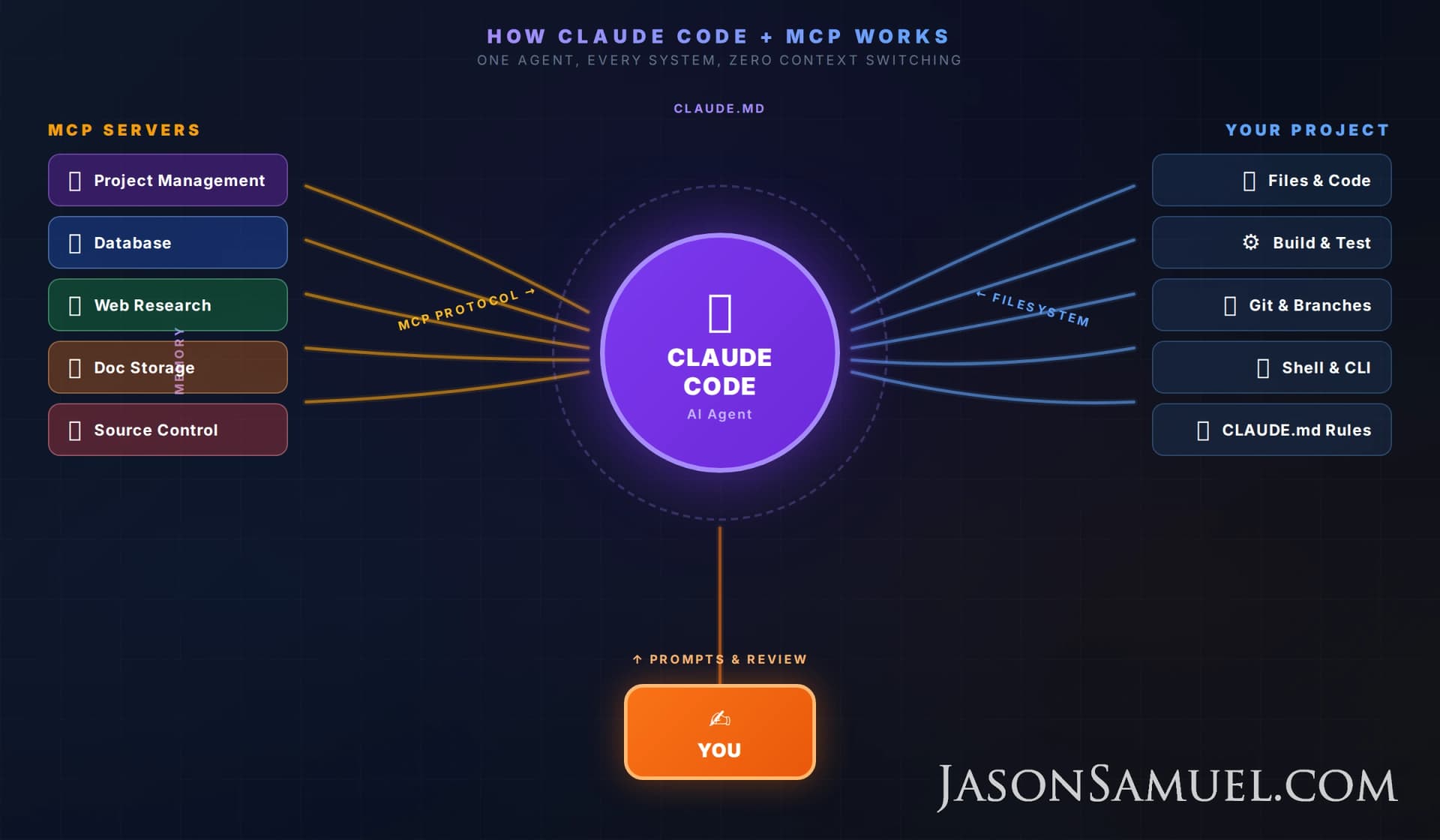
I've been using Claude Code as my primary building tool and it has changed how I work more than anything since Docker. Not just for writing code. For building presentations, automating workflows, managing infrastructure and SaaS platforms, doing research, everything. Claude Code by itself is great. What made it click for me is combining it with MCP (Model Context Protocol) servers that give it direct access to your systems. Project management, databases, cloud platforms, document stores, all accessible to your AI agent in a single terminal session.
Here's how I set it up, what I learned the hard way, and how you can do the same.
What Claude Code Actually Is
Claude Code is Anthropic's CLI-based AI coding agent. You install it globally with npm (Node Package Manager, the standard way to install JavaScript tools), run it in your terminal, and it gets a full view of your project. It can read files, write files, run shell commands, search code, and make git commits. It's NOT a chatbot with a code block. It's an agent that works directly on your filesystem and that is a massive difference.
npm install -g @anthropic-ai/claude-code
cd your-project
claudeThe cd your-project part matters. Claude Code reads everything from whatever folder you launch it in. That folder becomes its workspace. It sees all the files, understands the structure, and operates within that boundary. If you have a presentation deck in ~/talks/keynote-2026/, you cd into that folder and Claude has full context on everything in it.
That's it. You're now in an interactive session where Claude can see your entire project structure, read any file, and execute commands. Imagine giving someone a screenshot of your code versus giving them SSH access to your machine. That's the gap. If you've ever had to explain a codebase to someone by copying files back and forth, you understand why this matters.
The key capabilities for enterprise work:
- Full filesystem access - reads and writes files directly, no copy-paste
- Shell execution - runs your build commands, tests, deployments, curl requests
- Git and version control - commits, pushes, creates branches, reads history, manages PRs
- Tool use - calls external tools and MCP servers mid-conversation
- Memory - persists context across sessions through CLAUDE.md files
- Hooks - enforces rules automatically before and after tool calls
That last one is the big deal. You can build an entire governance layer around how the agent operates. If you've set up group policy for a virtual desktop environment, same idea. You define the guardrails once, and they're enforced every single time.
CLAUDE.md: Your Agent's Operating Manual
The most important file in any Claude Code project is CLAUDE.md at the root of your repository. This is where you tell the agent how to behave, what rules to follow, and what context it needs about your project. Claude reads this file at the start of every session.
Here's a stripped-down example:
# Project: Internal Dashboard

## Architecture
- React frontend with SSR
- PostgreSQL with row-level security
- REST API with token auth
- Automated email notifications

## Rules
1. NEVER deploy to production without explicit approval
2. RLS policies required on EVERY new table
3. All API responses must use standard JSON format
4. All dates must include T12:00:00 to avoid timezone rollback
5. Run build validation before declaring any task complete

## Current Sprint
- P0: Fix tenant isolation bug in the properties endpoint
- P1: Add webhook handler for subscription changesClaude reads this every single time. It doesn't forget. It doesn't drift. Ever. If you say "never use new Response() with a 204 status" because you burned two hours debugging a production 500 error, that lesson is permanent.
You can also create a global ~/.claude/CLAUDE.md that applies to ALL projects. I use this for cross-cutting concerns like credential management, security rules, and workflow preferences. It layers like Windows Group Policy: global loads first, then project-level overlays on top. Project rules win for conflicts, just like a site-level GPO overriding a domain-level one.
Memory That Actually Persists
Claude Code has a memory system that saves facts across sessions. When you teach it something important, you can tell it to remember that, and it writes a memory file that loads automatically in future sessions.
In practice, I use this for:
- Bug patterns - production gotchas that cost me hours to figure out
- Credential locations - where tokens and keys are stored so the agent doesn't ask every session
- Architecture decisions - why we chose one approach over another
- Hard-won lessons - things like timezone bugs, API quirks, and deployment edge cases
I had a timezone bug once where new Date('2026-05-01') without a time component caused UTC midnight rollback in US Central timezone, turning May 1 into April 30. That cost me weeks of wrong data on a dashboard I was tracking (I still get mad thinking about it). Now it's in persistent memory and Claude won't make that mistake in any of my projects. If you've dealt with date handling bugs in enterprise applications, you know how valuable that is.
Hooks: Automated Governance
Hooks are functions that run automatically before or after Claude uses a tool. This is where it gets serious. You can enforce rules the agent CANNOT bypass.
For example, I have a hook that blocks external image URLs in content files. All images must be hosted locally. If Claude tries to write a file with an external URL, the hook blocks it before the file is written. Another hook checks that every database table reference includes RLS (Row-Level Security) policy setup. Another one prevents commits that contain API keys or tokens.
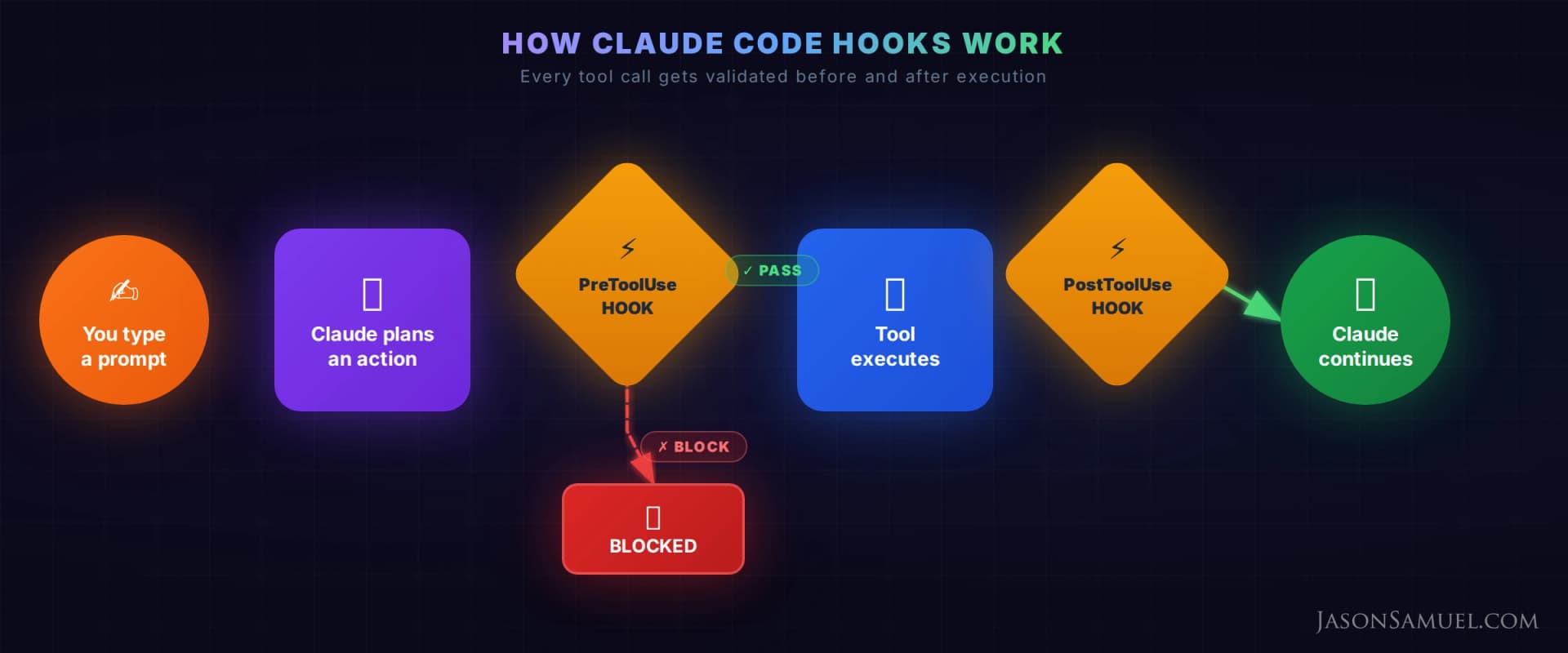
You're not relying on the AI to remember rules. You're enforcing them structurally. Same philosophy as policy-as-code. Think of it like Microsoft Entra ID conditional access policies. You define the boundary once, and every session respects it automatically.
MCP: This Is Where It Gets Interesting
MCP (Model Context Protocol) is an open standard that Anthropic created for connecting AI agents to external data sources and tools. It's basically a USB port for AI. Any system that implements the MCP server spec can be plugged into Claude Code, and the agent can call it as naturally as it reads a file.
The configuration lives in .claude/mcp.json in your project:
{
  "mcpServers": {
    "project-tracker": {
      "command": "npx",
      "args": ["-y", "@your-pm-tool/mcp-server"],
      "env": {
        "PM_API_KEY": "${PM_API_KEY}"
      }
    },
    "sql-database": {
      "command": "npx",
      "args": ["-y", "@your-db/mcp-server"],
      "env": {
        "DATABASE_URL": "${DATABASE_URL}",
        "DB_SERVICE_KEY": "${DB_KEY}"
      }
    }
  }
}Once configured, Claude can query your project management databases, read and write database tables, search the web, and do all of it within a single conversation. No tab switching, no copy-pasting API responses. The agent just has access.
The MCP servers I use daily:
- Project management - tasks, content pipelines, documentation
- Database - direct queries, schema inspection, access policy management
- Web research - technical questions mid-build
- Document storage - Google Workspace or M365 (Docs, Sheets, Drive) for business documents
- Source control - repository management, CI/CD, issue tracking
Here's where it gets crazy. When Claude is working on something, it can check the task board for requirements, look up the relevant data, research a technical question on the web, do the work, verify it, and update the task status. All without leaving the terminal! If you've ever context-switched between 10 browser tabs to get one thing done, you know how much time that costs. This eliminates it.
Real Workflows I Use Daily
Turning a Spec Into a Deliverable
I speak at conferences globally and constantly jump between PowerPoint on Windows and Keynote on Mac. I give Claude something like: "I need a new talk on AI agents for enterprise. Check the task board for the abstract I submitted. Pull the speaker notes from my last three presentations for tone and structure. Build the outline with section breaks."
Claude queries my notes for the talk abstract, reads my previous slides and speaker notes for patterns, builds the new outline following my existing structure, and updates the task status. All in one shot.
45 minutes of context switching down to 5! And the output follows my existing patterns because the agent read my previous work first. If you've ever asked someone to draft a deck and gotten back something that looked nothing like your style, you know why having an agent that reads everything first matters.
Debugging a Data Issue
"The dashboard is showing wrong month labels. Look at the date handling and trace the data flow."
Claude reads the relevant code, finds the date parsing, identifies the timezone rollback issue (it already knows this pattern from memory), and fixes it. I've been through this exact debugging loop so many times in my career with VDI session launch times, VDI master images with DST rollover, and now AI-powered dashboards. The pattern is always the same. Date handling is painful everywhere and having an agent that remembers every date bug you've hit is huge.
Cross-System Automation
"Pull the latest feature comparison data from the spreadsheet, update the tracking board with the new status, and refresh the summary deck."
Claude reads the spreadsheet through MCP, compares it to what's in the tracking system, updates the records, then refreshes the summary document. Three systems touched in one conversation. No manual data entry, no copy-paste errors, no "oops I updated the wrong version of the deck." If you manage any kind of cross-functional workstream, this alone is worth the setup.
Security Considerations
I know what you're thinking. Giving an AI agent access to your systems sounds terrifying. Here's how I manage the risk.
Scoped credentials - Every MCP server gets the minimum permissions it needs. The database connection uses a role scoped to specific tables. The project management integration only accesses the pages the agent needs.
Pre-commit hooks - Hooks scan for leaked credentials before any git commit goes through.
No production deploys without approval - This is rule number one in every CLAUDE.md file. Claude can deploy to staging all day long, but production requires explicit human approval.
Branch isolation - Claude works on feature branches, never directly on main. The merge to main is always a human decision.
Bash command scoping - For sensitive projects, I whitelist specific shell commands rather than giving blanket access.
The risk profile is basically the same as onboarding a new team member to your systems. You set up guardrails, you review their work, and you gradually expand trust. The difference is that Claude follows its guardrails EVERY time. It doesn't have a bad day and forget to check the security policy. If you've ever onboarded someone and had to worry about them making a mistake, this is actually a better model.
Tips From Daily Use
Write detailed CLAUDE.md files and keep them updated. The 30 minutes you spend documenting your project will save you hundreds of hours. Every time Claude makes a mistake, add a rule to prevent it from happening again.
Use a continuation file religiously. Context loss between sessions is the biggest productivity killer with AI agents. A good continuation file makes every session start at full speed.
Let the agent make decisions. If you're specifying every variable name and file path, you're using Claude Code wrong. Give it the outcome you want and the constraints it needs to follow, then let it figure out the implementation.
Run builds before declaring done. I have a rule that Claude must run the build validation before telling me something is complete. This catches 90% of issues.
Invest in MCP servers early. Every external system you connect eliminates a context-switching tax you pay on every task. The setup cost is an hour or two per server (usually less). The payoff is permanent.
Use memory for patterns, not one-off facts. The memory system is most valuable for recurring patterns: bug classes, architectural decisions, deployment procedures.
Keep an append-only history file. Your continuation file tells you where you are right now. A history file tells you how you got there. When debugging why something changed three weeks ago, this is invaluable.
The Productivity Math
I've been tracking this informally for months. On a typical day, I'm coordinating across 3-4 different workstreams. Each has its own tools, its own stakeholders, its own timelines. Before Claude Code, I could meaningfully push forward maybe one or two per day.
For the type of product work I do (cross-functional coordination across engineering, design, data, and vendor teams, plus managing specs, roadmaps, and competitive analysis), the output increase is dramatic. I can draft a product spec, pull competitive data, update the tracking board, and prepare a stakeholder summary in the time it used to take me to just gather the inputs. The compounding effect of MCP servers, where the agent can reach into your project management, research tools, and document storage without you copying and pasting anything, is what makes the whole thing click. I recommend starting here if nothing else.
The catch is you have to invest in the setup. You need good CLAUDE.md files, good MCP configurations, good hooks, and good habits around continuation and memory. If you just install Claude Code and start typing prompts with no governance layer, you'll get mediocre results and eventually something will break.
Treat the setup like infrastructure. You wouldn't deploy a VDI environment without group policy, profiles, and application layering. Same thing here. The upfront cost pays for itself within the first week.
Where This Is Going
MCP is an open standard and new servers show up every week for different enterprise systems. The more systems your agent can access directly, the more autonomous it can be.
In my opinion, within a year the standard enterprise workflow is going to look very different. Instead of someone switching between ten browser tabs and a code editor, you'll have an AI agent operating across all those systems simultaneously, with the human acting as architect and reviewer.
We're not there yet. Claude Code still makes mistakes. It still needs guardrails and human review. But the direction is obvious, and the people who learn these tools now are going to be way ahead of those who wait.
If you've been skeptical of AI coding tools because the demos all look like toy apps, I get it. I was too. Claude Code with a proper MCP setup and governance layer is the first AI workflow I'd actually trust with real work. Set it up right and you won't go back.

Jason Samuel
Product leader, advisor, and international speaker with 27 years in enterprise end-user computing, security, and cloud. Has deployed infrastructure at Fortune 500 scale across 44 countries. 1 of 3 people globally to hold Citrix CTP + VMware vExpert + VMware EUC Champion concurrently. 220 articles, 1,000+ reader discussions.
Context rot is real. Your AI coding assistant gets dumber the longer you use it. Here is the structural fix.
AI coding assistants degrade mid-session and nobody warns you. The degradation is architectural, not motivational. Telling it to try harder does nothing. Here is the enforcement system that makes garbage structurally impossible.
ai-agentsYour AI agent is lying about being done. Here's the 4-part loop based proof system that makes faking impossible.
Hand an AI agent a codebase and tell it to fix things, and it'll happily report back that everything is done. The hard part isn't getting an agent to work autonomously. It's getting one that can't fool you into thinking it finished when it didn't.
ai-agentsHow Google's Open Knowledge Format validates the BuildOS knowledge layer I built by hand
I spent months hand-rolling a knowledge layer for my AI agent stack. Google just shipped a format that formalizes the exact same pattern. Markdown files, YAML frontmatter, cross-linked docs. Here is why that matters for anyone building with agents.